



Pure 0.180a (Content Manager fix)
Hello,
This version is just a little update to fix the problem with the newest Content Manager.
Download no more available!
Please use later versions of Pure!
If you use the public CSP 0.1.79, you should still use CM 0.8.2467...!
https://github.com/gro-ove/actools/releases/download/v0.8.2467.39678/Content.Manager.zip
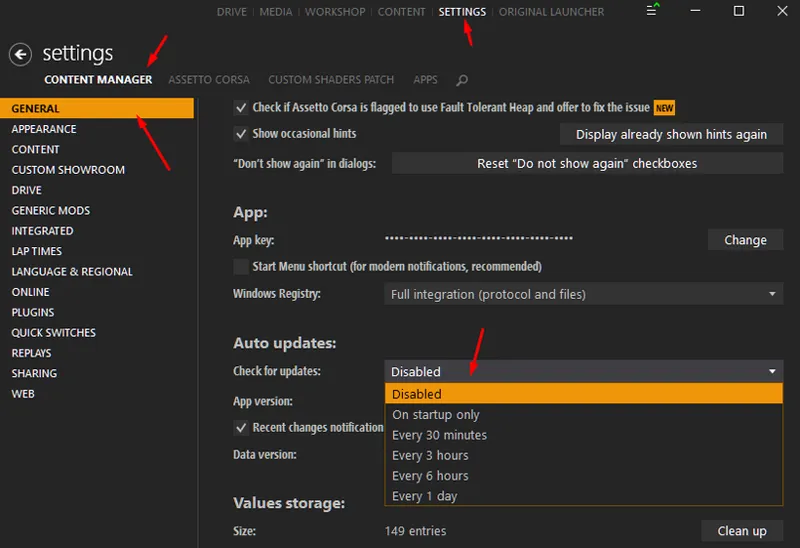
And deactivate updates then:
Please look in the original post to see all other details, like installation and changes.
Esp. with the new Content Manager, the selection of the controller was moved!
https://www.patreon.com/posts/pure-0-180-82842763

Comments (115)
Hi Peter. Great new update. I have a question for LCS. What is the best filter to use for VR please. Cheers.
ive downloaded pure, csp last night. do i still need vao shaders patch if i am on 1.8 pure?
Has anyone gotten any of this to work with the VIVE PRO 2 VR headset? I put my SIM down for the last 6 months. I had it dialed in but after some of these updates it just looks like shit and sounds like shit. It's not even playable.
Black sky no sol no pure , fresh install , fresh windows , did as instructed ,
If you properly installed Sol and Pure, then it could be you need to install CSP again. You use the latest 0.1.80p218 maybe?! Install it manually. Open the zip and extract the dwrite.dll and the extension folder to AC root folder.
pure config doesnt work it says pure not running but i selected it in the weather script
You need to install Pure 0.190. Please install it like it is described: https://www.patreon.com/posts/pure-0-190-84656023
ok I've found ty very much
where is rain please, have sound but not drops
https://www.patreon.com/x4fab/posts
when i download it from both sites, windows finds Trojan virus, idk what im sup to do :']
nothing !!
hi, Sol planner no longer works since installing version 1.8a. I reverted to 1.79 and it works (CM 0.8.2561) thank you for your help
Please install it properly. Open the 7z file with 7zip app. Extract the whole Pure 0.180a folder to Desktop. Go into this folder and run the install_pure.bat. Select the AC root folder. If you use CSP 0.1.79 you need to revert to CM 0.8.2467! Otherwise you don't have a, weather controller selection! I recommend to use CSP 0.1.80p218. Then the weather controller selection is in the Drive menu in the weather selection.
Hi Peter, after the CM update I am not able to get RainFx to work anymore. I can hear the rain but the conditions are not applied to the track. I have reinstalled CM v0.8.2467. Any suggestions on what to do next to get RainFX to work again?
Reinstall CSP manually. Open the zip and extract the dwrite.dll and the extension folder to AC root folder.
this makes my sky red at night bruh
It depends on the track. Track config makers can add a night light pollution. Open Pure Config app and go to the "night" tab. There you can lower it...
hello peter i did it how you told me and i did it how it is done in your video and is still doing the samething.
Maybe it's better you come to discord. It takes to long here to solve it. https://discord.gg/5dfGMbaf
alright/
i installed with contact maneger because i could't find the ac root folder
Just do it like it described in the video. In the install guide PDF you will see where the AC root folder is!
Hello Peter, i hope you are doing well, I have this bug in which as soon as i put pure ine game everything that is white included the sky and it blinds me, can you help me please
please open Pure Config app, it will show you the wrong settings!
Hey peter i finally download the pure but when i start a game to change the graphic it's does not let me change it because the parameter goes up and down and like the mod keep lagging and moving and because of that it doesn't let me change nothing of it. can you please help me?
Hod did you install it? You need to extract the whole Pure 0.180a folder to Desktop with 7zip app. Then you go into that folder and run the install_pure.bat. Select the AC root folder (steamapps/common/assettocorsa)
MY DOWNLOAD KEEPS SAYING UNCONFIRMED NO MATTER WHAT DRIVE I SAVE IT TO? PLEASE HELP...
Idk why it saying this. Can you open it with 7zip app?
how i do that im new in all of this stuff.
yes i did try the mediafire link all two of them the lower and the higher, and i did the same thing with the megafire to/
Actually all of the links are working, otherwise more people would report it. Maybe try another browser.
Hello peter, i have a problem with the link, is that when i download it, its comes with an error saying that. Pure 0.180a highres.7z isn't commonly dowloaded. make sure to trust pure 0.180 highres.7z before open it.
Did you try the mediafire link?
hello peter i have a problem with my sky is black tryed to instal everything pure and sol but nothing changed also its pure 0.180
Please update to Pure 0.180a: https://www.patreon.com/posts/pure-0-180a-fix-84102123
Hello, i've an issue with the preview generator, the preview is generating in bad quality but in the option of the preview generator, the preview quality is fine. Help please.
Maybe have a look at CSP Discord Server. This problem is outside of Pure... https://discord.gg/hJhqc5Xt
Hi, the pure config app doesnt work for me it doesnt have the sections
do u have the new content manager? and have u done the pure install like in the guide? (watch the video) i failed at first try then i watched the video, now it works.
its good for vr ? rifts
i am a silly boy pls ignore me
no problem. Have a nice day!
Hello since i updated everytime i open the tchat window in game, it crashes... I'm on vr if it can help.
this is also happening cheers
Just done all the updates and it looks great. One small issue I spotted (not sure if it is this or other updates but in the Formula Hybrid 2022 S the rev lights on wheel are not working very well, only coming on half way and almost immediately showing hitting the rev limiter. Will have a play around to see if I can work it out
hi peter, i have a question. after using this pure, even tho i start the game at night time, sky looks so bright but the background is dark
Did you already update to Pure 0.180a? If so, how did you install it?
Hello Peter, why does the wiper work, but the glass is not cleaned? thank you and congratulations for your work
Sorry, I don't know. But it seems the car is not prepared for it....
Hi Peter, not sure if anyone else is having this new boot error but I'm unable to get the game load - only seems to happen when ps5 controller is connected "module.lua.compiled:675: attempt to call upvalue 'drawBatteryIcon' (a boolean value)"
I don't know. I'm not realy into it....
Hi Peter, Thank you for the update fix! Apologies if this has already been explained somewhere, but when I use pure config I set up using no clouds and it looks great, but the setting aren't perfect for each weather / time of day. is there a way to separate the configs for time / weather type? Failing that is there a guide that can explain creating custom lua's for Pure?
What's the problem exactly?
hello Peter, thank you for this new function which will work wonders in my next assetto corsa videos. I have a small question but one that is very important to me anyway. Do you have any serious information on the release of the next ASSETTO ? it is in the process of being finalized and it should be available next April. Do you think it will still be possible for you and IIja to continue the adventure on the next opus ?
No. I'm not into it in any way...
My Pure doesn't install properly and I've tried uninstalling and installing and Pure doesn't show in my content manager. and in the cmd when I install - Uninstalling older Pure version - ### - removing PPFILTERs ### + Installing Pure + ### + installing weather script File not found - pure + installing skydomes File not found - Skydome_sets + installing weather controller File not found - sol2 File not found - sol2static + installing ppfilters and scripts File not found - ppfilters + installing Pure Config app File not found - PureConfig + installing Sol Planner app File not found - sol_planner + installing AC weather presets File not found - content Installation complete.
Please do it like it is described in the video or in the install guide. You can't run the install_pure.bat directly in 7zip app.
where is the new content manager .2561?
Use it only if you have CSP 0.1.80p218! It will update automatically if you activate the auto update in Content Manager - Settings - general.
Mine still has the black sky even after installing the new Pure and the sol planner is showing an error message in game
Then it is not installed right or you need to install CSP manually. Open it's zip and extract the dwrite.dll and the extension folder to AC root folder.
Can I please have a working Discord link? I'm having a lot of trouble with this. Thanks!
https://discord.gg/5dfGMbaf
Hi Peter. Thanks for the update. I have been using SOL for years but just downloaded Pure to try. I have both latest versions but if I use Pure in the weather fx setting in VR the ui is very dark on both planner and normal options. Also the car interior is darker as well. Any ideas please.
Open Pure Config app and switch to the pp tab. there you have many settings. Which ppfilter do you use?
Same as the others, everything that pure included just deleted and i cant install it again.
please describe it. Idk what the problem is on your side. "Same as others"?
I did not update Pure and I dont have black screen issue xD
Then you don't use the new Content Manager. This new update is a fix in combination with the new Content Manager 0.8.2561.. It does not bring a "black sky" in general, but it will surely break the working of the Sol controller and therefore Sol Planner will not run!
After updating everything, I still have a black sky.
Then it is not installed properly. Maybe try to install all things manually. Open the CSP zip and extract the dwrite.dll and the extension folder to AC root folder. Open the Pure 0.180a 7z file with 7zip app and extract the 4 folders apps, content, extension and system to AC root folder (steamapps/common/assettocorsa)
hey so maybe i'm missing something, but fr the life of me i can'tt get sol planner to work. did they take it away with the update? i installed all the fixes and everything, but i'd like to be able to change my weather and time of day as i please in game, and not ony from tthe drive menu
It's not taking away. Do you see it ingame as an app?
God im so happy that this is a known Failure... my assetto crashed last night and since then the Sky is black... i now deactivate auto update of content Manager...
just the sun cover. not a big deal, it all looks incredible no matter what. Amazingly photo realistic. And the default pure settings with standard pure filter seem to be honestly as good or better than any custom PP filters out there.
Sometimes the cloud formation covers up the sun when i wish it didn't.
Is it just because of the cloud shadows or the texture and the sun cover in general?
Is it possible to toggle the cloud formation as you set the time of day in the sol weather planner? It seems like a certain time of day will have a specific skydome for each category: ie, at 4:30 pm, there is one for few clouds, one for scattered clouds, etc.
The skydome textures are set for certain sunangles and weather. So like for few clouds there are like 6 textures...
Dear Peter, I appreciate your work, thank you for everything, but I still have errors, I want to contact you on discord, something to see with your own eyes what the problem is, please
Yes, do you have the link already? https://discord.gg/5dfGMbaf
how can I change weather controller
It's now in the Drive menu weather selection. If you use CSP 0.1.79 public, please look at the post and use the linked CM.
ok now it works, but I said I can't set pure and it also lags
Is there still a tab with a red dot in lua Debug app?
well with your version of the CM its perfect..... such a beatiful mod. I uninstalled sol again and stand alone pure is so cool. thanks a lot :)
Have fun...
i have sol 2.2.9 not working both
You should try to install CSP manually. Open it's zip file and extract the dwrite.dll and the extension folder to AC root folder
produces a lot of lag
Please open Lua Debug app ingame. Is there a tab with a red dot?
and installed only pure because i read your post somehwre that it installs sol and it did install sol 2.4
The new Pure 0.180a will install Sol 2.5 controller.
no i uninstalled sol
please try to install Pure manually. open the 7z file with 7zip app and copy the 4 folders apps, content, extension and system to AC root folder (steamapps/common/assettocorsa)
Hello... In game while using sol planner i get an error to select so 2.2 when this has sol 2.4
Do you still have Sol installed? Then you need to update Pure and Sol to the newest version. Here is the new Sol 2.2.9 https://mega.nz/file/4fkFiLLR#BC0qSAL1mA-Ohj11lsZjBYc5wLTyB17OB6qO58XUXZc
Hi i would really need help it it i installed pure but after that my controler script button under weather fx dissapeared
If you use CSP 0.1.79 public, please look into the post and use the linked older version of CM.
Hi, do you know how I can bring back the latest CM? I enabled "ignore update" when the green arrow came but since you brought your fix I want to use the latest version now.
You can download it directly from github: https://github.com/gro-ove/actools/releases/tag/v0.8.2561.39678
hello Peter, I have installed the latest version as it should be, I have the latest version of the CSP, but my clouds have disappeared .. I can't solve the problem, pure and sol work
please try to install Pure manually. open the 7z file with 7zip app and copy the 4 folders apps, content, extension and system to AC root folder (steamapps/common/assettocorsa)
Sorry, but I'm new to PURE. I used to be able to change time with Sol_Weather, but now I switched to Pure for weather. Any way I can still have a way to change time on my replays? I really need that for moviemaking.
I really want this feature back too :-(
I must have just not had a setting loaded. I loaded a persons settings and now looks great.
Thanks, I finally have PURE and SOL running together. Is there something I am missing though for the road textures to not look wet? I have everything I know on ultra. Thanks! Going to look for a tutorial.
check if theres weather script enabled or disabled in the weather fx
why i cant find weather script on my Content manager
Its now called weather style. the controller selection is in the Drive menu in the weather selection. If you use the public CSP 0.1.79, you should still use CM 0.8.2467...! https://github.com/gro-ove/actools/releases/download/v0.8.2467.39678/Content.Manager.zip
Fix works! Thanks!
thank you so much, struggled all night with the no sol 2.5 controller issue, works now!! so far so good for me! thank you
Will this fix black sky ? Thank you
yes