


Firebreak 0.1b Fixes Coming
Just a quick note to let you know that within the next week we'll be posting a minor update to Firebreak that will address some of the feedback issues that have materialized and reintroduce some features that didn't make it into the launch package.
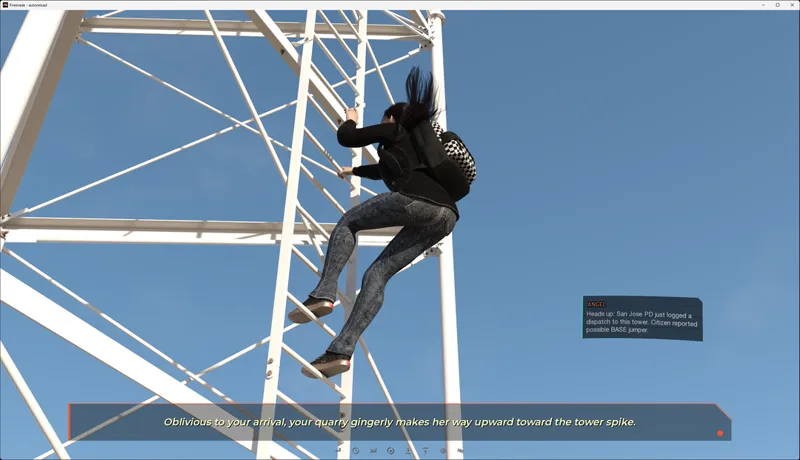
The first feature is the Echotext update. Some users pointed out that the gray text at the bottom was sometimes difficult to make out against a light background. There have been some improvements made, which include:
Adding the sender name to the text block
Animating pop in and pop out to feel like a more modern UI/UX
Adding the trademark upper left rectangle chamfer visible everyplace else in the UI
Creating a shaded backstop for light text so it's clearly visible in all conditions
It now supports quick alerts which is treated more like a push-to-talk than iMessage.
Further, there will now be a quick indicator when the MC is using his mesh abilities in the form of a frame-independent pop-up card that will also be integral to the combat module in later content.
This will generally just quickly flash code snippets that reflect what's going on around him, and how he is influencing the environment in the moment.
Also, based on feedback, some players found the dossier text too small and it forced them to put on glasses to play. I've made an adjustment to the biography section that should address that objective flaw in the UI/UX design.
Other fixes include replacing the ambient radio chatter during the Taylor/Skye recruiting scene due to the fact that a long conversation about engine trouble on the radio somehow made it through to launch and sounded really bad against the scene writ large.
Further, Angel now interacts with the player's Echo Implant during the recruiting phase as originally envisioned. Getting quick alerts working with the messenger was giving me lots of headaches as the dev cycle wound down toward launch.
You may have noticed that unlike Chasing Sunsets, Firebreak does not have an End of Chapter summary. For Firebreak, I've opted to start NEW chapters with a summary so players can rapidly get caught back up to where they left off after waiting months for new content.
I'm attaching a screenshot of that prototype now below with the story summary blurred to avoid spoilers for those who haven't played yet:
A number of other small fixes are going in from how dialogue/narration is presented, to adding uniform UI/UX formatting to the few bits and pieces that were not standardized.
Once 0.1b is posted, I'll make a last entry here to notify you and then we'll pivot to migrating Chasing Sunsets to the new framework for a few weeks.
NOTE While there are a few new lines of dialogue, particularly remotely from Angel in 01.b, there is no need to replay the game if you don't want to, as there are no point adjustments or chapter-critical context you'll have missed for Chapter 2 if you do not.
I will try to generate this as a patch as well so if you want to update, you don't have to download the whole new binary.
Thanks for bearing with us, and we can't wait to get started on what comes next!
Kent & Stoya
Comments (9)
Hola buenas tardes. Les puedo pedir algo. creen que lo puedan colocar tambien en español. gracias.
I get disabling achievements if you enable the guided mode. But why disable the gallery? It makes no sense...
We changed the behavior in 0.1b. Now it disables achievements only. Gallery and photo unlocks work normally on a fresh playthrough. Patch notes here: https://stonefoxstudios.net/firebreak-0-1b-patch-notes/
I'm not able to download the game with the links provided
Both Mega and GoFile fail for you? What kind of errors are you getting? Do you normally have regional restrictions on what/where you can download from?
I have worked with some really good ui/ux people before, and something they all have in common is how they come up with new stuff that solves something, not just new stuff for its own sake. Like how you put in the "mesh abilities indicator"... it looks like it has its natural place in the "machine" that the game simulates, and it sure looks cool, but it also gives the player a hint that something supernatural has happened without unnecessary dialogue or monologue. Awesome work! And also, putting the summary first in the chapter is a good idea, now I won't have to start one save back in order to re-read it.
I usually prefer not to have a text background. Instead I prefer to have a text outline about 3 px wide. It make the text readable over all images without hiding the details. When the VN does not include that option I just use URM to mod the text boxes. It make things readable for my old eyes. 😉
The background can be disabled under Preferences > Display. You can also disable the textbox accents by clicking "Accents" off.
Awesome! Nice on the add-ons/improvements/adjustments 😁👍🏻. Once again... I haven't played (no devices 😅), but get it polished and ready for me when I do eventually 😋. Can't wait to play this. Thank you, Kent and Stoya ❤️🫶🏻🫰🏻. Hmmm, that was kinda weird. I'm so used to saying Stoya's name first 🤣. Stoya & Kent... there, everything is all back to normal 😁✅️.