








Five tips for finer mixes
I am a full-time mix engineer that mixes a few songs a day, and I've made a career out of mixing (and still mastering) music daily.
The quality obviously has to be high when mixing for people like John Summit and the likes
(every client is as important and gets the same respect and quality from me).
And hey even my own music, after making music for 30+ years I want it to be tight: no excuses. Even when making more "lo-fi" styles, it has to be "right".
A lot of mixing I've literally figured out on my own, and that's why it's easy for me to share the techniques I am still using. So, I wanted to share these mix tips based on that I do very often –
I will mention a few plugins, too, some free.
I will also mention two tricks that got special thanks from a client when I did them for the first time in a mix. I hope these are useful!
Compressors are overrated
For years and years, I used to rely on compressors to make levels better on vocals, FX tracks etc, and if I got drumloops / top loops where the clap was too loud or hihat not loud enough and so on, I was trying to find the best compressor settings to fix it.
At some point I realised that compressors, while definitely useful to an extent, can be a bit of a lazy tool, and I started getting much more precise to become better with my mixes and levels.
To be honest, I don't use compressors that much anymore, and this I want to tell you:
Once I started realising that manual gain adjustments are the key, I've been relying on that way, way more than compressors.
On vox, always find the very loudest parts (visual side of things helps here in addition to listening) and start there. Also, these days I do manual gain tweaks to sibilants, mouth noises, clicks etc with manual gain tweaks. I use Ableton Max For Live ClipGain for these.
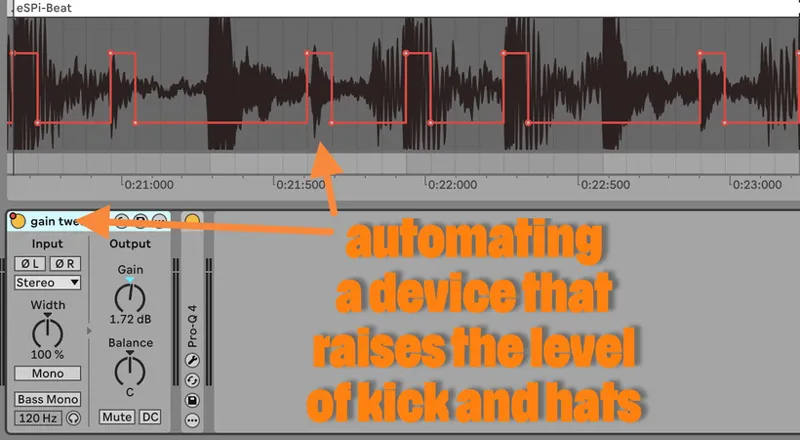
Got a clap that's too loud? Simply automate a gain plugin where the clap hits that takes level down. Or if it's not loud enough, go the other way. Automating a gain plugin on/off is good in this scenario, because you can then just tweak the level in the plugin.
For vocals, I actually tweak the gain line (of Utility in Ableton) as opposed to plugin on/off.
I'm def not saying compressors don't have any use, because they definitely do, but often manual gain tweaks are the way to get something exactly right for you, and even faster than trying to find compressor settings that fit the sound exactly (and this method is also artefact-free so no other signal will be affected).
In the pic below, I'm raising the kicks and hats of a drumloop so it gets a little more life.
Details make a difference
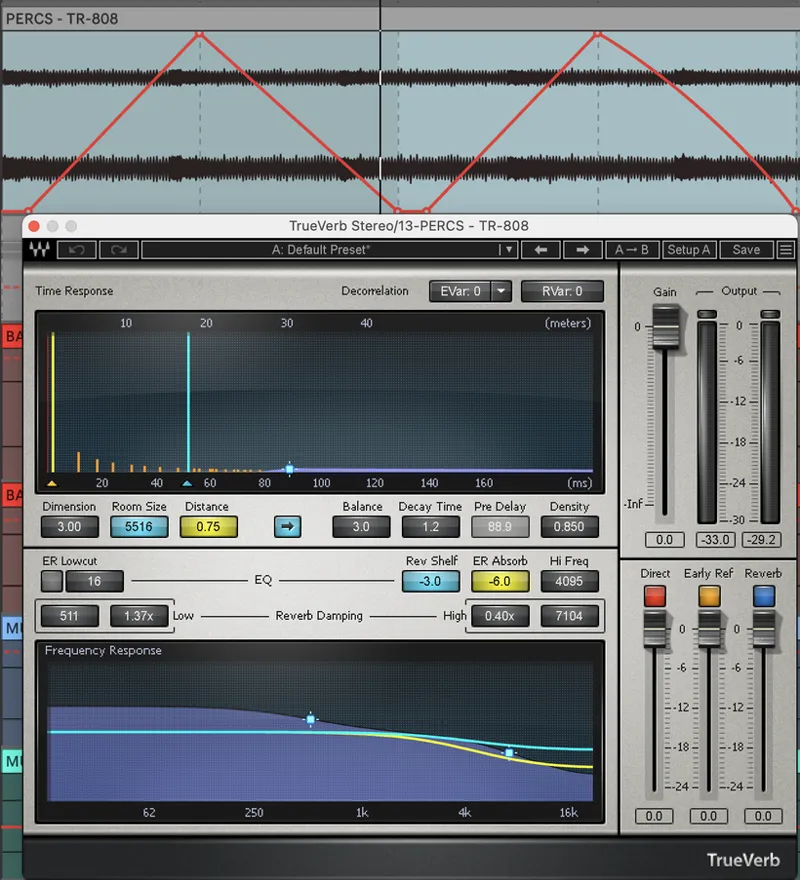
Another tip for a repetitive element is to give it some ear candy as opposed to keeping it completely static throughout the song. What you're seeing in the pic below is reverb parameters being automated for a hihat that plays in a fairly long intro in the song. The intro is kind of sparse and dry but there's a bit of tension building, and the dry, static hihat almost bothered me, so what I did was gradually automated the distance parameters (not decay) of a short reverb (Waves Trueverb) I put on it, so you get a sense of "growth" in it (which is not the reverb length).
The client ended up making a point about the hihat specifically (he didn't request me to do that), so it's clear that adding a little bit of detail on sounds can actually make for a nicer listening experience.
Left/right panning for repetitive sounds
Whenever I have a lot of stuff going on in the mid signal and there are things repeating (meaning your ears get used to hearing the sounds pop up in the mix), I do a bit of left/right panning to give the sounds a bit of an edge: your ears will pick it up better.
Think about a repeating vocal/word, an arp that goes on a on, acid line, a repeating stab…could be anything (I don't do it to drumsounds though). I don't usually go mega wide or panned, but a little bit of distance from the center helps.
I rarely do static panning, but this movement will make a sound pop out of the mix.
I don't always do it to an element every time it appears: sometimes I may only do it in a section where it needs some special attention.
Also, sometimes I do this for white noise sweeps and that sort of things, where I pan the sound much more: can be a nice effect when you have a riser or a downer move from far left to far right: it really asks for you attention (the client feedback that mentions "airplane sound" above does exactly this: makes you feel like the airplane actually moves in the mix and goes past you).
Try it the next time in your mix when you feel there's a lot going on in the mid signal and you want a sound to pop up.
Eliminating transients in side signal
While some wide drums can sound nice (e.g., common in house music to have some shakers and top loops wide), I simply don't think transients belong in a classy wide signal: it just feels way too "restless" and there's energy in the wrong place.
Tools like Spiff are great for eliminating transients on sides, and I do it all the time, every week. I enjoy widening my master signal too (always just raising the existing width), so I often put Spiff on my master to round any possible clickiness (also on the tracks that have side punch; some some drum tracks).
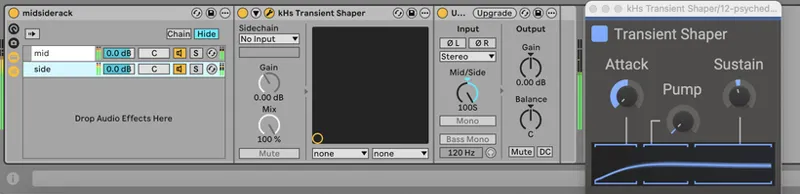
You can use other tools too, so I'm not trying to sell Spiff to you. Kilohearts have a free transient tool, so just create a mid/side chain in Ableton Live (download one from me here) or your fave DAW and insert a transient-shaving plugin on it (pic below).
Compressing drums? Be mindful of attack time.
If you do drum bus compression, make sure not to smash the transients. I hear that too much in modern mixes, because compression is in vogue, and many do it wrong or too aggressively.
If we try and find out what the length of a drum transient is, we can easily do a test in an audio editor: take a drumsound and chop off 10 ms off of its beginning, and you will hear its loses the knock.
Hence, when compressing drum busses, we don't want to go below 10 ms attack time, because we want to let that smack through and not create that squeezed tone: always celebrate punch in your drums, no matter what genre!
Even 30ms attack time can be fine for sure, for drums. Release time I'd set as fast as possible (see pic).
Comments (16)
Regarding reducing side transients with Spiff, is there a particular frequency that you emphasize for each track or do you adjust on a track to track basis? I’m a spiff user and am super curious
No particular frequency per se but a lot of that annoying snap will happen around midrange and high-mids, so let’s say 1K to 6K is the main range.
Great tips — I’ll definitely keep these in mind moving forward. What are your thoughts on the phase and delay of low-end instruments or samples in a mix? Do you usually phase-match or adjust them during your mix sessions?
I’ve never too considerate or worried about that, I think; I often use minimum phase on tracks to mix and natural phase on master. I don’t do highpassing (mostly bells) so the phase doesn’t take a crazy beating.
I have heard you saying in your videos to use shelf or bell rather than a high pass or low pass cause it causes weird resonances. I totally agree with it but should i follow the same while producing a song where i dont need unnecessary frequencies on the low end of a clap lets say. I have doubt of when and were to use high pass or low pass!
Pretty much when in doubt, just don't use it. If it feels like your clap has too much low end, use a solo bell to find where it is, and cut there till it feels right. That's literally how I mix most of the time.
As an exercise a few months ago I made sure not to use compression at all. I use Renoise and editing note velocity is really simple, so that is how I managed level changes. I was already doing that a lot with break layering to add variety to the drum hits. It ended up with me snowballing it into a 8+ minute breakbeat WIP that has been well received so far. If you think about why compressors were invented and used it was primarily a tool for dealing with recorded tracks, or tracks that were being recorded. You don't really need to do that with music being made with a DAW.
Compressors were first invented for radio: before that, there were people that had to manually adjust faders on a mixer...can you imagine doing that for a living :D
any tips on doing that cool reverb trick with stock ableton reverb? as it does not have 'distance' only decay
Should try! Might be a good topic for a little tip video :)
Everytime I see people saying keep everything below 100hz mono. Sometimes below 120, I have tried turning everything below 100hz on my master into mono and it just looses power and fullness. Do you turn sub completely into mono or just leave it the way it sounds originally?
Most of the time I keep stuff below 100 mono; that width doesn't sound good to me. Someone said the human ear sucks at telling the direction of very low frequencies and that it sounds confusing to the ear, and I agree.
Love these tips. Would you apply the side transient trick only on the master or would a drum buss also suffice?
Can rock both / as needed!
Hey fanu, really good tips here! On the screenshot of the sides transient softener, is there a reason why you use the transient shaper before siding the signal?
Ummm, yeah good Q; maybe the order doesn't matter. Try and see how it feels!