


[Move The Chains] - UI Design
So, I've been chipping away at the UI while doing renders for both WWJK and this. As far as my brain can think, I've basically finished everything that I wanted to include. From the obvious things like the main menu, to smaller things like a music credits screen. I'll actually have to do a build and playtest everything to see if it all works as intended, but so far, everything seems to work. This is just a bit of documentation on the process. Trials and errors, learning lessons, sanity and patience being tested, etc.
So, as you've already like seen in once place or another, the main menu has been completed.
Not a 100% on this yet. Still might move the title up just a bit to create a bit more space or the illusion thereof. Will still likely add a Twitter icon somewhere, not decided yet there, either.
Beyond that, there's not a whole lot to this. Just some icons made in photoshop with renders or vector icons (short of Patreon/SS logos). One matching the general color scheme of the VN for hovering, and then a black/white/gray for idling. If you watched the video prior, you might've noticed some sound effects on the hover. The idea itself will stay, not sure about the sound yet. It exists on most hover actions outside of actual gameplay (for now, at least. We'll see how it sounds for choices, etc.). This also includes a whistle blowing sound for clicking on any of the menu items, though this only exists for the main menu.
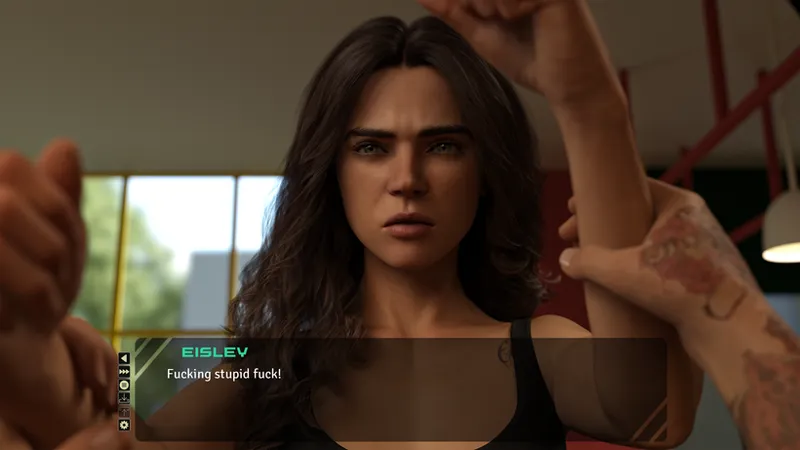
In-Game UI:
Nothing too extraordinary here. The text/dialogue box is a bit thinner and narrower than what you would find in a VN using the default textbox (not that there's anything wrong with using the default one. It's perfectly fine, just wanted to use something that fit the aesthetic a bit more.), while also allowing more of the image/render to be shown.
The quick menu buttons are much of the same, tossed into a vbox and placed to the left of the dialogue box. Small enough to be out of the way and non-distracting, but not the run of the mill quick menu textbuttons running along the bottom of the screen.
The namebox (not shown in the above screenshot) is just above the text to the left side of the box, just to the right of the two diagonal lines on the top left side (holy shit was that a word salad and a half.). Honestly, just easier to show:
Note: Both of the above renders are being used for example purposes only. Neither have been through postwork beyond scaling them down for Ren'py. Neither of the above will be indicative of the final, end-user result.
Settings:
Not too different from your standard settings menu for Ren'Py. Again, just set up to appear closer to the aesthetic of the VN. The buttons on the left still need some work, too grainy. Lines aren't very clean. Might make them larger and then scale them down to preserve quality, but can always take care of that later. What I wanted to get right was the sliders. Specifically, getting the paw size right. Big enough to drag, but not enough to overtake any text. Again, color is just there to match the general yellow/black/gold aesthetic of the overall identity of the VN.
The dialogue box transparency slider wasn't playing nice with the code, as far as I was able to get it. Might still add it, but we'll see. Was also thinking of attempting to put in a few buttons to choose the type/dialogue type to different fonts. Again, just a maybe. May or may not come later.
Save/Load:
Again, not too different from Renpy's default save menu, just with the other game menu buttons on the top. The X's and O's should be pretty self-explanatory, as well.
Settings:
Credits kind of speaks for itself here, though there's more than the title would imply. Special Teamers are Patreons/SubscribeStar supporters (SubscribeStar supporters haven't been listed on it yet, haven't gotten around to that quite yet. Got lost doing other stuff and forget to punch them in.). "Staff" felt like a fitting term, as a lot of the code I got came from google searches. They ended up showing up a fair bit in them with some solid help.
The exceptions here are DoubleDoink (who wants to remain anonymous, so will remain unlinked.) and WhitePhantom. The former has been pretty helpful hashing out some of the visual stuff I've been working (plus offering to pick up on some postwork) with. WhitePhantom for some solid advice on the legal front (specifically on the EULA front. Both in idea and verbiage. Hopefully they don't mind that I stole a paragraph of two from their own.). Make sure you check out WhitePhantom's Defending Lydia Collier (Website, Patreon, SS.).
Settings II:
So, this is the section - "Links and Licenses" - is for the VN's music. The imagebutton featuring the album cover will take the user to the license page/website/etc., basically wherever the said license and/or permissions of use are linked. Right next to it is a textbutton that'll allow the user to play said song. One issue I'm having with that, is that as soon you hover over any other image or text button, it stops playing. But I suppose that's better than not having it at all.
Everything else is pretty self-explanatory. The EULA section is there for reference, as you'll have to agree to those terms before you can enter the actual VN. Warnings is basically just me excusing myself of liability from any damages sustained while playing Move The Chains (flashing images, drug abuse, violence, etc.). DMCA/Legal contacts are for those looking for contact information to get their music removed from the game, and to make it clear that I'm not maliciously using their music without any sort of permission to do so. Everything below the above is just social media (Patreon, SS, Twitter, YouTube) and a Linktree with everything else.
So, while it's not quite entirely done, it's in a mostly finished state.
- MissFortune.