





The Villain Simulator - Beta 33
Beta 33 is here!!!
Windows Download
password:WhatsUpChoom
If you get the error about the App Damaged try this
For the cheat code look here
Keep in mind that links might rotate so if they stop working on the email you can check here for new links.
Check What's New on Beta 33 Here
VR Users Note
Smooth Locomotion has been added, you can enable it on the Settings. However if you can't move you might need to setup your bindings. Look at the end of this post for instructions.
Desktop Mode Controls
WASD - Movement
E - Grab/Interact
Ctrl - Toggle Crouch
Left Click - Shoot/activate
Right Click - Toggle Hands / Toggle Laser Aim
Mouse Scroll - Toggle power level on Dematerializer when is grabbed.
1 - Normal Hand Mode
2 - Interact Mode
3 - Slap Mode
4 - Punch Mode
5 - Fun Mode
ESC - Pause Menu
VR Mode Controls
Trigger - Shot / Interact / Activate UI Buttons
Grip - Grab (Grabbing with Grip and Trigger will do hard grab)
Joystick/Pad up - Teleport/Move
Joystick/Pad left/right - Snap Turn
Button B/Menu Button - Toggle Laser Aim
Button A/Trackpad Click - Toggle Dematerializer Power Level
How to use the new interaction
Desktop Mode: Change mode to fun Mode [5] then point over a nice area and click, keep clicking to keep playing.
VR Mode: Grab your pants to have fun, get close and position yourself, then is up to you.
Be careful as a gifted player you can cause deep harm
How to Tickle
Desktop Mode: Change hand mode to Interact Mode [2] then point over a tickling area and click, keep clicking to keep tickling.
VR Mode: Just hover your hand over a tickling point and press trigger.
Fixing SteamVR Bindings
1- Open SteamVR settings
2- Enable Advanced Settings
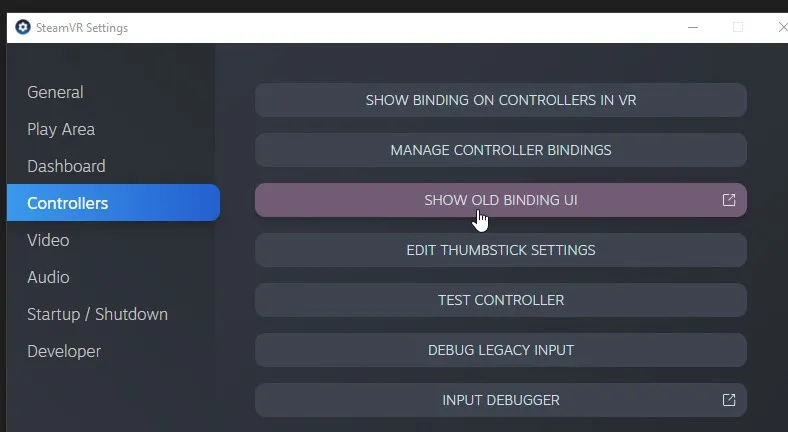
3- On the Controllers section click on Show Old Bindings UI
4- Activate the official binding
If that doesn't work you can try clicking "View" and then click on "Select this binding"
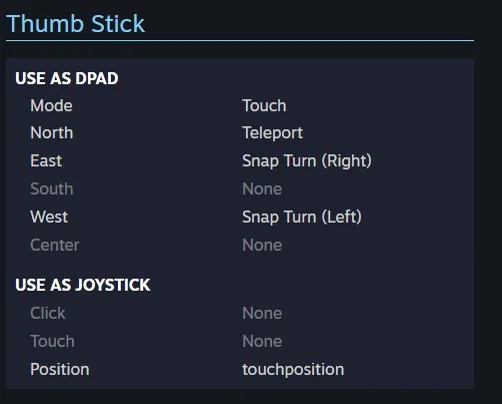
If that also doesn't work you can configure the binding manually, you need to add a new Joystick binding and set Position to touchposition
For the Vive wands you need to additionally set the click to movementallowed