



FM26 3D Stadium Megapack BETA Version 2.9: "It's The Final Countdown"
Hey everyone!
2.9 is a big one. Crowds react way better now without the stutter that used to come with it, and FreeCam picked up some new tricks. If you play a lot of matches you'll feel this one straight away.
I would recommend reading all the changes and the How To Use sections, that way you'll know how and what to trigger when :D
CROWDINJECTV3
Crowds now react properly to what's happening in the match. Goals, saves, VAR checks, boring moments.
26 different match moments all get their own reaction now. Celebration, booing, standing applause, sitting bored, angry gestures, the Gangnam Style and even the Macarena. Essentially the lot.
Each reaction uses up to 17 different animations sprinkled across the crowd so it doesn't look like everyone is doing the same dance at the same time. Reactions ripple across the stands naturally instead of firing all at once.
Biggest thing: this no longer causes a frame stutter when a mood changes. The old version had a noticeable hitch every time the crowd switched reactions - that's gone.
HOW TO USE:
The reactions just work automatically.
Press Numpad + during a match to toggle the crowd on or off if you want a more performance friendly matchday experience.
PERFORMANCE PASS
Did a full sweep across every plugin this cycle. Lighting, cameras, crowds, stadiums, seats - all got a cleanup.
The numbers (in a heavy stadium at cranked-up settings):
Average FPS: 108 -> 165
Worst moments (1% lows): 20 -> 75
Big stutters over 50ms: 452 -> 0
Heavy stadiums like might still drop harder than lighter ones, but that's just because there's more stuff to render in those stadiums, that is not a code thing, but a geometry thing. This, however is now much less noticeable!
CAMERAINJECT:
The methods we hooked into to take control of the match camera got quietly retired by SI in that patch, so our plugin was hooking into nothing. It's been completely rewritten from the ground up using a different approach that doesn't depend on those dead methods.
HOW TO USE:
Press F2 to toggle LookAt re-aim.
What this does is include an action shake. It is off by default, which causes the cameras to move smoothly, but if you feel like you want to be more in the match, press F2 and feel it for yourself :D
FM's dynamic zoom still works on top of your custom camera position - the camera zooms in and out based on where the ball is like vanilla does.
Nametags over players now line up correctly with the custom camera.
FREECAM - BALL TRACKING
FreeCam now has three modes, cycled with F4:
Mouse:
The original free-look. WASD to fly around, mouse to look wherever you want.
Look at Ball:
WASD still flies you around, but the camera auto-aims at the ball with smooth easing. Great for dramatic sideline shots and cinematic replays.
Chase:
Camera follows the ball at whatever distance you had when you switched into this mode. WASD adjusts the offset while you're tracking, mouse-look still works. Basically a broadcast camera you can steer in real time.
A small help overlay shows the current mode so you know where you are in the cycle.
HOW TO USE:
Launch FreeCam as normal.
Press F4 to cycle between the three modes.
In Look at Ball or Chase mode the camera tracks the live ball position, so wherever the match is happening that's where you're pointed.
BUG FIXES
FreeCam now takes priority properly when you toggle it on after CameraInject is already active.
Fixed a slow memory build-up in long matches caused by how the crowd was handing data to the GPU each reaction.
REWORKED STADIUMS
BRAZIL:
Chapecoense
Coritiba
Fluminense (Maracana)
Mirassol
Sport Recife
Red Bull Bragantino
Clube do Remo
Clube do Remo (Mangueirao)
Santos
TURKEY:
Besiktas (Tüpraş Stadyumu)
Bursaspor
Fenerbahce (Sukru Saracoglu)
Galatasaray (RAMS Park)
Goztepe
Trabzonspor (Papara Park)
SLOVAKIA:
Slovan Bratislava (Tehelne Pole)
MALTA:
Centenary Stadium
Ta'Qali National Stadium
Tony Bezzina Stadium
This is a FULL VERSION, SO BACK UP YOUR CUSTOM KITS IF YOU HAVE THEM!
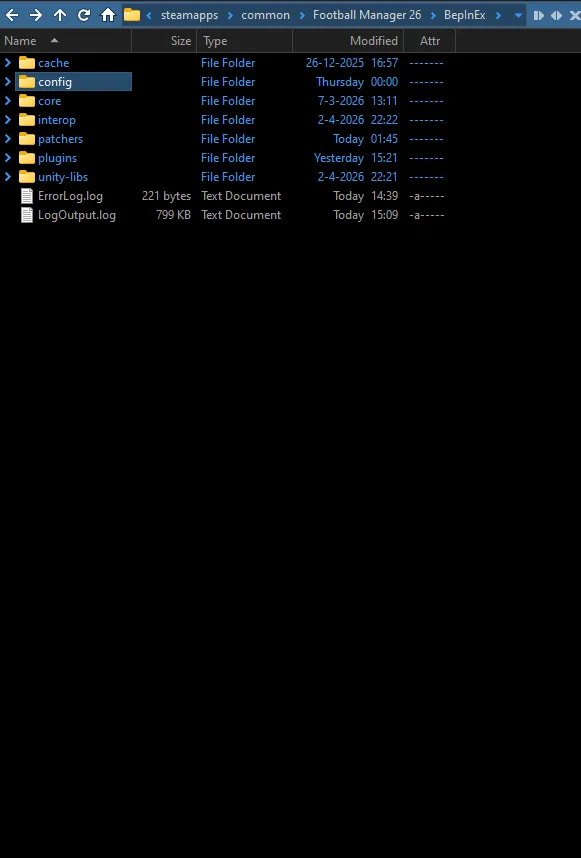
You need to remove the files below. This time it includes a few config files and other files you might have collected over the months. Remove them BEFORE you install this update!
Like in the image, you need to go to the BepInEx folder and go inside it. You will see that the config folder is highlighted. Enter that, and clean the house. Remove all files inside, unless you've edited your own ones from different plugins. This step is incredibly important.
Do not worry about the lack of configs. The game Automatically generates them when you open it. But we may want to return here in a bit. You also want to remove your cache folder, which is right above the config folder.
Now, after installing and playing a match, should you get very low FPS there is an option in the Config folder. Go into the CrowdInjectV3 config;
And right at the top you will see the following;
You can change the quality of the crowds from High to Medium. Capital M. What this does is reduce the number of polygons on the crowd, which will run more efficiently. You may in some cases double your FPS this way. Save the file and reboot the game.
The link below is where you can download the files. The password is that which you received earlier in your mailbox - if you have lost the passkey, shoot me a DM and I'll send it your way!
Alternatively, there is a torrent file too!
First time Installation:
Installation path for Steam is:
Program Files (x86)\Steam\steamapps\common\Football Manager 26
Installation path for Xbox Game Pass is:
XboxGames\Football Manager 26\Content
Installation path for Epic Games is:
Program Files (x86)\Epic Games\FootballManager26
Steam Deck (Desktop Mode):
Download the Linux version of BepInEx Bleeding Edge (https://builds.bepinex.dev/projects/bepinex_be)
Download r2modman and extract it
In that folder you go to r2modman app image
Follow the path -> home-deck-config-r2modmanplus-local-fm26-profiles-default-
Add my files to that path.
You can make a shortcut on your homescreen of the r2modman app image and click execute
Search game: -fm26 and then select profile
Showing on this screen is bepinexpack-footballmanager26 click on it and install
In the top left click on start modded, not vanilla.
Game will load
Again huge thanks to Luke for the find.
Furthermore, when you install the files, make sure you place all subfolders into those directories above. That is two folders and 4 loose files. If you do not do that it will not load.
If you are having extraction issues, try using winrar or winzip to extract the files.
The first boot after an update to FM or running for the first time will take a long time.
IT HAS NOT FROZEN, IT IS LOADING. DO NOT INTERRUPT IT!
Should you get an anti tamper message do this:
Remove the files from the directory when FM is closed.
Boot the game, play a match, close FM.
Reinstall the files whilst FM is closed.
Then you will be able to play.