
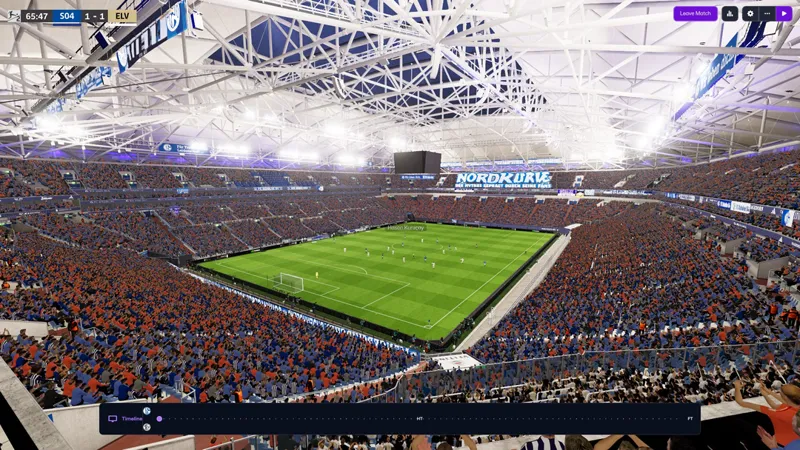

FM26 3D Stadium Megapack BETA Update 2.8 "Stability & South America"
Hey everyone!
Quick one this time. 2.8 is a stability update, no flashy new plugins yet, just a bunch of fixes that make what's already there work better. If you've been having issues with lighting, bloom, or balls going dark, this one's for you. Aside from that, almost all Brazilian stadiums have been tackled this update, along with some new ones entirely!
STABILITY
Bug Fixes:
Fixed a stutter caused by the lighting system forcing dynamic updates every time the skybox was reapplied. Now only updates when actually needed - should feel noticeably smoother in custom stadiums.
Fixed a memory leak where skybox materials were being duplicated and never cleaned up between matches. Long sessions should behave much better now.
Fixed the bloom tweaker accidentally affecting vanilla (non-custom) stadiums. It now only touches bloom in stadiums that have custom lighting. If you were getting weird bloom / nuclear lights in vanilla stadiums, this is why.
Fixed vanilla stadiums getting the wrong skybox and exposure after playing in a custom stadium. Leftover skybox entries from custom matches were bleeding into vanilla ones, that's gone now leading to a cleaner matchday.
Fixed a conflict between bloom threshold and per-light lens flare intensity that was washing out floodlight flares.
Fixed FreeCam not taking priority when toggled on after other camera plugins were active. Now correctly takes over when you activate it.
Fixed balls going completely black when bloom intensity was set to zero.
BALL LIGHTING REWRITE:
Completely rewrote how custom balls handle lighting.
New custom shader that properly samples light probes for ambient lighting, loops through all scene lights (Forward+ compatible), and balances fill-lighting so balls in shadow still catch floodlight glow without blowing out in direct sunlight.
Without any jargon, the balls now stay lit.
Tested across night, day-shadow, day-sun, and vanilla stadiums. Should look correct everywhere now.
REWORKED STADIUMS:
BRAZIL:
America MG
Athletico Paranaense
Atletico Mineiro
Bahia
Botafogo
Ceara
Corinthians
Cruzeiro
Flamengo (Maracana)
Fortaleza
Gremio
Internacional
Palmeiras
Sao Paulo
Vasco da Gama
Vitoria
PORTUGAL:
CS Maritimo
Pacos de Ferreira
Vitoria de Guimaraes
ARGENTINA:
Boca Juniors
River Plate
Racing Club
ENGLAND:
Bolton Wanderers
Chelsea (Stamford Bridge)
Fixed the "no stadium" issue at Blackburn.
ITALY:
Atalanta
Lazio
Parma
SPAIN:
Valencia
Villarreal
GERMANY:
Bayern Munich
Schalke 04
CROATIA:
Dinamo Zagreb (Stadion Maksimir)
Hajduk Split (Stadion Poljud)
That's 32 reworked stadiums in total. Big push on Brazil and South America this time around.
Installation:
The link below is where you can download the files. The password is that which you received earlier in your mailbox if you have lost the passkey, shoot me a DM and I'll send it your way!
BACK UP YOUR CUSTOM CROWD KITS IF YOU HAVE THEM!
Even though this is a full version, you will need to remove the below files, but before you do so, go into "Bepinex/plugins/" after doing so, copy the Crowdinjectv2 into a different folder, then after installing the files head back into the plugins folder and place the crowdinjectv2 there.
This is a one time thing, since the current file on my end is unstable since I'm rewriting it.
You can then add in the new files!
Installation path for Steam is:
Program Files (x86)\Steam\steamapps\common\Football Manager 26
Installation path for Xbox Game Pass is:
XboxGames\Football Manager 26\Content
Installation path for Epic Games is:
Program Files (x86)\Epic Games\FootballManager26
Steam Deck (Desktop Mode):
Download the Linux version of BepInEx
Download r2modman and extract it
In that folder you go to r2modman app image
Follow the path -> home-deck-config-r2modmanplus-local-fm26-profiles-default-
Add my files to that path.
You can make a shortcut on your homescreen of the r2modman app image and click execute
Search game: -fm26 and then select profile
Showing on this screen is bepinexpack-footballmanager26 click on it and install
In the top left click on start modded, not vanilla.
Game will load
Again huge thanks to Luke for the find.
Furthermore, when you install the files, make sure you place all subfolders into those directories above. That is two folders and 4 loose files. If you do not do that it will not load.
If you are having extraction issues, try using winrar or winzip to extract the files.
The first boot after an update to FM or running for the first time will take a long time.
IT HAS NOT FROZEN, IT IS LOADING. DO NOT INTERRUPT IT!
Should you get an anti tamper message do this:
Remove the files from the directory when FM is closed.
Boot the game, play a match, close FM.
Reinstall the files whilst FM is closed.
Then you will be able to play.