




about Q.C.A how to use classification
QCA v0.5 downloadlinks : https://www.patreon.com/posts/58923023
You need to do the work following:
1.Install [ DEF UI(VIS) ] or [ Fall UI(FIS) ]
2.Install iconlibs2 swf: https://www.nexusmods.com/fallout4/mods/31088
or FallUI - Icon Library : https://www.nexusmods.com/fallout4/mods/60579
3.Add [VIS or FIS] tags to your independent clothing Mod
About the example of Fallui esp of vanilla clothing vis TAG (it's just an example, If you have installed other Item Sorter tags mod, Q.C.A will automatically recognize the vanilla clothing classification):
Fall UI (FIS) : https://www.nexusmods.com/fallout4/mods/60580
Def UI (VIS) : https://www.nexusmods.com/fallout4/mods/3877
(You only need to select one of the above two links)
Following, I'll tell you how to add classification to mod esp of independent clothing:
1.(Optional), configure your Q.C.A XML. Of course you can ignore it. I have added some preset ICON tags in Q.C.A v0.5 (Including DEF UI, and FallUI)
The following is the Def UI (VIS):
left: Data\Interface\QCAMENU_CONF\conf.xml
right: Data\Interface\DEF_CONF\DEF_INV_TAGS.xml
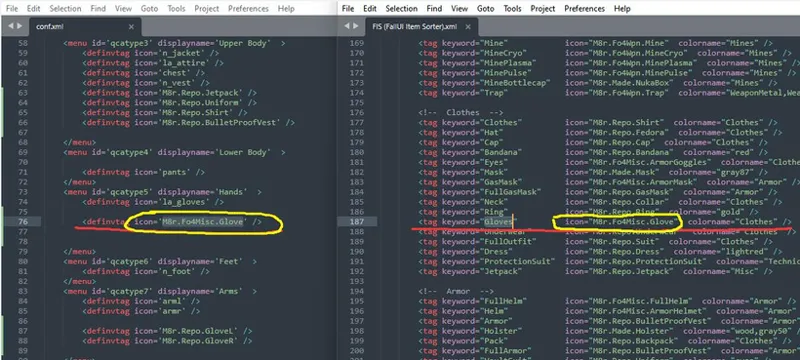
The following is the Fall UI (FIS):
left: Data\Interface\QCAMENU_CONF\conf.xml
right: Data\Interface\ItemSorter\FIS (FallUI Item Sorter).xml
This XML file should cooperate with "Data\Interface\DEF_CONF\DEF_INV_TAGS.xml" file editing
if you installed FIS
This XML file should cooperate with "Data\Interface\ItemSorter\FIS (FallUI Item Sorter).xml" file editing
You can customize the categories you want to add and modify
Just put the corresponding [DEF_INV_TAGS.xml / FIS (FallUI Item Sorter).xml ]'s icon name add to the menu node of the 【Data\Interface\QCAMENU_CONF\conf.xml】 file
2. Add [VIS or FIS] tags(get the keyword character in your Item Sorter XML file) to your independent clothing Mod
example: VtawWardrobe7 : https://www.patreon.com/Vtaw
example: K-Girl outfits : https://www.nexusmods.com/fallout4/mods/26309
Tip: This ESP name tag is not required to be in English.. You can use the translated language......example my language : [上身] 破损衬衫
v0.4 will add selfie action

Comments (26)
To anyone looking for a tutorial on doing this I made a short video on adding these tags. https://www.youtube.com/watch?v=ZUNQ7Hh7mIw Im also working on mods that patch various clothing mods to work with QCA but i'll only release them if I have permission from the Mod Authors and if need be Toounx.
is there a way of controlling the camera view of the selfie option
Not working for me with FallUI. It opens buy remains stuck at "loading data".
i don't know if you still need help but i found out that getting FallUI - Icon Library solve the Infinite loading data
can anyone elaborate more on getting the tags working with FallUI? fuck me i love this mod so much and ill be damned if im going to let it beat me
Heres a video guide I made explaining the process. The conf.xml shows you the tags it applies, you gotta find the corresponding tag in the FIS.xml in the FallUI sorting mod. The video explains it more with me showing the process step by step. https://www.youtube.com/watch?v=ZUNQ7Hh7mIw
i got the mod in my game but it zooms too far in when i use it. the mod likes to get me close to the torso but fails to let me see the body proper how do i fix it
I can't find footwear/shoes line to match between two file: [Data\Interface\QCAMENU_CONF\conf.xml] And [Data\Interface\DEF_CONF\DEF_INV_TAGS.xml]. How can i make it?
Done LOL! :v
doesnt work w fallui
3 years late but if youre having issues its probably because the tag youre using doesnt work for it and you need to try another tag.
it isn't working with Fall Ui
can you post a video tutorial on how to work this out please??
3 Years late but I made on last year https://www.youtube.com/watch?v=ZUNQ7Hh7mIw
Followed steps, didnt work... did I miss something?
hi, i'm not so skilled on mod installation i put the file in data but the mod doesn't work can someone pls help?
Anyone know how to make the UI brighter?
Can we actually take screenshots with the selfie camera?
I install and then when I click the hotkey it zooms in on the character and shows the interface but it just stays on "Loading Data" forever.. Nothing every happens no matter how long I keep it loading. Help please. I don't see any replies from the author here.. did she abandon these projects or what is going on?
You need to have Def_UI and VIS item sorting mods installed. When you run the Def_UI installer choose Valdacil's Item Sorting as your sorting mod. It did the same thing for me until i loaded those mods. Hopefully He'll add support for FIS and Fall_UI soon.
May i ask for your enb what you are using?
Hey just wanted to say thankyou for your mods. Your mods are top tier, and the only mods i find quality enough to not mind paying 5 bucks a month for. and i cant do a Fallout 4 playthrough without them. keep up the great work! absolutely love the content you provide!
我在想是否可以做到,在容器或衣柜的服装,也能够直接试穿,这样身上就不用带太多服装了,思路:可能象全息作弊器那样,有玩家的私人储物空间,他可以分类添加更多自定义容器
(PC Gamepad = Xbox Controllers) The only option I see in MCM is for ⬇️ D-pad for Gamepads. Is it possible for you to change it to any D-pad ➡️⬅️⬇️⬆️ on the gampad that we can assign it to? ⬇️+🎮=🚫😢 ➡️⬅️⬇️⬆️+🎮=✅😁
Is there a chance you can add an option of the different directions ⬆️⬇️⬅️➡️ for the d-pad on this mod, QMW, night vision and menu wheel? All of your mods are so fuckin awesome and intently made to function correctly but it would be even cooler if I can use the D-pad as a full utility secition for these mods.
⬆️⬇️⬅️➡️ The function of is already available in 0.2. You mean QMW ⬆️⬇️⬅️➡️ can be used. QCA does not enable???