




Q.C.A(Quick Change Armor) MOD Public Beta v0.5 (Q.M.W companion piece)
download links:
https://drive.google.com/drive/folders/1CXKwJ6Cfu-4B5jFzs9C6hiHuXCg5YJ2S?usp=sharing
update: v0.5
· Support Fall UI(FIS), (Please see this for details : https://www.patreon.com/posts/66039149)
update: v0.4
· Support Classification, (Please see this for details : https://www.patreon.com/posts/66039149)
· Add selfie action in QCA Left Menu(at present ,only PC can be used)
update: v0.3
· Support 32x9 display scale(in MCM menu)
· Add male animation in MCM menu
Describe------------------------------------------- :
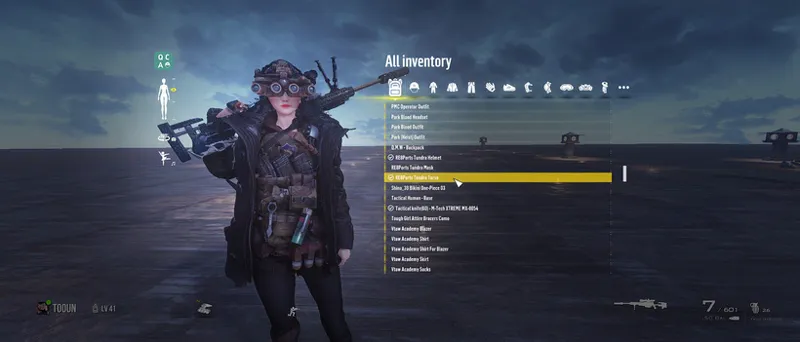
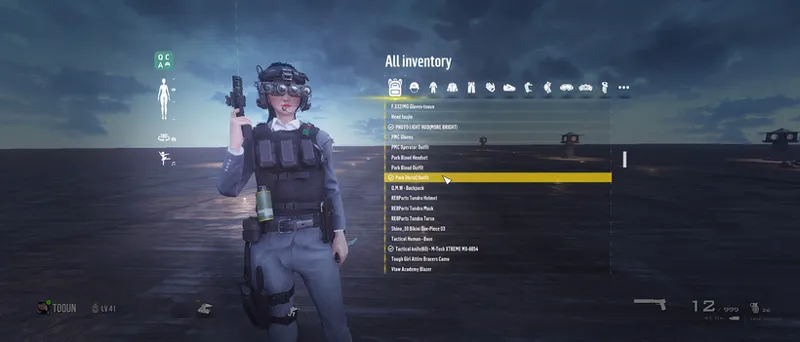
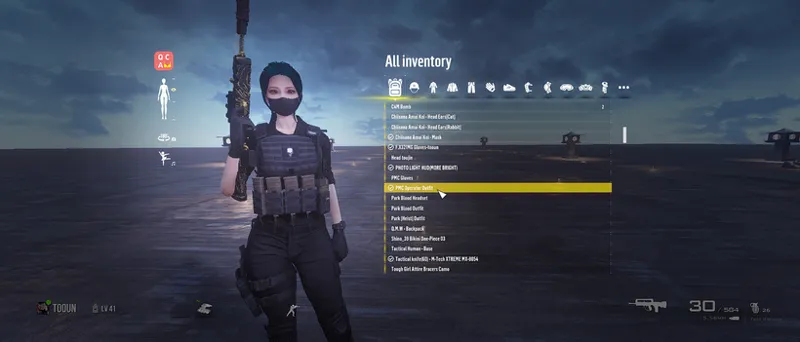
Changing clothes in the vanilla game only be displayed in the pip-boy 1st , and there is no previewing in 1st, and can't view Body front
This mod only requires you to set up a hotkey, which can be quickly previewed in the 3rd
There are no restrictions on this mod. All clothing mods can be used.
Although the current version is beta, it has good compatibility with other mods
The following mod clothing switching will be supported in the future, and the suit will be displayed in the form of UI list. Switching suit is more convenient
Outfit Switcher - Hotkey Loadouts(registrator2000's)
https://www.nexusmods.com/fallout4/mods/10282
Known bug, if you install 4K Textures clothes mod, it will be very slow and lag when switching clothes
This is not my problem. The original game also has this problem.
(you can Use PS to convert the clothing Textures to 2K or 1K)
About install :
F4se , MCM and [DEF UI(VIS) or Fall UI(FIS)] is required. Game version above v1.10.114 - Last version(optimum)
Tips:
Install the complete F4SE, corresponding to your game version.
Normally there will be a lot of pex files in [ data/scripts ] Folder :
Actor.pex \ ActorBase.pex \ Armor.pex \ ArmorAddon.pex \ Cell.pex .......................................UI.pex \ WaterType.pex \ Weapon.pex
install :
The ESL file must Activated before entering the game
you can use your [ MO / NMM / Vortex ] tools to Enable it(or Manually activated/edited the plugins.txt)
C:\Users\xxxx\AppData\Local\fallout4\plugins.txt
xxxx = your system user name
C:\Users\xxxx\Documents\My Games\Fallout4\Fallout4Custom.ini
Add the following data
[Archive]
bInvalidateOlderFiles=1
sResourceDataDirsFinal=

Comments (46)
If you're having download issues. Do this: Click the download all to get this file Q.C.A Menu(Quick Change Armor).Beta.v0.4 -- Then in the drive link, double click the patch file and look to the top left corner of the screen, you will see "file" click it and open file, follow the prompts, you can download it from there.
Love the dance and camera work you did...Is there anywhere I can find more of those? 🙏🥺😳
Is there a possibility that this mod will be updated for the next-gen patches?
hey, is there a quicker way to add those tags like [Top] or [Bottom] to a clothes mod? ive been doing it manually and it really takes time. it would be so helpful if there was a quicker way to do it
just follow this this post https://www.patreon.com/posts/66039149 . Try index in your armor/clothes mod and configure xml file
Dumb question guys, how did you got the items being shown on their respective section? all of mine are shown on the "all" tab but when i switch to any other, nothing is displayed.
just follow tooun's guide in this post. I'm using fallui series and it work with this mod. Install mod, open your item sorter (def or fis) to get the tag names, use FO4edit to rename your clothes with the tag names, that's it
I have the issue where my keybind gets cleared automatically after assigning it, and it only does it with this mod, others work fine. Is there any way to fix this?
Love this mod! Although I'm Not sure if its something i've done wrong, but when using the selfie part of quick change, when it shows a couple of the poses (the pointing a gun and twirling a knife ones) the weapons have no textures?
I can't save my game. both save and quick save are blacked out and I can't autosave either. the console command doesn't even work
man I love all your mods and I have mostly all of them but how exactly am I supposed to get his mod to work? when I download it it just shows up as a file called 1. do I make it into a winRAR file or something or do I just put it straight into Vortex?
Yeah just rename it and add .zip at the end. You can then drag it over to Vortex in the "Drop Files" bit down at the bottom.
right click choose rename name it however add .7z= for 7zip or WinRAR = .ra
Oh god, Yes please, FallUI support. I've been having trouble with this mod (became a patron specifically for it, BrandyBoy sent me) and the infinite loading. Just came here now to see if this was a common issue and am pretty sad to see that its compatibility with FallUI is the culprit.
Was the download link removed? The one at the bottom of your post does not work. Could you please add the link or comment it?
I agree with Liliya, I'd love to try this but FallUI is more important to me personally.
Any chance you'll make a version that relies on FallUI instead of Def? FallUI has pretty much superceded Def at this point and offers a lot more functionality and options.
Okay I made an important discovery on this front. You can have both Def UI and Fall UI. Just let Fall UI overwrite Def UI, but the files that this mod needs to function will still be available. Only caveat, you don't get icons and renamed items don't carry over their new names. For example, I renamed the armor pieces I wear to My Leather Chest Piece, My Leather Right Leg, etc but the quick change menu just shows them as their original name. Also the outfits will only show in the main backpack tab and not in the individual head, eyes, etc tabs. But, until there's a full Fall UI version, it is at least manageable with a frankenstein install. Added note: that should also mean if you have any other mods that require Def UI and there's no Fall UI version, it "should" work, possibly with limited functionality. But worth a try.
Once I click the hotkey it just stays on "Loading Data" forever.. any help?
Do you have DefUI+Inv? It doesn't work currently with FallUI+inv, you get the forever loading data issue without DefInv
Dudes, i don´t know if this guy hates us but, for those getting a file called "1", thats the mod, the only thing is that don´t have any extension, for example ".exe,7z,etc". Change the file name (enable the option to see file extensions in the "file explorer"), and, add a name and the extension of your favorite archive compressor "7zip = .7z" WinRAR = .rar", it should look like this: modname.7z or modname.rar That's it
i forgot how i did it but the file named "1" is the actual mod
I'm also having the same issue with it downloading a file called "1"
Im having an issue where i click the download link and it downloads as a file called "1" and it doesnt rlly do anything, any ideas?
Having a issue where the quick access menu is way too close and zoomed in. How to zoom out?
Everything seems to be working for me except when I open the menu the screen darkens and I can barely see my head and feet. Any way to brighten up the menu?
Download does not work for me for some reason, when i click the .zip link it downloads something i cant open. i download things all the time this is new for me lol it says its just "file" and its name is just "1" and it has the icon of like an ssd?
Im having the same problem
thank you for adding 32:9 support so quickly! I appreciate it.
What do the icons on the left mean/do and how do you zoom out?
same, how do you zoom out.
I can not get this to work. I have the requirements and the mod shows up in the MCM. But when i set a hotkey and press said hotkey, nothing happens.
I'm experiencing the same issue. Were you able to solve it?
i can't view a lot of my outfit pieces
Awesome mod. Do you think you could give us a weapon tab in the outfit menu to quickly select a gun while changing outfits?
How can i zoom in and out because when i open it up it zooms to much to my character so i dont see the complete Character
type : fov 100 100 if you want see your complet character or type fov 80 80 to get back to normal.
Love this mod but cant figure out why i am to far zoom in and faded dark screen
Tooun, do you think you could make a quickboy for fallout 4 like in fallout 76 based on this?
open quickboy in 3rd??
@Tooun Yes it's solved, case closed. 😂😂👌... Thanks for creating amazing mods detective Tooun.
Tooun, sorry for my mistake on my part. I didn't place the QCAMenu in the interface folder. Lol, I feel so stupid now.
you mean has Solved?
am I able to install this using a mod manager?
You can with out
Tooun please give us the ability to save multiple outfits, like player equipment in Skyrim SE. I need to have more then ten outfits, that's not a lot to have in Fallout 4. A feature where the outfit can be save as a loadout but it don't need to be in the player inventory taking up space. I'm always carrying around ten outfits in my inventory and it can weigh me down sometimes a lot. Please, please do that beautiful. You're the best, much love.