



Mod It Yourself - Let's start! - Iterations in Objectives
I want to start something, I don't know how far it'll go, maybe it'll end with that one post (I hope not though^^).
I want to teach you some modding, firstly how to do simple changes in mods to adjust them to your needs. And first thing I could think of were objectives in aspirations, where there is a number of iterations - how many times a Sim needs to repeat the action to complete the task.
We all play differently, some play with long lifespan and some with the very short one. I play with the long one and I am aware that can affect how challenging my aspirations could be. So how about you could customize some aspects to your needs?
Before we start
If you are new to modding - I recommend to make backup of your Save folder before entering game after changing the mods (and I recommend it also when you put a new mod in your game, to make sure, that even if something crashes, you won't lose your game progress).
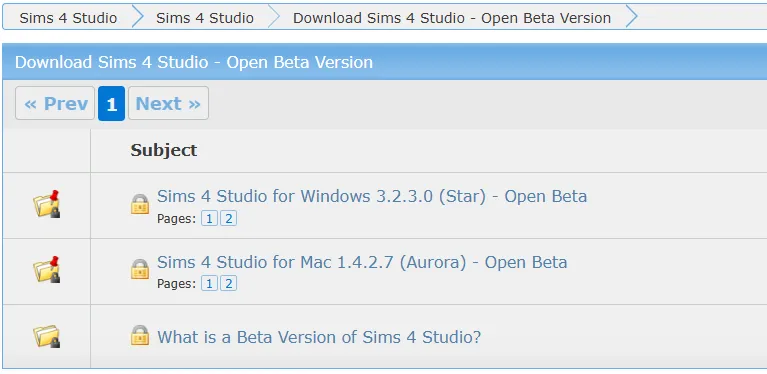
Prerequisites - Install Sims4Studio (to open the file and be able to modify it). You can download it from here: https://sims4studio.com/board/6/download-sims-studio-open-version Install the one for your operation system - Star for Windows and Aurora for Mac.
How to change the number of iterations needed to complete a task in aspiration?
Step 1 - Open the mod
Once the Sims4Studio is installed, you'll be able to open with it a mod that you wish to modify. Go to the Mods folder and open a mod.
Let's practice on my My Own Business Aspiration.
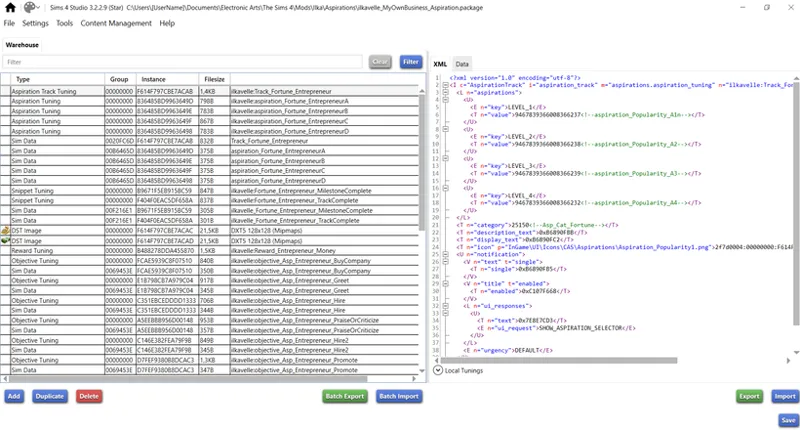
This is the view after opening a mod in S4S:
Step 2 - Look for Objective Tuning files
Look for them on the left side (I am not sure how the photo above is readable so below the larger fragment with Objective Tuning marked):
Each objective tuning is responsible for a task within aspiration. You can see the name of it, the one that is highlighted is named ilkavelle:objective_Asp_Entrepreneur_Hire - so this is the objective to "Hire New Employee". It's quite recognizable, you can guess which task it is about. But files are not always named in a comprehensible way, unfortunately. I must admit, when I was starting modding I wasn't naming them very well :( Now I try to be more organized with it, so it's definitely easier to search for files. within my newer mods.
Tip: To easily find all objectives files, you can click on Type column and this will sort all the files according to their type - that way you'll find all Objective Tunings grouped together.
Step 3 - Click the Objective Tuning you want to modify
...and look at the right side of the S4S. I clicked the Objective Tuning named: ilkavelle:objective_Asp_Entrepreneur_PraiseOrCriticize
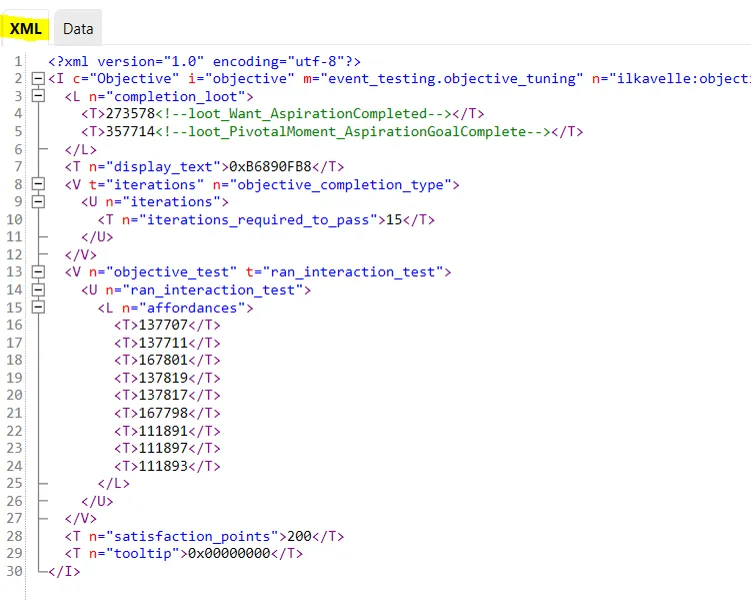
And this is what opened for me on the right side:
Make sure you see the content of XML Tab (marked with yellow above).
Now you see how this objective is constructed.
Step 4 - Change the number of iterations
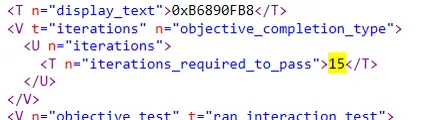
Look for this fragment of code - "iterations_required_to_pass", we can see number 15 next to it:
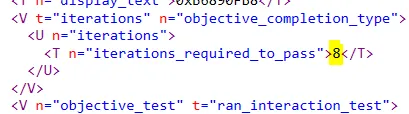
This means (in this objective) that Sim must "Praise or Criticize an Employee" 15 times. You can change this number :) But be carefull no to remove any other sign ;) Just change the number. For the training purposes I am changing it to 8.
Step 5 - Save the file
Click on the Save button in the right down corner:
You should see the notification saying that .package file was saved. Now you can close the mod.
Step 6 - Open the game and check the changes
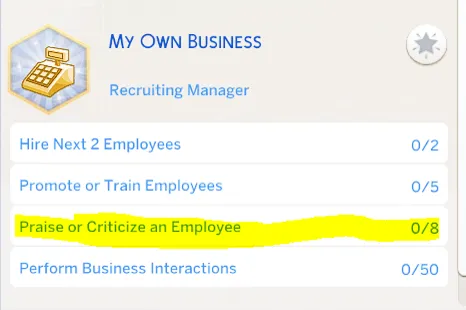
As you can see, the change is now visible in the game - 8 actions are here now required. (I had to cheat to quickly see this change as my Sim didn't have this aspiration ;) )
Good news is, if you mess something up (e.g. by mistake delete something in the mod etc.), you can simply delete the mod and download it again ;)
Final note
What I showed you here will work only for objectives where there is specified number of iterations for the given action. But there are other objectives: for skill progression, or career progression, or having a certain buff or mood etc. For these objectives there is usually no iteration aspect, but other parameters. You can of course check it by yourself and try to play with these other parameters on your own. As I mentionned, if you mess up, you can always redownload the mod :D
Career objectives work the same way, so you can alter them in the same way as shown here.
The fact that you changed the number of iterations will not automatically mean that the text also changed. In the example above the number of iterations was not specified in the task text, it was simply "Praise or Criticize an Employee". But sometimes it is specified and then it will stay unchanged until you change also the text. But this topic is not for today :)
Did you find it useful? Was is comprehesible? Do you want me to make some other intructions like this? Please let me know your thoughts :)
Comments (27)
I’ve asked questions like this before, about changing someone’s mod to better fit my game. Always hit a brick wall. It’s taboo! This was great! I wish more creators used Json files like Lot51 or Frankk has so you can fine tune his mod. Idk if maybe you could collab with him to teach us how to create a json file for a mod so that our changes can survive updates? Is that possible? No idea! I actually have a few very specific ones that really interrupt my gameplay. So, suggestions! Sac’s Life’s Tragedies mod is WAYYYYYY too frequent. I play very long lives and believe a “tragedy” should be uncommon if not rare in a sim’s life. He has different options but they’re all crazy frequent. I literally can’t use the mod. If I could change the frequency I could use it! Mccc has a setting for how many babies a sim can have at once. I went with 6. Problem is, however he sets up probability here makes it VERY common for all sims to have 3-5 kids at once. Like it’s nearly every time. I HATE this. Quints are rare. Even triplets are not common at all. I really want more realistic probability settings for this but he does not seem interested in changing that. I’ve resorted to clicking all female sims I encounter in game and selectively reducing their fetuses manually 🙈 Being able to fix this would be amazing! Also this one might be the most helpful for others, blacklisting! So many creators don’t bother (or don’t realize they need to) blacklisting pets in their mods. Plumlace currently has all of my household pets going through crazy mood swings from her personality mod. It’s bad. She said she’d fix it but maybe forgot. This mod is far from the only one that affects pets when it shouldn’t. I have to remove many mods because of this. Learning how to blacklist would be a godsend! Been meaning to switch around my subs and add you but actually haven’t played in months. I will get there, though! This is all so helpful. Really looking forward to that interaction that will let my tods use their kiddie pool without the adults 💜
Hi, I didn't reply back at the time when you wrote it, but I read your comment and I wanted to give a thought out answer. I know what you're referring to in the context of other mods. I could look up about the frequency - the thing is it might be coded in many different ways. Analysing someone's else code is not easy, and Sacrificial's mods are large :) a loooooot of files inside and to find the ones that interst you - it's not easy :D I could for sure help with blacklisting for pets, I think it should be easy for buffs. For the probabiity of number of babies - this is too difficult for me, I don't even know where to look for this. You really got me interested by the json file creation. I never thought of this, but you are right, Lot51 or Frankk do use it! I didn't contact them yet, but I plan to and see if it's possible to keep some tuning untouched after the patch and changes. 🤔 Thank you for all your suggestions!
Thanks, you're a very good teacher!
Thank you :]
OMGosh that was EASY!!!! Yes please more like this!
Happy to hear that! :D I will post more :)
Yes I'd love to be able to make some modifications to mods myself! Definitely interested in more posts like this! Thank you!! :)
Thank you for this i have been interested in modding this is very helpful
Thank you, thank you, thank you 🙏🏻
Thank you! This is amazing. So grateful to have modders willing to share their knowledge and teach us! Please share more!
Amazing, appreciate you sharing your knowledge like this!
This is amazing! I have always wanted to learn how to mod. I have tried, but it feels difficult to learn by myself. So, this was very helpful!
You should try! I will focus first on easy alterations but with time I will probably also show something more complicated :)
This is on my ADHD project bucket list. Just small mods and CC creation. This is a great start for me. I will tackle something after I finish creating the painting override I am working on.
Great! Let me know how it goes :]
I'd love to learn how to change skill learning - I want cross stitch and knitting projects to go a lot slower, even for the highest level skill. I can't believe you're going through the trouble to write this out, well done and thank you for your work!!
Ok, noted down, I could show where to look for it. But do you know that with MCCC you can slow down the skill gaining tempo? (I think so).
amazinggggg maybe someday ill mod too
Yes! Go for it! :)
Thank you!
This is so awesome! Thank you so much 🤗
This is so useful and appreciated
This is so cool! Thank you so much for sharing! I've always been very interested in modding, but I've never known where to start learning. 💖
I know, I still remember my beginnings 😅
thank you
These little tutorials could be very helpful for making minor adjustments to suit individual gameplay, and yes, it is perfectly comprehensible. Thank you for taking the time for this project! :)
Yes, I plan to show here minor adjustments, but the more I will show, the more understandable the whole modding process will be, I hope 🤗 :)