
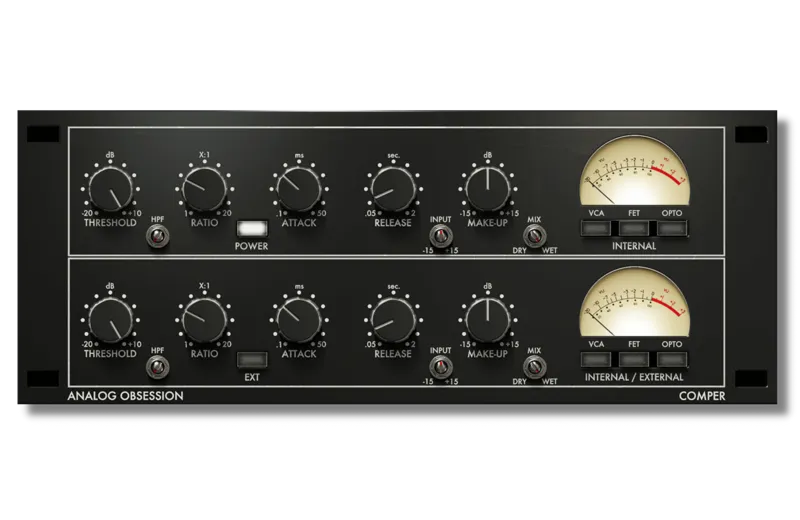
COMPER
Hi!
I wanted to celebrate Pro Tools / AAX support with new plug-in before update my whole plug-ins with AAX support!
Here is COMPER!
"Multi-Mode", "Serial Compression" with "Switchable" and "Blendable" circuits!
Confusing?
Not at all! Let me explain!
Basically, COMPER has two compressor in series. Top side compressor is first and bottom side is second compressor. As you can see, top side labeled as "INTERNAL" and bottom side labeled as "INTERNAL / EXTERNAL". This means top compressor has no external side-chain feature. But bottom one has both internal and external side-chain feature. This is "Serial Compressor". Great for coloring and also, taming peaks at the same time. Lots of scenarios! Simple...
Let's talk about Multi-Mode!
Each has three compression mode. VCA, FET and OPTO. You can simply select which mode you want to use. So, it's basic "Switchable" mode compressor. But these buttons are not radio-button to select mode with one click. You need to click active button to disable it and enable another mode. Extra clicks??? Why?!?
Because you can use these modes TOGETHER! This is "Blendable" part!
You can select VCA and OPTO or VCA and FET or any of them or all of them, at the same time! These circuits are PARALLEL and they will be summed according to their count. For example, if you use two mode at the same time, you will get 50/50. If you use all of them, you will get 33.33~/33.33~/33.33~. Using one? 100...
That's all!
FEATURES
- Two compressors in series with three circuits for each
- Multiple circuits are usable for each compressor (VCA - FET - OPTO)
- THRESHOLD +10dB to -20dB
- RATIO 1:1 to 20:1 (With 1:1 you can get extra transformer color)
- ATTACK 0.1 to 50ms
- RELEASE 0.05 to 2sec
- HPF 20 to 750Hz (Side-chain)
- INPUT +/-15dB gain compensated (Usable if Threshold can't reach low signals or if you want to push it harder!)
- MAKE-UP +/-15dB
- MIX will "mix" dry and wet signal
- EXT will engage External Side-Chain for second compressor
- POWER will bypass whole plug-in
- ANALOG OBSESSION label is oversampling. Simply click it and engage 4x oversampling.
- Touchscreen support
- Resizable interface. Simple "Bottom Right Corner Handle" to resize. 50% to 200%.
*Resizing Tip: When you duplicate plug-in, it will remember current state of GUI size. But if you load new instance, it will be opened at default size. To get rid of this issue, simply follow these steps;
1. Open plug-in for the first time
2. Resize GUI according to your screen resolution or you liking before setting any knobs
3. Save this state as default preset with your DAW
Now, you will be able to load new instances with same size.
(If you want to go default size, simply double click to resize handle.)
AVAILABLE FORMATS
VST3 / AU / AAX Native - Audiosuite | Mac 10.11 or Higher | Intel / Apple Silicon
VST3 / AAX Native - Audiosuite | Windows 10 - 11
Mac Versions require a graphic card that supports “Metal”
Windows Versions require a graphic card that supports “OpenGL”
VERSION 1.1 - 17.11.2022
- Added HPF (Side-chain)
- Adjusted scales of Attack, Release and Ratio
- Fixed Ratio readout
DOWNLOADS
Comments (45)
Love this plugin! But I’m having issues when using this (and all your plugins) in DaVinci Resolve. The window size is too big and there’s a lot of weird pink background…
If I don't click any of the compressor modes does that bypass the compressor? Asking for if I want to just use one of the 2.
When I have more than one instance of this plugin's GUI open, both remain working but no interaction via either GUI is possible until I close all but one, then the last GUI works as expected.
i love this plugin! please can you update auto gain??
Wow, what a lovely plugin! Just discovered it, and im using it all over my mixes. I had commented on an issue with LALA and an inverse state indicator issue using UAD Luna console view (on my system), but with Comper, the visual state indicator appears to function as expected. I have experienced quite a number of AO plugins that have the same state indicator issue (plugin appears disabled, when it's actually enabled) in Luna.
The button to open the pinout menu varies per DAW, but once you find that, just choose either the kick channel or kick bus as the source for the detector signal, choose external for the side chain on the plugin. Then the kick will be the source to attenuate the bass guitar for the duration that the kick signal exceeds the threshold despite the plugin being installed in the bass buss or channel, and the attenuation meter moves with the kick, not the bass. Usually 3-4 dB is good on the hits for rock.
This is excellent! I used it on a bass bus, using one compressor for the bass and the other side chained to the kick. Very easy to get a good bass sound and it was easy to quickly get the kick attack and sustain right and control the ducking.
Could you go into more detail about how you do this? This is where I am struggling to understand.
Can you please add a channel linking and unlinking function to your compressors? It would make all the difference in the world when you use your compressors on stereo channels. Without this functionality on your compressors, you get too much ducking and too much of a narrowed sound on stereo channels. Please add Channel linking and unlinking function.
This is hands down one of the best sounding and most versatile compressor plugins I've ever used!
I just love your stuff! I have a second system I use only for my front-end processing. This is the only compressor in my vocal chain. What else would I need? Keep up the awesome work, you rock!!!
Would it be possible to get a midrange Pultec? They are very useful and there aren't many good emulations on the market.
Presets would be awesome! Is there a place where Analog Obsession users can go to share they're plugin presets?
Or a place to share guidance on usage. This serial idea is alien science to me. :( I really want to understand how to use this. I intuit that it is important.
This is single-handedly one of the best software compressors ever written(in terms of sound, usefulness and practicality). I'd love to hear your take on a CL1B style emu. It looks as though you haven't done one(or at least in a while).
can someone help with issues I;m having. I download the installer, it opens but stops at the message about supporting on Patreon. it does not install or load. I'm on a Mac with Monterey and specifically trying to get the brit channel vets
Hi! COMPER and other updated plug-ins (with AAX) are fixed. But others still have issue with Mac’s Dark Mode. You need to use normal mode while installing. Then, you can go back to dark mode. I am about to update all plug-ins with fix and also, AAX and resizable GUI. Thanks
I'm really digging COMPER. No issues in LOGIC and LUNA. Got some serious mojo. Sounds amazing (especially with the oversampling engaged). Mixing the compressor types is really fun (and versatile). Great job.
Comper crashes my Cakewalk DAW with Win 10. Rare works. I've heard, Cakewalk had sometimes Problems with the VST3...?! Have someone an idea ?
This is intruiging, but I'm on High Sierra, I did try it as the other plugins i have work well - but Comper crashed, since that crash i looked here and it states (Requires a graphics card that supports "Metal") I have no plans to change my OS as Logic 10.4.8 is stable on Mac OS 10.13.6.
Same here.
This plugin is fantastic. I finally got around to download it and sonically and functionally it's a new standard for me. I'm wondering if there's a reason why the 'save as default' doesn't work for Logic?
Hi the download links do not work at all! something wrong on my side?
Hi! Possibly something is wrong on your side. What is your browser?
This is a terrific plugin, love it. It really fills a niche in production workflow. My only request is to add dedicated bypass buttons for each compressor so we don't have to click around on the algorithm buttons to hear what each is doing separately.
I don't know how I missed it the first time, but the fact you can push multiple buttons so that OPTO/FET/VCA can work in parallel is a particularly brilliant innovation. Take that and the fact it's two comps in series? It's brilliant! Everyone join the Patreon if you can, we gotta keep this stuff going!
Hello! Version 1.1 ready to download! - Added HPF (Side-chain) - Adjusted scales of Attack, Release and Ratio - Fixed Ratio readout
My new favourite compressor plugin! Seriously, this is amazing! I do think that gain compensation is doing too much and even makes the sound much lower in level. Raising the input gain can even make the output of the plugin almost inaudible. EDIT: I see you now added the HPF, I was missing that and thought I just overlooked it. Great! This is one I will recommend to anyone looking for a compressor!
Love the resizable GUI
Windows zip required please, Windows defender blocks the installer file
just click more info then run anyway.
Where is Windows Zip?
Just added zip file!
Wow so much easier than using a VST wrapper! Is there a date for when the rest will be available for AAX? Thanks! Works great for me so far!
No, date but I already started to update my whole catalog. I will start to release updates as soon as possible. Thanks!
Unfortunately, my DAW can't run VST3 .... yet
I use Reaper on Mac with High Sierra and as soon as I try to load it the DAW closes It does this with both VST3 and AU… why?
Please, contact via email for system details. Thanks!
EXCITING! For those who don't know -- an effective technique is to use two compressors in series -- where the first compressor is set to fast settings, catching just the peaks. The second compressor can have slower settings and go deeper with the threshold. The result is more transparent because that second compressor isn't over-reacting to the peaks, because they're already treated!
Ok so let's keep the tips going in this thread - you can use opto first and vca in series to mimic the shmc mastering compressor. Touch up with your favorite neve style Saturation and you have shadow hills in a pinch 😂
Thanks! PluginDoctor has issues with some interfaces. I noticed that, too while testing COMPER. For example, when I resize it with PD, gui goes blurry. I have to close and reopen gui. Hopefully, I didn’t get any issues with DAWs.
OMG this is huge!
Sounds very intriguing! I like the direction you are taking with plugins like this one or BlendEQ. Just went to try it out but on macOS it appears that the UI is not scaled properly (UI is occupying the top-left corner only, the remaining 3/4 of the plugin UI are magenta). Is it just me or is this an actual bug?
This may have something to do with hardware acceleration or high dpi settings if you have those in your DAW.
Looks cool reminds me of my preamp ua with blend between solid state and tube :) thanks for this!