

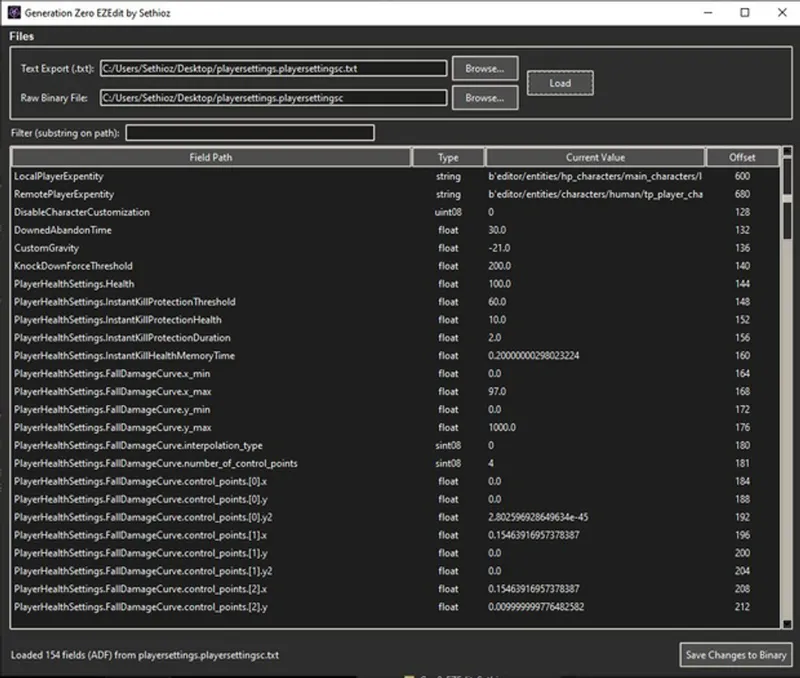


Generation Zero EZEdit file editor / mod tool (How to mod Gen 0)
It seems like nobody has made working modding tools for Generation Zero, so i wrote one quick tool that makes editing extracted files easy! This is GUI / visual editor, but you still need to extract files first. I used DECA ( https://github.com/kk49/deca ) for that job, but DECA isn't easy tool to use, it's half-baked and half-broken, clearly its developer has no idea that we're living in AI era.
Anyways it's "simple" python script compiled into standalone .exe.
Anyways, i tried using latest DECA, but it didn't work. i discussed this with AI and AI said that probably lazy/incompetent programming, which turned out to be true. I had to use older DECA b559, which works with latest "Generation Zero: Final Showdown" that uses GenerationZero_F.exe file. That's why i have included DECA b559 to this post aswell, so you don't have to go looking for it on github.
I basically got into this, cuz all mods on nexus seem to be broken, either no effect or they totally crash the game. So you have to re-do them and now i understand why nobody wants to do this, cuz before my tool, only method was to extract text + raw file and then look at the offset where the value is kept, then use HEX editor and replace bytes. it's also "little endian", which means you have to reverse the byte order.
(deca does NOT have ability to re-pack files, which is why my tool is required if you don't want to manually HEX edit)
How to Use EZEdit:
Download EZEdit_V2.zip (bottom of this post)
Extract EZEdit_V2.exe (i pass protect .exe cuz most ppl use idiotic default settings that don't allow downloading .exe files, most "modern" browsers now also scan content of archives upon download, so best way is to pass protect it)
pass = sethioz (lower case)
Run EZEdit_V2.exe
Click "browse..." behind the "text export (.txt)" field and choose the extracted .txt file
Click on "browse..." behind the "raw binary file" field and choose the corresponding raw file that goes with that .txt file.
Click on "load"
Make your changes
Click on "Save changes to binary" button at bottom
NOTE: this tool doesn't have "hold my hand" mode, if you choose wrong binary file, it won't check, it will WRITE. so you will screw up the file if you choose wrong file. so pay attention to what you're doing.
For example those extracted files:
\loot_containers\loot_container_ammobox_large.epe.txt"
\loot_containers\loot_container_ammobox_large.ee"
\loot_containers\loot_container_ammobox_large.epe"
If you choose .ee file and .txt file and then load, my tool will load just fine, cuz it doesn't read the binary (.ee) file at all, it only reads the .txt file and makes a blind-edit based on the .txt file. Which is WHY it is important that you pair .txt with .epe file and NOT the .ee file. this same logic applies to every extracted file.
How to extract files using DECA:
I had issues with it, so thought i'll write a quick guide.
download deca_gui_b559 from this post or from github
extract entire deca tool and run deca_gui.exe
click on file > new project...
browse to your generation zero folder and choose "GenerationZero_F.exe" > click open
let it finish, this process took me about 2 hours (cuz DECA is poorly coded)
WARNING! deca tool extracts ENTIRE GAME into root of your drive where DECA is located, for me DECA is in:
G:\Mods\generation zero\deca_gui-b559
it keeps its settings in:
G:\Mods\generation zero\work
BUT it made a MASSIVE 50gb folder here:
G:\archives_win64
DON'T WORRY, deca only needs to do this once, after it's done extracting and mapping, you can then delete those files. DECA only needs its database file that it generated during that step, which is about 1.3gb for me and is located here:
"G:\Mods\generation zero\work\gz\db\core.db"
Now in DECA tool highlight the folder/file/files you want to extract (in my example, we're going to extract entire /settings/)
Now click on "extract" tab at bottom and choose "export raw files" and "export as text" > click on "EXTRACT" button:
This produces 2 sets of files in /extracted/ folder:
G:\Mods\generation zero\work\gz\extracted\settings
THOSE are the files you need to use in my tool to edit them, for example in /settings/ folder we'll find:
playersettings.playersettingsc.txt (text format) AND playersettings.playersettingsc (raw/binary).
You feed that pair of files to my tool and make edits.
This is 100% confirmed and working as this is how i made my storage capacity increase mod, first i asked claude to do direct edits, but then tested with my tool and it works.
How to INSTALL Mods:
Finally, here's how to use/install the modded files
Go into your generation zero folder, in my case it's:
G:\Games\GenerationZero\
in there make a folder called /dropzone/ so full path would be:
G:\Games\GenerationZero\dropzone
this is where you put all the files you have modded, but you MUST keep the structure intact! Structure is self-explanatory, just look at the original structure they extract as. If you wanna edit player settings, then you'd place the file like so:
"G:\Games\GenerationZero\dropzone\settings\playersettings.playersettingsc"
Now you have to make shortcut to game (or if on steam, use launch options)
Right click the shortcut and in "target" field add this line:
--vfs-fs dropzone --vfs-archive archives_win64/initial --vfs-archive archives_win64/supplemental --vfs-archive archives_win64/optional --vfs-fs .
Some say you need "--vfs-fs ." at end, but for me it worked without it, but also works with. If one doesn't work, try other, simple!
If on steam, put that entire line into launch options.
Full "target" path for me looks like this:
G:\Games\GenerationZero\GenerationZero_F.exe --vfs-fs dropzone --vfs-archive archives_win64/initial --vfs-archive archives_win64/supplemental --vfs-archive archives_win64/optional --vfs-fs .
Now launch game from that shortcut.
NOTES:
I tried editing motorbike stats, but it seems like game is overwriting them from somewhere else, which is probably why nobody has made a mod that change vehicle stats, i found some old outdated "fast bicycle" mod, but that crashes game as soon as you try to load bicycle.
I tried editing myself and while my tool makes edits fine, game just don't give a shit, it overwrite them with something else. Perhaps some DLC files that overwrite it, that's again lazy programming. In fact if you open those files, you will see just how LAZY programming it is, they still have all the helicopter, boat, truck..etc stats and logics in there aswell, even tho Gen0 only has bicycle + motorbikes. they even have turbo, nitros..etc settings all present, cuz they were too lazy to optimize their code.
So if you wanna edit vehicle stats, you gotta look deeper. In case you wondering, vehicle stats are in here:
editor\entities\vehicles\01_land
BUT as i said, those get overwritten with something else. In there i found clear stats like top speed, rpm limit, fuel consumption, final drive, gears ..etc, but they have no effect. I discussed it with AI and it also thought that most likely bad coding and ther's some other place where it overwrite them with, devs often do this lazy coding, instead of changing the source, they just "patch it" on top without changing the base stats, leaving remnants and causing games to run like snails.
! IMPORTANT !
on further examination, i noticed that deca does NOT extract all the files as tool is half-broken, so that's probably why i couldn't find the vehicle stats override as they're among non-mapped files.
Bulk Editing:
I added a quick python script that finds and replaces ALL the HEX strings within the folder where you execute the script in.
HOW TO USE:
download and place "replace_hex.py" in the folder with the files you want to edit
open it with notepad++
edit the bytes you want to find and replace
save the file
double-click the "replace_hex.py"
I used it to change the loot spawn timer in 150 files. I first opened all 150 .txt formats in notepad++ and did global search for 14400, which is the default loot spawn time (14400 seconds = 4 hours) and verified that 14400 is unique to each file. (it wasn't, but others were file IDs that were only generated when converting raw file to text). then you have to convert 14400 to HEX 4 bytes, which is 00 00 38 40 and since Gen0 files are in little endian, you have to flip the bytes so it's 40 38 00 00, then search that string within HEX editor.
Just for good measure i added leading 42 and trailing 01 as 40 38 00 00 always sat in between 42 and 01. then i entered 42 40 38 00 00 01 as the search string and another to replace my value with.
KNOWN BUGS:
Some values are not shown, because deca doesn't extract them with offsets, i just noticed it when trying to edit weapons. i noticed there's yaw/pitch for recoil, but those have NO offsets and since my tool is offset-based (only way to precisely edit the raw file), it skips offsetless fields. You CAN still edit them, just not with my tool, you have to do it manually with HEX editor, i just wanted to list this. it's technically not even a bug with my tool, it requires offset, but if offset doesn't exist, it skips it as it can't safely edit it. Maybe there's a way to calculate the offset, but i doubt i can bother. i mean that values are probably close to something else, they're probably some sub-fields that are between other fields, so you can do like +4 offset or +8, i'd have to feed lot of files to AI and ask it to find a pattern, but i just can't bother with this.
REMINDER: pass = sethioz
(pass protected archive is required as patreon and lot of modern browsers tend to block .exe downloads and archiving alone won't help, as they also sniff inside and find .exe and then block it - FUCK THIS MODERN SPYWARE ERA!)
Comments (1)
Great! ty!