


sorThunder - Thunderbird account order sorting tool (freeware)
This started to get on my nerves that thunderbird doesn't have option to SORT account order (account display order), i have like 20+ accounts there and some are linked, like my youtube accounts and my personal email, so i want those to be NEXT TO EACHOTHER, while some other old accounts i use on sites that i don't really trust, i want those to be sorted below, but thunderbird won't let you do this, so it's a BFM - BIG FRIKKIN' MESS!
that's why i wrote sorThunder tool instead. it reads/edits prefs.js file that is in thunderbird's default profile folder. to prevent possible corruption, it's not possible to apply changes while thunderbird is running.
It's written in python and compiled into standalone .exe. sorThunder comes from "sort thunderbird", it sounds cool, so why not?
FEATURES:
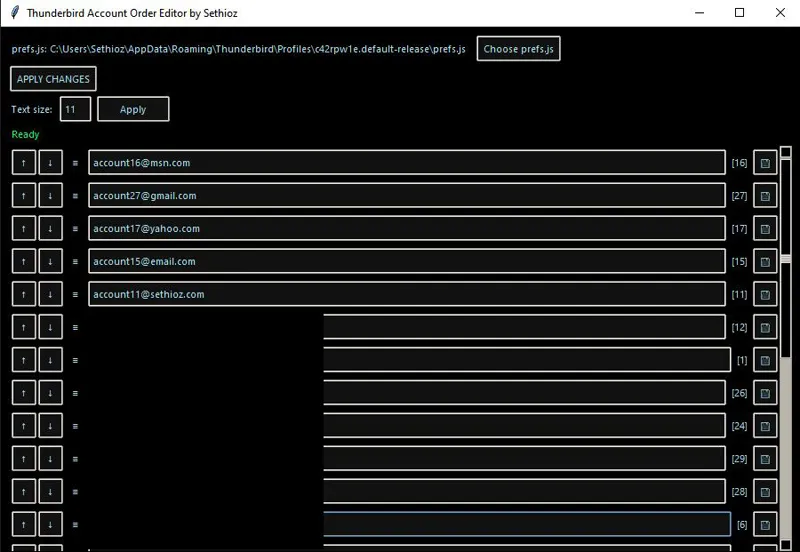
Displays all accounts and their order
Lets you edit account display names (can also be done in thunderbird, but this is simpler)
Use UP/DOWN arrows to move accounts.
Allows Drag & Drop sorting (grab the ≡ lines by holding mouse 1 in front of account name)
You can choose different prefs.js file if you want to sort it for another device or someone else, you only need prefs.js file.
Makes automatic backup (prefs.js.bak) in same folder as prefs.js you are editing.
Displays thunderbird's account IDs behind each account, that's thunderbird's internal mapping, those are there for your own reference.
Adjustable text / UI size
No installer / no install required (runs as standalone .exe)
HOW TO USE:
HOW TO OPEN prefs.js:
Tool should automatically open default prefs.js that is in first thunderbird profile, however if it doesn't, then click on "choose prefs.js" and open the one that your thunderbird uses. Alternatively you can make copy of your prefs.js and edit it outside of thunderbird profile, then save it and overwrite the original.HOW TO EDIT ACCOUNT DISPLAY NAME:
Simply click on the account name box and write whatever you want it to be, it's DISPLAY name only and does not affect how thunderbird works. After you have edited display name, you have to click on the SAVE icon 💾 (looks like a floppy disk), after that you have to also click on "APPLY CHANGES" button above. You must click BOTH buttons in that exact order, if you click anything else before clicking the 💾 icon, then name will revert back, if you don't click APPLY CHANGES, then it won't be saved in prefs.js file.CHANING ORDER OF ACCOUNTS:
Method #1: use the up/down arrows that are before the account, those are good for small nudges.
Method #2: drag and drop, grab (click + hold mouse1) the hamburger lines ≡ in between up/down arrows and account name, now just drag it where you want it to be, then release mouse 1. Quite simple, it's like any drag and drop works!SAVING / APPLYING CHANGES:
Click the "APPLY CHANGES" button above, it will show a message that changes were saved. If you see "Exit thunderbird to make changes", then this is exactly what i means. if your thunderbird is "not" running, then it means its process is still open on background, CLOSE IT COMPLETELY. This is a SAFETY as thunderbird is making constant changes to prefs.js and if 2 programs try to write at same time, it can corrupt the file and other reason is that thunderbird does not refresh itself til you restart it, so you MUST RESTART thunderbird anyways, which is why you can only edit it while thunderbird is not running.HOW TO CHANGE TEXT / UI SIZE:
In the "Text size:" editbox, type text size that you want, then click on "Apply" button next to it. I suggest don't change it to stupid values or you'll just get stuck and have to restart it. It's there to prevent potential scaling issues that come from different DPI scaling and/or resolution. Don't touch it unless text is too small/big.
if you have any issues or find bugs, feel free to message me, but don't expect a fix. i made this tool for myself as it got annoying that thunderbird don't have built-in sorting feature and it works fine on my pc (win 10) and laptop (win 11), so i expect it to work on every PC that has win10 or win11.
LICENSE:
This tool is freeware and made completely by me (Sethioz), but not open source, cuz i don't like giving out my source code just so some greedy monkeys can steal and sell it and use it as their own. those greedy paste monkeys are getting on my nerves .. go do something useful instead of STEALING from others. tool is free, what more do you want?
YES you are free to share the tool, but it would be much appreciated if you linked to this post instead of hosting it elsewhere or giving it directly to someone. If i update the tool, then update will be included in this post aswell (i will update this post as needed).
Comments (1)
Neat! Nice addition. And I fully agree on your position about not giving out the source code.