
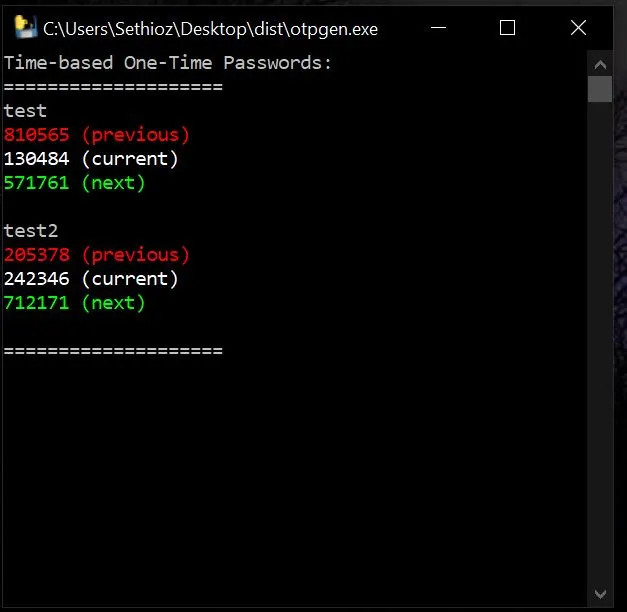


OTPGEN minimalistic one-time password generator aka authenticator for PC
Tired of those idiotic TOTP (Time-based One-Time Password) programs that make you jump thru loops and hoops just to get your damn code? i've been using browser add-on called "authenticator" which is quite simple and easy, it exists for chrome and firefox, but it's pain in the a-hole if you just want to simply copy paste something specific and it's hard to edit them aswell. winauth is also good simple tool, but it also makes you jump thru loops and hoops and it saves data in /users/ folder somewhere... bah!
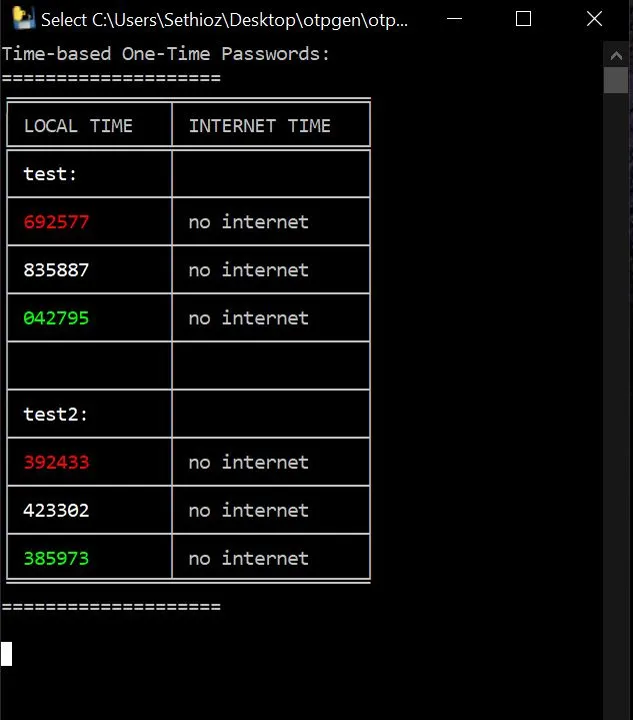
AS THEY SAY: if you want something done right, DO IT YOURSELF, so i made my own! it's minimalistic TOTP generator written in python, i compiled it into .exe. i made 2 versions, one uses your PC's local time only (so your pc time must be correct or it gives wrong codes) and other one connects to ntp.org to fetch correct time from internet. this is used so that if your local system time is wrong, then it won't matter. it displays codes based on local time and internet time. It also means you must allow it to connect to internet, otherwise "no internet" is displayed under internet time fields.
I made it mostly for people like me, who want to have ability to backup things quickly and with ease and without headaches. you can simply make small encrypted container with truecrypt or veracrypt and put this tool + your secret keys in it, then put it onto usb stick or upload to internet. this tool DOES NOT save any data on your computer or anywhere else, only storage is inside otplist.txt. idea is that you can use this in non-trusted computers, it won't save nor leave any traces, you can run it directly from usb stick aswell, grab your code and be done with it.
i dunno what's wrong, but it doesn't match the authenticator time 100%, this is why it has previous, current and next codes. in my case, one i see in authenticator is about 7-15 seconds late in my OTPGEN, that's why i included prev>current>next, so if one code doesn't work, just grab one from next field. most services allow variation anyways so it shouldn't be an issue, but that's why those fields are there for.
HOW TO USE & ADD YOUR ACCOUNTS / CODES:
1. open otplist.txt in notepad++ (highly recommended, but any text editor will do)
2. replace test with your account / service name, it has nothing to do with actual service, its for your own reference.
3. replace the sample code after : (colon) with your actual secret code.
4. save otplist.txt
5. otpgen.exe / otpgen_rem.exe must be in same folder with otplist.txt file for it to work.
6. run otpgen.exe (local time only) or otpgen_rem.exe (one with internet time check)
7. you can update otplist.txt while otpgen is open, it will auto-update every 30 seconds, once it does, it will display newly added codes.
8. to copy a code, double click on it or highlight it as normal (left click + drag) then right click on it (right click in console = copy) or use ctrl+c or special hotkey if you have one. OR just type it out manually, duh!
BUGS:
sometimes console window goes black, if it does, touch it! i mean it, just touch it, bring it to focus and click on it, press enter, press space, til it comes back or just restart it.
questions? comments? use the comments field below or PM me!