
Handy Features of the Interaction Menu
Hi!
Today, I’m gonna show you some very useful features I added to the interaction menu this week. Let’s get into it! This post is for Patrons only so please don’t share it, thank you!
Interaction Menu Feature: Searching
Earlier this year, in a Patreon post, I shared some ideas I had for the interaction menu in Paralives. Well, now they are no longer just ideas and I added some of them to the game!
In Paralives, just like in real life, some objects will have a lot of interactions. A computer, for instance, has so many things you can do with it so the interaction menu for it will be very full. Being able to search an interaction by name will be very useful in those cases, when you can’t remember in which submenu an interaction was!
The search feature in action. We don’t have objects with a ton of interactions yet but imagine that there would be a lot more interactions, many of them into submenus. The search feature would come in really handy then!
Interaction Menu Feature: Pinning
Next, I added the interaction pinning feature. It could also be called favorites.
A lot of the time, you end up doing the same interaction on a given object. For instance, when clicking on a bed, most of the time, it will be to select the Sleep interaction.
Now, you will be able to pin one interaction per type of object so that it visually stands out when opening the interaction menu. But most importantly, this pinned interaction will now be mapped to a shortcut. In addition to left-clicking the object and browsing the menu to select the interaction, the object can be right-clicked to add the pinned interaction to the interaction queue without even having to open the menu!
In this GIF, I simply right-click on the floor to run towards the clicked position, without the need to open the menu to select the Run interaction. This works because I marked Run as the pinned interaction when clicking on the floor.
Interaction Menu Feature: Build Mode Shortcuts
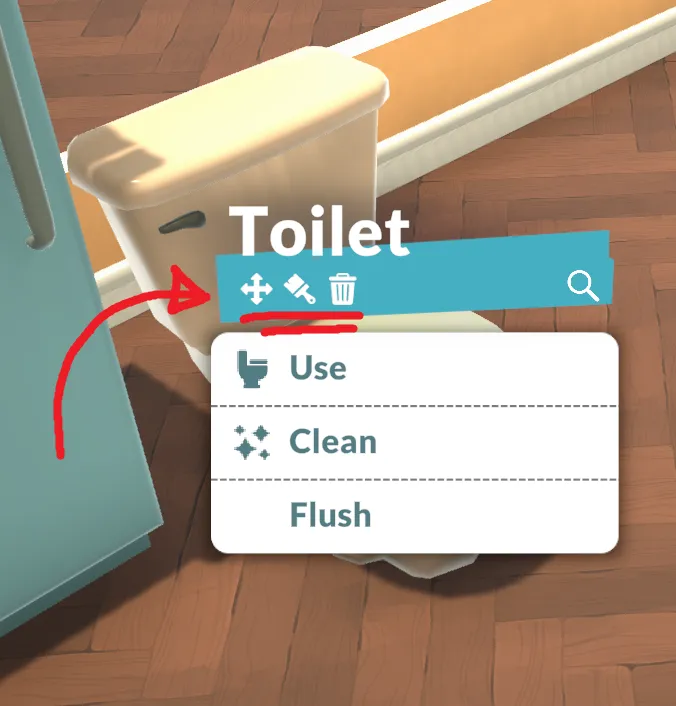
Sometimes, you want to tweak an object in your house but it’s a bit of trouble to go into build mode just to do a small change and then come back to live mode. That’s exactly what I told myself when I added some small shortcut buttons in the interaction menu to:
Start moving or rotating an object
Change the colors of an object
Delete an object
These shortcuts in the interaction menu should allow you to quickly tweak an object in your house without needing to go into build mode.
More buttons might be added in the future here like:
Duplicating the object
Changing the texture and material of an object
And other object related customization
These buttons won’t be here when opening the interaction menu after clicking on a character (because you can’t move or delete a Para!) but they could be replaced with character specific buttons like:
See character personality sheet
See skills
See relationships
See outfits (or edit outfits if we clicked on one of our household’s character)
That’s it for today. Let us know what you think in the comments and have a great weekend!
Alex
EDIT - January 10, 2023: This post is now public. Feel free to share it!
Comments (38)
Pinning interactions is the best thing that I didn't know that I needed until now. Amazing!
I hope it will be possible to edit the outfits of someone outside of the household.
I think baby showers are one thing, in that for many people they are fun but please do not make gender reveal parties. I think they clearly undermine the inclusivity of your game.
I have trouble remembering a bunch of keyboard shortcuts so it's a good sign for me that I think everything is intuitive so far :)!
Will some of these things be pinned already? Like using the toilet or sleeping?
with all honesty i guess the drop down for dance here walk here wont be a fun option if we do play like .. even in sims we play on multiple household members so selecting each on and having such micro controls for everythng makes the game too draining in a way .. its just my perspective 😅
The pinning option with right click is my favorite, so creative. Great job!
Now that I see the pinning mode to walk with a single click, a mode to move our Para with the WASD keys or a controller would be great
I love these features! They're incredibly thoughtful. Looking forward to them!
amazing features. these need to stay for sure!
The shortcuts are awesome as well as being able to change object colors and positions in live mode!
omg the short cut tied with favorite interaction is just genius, i never knew i wanted that but it's perfection
Loved these QoL features when you first brainstormed them and love them even more now that they're implemented! My favorite is the build mode shortcuts but I can honestly see all these features getting a ton of use from me. Amazing work!
This looks great!! I love the thought of common actions being pinned to make easier, and the shortcut to use them!
the right-click-for-pinned-action feature is really incredible! i can imagine using this e.g. so right clicking on the fridge does "cook for the whole household"/"serve meal" (or a similar available option). if i just want all characters to be fed (instead of e.g. honing a specific baking skill, use up a specific ingredient, or something like that) it's really neat i don't have to each time navigate a menu. more and more excited for this game every day :3
Very nice! I love the search option. The 2 interaction menu concept posts from months ago were ones that excited me a lot so I love watching it come to life. Some questions - Will all interactions have small icons? What happens when you pin an interaction that has sub-folders - i.e. will ordering takeaway choose a random interaction in the sub-folder? And are you guys still planning on having the small hand-drawn elements for certain interactions (i.e. romance options having small hearts)? As for feedback, I did prefer the star from your last post on the interaction post over the pin, but understand that it is more intuitive that pinning an interaction makes it a shortcut, whereas this isn't as obvious with a starred/favourited interaction.
It looks so good I love the. Features you added I’m so excited
You're adding so many cool features
If there is a cheat code for us to edit everything, we could edit Paras in the menu, usefully to change someone in neighborhood if wanted.
Amazing! Will the pins be unique to each para?
Also love the build mode feature, I'm a buyer so this is going to make things 10x easier to decorate it'll be like "designing on the go"
Love the pinning feature!! Its going to be super helpful love the Innovative features the team is bringing 😍
Being able to move something without fully loading into build mode is going to be soooo helpful!!
You guys are so great at adding features I never even knew I wanted!
:D
Great stuff! How do you pin an interaction?
Thanks!! It isn't show in the GIF but you click on the little black pin beside the interaction and it turns into a red pin
The amount of times I've wished there was an easier way but never thought of something like this is amazing to me. I love it! 😍
Thank you!
This is AMAZING ♥♥♥♥♥♥♥♥♥♥♥♥
<3 <3 <3
oh wow i could only ever dream of quality of life features like these in a life simulation game!! Honestly some of the most useful features I've seen so far
Thank you!!!
Well done !! These features will be so handy omg !! I love how the Ui is looking ! I hope we can recolor it
Thank you! We are not planning to make the UI recolorable but it could be a nice option to add in the future
All right, cover your ears.... AAAAAAAAAAHHHHHHHHHHHHHHH!!!!!!!!!!! I love this so much! You just keep smashing it out of the park with getting the details right. This is really amazing!!! ❤️❤️❤️ I was thinking about menus like the social interactions menu that I imagine would have a lot of options. In that case it might be relevant pinning multiple interactions to have them at the top and always visible. Would it be relevant to allow pinning more than one item? I really do love the right click short cut but maybe that could be for the top pinned item then?
Thank you! You are right that being able to pin multiple interactions could be nice! It adds complexity and more questions like the one your mentionned but maybe we can look into it eventually!
This is so clever and intuitive! This game is so great and it isn’t even in pre-release!