
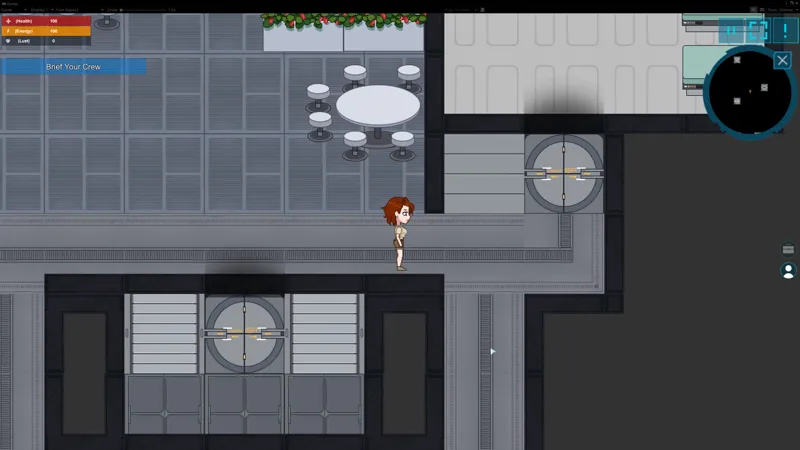
Quick Update on Sharper textures in the game
Hey! This is just a very quick short update regarding my yesterday's bulletpoint:
Content (Art):
Reimport all textures in the game (non UI/dialogue avatars related) using the sharper import method.
It turns out, it's not so simple. It's possible you've noticed, but sometimes textures appear to be moving when your game camera is also moving and I think it's due to how Unity renders pixel art textures.
Here's how it looks without any changes except for importing the textures with more sharpness.
And here's how it looks with a few extra additions from my side that pretty much eliminate the "jitteriness". However, more changes are necessary because now the camera won't zoom out/zoom in smoothly anymore to make sure the textures are rendered without any kind of deformation.
So, to not overcomplicate things for this month, I'm going to instead have these changes added for the June update, because I need to do extra scripting and testing to disable some things that would allow me during transitions to zoom in/zoom out the camera for cutscenes.
That means in the next month's build the game should look overall much better with the artstyle the textures were developed for in the first place.
I wanted to update you with this because by the end of the week I might forget, it can be a struggle sometimes to figure out how rendering works but it will be helpful in the long run.
Comments (2)
It's nice with shaper textures when i look at a still picture, but as you show in the first moving picture there is alot of "downsides" with the sharpening that i for one didn't foresee. The second moving picture is really nice but as i understand it there is some more manually fixing is needed to get there. And the you say "next month's build the game should look overall much better with the artstyle the textures were developed for in the first place" Isn't it better to keep the artstyle that the textures we developed for??? Sometime you shouldn't ask us, just go with your gut feeling, the game was fine with the "old" artstyle, but on a still picture "option b" looked better... I say, keep the old art style... ;-)
The textures are actually the same, the filtering method is the only different thing. I thought it was just an Unity thing that the textures I had made are blurry, but it's actually more complicated than that. The goal with this isn't to have sharper textures, it's actually to make sure that what I drew looks in the game as I drew it, not as Unity imported it if it makes sense. So the game will look better without changing the assets in any way, but instead to make sure that the assets are rendered properly. There are some examples here https://docs.unity3d.com/Packages/com.unity.2d.pixel-perfect@1.0/manual/index.html This will make sure that the future maps I draw like the village are also being rendered how they were drawn, which should make the game look a bit better because the current way Unity imports the textures makes them blurry and it looks a bit off.