
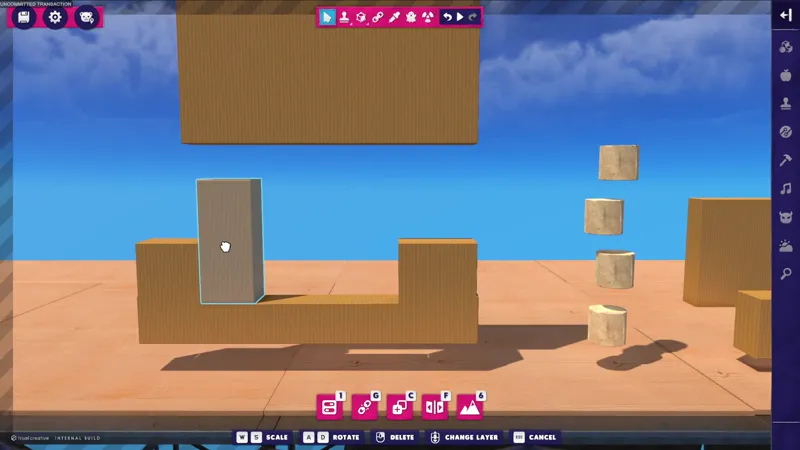


Dev Video: Surface Snap Prototype
One of the challenges with a 2.5D level editor is depth perception. In fact, it's one of the biggest challenges we face while developing the game overall!
To help solve this and make creating easier, we've setup an optional 'Surface Snap' feature prototype. It works by finding the nearest material or prop collider edge, then forcing the held object's collider to touch it.
This feature would help address a couple issues:
Makes it easier to place things together quickly and neatly, with less need for precision.
Place Props directly on surfaces without needing grid or having to override physics.
(and without refactoring parts of the game's tools to make things resist each other during placement)
The issues with this feature:
It's currently a prototype, so it works best with simple geometry and not complex shapes.
It needs polishing to look, sound, and feel better.
It isn't especially good for performance right now, we think.
It's difficult to properly add, because it has to be set up for several modes of placement. So far, we've only got it working on things already placed in a level and not when spawning things.
It detects invisible trigger colliders on objects, and we haven't figured out how to ignore them yet.
Because of the issues, this feature could very well be scrapped. However, it's extremely useful in practice and feels good when it works! This is one of those small things that majorly improves the quality and feel of the level editor. We're struggling to properly add it in a way that works best with all the existing features and code we have, while also being performant.
Below is a comparison of trying to align 'pillar' Props without surface snapping, then with surface snapping.
Surface Snap: Off
Surface Snap: On
What do you think? Would you find this to be a useful feature?
Keep in mind, this was meant to be a solution to the fact that all objects phase through each other when selected and moved in the level editor. Unlike other games, they don't push against each other naturally. This is due to a technical and performance limitation!
By surface snapping, you'd solve the same problem but in a new way that feels more editor driven than physics driven.
Comments (8)
Implementing this feature and allowing it to be toggled on and off is a great idea! I'm really surprised LBP didn't have this alongside the angle and grid snapping tools. I guess I just never really thought about it.
Very useful
Definitely seems useful! But also seems like a feature that needs to be able to be toggled on and off easily for sure. Snapping features like this can be pretty frustrating to work with when you’re not wanting them to help, yknow?
It’s toggleable! Hopefully we can get it working properly someday, because it’s been a big improvement 🙏🥺
Very interesting! It does seem like an important thing to add. Making the level editor feel good/fun is what will differentiate it from a boring game engine
100%!
Oh this is amazing! So by default when you move stuff around it just all overlaps into eachother? I don’t think I realised that. If so I think this is definitely a necessary feature. I hope you can get it all ironed out! 🤞🏻
Yeah! When you move things around, the collision is disabled and things phase through. With this, it simulates an impact by snapping pieces together like Lego bricks. It’s so nice! 😅 hopefully we can get it shippable and fully implemented someday soon.