
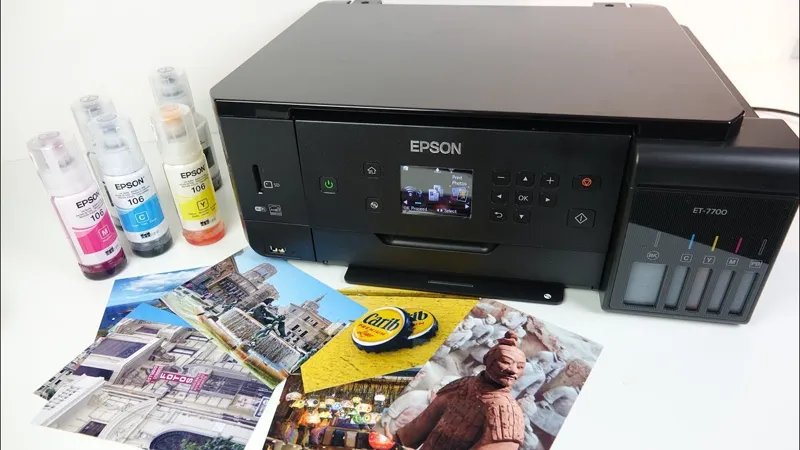
No one reviews printers any more (well nearly no one)
A couple of the videos I was hoping to work on this week have been held up while I wait for parts, and with no guarantee that the parts are going to resolve the problems. So in the meantime - here's a review of a printer.
There's a really good deal on this printer at the moment, but unfortunately the offer is for the UK only. I try to make videos where the content is relevant to most viewers and won't go out of date quickly, however this time the offer was worth sharing so I made an exception.
The full info is in the video description text box on youtube - but here's the link to it on Amazon UK https://amzn.to/2M5qUUs
Given the limited window of long term usefulness this video will probably be going public in about 24 hours.
UPDATE: Deleted the additional paragraph of text about my request for an APS film as Phil has kindly sorted this one for me.
UPDATE 2: I'm acutely aware that a video about a printer isn't going to set the word on fire. In fact, so much so that I've now added on a puppet outro addressing the mundanity of this video. You can see this in isolation here: https://youtu.be/w2w7y-ZnwB8 It's not my best work - but it might go some way towards appeasing those upset by their recent absence.
Epson ET 7700 Ecotank REVIEW - Cheap Photos From an Inkjet printer!? (YouTube)
Comments (53)
Matt: You mention scanning tech documents and uploading them to various online archives. For any analog photography documentation you may require (owners manuals and some repair manuals), I highly recommend the site maintained by Mike Butkus. Sometimes called the "orphan camera" site, Mike's got close to 3K manuals covering cameras made since the dawn of the 20th century. Most are high-quality scans (allowing for the condition of the originals he has to work with). Mike is supported by users' Paypal donations. Here's his home page: <a href="http://www.butkus.org/chinon/on-line_manuals.htm" rel="nofollow noopener" target="_blank">http://www.butkus.org/chinon/on-line_manuals.htm</a>
Thanks for the link, it may well come in useful at some point.
Thanks to your brilliant video, Epson just sold one of these printers. Thank you, Matt, for your detailed review!
I hope it lives up to your expectations.
Got an XP-615 here, I only use it for photos and the individual inks are literally pennies from Amazon (3rd party, of course!), the scanner is very good on it too. Great video but can't say I'm tempted purely because of the usual 'drying problem' on plain A4, although it DOES pay to look into the obscure settings on the EPSON print manager (this is actually the one reason you *might* want to consider sometimes installing the bloatware on the CD), this allows you to alter print density and drying time which I found helps a lot. That said, I rarely use it for plain A4 work as I have a trusty Colour Laser for that just seems to go on forever, shame about the size though :(
Thanks Matt, it’s been a while since the HP Printer entered service. I myself have long been a convert to the Epson Printer line - the appeal of changing individual cartridges always sits better with the mind and pocket. I have the WF2650, which they later produced a version with the Eco Tank. Aside from the odd paper jam, I’ve had very little in the way of problems with the Printer. It’s one of those household items you forget about. The iOS App is handy for PC Free operation.
I work for a printer manufacturer (not Epson), and this model actually interests me. Especially the ability to print on discs. I think the ink bottle system is brilliant!
As I just invested a lot of money in a set of cartridges for my Canon printer (read 2 teaspoons of ink and a very expensive bit of plastic and electronics) I don't need one now but I'll definitely keep an eye on these. Inkmageddon was the reason I always had plastic gloves and kitchen towel when I was an engineer
Yay Puppets!!!
I gave up on Epson inkjet printers in 2008...I got tired of using up cartridges in the attempt to clean the jets...so I bought a Dell 1320c color laser printer then...and have been happily using it ever since...10 years so far. I buy a set of Toner cartridges just under one per year. Roughly $50 a year for the set...for me, much less expensive than the inkjet cartridges...maybe the inkjets have improved...but I haven't seen a print as good as my laser....for B&W prints I bought a cheap Brother laser printer a year prior to that...wore it out last year and replaced it with another cheap brother...this one with dual side print.
I know this is a strange place to ask this as its not relevant to the video, but have you ever considered making a podcast? I know so much of the 'reviews' aspect of Techmoan is visual but the talk about old formats and the history of companies etc is something I always enjoy when you cover it. I could see a tech history podcast really working.
Its something that has crossed my mind - but I decided not to pursue it. I think you'd need a number of like-minded individuals rather than one person and I really don't know anyone else.
Oh, this printer is a HUGE improvement on their earlier ink-tank models - one of which I have had for a few years. My only real complaint with my current one (L355) is that however careful I am, I always end up with ink all over my fingers when refilling the tanks (even when I wear latex gloves - work that one out if you can!), so they really seem to have overcome that particular problem. Great review as always, Mat. I am constantly amazed at the amount of adhesive tape Epson feel they need to use to ship their new printers, but I guess the tape is a fraction of the cost of replacing a machine damaged in transit.
Yes I was amused by the packaging...and you should have seen the size of the Amazon box it came in. I was concerned that the printer would be gigantic. I came to the same conclusion that they must ship these things all over the world and really want them to arrive fully functional. I suspect there were some expensive lessons learned before they arrived at this amount of packing.
I've got several APS carts if you want. Generic holiday stuff.
I’ve been promised some others already but many thanks for the offer it’s much appreciated.
Feels good to be a part of supporting your channel, and watching your reviews. I remember seeing those printers in stores in the U.S. and I think my family might have used it before. Great job!
I started with a Canon multi-function unit in 2005, ended up taking a soldering iron to it to install a continuous ink system. Moved on to an Epson line of the same, and had 5 of those machines over the years. Alas, you have to watch the ink tanks inside the machine as they can leak after being removed and re-inserted a number of times. And the Epsons I had came with a diaper for excess ink that wasn't user changeable, so I'm really glad to see that feature. And the permanent tanks remove the tubes and leakage problems. It's come a long way, and if you've had one of these before, you know how expensive those tiny proprietary ink cartridges are. It's a bit of dosh up front, but I think we're finally at the right place with these. And look at those photos!
The last inkjet I bought (HP) cost me AUD$120 from a big office supply chain. After burning through the half-capacity "introductory" ink cartridges that came with it, I discovered... yep, you guessed it, a replacement "high capacity" Black cartridge was $60, and the colour cartridge was over $80. This was in the days when you could still refill HP cartridges (before they incorporated the "smart" print head with the microcontroller that tells the printer when the cartridge is empty and thwarts any attempt to refill it), so I gave that a go... one time only. Considering that my printing/scanning needs are pretty light, and that same office supply chain offers scanning and B/W prints for a couple of cents per page (open until 7pm every day), you can probably tell where this is going. FOR SALE, BEST OFFER: 1 x HP PrintCenter 5280, several years old but very lightly used. Black ink cartridge requires replacement, if you can find one. Plus, I will even include the original Driver+Bloatware CD! Now please form an orderly queue and prepare to explain why YOU should be the one to benefit from this deal of a lifetime... and you'd better make it good, I've got people beating my door down to get hold of this.
Nice video. Almost want me buy one 😉. About the PDF: macOS users can add/remove/rearrange pages in an PDF document in the Preview application, no seperate application is needed. <a href="https://support.apple.com/en-gb/guide/preview/add-delete-or-move-pdf-pages-prvw11793/mac" rel="nofollow noopener" target="_blank">https://support.apple.com/en-gb/guide/preview/add-delete-or-move-pdf-pages-prvw11793/mac</a>
Thanks for the tip.
That makes me think about the old day when I have to modify the printer from cartridge ink to using a custom-made tank instead. The ink is cheap, to be honest. But it's really a pain in the butt when the ink is running out. You have to use a syringe to pull the ink from the bottle then precisely injected into the tank. That always makes my hand mess. Anyway, thanks for the video Mat! (No puppet though. :( )
There is also a cheaper model, ET-2750 which is about half the price. I can't speak to the real details but it seems the only serious differences are smaller ink tanks and no ethernet, which Mat wasn't interested in using anyway.
Yes I would have gone for that one but unfortunately it loads paper at the rear, most of the product shots are a bit disingenuous as in use it should have a stack of paper sticking up.
I like the design of these Ecotank printers, Still think laser is better for everyday printing in B&W, but there's simply no comparison for very high quality photo prints. Even very good colour laser isn't as good as Epson's top of the line colour photo printing. Don't really want to keep two printers around though. For the time being, have gone with a Brother 7820N B&W printer and a dual-sided Brother ADS1500W scanner right next to the recycle bin/shredder for handling documents.
As you say, I didn't expect to be watching a video about a printer when I got up this morning. I'm glad I did though. It did lack one thing that for me marks out your best ones - the part where you say "right let's get the top off and see what's inside" though of course you're not going to do that to a new piece of kit.
On the subject of printers, it disappoints me that there don't seem to be any affordable consumer printers that are capable of printing a banner onto fan-fold continuous feed paper (without falsely detecting a jam and aborting) nowadays. It's a shame that I have to go back to a dot matrix printer and an old copy of The Print Shop in order to do that. I know there are commercial printers that print on nonperforated roll paper and have a cutting blade, but they're a bit out of my price range. I would really dig a video that offers some other creative options here.
That brings back some memories. I was big on PrintShop back in the day, always printing out banners and flyers for the office.
I'm sure others have got far more interesting photos than me, but if you need it I've got several developed film rolls kicking around
I think I'm OK - but if things don't work out I'll be in touch - thanks.
Yes, people do still print disks, but these days they're Blu-rays. Blu-ray disk printing would be one of my absolute tick list must-haves.
I'd be interested to know more about what blu-rays you are printing on - it's not something I'm familiar with, so any information would be appreciated. Is it data backup or video?
I see you're already sorted for some APS negatives, but if you wanted to take some pictures of your own to show I think I have an unexposed cartridge around here somewhere and would be happy to lend you an APS SLR to play with. I think there are still mail-order labs who can handle the stuff!
I’m fine for film, but thanks for the offer - the problem was that no one is developing them any more in a way that this device recognises as a developed film. The last one I shot was identified as a cleaning cartridge. I’ve used two different places now and I reached the end of my tether. Thanks to Phil there’s a couple of old school developed rolls on their way to me.
Back in the dark ages, Epson were THE inkjet printer to have. A company www.inkcycle.co.uk used to supply sets of remanufactured cartridges for 5-10% of the OEM cost in bulk - 6 B&W and 6 colour for £12 inc. shipping as I recall. HP cartridges included the print-head and were nowhere near as cheap. The last inkjet printer I owned was a Stylus 600 - I've used B&W and colour lasers ever since. That's about to change.. Inspired by BigClive, I'm getting back into making pcbs and will need an inkjet printer for stencils. I'm liking this Epson ink-tank system and will be looking for a printer-only version of what you just got. I'd appreciate an update, perhaps in a few weeks on how your printer is holding out..
If things go downhill - I'll be sure to post an update on here.
Great to see that this Ecotank printer does borderless prints. The main thing that put me off the Ecotank printers was that their earlier models could only do bordered prints, such as the ET-4500.
I didn't know that - I'm glad that I unwittingly demonstrated borderless photos in the video now.
I wonder how to gauge the trade-off for a great printer like this (but still rather expensive) vs. a comparable cheaper printer that still uses expensive ink tanks. I'm really happy with my Canon inkjet, as it seems to have many of these features, scans nicely and prints beautiful photos, but of course the ink tanks are high priced.
I wouldn't change a printer until you really have to. The scanner on mine was out of focus and I also needed to buy some new ink for it so it seemed the right time for me to shop around.
I think I have been burned too many times by inkjet printers and their supplies cost - they could give me a $500 printer for free and it seems I would spend far more than that keeping ink in it! - It's like someone giving you a free Range Rover - well, just watch the video if you don't get my analogy - lol <a href="https://www.youtube.com/watch?v=FvJCCoLoKRA" rel="nofollow noopener" target="_blank">https://www.youtube.com/watch?v=FvJCCoLoKRA</a>
I picked up an EcoTank a while back and it's the most useful printer I've ever owned. So nice being able to print something out in full color and not worry in the slightest about how much the ink costs.
I have a lower end MFC-J485DW that is about $60. I was so impressed by it that I also bought one for my mother-in-law. I didn't have a need for all of the extra features, but it is still has WiFi, duplex, multipage scanning and the ink does not dry out. Excellent review though. Kudos
This is the first printer I've wanted in like ....15 years!
It’s funny how we’ve forgotten about printers and they’ve become as boring as a washing machine or a central heating boiler. I was surprised how much they’ve improved since I last looked.
I have a lower mid range Epson I picked up a few years ago, and a huge and underappreciated featured is the Scan to Cloud, which I have setup so everything goes to my Google Drive as a PDF. Anyways when my bills come I just bundle them up and do a batch scan and bam, everything is in one location. I was looking for a scanner that did this since I had a bunch of old bills I wanted to shred, but dedicated scanners that go scan to cloud are really expensive, instead this printer did exactly what I wanted for about 1/4th the price. I don't know if other printer companies offer the same thing, but at the time only Epson offered the ability to scan directly to services like Google Drive, Onedrive, etc.
That’s something I’ve never really thought about, but it makes a heck of lot of sense now that you mention it. I’ll have to investigate this idea further.
WOPR... Genius ;) Greetings, Professor Falken.
I’m a firm believer that a WiFi network name should be fun. Somewhere on my street there’s a house with “Pretty Fly for a Wi-Fi’.
I could get on board with this. It's funny--Epson used to be AWFUL with their ink tanks and pricing, but assuming these prices translate relatively well into the US market I wouldn't even hesitate buying genuine ink! I myself print so rarely that I use cheap B+W laser printers (toner doesn't dry out so they don't need to do periodic maintenance to prevent the inkjets from drying up), but if I found myself wanting a color printer I might find myself looking for something like this. Thanks for sharing!
Thanks. I went cheap laser for a few years, but then when it died went back to inkjet for no particular reason. I was surprised to find that it worked fine and never dried up. I think a lot of the problems with things like that were the result of cheap inks being used. Now for some reason I’ve got into printing photos as I feel I never look at them when they’re just stored digitally, I think it might be an age thing.
I have many APS developed rolls from the 2000’s, when I used s Canon Ixus (There’s a gadget for a video!) be happy to share them.
If you could find one that shows anything you’re not really interested in other people seeing, you could be a real life saver. If you wanted I could even send you the TV viewer device afterwards so you could view your old films on your TV. Assuming the blasted thing actually works after all this.