


Sims 4 Mod Folder Organizer + Icon DLL (Downloadable Folder Template Included!)
Hey Simmers! 💛 I’m excited to share something a little different today — not new custom content (CC), but a downloadable folder setup and i
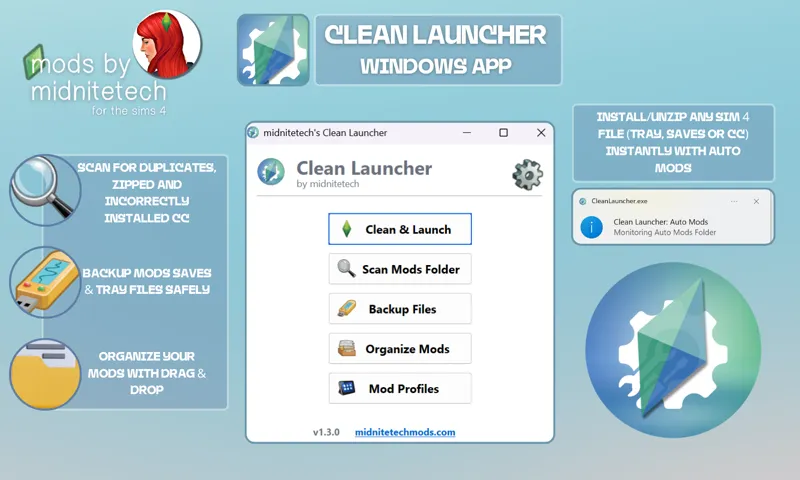
Want the whole process automated for you? Go here!
Hey Simmers! 💛
I’m excited to share something a little different today — not new custom content (CC), but a downloadable folder setup and icon system to help you organize all the Sims 4 CC and mods you already have.
✨ What’s Included
✅ A clean, pre-built folder template to keep your Mods folder tidy and script-friendly
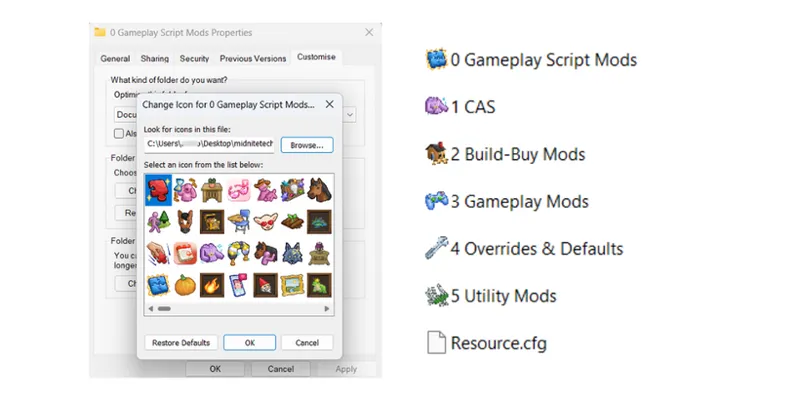
✅ A custom-made icon DLL file with over 900 Sims 4 folder icons, so you can apply cute, matching icons to each folder on your computer (Windows)
✅ A detailed guide on organizing, troubleshooting, and clear instructions
💡 Important: This is NOT CC or Gameplay Mods!
You’re not downloading any Sims 4 content itself — this is just an external tool to help you organize your existing CC and mods on your computer more easily.
📁 Folder Template Categories
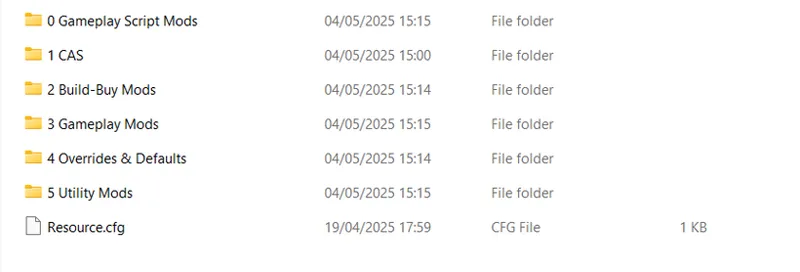
The folder template includes suggested categories like:
CAS Mods
Build/Buy Mods
Script Mods
Utilities
Gameplay Mods
Visual & UI Tweaks
…and more!
You can adjust or expand them however you like to fit your own collection.
🛠 How to Use
1️⃣ Download and unzip the folder template.
2️⃣ Move your existing CC and mods into the matching folders.
3️⃣ Use the included .dll to apply cute folder icons (Windows only).
4️⃣ Keep your Mods folder cleaner, easier to manage, and easier to update!
⚠ Reminder
The .dll file doesn’t go inside your Sims 4 Mods folder or into the game — it’s used outside the game on your computer folders, like your Sims 4 Mods folder or any other folders you want to decorate.
You can store the .dll anywhere on your computer — but if you move or delete it later, the folder icons you’ve applied will stop displaying.
So be sure to keep it in a permanent, safe location.
✅ The download also includes a detailed guide with:
Step-by-step instructions for applying the folder icons using the .dll
A troubleshooting section if anything isn’t working as expected
Tips and recommendations for organizing your custom content (CC) and mods for easier management
📥 Note on Downloading
When you download the folder template and .dll, make sure to extract the zip to a new, separate folder — I recommend creating a fresh folder just for this setup.
That way, you can organize your mods and CC cleanly without accidentally mixing the template folders into your existing Mods folder.
Once you’ve organized everything, you can move your files into your actual Sims 4 Mods folder as needed.
Thank you so much for supporting me — I hope this helps you keep your Sims 4 setup tidy and stress-free. 💛
Comments (27)
Hello! I use the folder icons all the time and I was wondering if you would ever add more? This is not an ask, just curious :) Thank you for making it in the first place!!
Aww, I'm glad you use them! I haven't used the icons myself in a while, but I'm happy to add a tutorial or add some more. Just let me know!
Has this been updated or is this still good? X
Hi! It’s not a mod, just a DLL and folder setup :)
Thank you so much for sharing, this is a great tool and helpful for me to clean up my cc folder messes 😅😅
Since today whenever i'm trying to customize my icons and use this it keeps saying the file doesnt conatin any icons, i've already redownloaded it twice but I just keep getting the same error now it was working fine a few days ago but now it's not anymore for some reason
Will there be a chance of The Sims 3 Magician Profession being created for the sims 4 at any point in time? Just a curiosity question.
can you pls share a png version for mac users
omg yesss that would be so helpful!!!
Thanks so much for this!
Mi carpeta de mods y yo te lo agradecemos profusamente.
¡De nada! 🥰
What a great idea! Thanks. <3
This is so awesome! Thank you so much!
Sounds amazing! Who wants to volunteer to record a tutorial via YouTube? 😇 a tutorial for Mac players and one for pc players. Please and thanks ☺️
Oh my goodness!!!! I was just searching for the best way to re-organize my new mods folder! Thank you for sharing!
Thank you so much ! My mods folder is already clean but I always wanted to customize it with in-game icons, yours are per-fect <3
I greatly appreciate this - Thank you!
I just looked. My The Sims 4 folder is 125 GBs. My Mods folder is 124 GBs of that. I don't think I have what it takes to clean that up, even with the template. TY though.
Wow! How long does your game take to load?
Waouh ! Such a great thing to share ! I have so much headache sometimes with my mods folders 😅
Love this!! Such a great idea, thank you!
Awesome! I just need a full day to organize my 20,000 mods now! I wonder if that's a good enough excuse to miss work? 😅
Wow! I don't feel bad about my 8k anymore LOL!
Thank you! I always struggle to figure out *how* I should organize my mods folder, so this'll be really useful 🤩
This sounds like an amazing idea!! I need to clean up my mods folder. Thanks for the cute templates 😊🩵🩵🩵
This is sooo helpful and cute!! Thank you for all your time and effort! 🤭❤️