




🚀 Clean Launcher App
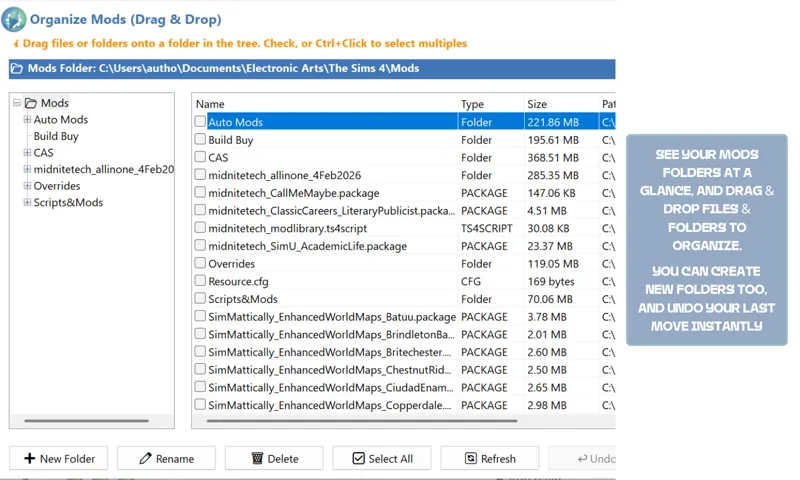
31st January 2026: I've overhauled the entire program and removed the auto-organize feature. It was impossible to maintain, and it's been replaced with a much easier drag & drop interface, so you can see all your folders at a glance. The user guide is here.
30th January 2026: Download removed as undergoing changes/fixes
Condensed changelog here.
Hey Simmers!
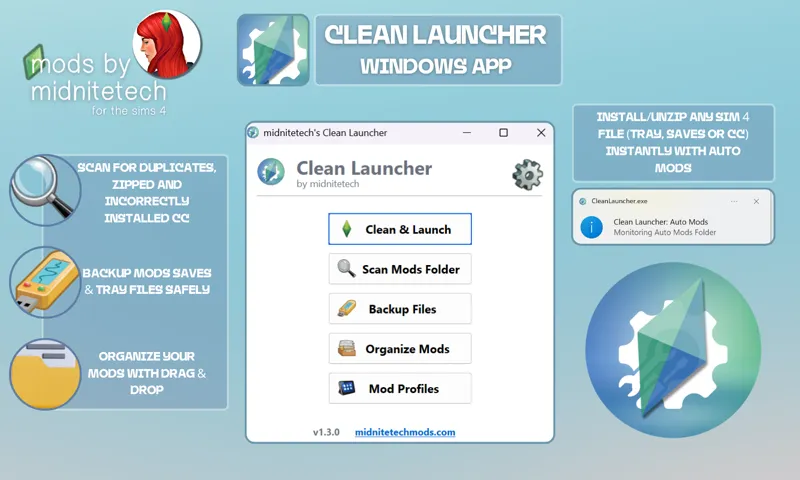
I’m excited to release the first public version of Clean Launcher—a simple, all-in-one tool for managing Sims 4 mods, cleaning cache, scanning for duplicates, and backing up files.
Key Features:
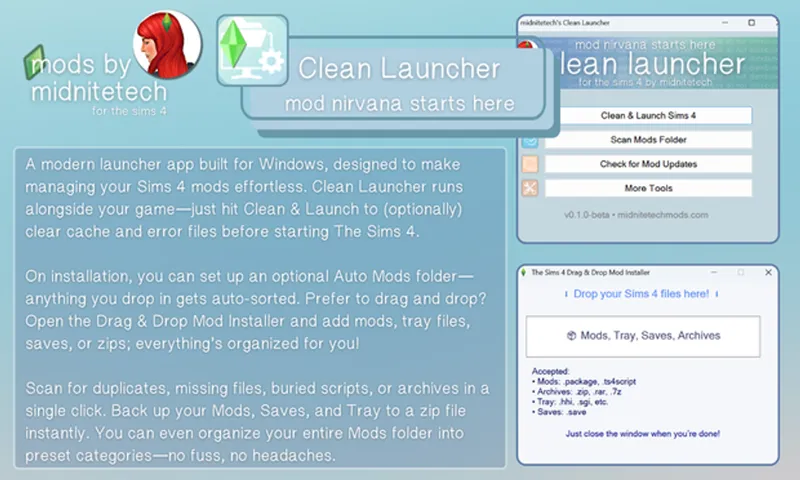
🪄 Auto Mods: Automatically sorts and extracts files into the correct folders (Mods, Tray, Saves).
🧹 Clean & Launch Sims 4: Clean cache/error logs and launch the game in one click. Set it to clean when your Mods folder changes.
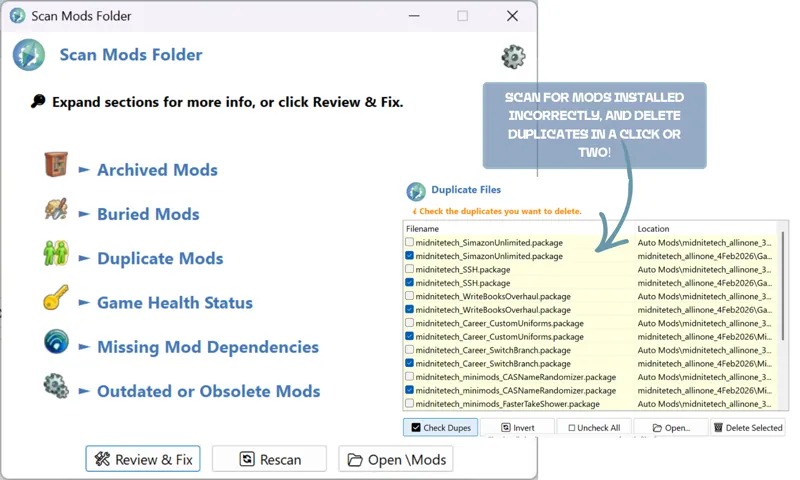
🔎 Scan Mods Folder: Finds and fixes issues like duplicates, hidden files, and missing mod dependencies. (My mods, UI Cheats and Lot 51's Core Library only, currently)
🗂️ Backup Mods, Saves & Tray: Zip and back up your game files for safekeeping or easy transfer.
🧩 Organize Mods: Drag & drop your Mods into folders, create new ones or delete. Undo the last move with one click.
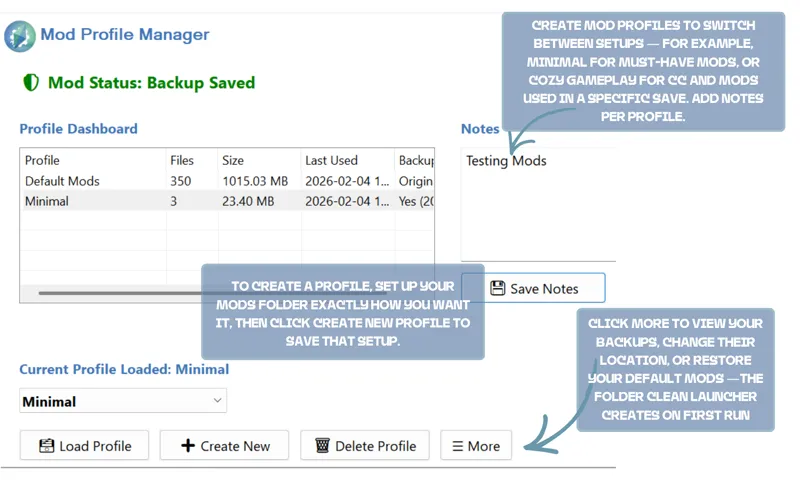
👤 Manage Mod Profiles: Switch between different mod setups. New CC is backed up and imported automatically.
📥 Download & Use Clean Launcher
Download the attached .exe (do not place it in your Mods/Sims 4 game folder).
Double-click to install.
If SmartScreen or your antivirus shows a warning, you can safely allow it. Here's the proof it's safe. (Yes, 2 out of 60+ vendors flagged it as unsafe—it's because it's unsigned. It's perfectly safe, otherwise the major vendors would flag it).
You’ll be prompted to back up your CC, and to set up an Auto Mods folder (recommended).
Anything placed here is automatically extracted and sorted:Tray & Saves files are moved to the correct folders
Script mods and their companion files are kept no more than one folder deep
Other CC stays in Auto Mods until you test or sort it—so you always know what you just added
From ⚙️ Settings, enable Start with Windows to keep Auto Mods monitored automatically.
🗑️ Uninstall
Uninstall through Add/Remove Programs like any other app
If you have the old portable version, right-click Clean Launcher in the Tray menu (by the clock) and Open Installation Folder. Exit Clean Launcher, and delete the app from the folder.
Need to report a bug? Go here.
Comments (257)
hi! im very sorry if this is inappropriate, my game isnt 'original', would this still work? or, is better exceptions enough for me, thank you very much and i completely understand if you choose to not answer.
Hey! Yes it will still work.
I'm guessing this isn't for Mac Users
I wish the green bar had the expected time it would finish scanning the mod folder when trying to back it up
do you have a mac version? idk y it wont open for me
No, I don't have a mac unfortunately.
Wonderful App! I have a 280gb CC folder, and this made it so easy to delete all the empty folders, exception files, PNGs, and hundreds of Read Me files I had accumulated. It saved me so much time. It also moved folders that were +5 folders deep into 1. Great work. Thank you!
I can't download it. if I want to open the attachment it says there is nothing to open:( how do I fix this??
Your browser may be blocking it. Hit Ctrl+J after pressing download. If it’s not your browser, it’s your antivirus. Check the OP for more info.
This has saved me so much. I have a more low-end computer so my game crashes alot and i hate going through and manually going through my mods folder or backing up my files manually so this has saved my saves so much. This is one of my favorite things ever Thank you so much for this, you're the best ! <3
please please make one for mac, this has amazing reviews and I am so sad I cannot use it with over 11k cc and mods.... thank you for your amazing work!
Make a Mac version please
will this clash withthe mod manager i have downloaded? or should i uninstall that before downloadin this one?
Hi, no you can use them both :)
wait I'm so sad that there is not a Mac version! I've gone too far with my mods and I genuinely cannot comprehend how to avoid having to start from scratch now I regret getting a Mac because your mod would solve my problem hahahah ahhhhhh
Can you share a link to the old Portable Clean Launcher? I didn't realize that I would need to disable it before I uninstalled the program and now have a dead CleanLauncher in my startups that I'd love to be able to delete, but I uninstalled it months ago and only just noticed the error I'd made.
No worries, easiest way is Autoruns: https://learn.microsoft.com/en-us/sysinternals/downloads/autoruns
BABY youre a life saver to the sims community. you are loved and wanted. thank you
Would love a Mac version :) I saw below you don't have one, but just wanted to comment. I have no idea what is involved in creating these systems but I am sure it is time intensive, so thank you for all you do!
I just starting using it but there's a problem, when i wanted to do the backup for all it gave me an error so i proceeded with only the mods. After 2 hours it wasnt even halfway done and i even placed a toothpick on the progress line to see if there was any progress and it just got stuck at some point and never moved . I tried deleting that zip file but it wont let me either, i dont have a lot of mods theres only 60gb worth so i believe it should have taken 10 minutes to finish but never did.
Hi! Can you send me the error over on Discord, please?
please make one for us Mac users
I don't have a Mac at the moment, unfortunately
i love the backup feature so much, would you ever consider adding a backup option for your program files? thanks for this btw x
Hey, just confirming is this only for windows?
yes
Hi just asking, are u sure this is safe . Dont take it personal but my web browser is saying its not downloaded often and that it can harm my computer
Hi Kaylah, I made it myself, so yes I'm sure :)
Hi I downloaded it twice it will not open
Your antivirus or web browser are probably blocking it. You can add it to the whitelist (Google how dependant on the antivirus you use or let me know which one).
Do you by chance have this for Mac?
Hi I am having trouble creating the back up mods. I keep receiving an error message stating that it could be insufficient disk space (I have plenty of storage), Files in use by Sims or other program (I completely shut down the game/app), permissions restricted ( i ran it as an administrator), and corrupted source files. Is there a way to resolve this? Thanks!
Can you send me the error message you're receiving on Discord or through my website, please?
hey i redownloaded the update twice but everytime i try to click on anything it just totally freezes
What Anti Virus are you using? It might be blocking it. Add it to your whitelist, and redownload the app to try again.
How do you delete when its accedentally in the mods folder ? Its not letting me
Hello, I wanted to know if this program is also available in Italian? It would also be very useful for the Italian community. Would it be possible to collaborate on the translation?
I tried to delete some duplicate mods but it said "access is denied" what should i do?
Try running it as an administrator. (Right click)
The proof link says there's a trojan virus. Eeek
It's a false positive, which is perfectly normal for an unsigned app. As you can see, all the major antivirus's mark it as safe. You can open it with AutoHotKey if you download it, and see the code yourself. :)
It says there is a trojan virus.
fam, it literally says theres a trojan in that file.
That's because it's unsigned, and 2 out of 61 vendors have flagged it lol. It's safe; you can view the source code using AutoHotKey.
i keep getting a error message saying make sure you trust it before open it im confused
Thats not the mod its your pc antivirus doing that, you have to allow it in the settings.
it's not allowing me to download the app is there something I can do to be able to download it? It just gives option to open with media player and is titled "unconfirmed crdownload"
That’s because the download is incomplete, or corrupted. Download again, hit Ctrl+J and check if it needs approving.
Are you going to/able to make a Macbook version?
Hi Olivia, I don’t have a Mac unfortunately.
Hi, I am unable to delete the older version. I have read your post as well as your message to someone else about looking in the "tray" as well as add/remove like any other app, but my concern is that it does not show up as an app to uninstall. I see it on my document folder, and it worked fine, but the problem is even when I close the app, it states that I cannot delete because it is still open, which it is not. Is there a way where you can break down the instructions, so that way I can understand?
The old version was portable, so you can't uninstall it as such. You need to click on the arrow next to your clock (bottom right of your Desktop), and right-click the Clean Launcher icon. Choose Open Installation Folder. Then right-click again, exit, and then delete the folder. Let me know if you need some more help :) You can also Ctrl+Alt+Delete, right-click Clean Launcher and End Task.
It says the download is infected with a virus and I had to quarantine the download.
Hi, please read the post, under 'important'.
I have been trying to fix my game for 8 hours no joke, i see a reddit post about this like 20 mins ago and now my game is fixed. I have no clue how to thank you i wanna cry thank you so much for making this
That's awesome I'm so happy!
what if its not downloading to my computer
I'm not quite sure what you mean? Is your browser blocking the download?
Sorry to bother, but had a question while reading the user manual. New mods you are downloading go into auto mod (makes sense), but what if you are trying to download mods for a specific profile? Do you then manually move them? Thanks!
Hi! You would need to load the profile you wanted to add them to first, add your new mods, and then hit replace profile.
dumb question but how do i delete it its not showing up in my apps and im struggling
It’s not dumb! Did you install it or do you mean you have an old version? If you have the app open, right click it in the tray and open installation folder. You can delete it from there.
Knows this exists now... TO THE DOWNLOADS!!
how do you use this app?
There is literally a user guide linked at the top. READ THE WHOLE POST, PEOPLE!
hey, so i deleted it like you said now it wont let me download the new attachment
Is your browser blocking the download? (Ctrl+J)
Hi, I'm trying this out for the first time and i like it so far, however is it possible to change the location of the profiles folder? Because right now it saved it (along with my giant mods folder) to my C drive which is kinda small (i try to keep it to the essentials only) and it got pretty instantly filled lol
Hi! Yes, you can. Go to Mod Profiles → More → Change Backup Location
Thank you for this app; it's literally my fave one to use. However, after re moving all older files & application I keep getting the following error: "CreateFile failed; code 3. The system cannot find the path specified." However, It didn't give me the option to select where to place, so I'm unsure where it's trying to place it.
Hi! Which stage are you getting that message at? Installation?
how do you go about installing new mods with this? you removed the drag and drop function.
Use the Auto Mods folder :) If you check the user guide, it's in there. I felt that having both was overkill, but if you particularly liked that feature, I can add it back in.
the way my life became instantly easier with this app, no more manually finding and deleting things. literally saved my sanity
Aww, I'm so happy to hear that Katherine, thank you so much!
im having problems deleting the old version :(
You should be able to put the icon in the trash and delete it its not part of your system you had to install.
will the download be available today?
Is it still safe to use until the new one?
when will download be available again ?
Hopefully this weekend :)
Thank you so much for this program, it really made cleaning up the apparently 67 duplicate mods that I had, easy and breezy!
Thank you for this! <3
Sorry for being not good at computer. I had the launcher rearranged and clean launch for me which solved the issue of not updating after 6 months and manually updating every mod I had. But after the first launch I noticed all my moved out of burried scripts ending up with _1.1.1.1 in the name and several causes BE to flag critical exception. I had to redownload the script mods it's not a big deal but would wonder why the launcher does it.
Did you take any screenshots at all? Or do you have the BE's?
I want to express my gratitude! It's been sooooo easeful cleaning up my mod folder using your program. Thank you soooo much! You did an amazing job.
Ok so theres this funny thing with the auto mod folder organizing where since it organizes files based on names so sometimes in the Clothes and accessories / Tops folder you may find "Kitchen counter TOP" 😂i love this tho!! life savior honestly
So i accidentally stopped the program and now all mt cc is gone and the undo does nothing and they arent in the recycling bin or anywhere else on my computer
What feature were you using? There's nothing with this capability.
Hello! When scanning, I never get to view duplicates; the menu doesn't appear. Does anybody know how to make it work? ;(
Hi, its not letting me backup my files no matter what destination I choose. I swear I am meeting all the criteria that is showing on the popup.
this fucking mod ruined my mods files!!! i had everything in folders and easy to find now it looks like shit because of this i hate it!!!
Woah, that's a bit harsh. Why did you organize your files if you were happy with them? And if you read the User Guide, it explains that you can just click 'Undo'.
HI, is there a clean launcher for Apple/Mac users?
bare with me im working on trying to launch it with wine I'll lyk if i manage to do it
Good afternoon, I have encountered an issue where when I attempt to launch the Sims 4 through the clean launcher app, the EA app opens, and it appears my game is not open or running in the background, as I can press the play button in the EA app, and after 30 minutes, my game still hasn't launched, which is unusual. I attempted to uninstall the program as I believe that may be the issue; however, unlike other programs, there is not an official uninstaller. I deleted the other files, however, and I'm just curious if anyone else is having a similar issue. :)
Ciao Mia Dent, mi è successa la stessa cosa.....non riesco più ad avviare il gioco....cosa si pùò fare oltre a cancellare il programma?
hi, every time i do drag an drop it dont go in mods folder and organise like it says in instructions , just goes into documents and messes up all my game :(
Hi, is your mods folder correct in the app? You can reset it in settings. See the User Guide :)
Hi pretty!, will you by any chance make an App like this for MacOS?
Hi how do I uninstall this mod? its says "noautomatic installer found.Please uninstall through Windows Settings > Apps" But when I go to my Windows Apps I can't see it there. HELP!
Hi, please see the User Guide :)
Hi love! How long does it usually take for it to organize my mods? I have about 3k files
Love this mod, but the only issue i'm having is whenever it says I have duplicates sometimes it will show some that does not have any duplicates and will delete some of my CC. Not sure if it's just an issue with my clean launcher or not. Other than that I really love this mod and it's functions.
Yeah, this is an issue I have as well. I have the Sims Mod Manager installed and I can manually check ones that are older and delete them but that is SO time-consuming. I am not sure if it's possible, but is there a way a function could be put in where the scan finds the older one of the duplicates and deletes that one? That would be AMAZING. I love your mods, midnitetech. Thanks for making the game so much easier for many of us :)
Hi there I love and promote clean launcher as much as possible but the one thing that does not and has never worked is the outdated mods or cc. it has never alerted of this once and I have had outdated stuff in my game.
Hi Breanna, it only checks a few creators, mostly mine and some bigger mods like UI Cheats and MCCC for the time being.
i'm having issues with the entire app. I've reset my pc, uninstalled then installed but whenever i do the drag and drop it doesnt seem to work as well as the auto mod sorting. i'm not sure if this is a me error or the app?
Hi Tee, doesn’t work how? Are you getting an error?
Auto mod sorting isn’t working for me. Help?
me as well..
This is so so very amazing and needed, Thank you! When will MAC be ready?
Hi there! I'm loving the potential of this program, but I'm running into an issue. I'm not sure if this is a feature or if I'm doing something wrong. Is it possible to create your own file structure & have the program organize files in that way? I typically organize my CAS & Build Buy items by creator. I was trying to do something similar using the auto sort with custom names feature, but it kept setting up the folders the same way as listed above. Is a custom file structure/organization system possible for the auto sort feature? If so, what are the steps to making that happen? Thanks!
this is the main thing missing from the few programs out there in this space
Microsoft Defender SmartScreen won't let me run the program, idk why, but I just figured I'd say something as a warning to others that ur pc may not allow you to use this one.
You just need to click more info and run anyway.
hello, just updated to v1.2.1 and the drag and drop installer keeps giving me an error saying "3169: FileCopy (fullPath, dest, true). any idea how to fix it? this is my favorite feature of the launcher so i'm a little bummed
Hey! Sorry I just saw this, have you moved it out of the folder? Does it give the error randomly or when you actually try and copy a file over? Try right clicking, and running as administrator.
can you add instructions on how to delete it please
Hi! Remove the auto-start entries (check the user guide) and then delete the folder it's in.
Hi, I cannot uninstall the older version as it's not showing up in control panel or in apps & features. Do you have an uninstaller for this program?
I have the same issue
How do I remove the application from my computer, I uninstalled it but it still keeps popping up ?
It's because you have auto start with Windows enabled. You can disable it in the Clean Launcher settings if you have the old version, or hit Windows + R, type in shell:start menu and delete the shortcuts from the folder. Then you can uninstall/delete.
Hi! I love this - I tried the auto sort and it did sort my mods for me but the progress bar does not seem to be working, otherwise an amazing mod! One thing I noticed is that tray files were created in my mods folder when I did this so I just moved them over to the tray file to avoid any conflicts with my game - and also I have twistedmexi's betterbuildbuy mod and it did not categorize the organizeddebug section properly, so if anyone else sees this in their folder and is confused as to what these files are, they belong to that mod in particular; would show file type as "TMBIN File" = twistedmexi bin file
the auto sort seems to get stuck and there's no progress bar. Otherwise, awesome app!
does it end up sorting tho?
mine is talking about possible causes... disk space, files being used by ts4, permission restrictions, and corrupted source files. i have more than enough space, it's a completely empty drive, and i have no idea how to fix the last two.\
Hi Juliet, without seeing the errors, it’s difficult to troubleshoot. Can you send me a screenshot and a report from the help menu please.
is there a way to download the older version to be able to use it
beta version deleted all my mods when i used it
Which version? They’re all beta. And it doesn’t delete your mods. What feature were you using?
Hello I was just wondering if you could tell me which is the file being deleted during duplicate deletion, is it the yellow highlighted file or the grey?
The grey :)
I keep getting a message that says it can't find the file specified. I must be doing something wrong.
Can you send me a screenshot? Which function are you trying to use?
Thank. But why can't I find the Clean Launcher that I have to unistall in my Settings? And I'm also still getting messages to update my app even though it is updated.
You’re using the wrong version if you’re still getting the message. Just right click the old version (it will say v1.1.0 at the bottom) find its folder location and delete it, then use the new one.
This is beautiful, thanks for all your hard work!
This saved my life and improved the hell out of my gameplay. Thanks a million mod i forgot i had omg thank you.
I’m so pleased to hear this Tisha!! Thank you so much for being so kind :)
LOL It told me to update and the download is removed. I'll scan my folder with the old version and patiently await the new download file :)
Samesss
Do I just delete the app and remove it from my documents and reinstall ??
Hi, this is a portable version, so you don't install it; just follow the download instructions under the red banner :)
can I use this for MAC too?
It's Windows only, currently
Is this only for windows or can it be used for mac?
First, I love this app! Second, this particular version throws errors through my antivirus (AVG) and will run in a loop forever if it's not caught. AVG says it's infected with IDP.generic, though nothing else shows up in a system scan. Just a heads-up! Thank you so much for this work.
Huuuuge thanks! Not me going on using this - "my mods folder is well organized, I'll probably have a dublicate or 2" BAM! 349 dublicates found! Spat my coffee on my screen 🤣🤣🤣
Wow thank you so much for letting me know!! That’s awesome!
OMG I had been wanting to organize my CC folder for ages and this tool is currently doing it for me! I might not leave the actual mod organization part (depending on how easy I find it to keep organized and avoid breaking things when I have to update mods) but even if I switch some things back, this is purely magical. I haven't played around yet with the mod profiles part, but if it works the way I'm thinking it might -- yay! Either way, wonderful tool and I'm excited to fully explore it!
Thank you Sunni! My new version is much better, I worked on it for 10 hours yesterday (😅) trying to get it done.
Hi there, I currently have plumbbuddy installed - would I need to remove it to use this? Thank you :)
While they have overlapping abilities, they are two separate tools and you can use both (I am)
Hi it keeps giving me a message when I click start clean launcher saying windows cannot find scripts autohotkey.exe. Make sure you type the name in correctly and try again.
Hi, which version are you using? If you move the folder, it won’t work. Redownload and ensure you’re clicking the right file- don’t move anything or it won’t be able to find it.
Hi there - how does the Clean Launcher interact with the EA app? Can it launch the game in offline mode?
It can’t, unfortunately. The EA App doesn’t allow ‘remembering’ an offline status.
hi so the program didn't organize my folder. It made all the .ts4script separated and away from their package file. so ex: loveextender.package and loveextender.ts4script were in two separate places. took me 2 hours to fix
Hi, So you can just press Undo? And which version are you using? Please bear in mind it IS a beta, and I have a user guide that’s very easy to follow.
can i just ask where the deleted files go?
Hi! The new version will send them to the recycle bin rather than directly delete if it can. It should be out soon.
Every time i select for duplicates to be removed it shows an error on every file saying could not delete & it keeps saying I dont have the modlibrary script file when I do
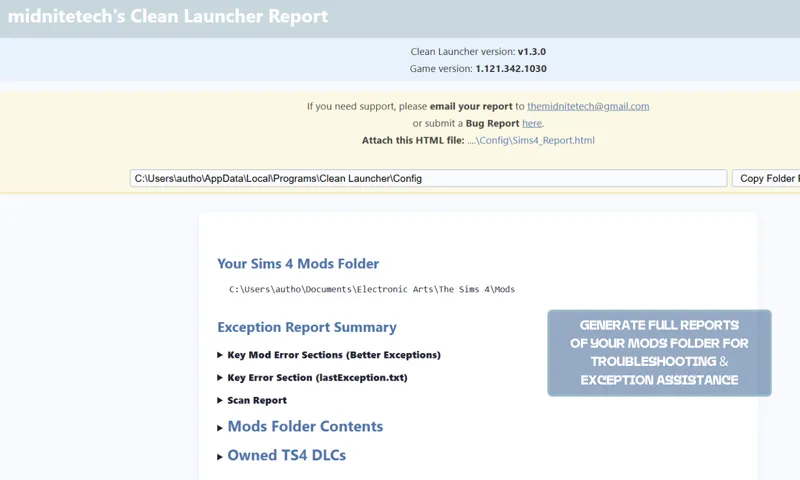
Did you send a report? Can you send me the error you're getting please? midnitetechmods.com/contact Just in case anyone else is having this issue, you need to ensure the file name isn't a copy (ie. (1), filename- Copy etc. Rename, or delete and redownload to solve the issue.
wowww you're the best!!!!
How do i uninstall? I tried everything and the program still exists even when I try to uninstall the search results wont show it!
I got u sis watch this tutorial, copy and paste on YouTube. https://youtu.be/5w-TOeyJjNQ?si=96NXFvtmbwlgInnD
God Bless you!!! This Amazing!!!
Would you ever consider releasing this for Mac users?
My game was giving me the 102 error code after finally updating everything weeks later. Used this tool and it found zips in places I didn't even know were there, and my mods folder is super organized lol. And it pointed out what script mods were too deep. After some deleting and moving around, my game is loading now. Thank you!😭🙌🏽
This has saved my generational save !!! I could cry - youre the best!
After getting a very nasty message yesterday, this has made my day, thank you!!
Hii I would like to ask how to delete this from my computer? I uninstalled it but every time i start up my computer it keeps opening back up please help.
Hi, you need to Disable Start with Windows (in the settings menu), and then uninstall :)
midnite this is literally incredible my mods folder is well over 100gb and this helped me find so many duplicate files i would not have found on my own <<33 you are the single reason my mods folder is healthy now
I love the idea of clean installer. The only thing I have found so far is that when things are organized, they don't always end up in the correct folder. I have Srslys cooking mod and some of it ended up in hair.
This is because it’s so hard to account for every creators naming strategy. The new version will be better, but if you can send me a Full Report from the Help menu, after the organize, I can see what’s where and improve on it. You can always Undo the changes.
Hi sorry to bother you but I keep getting Access Denied trying to extract the file to my computer. I know you said to exit and remove the tray also. but I don't know what that means. I really liked the way you had it the last update. it was easy for me to add it to my computer. could you please help me. I really want your app for my folder. remember me. I have 300gb and so far so good with your program but I just can't open it. Thank you.
The tray menu is by the clock on your desktop. You’ll see a little plumbob there- right click and exit. If you still get the error, go to the actual directory where you installed the app (it should have the file path in the error message) and delete the Clean Launcher folder. Just ensure you move any Profile/Backup folders out first, if there’s anything you want to keep.
Would it be possible to save the backup path please?
can i use this with a mac
it's windows only!
Thank you for this it make things so much better.
When I try to download it, it keeps saying cannot download virus detected. I read the multiple times but maybe I'm just not understanding.
me too
I have a question. When it shows duplicate files, it shows desktop.ini. Folder names, not the actual files. I went into my mods folder to see if they were actually duplicates, but i don't see the duplicates that the Clean Launcher is claiming I have. The file name of the mods/cc that it's showing says desktop.ini. I don't understand what the duplicates are, especially when I manually went in to find them. I don't see the duplicates the app is talking about. I hope I explained this clear as I can. So when I go into Sims 4 Mod Manager, it says I have no duplicates.
Hi, can you send me a screenshot, or a report from the help menu, please?
how do you delete this off your computer i uninstalled it and its still popping up?
Go to uninstall programs and it should be listed so you can take it off.
Thank you for this mods! I think I have too many buried script mods. It gives me the window of all the buried ones, but the window doesn't fit on my monitor, and I don't have the option to scroll down or exit out the window. Not sure how I would fix this yet. Thank you again!!
Ah okay, I'll make it a scrollable gui in the next update :)
Perfectly simple directions. I was able to get rid of the old version easily and install the new one. Thank you so much for this amazing app!
Thank you, Abby!! 💚
Are there any videos showing this mod in action?
I can make one!
How can I translate this?
I'm working on the language pack now :)
Good morning. I'm using the old version of clean launcher because when I try to install the new one, I double-click on the exe file and nothing happens. Same for the portable when I click the start clean launcher.bat. I do not receive an error message or pop-up. Just nothing happens at all. I even tried opening as administrator and same thing.
Hi Tami, try the new version :)
hiii used the drag and drop to install a bunch of cc and now i... dont have cc? its in the folder unzipped, but doesnt show in game despite both cc and script mods being enabled 😓 most likely a problem on my end but if this is something uve had happen is there a fix?
Can you show me a screenshot? I haven't had this happen before, no!
Is there going to be a Mac version?
Eventually! I need to hackintosh my spare pc.
Thank you so much for your effort. It's a handy little app for sure! I was wondering if it would be possible to have some kind of safeguard in place to prevent updating the EA app. For example, when I did a clean and launch, it cleaned the files like usual, but then updated my game instead of running it, which is definitely not desirable on my end for many reasons. Is there a way you can add a setting to force it to run in offline mode? I appreciate your amazing work.😊
Midnitetech, I hope you see this, and peachmiilk's comment, and that such an "EA App blocker" fix is a feasible thing! What a miracle it would be to be able to force the EA app to stop cheating itself online for various reasons. I have found that the standard "just go into offline mode" spammed forum advice doesnt even work anymore, recently. In my case, it now creates a fancy ERROR 2o4 Error "license expired -- play the game online to verify" to force one online. [What is the point of *forcing* us to download 2oGB of fluff and bugs if we aren't getting the newest pack? Remarkable.] ps, Midnitetech, I love all your mods *tremendously*. they are essential!
Thank you! you are amazing!
ESET antivirus is fussy about it.
Can you let me know what it says please, and I can submit it as a false positive :)
But what's the "Automods" folder for? Why can I install zip files with Dag&Drop but the added mods don't go there? Does it put all the extracted files or add them to the mod? I'd like it to put them there... is that possible? Or can I choose the destination folder?
Hi Stefano. Please read the User Guide. Auto Mods & Drag & Drop are two different things. Anything you put into Auto Mods is auto extracted. Drag & Drop sorts directly into your mods folder.
I was wondering how to get rid of the othe elements that need to be manually unistalled
You maybe had Auto Mods turned on? Just empty and delete the folder, or check the directory you installed it to.
when I try to DL it says couldnt dl no permission. what do I need to do? thanks
Can you send me a screenshot? Themidnitetech@gmail.com
Appreciate you!
thank you so much for this!!! the game is way more managable & easy to follow updates
You’re so welcome! Thank YOU! It’s so lovely when I see messages like this- it really makes my day 💚
Microsoft have now OK’d the file. Please see the VirusTotal link in the post above. Please try again if you have Windows Defender and had a problem installing. Kaspersky have flagged it now, so sending it to them to OK too!
Mine says FileRepMalware and will no let me install it at all not even from the Sandbox.
Hi please see the above statement. It’s not a virus. You can see the TotalVirus scan above.
my laptop (microsoft virus defender) detected this virus: Trojan:Win32/Sabsik.FL.A!ml what should i do? i followed your directions to bring it back but before i install i wanted to let you know
Yes, it’s not a virus. Please read the full statement above! :)
this is something i've wanted for a long time now! modding other games with profiles has made me spoiled lmao--but i play some Very different saves, and organizing my files every time was such a pain!! thank you so much for taking the time to make this!
guys theres no virus ive been using it for 2 weeks
ive been wanting to try this forever but im really scared, i read your section about the antivirus but is there a way you can change it so that its safer to download? there are a bunch of other independtantly made windows apps by simmers but my antivirus system never fought this hard against them? like im not a programming but there has to be a way skdjfknsjdf
It's around $400+ to digitally sign an app. What antivirus are you using? It's safe- I've added proof in the VirusTotal link.
Hi! Can't tell you how I'm looking forward to using this, BUT I do have one major question. In my mods folder all my CC & BB is merged into individual packages by creator or subject, etc. I'm not certain if these would be readable. If not, could the app be directed to my external drive where I keep all the original separate files in various folders? Thanks!
Hi! You'd have to move your originals over temporarily, if you wanted to give them a sort through :)
Woah, today i cant download it, its says virus detected :(
Hi, please see the statement in the Download instructions regarding your antivirus software.
Ive been using it for several days now while building an extensively modded and cc'd game and I love it. I have a question. When you use "delete duplicates" does it delete the older one or is it folder based or random?
It was random, but I've changed it now so you can invert selection, or just manually select depending on your preferences. I'm so glad you like it!
Want to try it so bad! but it says virus detected.
yea i got the same warning
Hiii, i just found this and immediately had to join. Thank you so much. You told us to let you know if anything happens. So today, after downloading it. Everything worked fine, except when i clicked "delete double mods" the app crashed and closed. But it began working again shortly after.
I accidentally came across this it sounds so amazing i had to subscribe right away
Aw thank you that’s so sweet of you!
For the required files status, would it be possible to add something that tells us what is requiring it? It is saying that I need "Andirz_BrainBlasted_InjectionTools", which is permapaywalled, and whatever is reliant on that is probably not important enough to pay for it so I'd just like to take it out.
It’s not paywalled, you just have to be a free member. Do you have DISL mods?
omg thanks! can't wait to try it
This is so incredibly useful! Just used it and liked how quick and easy it was to use. My favorite feature is how it finds what's missing for the mods. Thank you!
So glad you like it!!
This is AMAZING!!! Thank you sooooooooo much!
Ok I know it's been only 10 min since my last post, but your program works so fast. I checked for the mod updates available, and I only had 5. 4 were from you and 1 was Twisted Maxi Better Exceptions. this one was already updated to its most current version. As for the 4 that were yours, just careers that I missed when you posted them. I love how the program takes you directly to the modders page for the most current program to upload. I haven't launched the game as yet but, I will after you have had time to see this post. I would love to share with you how my folder looks/how it is organized and how easy and fast it is for me to complete each task. Thank you again for your hard work!
This program is amazing! I paused my Avast for 1 hour to install it. and it ran smoothly. I first checked my Mods folder with your program, and I only had 21 duplicates out of 297g in my folder! YESSS!!! I double checked my items with the s4s to see what they looked like. and out of 21 items only 2 needed to be removed. the other ones were different items but, with the same name and labeled like *baby monitor (1) and baby monitor (2)* these were different items with the same name by the same creator. Q? do you have an email that we can send you information or picture of our folders to correspond with the information that we share? or just keep posting it here? thank you for your hard work and, will be back with an update in the next part of Check for mod updated. Your amazing!
Hi, I’m so glad you’re liking it! In the help menu you can send bug reports, and if you hit Create Full Report it will give you the link to send it to me. The report lists all your mods and any issues for me to check!
thank you for this. Was able to find my out of date mods and direct me where to update, also cleaned out all of my duplicates and organize my files. saved me so much time
That’s awesome, thank you so much for letting me know!
this is genuinely amazing i can't believe nobody has done this yet
Thank you so much. I need this so bad!!!! Your are a true blessing!
Love your mods! TYSM!
same and thank u so much it help me a whole lo
found duplicates, unzipped files etc!!!
Yayyy!
ok, it's amazing!!!
thank you! trying it now