

Playable Demo: Umbra, a LIMBO Inspired Menu System for UE5
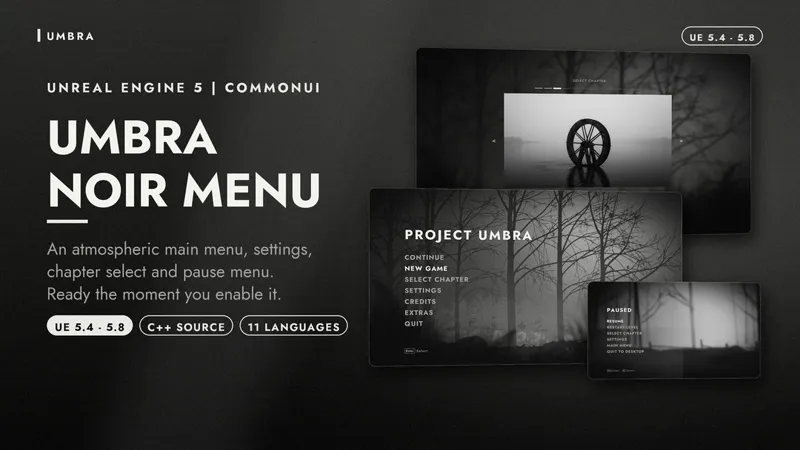
A packaged build of Umbra, so you can move the mouse around in it yourself. That is really the point of this one. Screenshots cannot show you a menu that shifts, drifts and flickers, and video only gets you halfway.
Move the mouse slowly across the main menu and watch the silhouette layers separate. Let it sit still for a moment and watch the fog cross, the dust rise and the grain move. Then go into the game and pause it, and watch the colour drain out of the world while the fog keeps drifting over the top.
WHAT TO TRY
- The chapter select. Browse with Left and Right, the mouse wheel or the bars along the top. Chapter three is locked, so you can see how a locked chapter reads
- The controller layout screen, if you have a pad plugged in. Every button has a line running to what it does
- Rebind something in Controls, then go back to the controller layout and watch the diagram follow it
- The five theme presets. The default is the black and white one, but there is a sepia, an ember and a pale
- Switch the language on the General page. Everything changes live, including the screen you are standing on
CONTROLS
Keyboard: arrows to navigate, Enter to select, Escape to go back, Left and Right to change values
Gamepad: D-pad or stick to navigate, A to select, B to go back, Start to pause
In the gameplay level, fly around with WASD and the mouse
If anything reads badly on your monitor, or the atmosphere costs you more frames than you expect, tell me in Discord. That is the kind of thing I would rather hear now than after someone ships with it.
Download plugin for patreon members
Playable Demo