
BrowserFolders
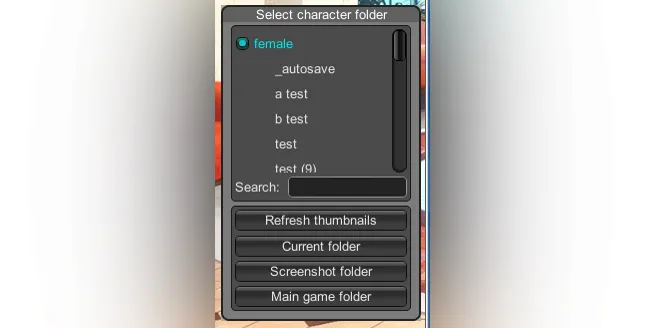
A BepInEx plugin for some Illusion games that adds subfolder support to main game and studio. It works with character, outfit(coordinate) and scene file browsers. You can organize your cards and scenes into folders and use this plugin to browse them (features vary between different games).
Downloads and full changelog
How to use
Install latest versions of BepInEx 5.x, BepisPlugins and Modding API are installed and your game is updated.
Download the latest release for your game below.
Extract the plugin into your game directory. The dll file(s) should end up inside the folder `BepInEx\plugins`.
Warning for EC users: Remove `EC_BrowserFolders_Hooks_EC.dll` if you have it in your plugins folder.
Start Studio and open the scene load window, or start chara maker and open the character load window. You should see a new window next to the standard file list. Click on the folder names in the list to open contents of that folder.
Comments (8)
I am having trouble downloading the janitor mod
There is no janitor mod. If you mean the official Darkness DLC, it can't be obtained legally at this point.
Yo add subtitles to sex scenes...
If you want subtitles during h scenes then you have to turn them on when installing hf patch, they are off by default because of the bad translation quality.
In AI, the selector for Bathing and Closet outfits doesn't seem to recognize the folders, can this be made to work?
It can, but so far no one stepped up to do it.
u can dm me on Discord? '' Rikka • アリシア •#4347 '' Im confused about Koikatsu
If you have any issues then just ask in the #help channel on the discord server. Someone will help you or forward you to the proper place to ask.