
QuickAccessBox
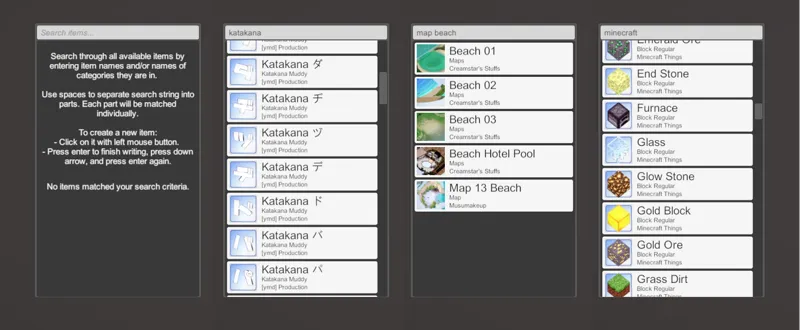
Plugin for Studio that adds a quick access list for searching through all items, both stock and modded. The plugin comes with thumbnails for the items, unlike the original studio interface. It's also instant and has low resource footprint, no need to wait for menus to open.
You can see a video preview here.
Download the latest version
How to add thumbnails for your modded items
How to use
Make sure your game is updated and has the latest BepInEx, BepisPlugins and Modding API installed.
Install XUnity.AutoTranslator v3.7.0 or newer and get the latest translations for your game. This is necessary to be able to search for the items in English.
Download the latest release for your game below.
Extract contents of the archive into your game's directory (the .dll file should end up inside your BepInEx/plugins folder).
Start studio. Once fully loaded in try pressing Ctrl+Space combination and the box should appear. There also should be a "Find" button near the left edge of the screen.
Note: The first start after installing this plugin can take longer than normal. Make sure you close the game normally (by pressing esc > yes) afterwards to let QAB save its cache to disk.
Comments (4)
It's not working for me. It keeps saying this, Could not load (HS2_QuickAccessBox) because it has missing dependencies: com bepis bepInEx srenshotmanager (v15.1 or newer)
Update your BepisPlugins to the latest version. You can find the link in the installation instructions.
Where can I buy the "Honey Select 2"?
You can buy it here https://dlsoft.dmm.co.jp/en/detail/illusion_0030/ab=apcgame-kihon02/