
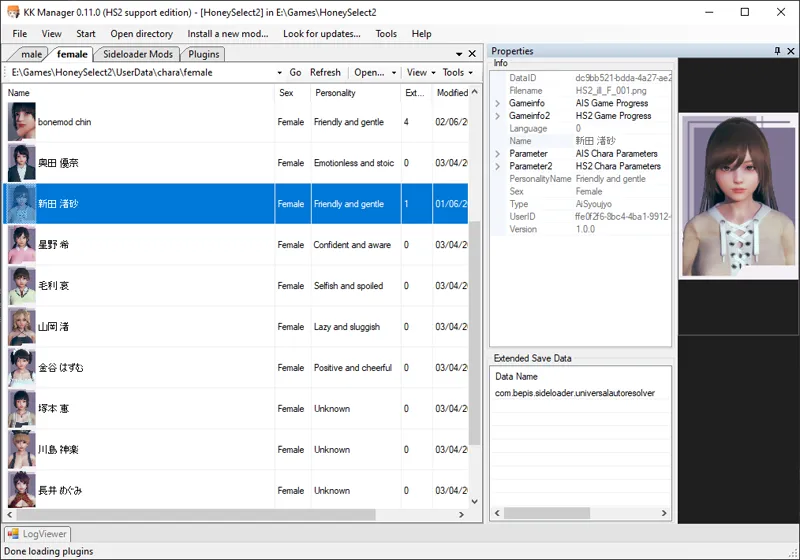
KKManager v0.12.0
Mod, plugin and card manager for games by Illusion. It includes an automatic mod updater.
What's new?
v0.12.0
Added support for S3 update sources
Improved the logging system
Do not compress bundles inside StreamingAssets folders, log each skipped bundle
Many bugfixes and minor improvements
v0.11.0
Added support for HoneySelect2
Improved character card support for AIS and HS2
Skip bundles in StreamingAssets when compressing game files to fix issues in HS2
Prevent randomizing CAB strings if it's likely to break the bundle
Supports new version of mod update info format (old KKManager versions won't be able to update using these)
Fixed the bad sources error appearing at wrong times and made it more useful
Fixed crash when disabling a zipmod if a disabled version already exists
Fixed and improved the "Fix file permissions" tool (before it failed in some cases)
Updated dependencies (including SB3UGS to latest version for HS2 compatibility)
How to use
Overwrite your old KK Manager installation (usually inside a "[UTILITY] KKManager" folder in your game directory), or extract it to a new folder anywhere outside of your game directory (do not extract the manager directly anywhere in your game directory!).
Start KKManager.exe, create a shortcut to it if you want.
If the game directory was not automatically detected, select where you installed the game.
If there are any mod updates available, the update menu button on top will turn green after a while. You can click it without waiting to check for updates immediately.
Comments (16)
Letting this took update my mods literally broke dozens of mods for my characters and now I have to basically reinstall the game to get it to recognize the mods again, even though I've re-copied them into the folder. This is a huge pain in the ass now.
It could be anything, ask in the help channel on your game's Discord server. That way I or someone else can help you more easily.
How does the ignore list work? I put the mod file name in the .txt file but it still downloads it anyway, am I supposed to include the path also?
This feature isn't really finished. You use it by giving names of the files you don't want to download, so names of the zipmods. No need to specify paths. The names are case sensitive.
There is a logic problem. KKManager delete old plugin first. At the same time download the new plugin. Here is the problem: if I spend many hours to download 7GB(mod pack) and several plugins failed to download (net problem, PC problem and etc.). the old mod cannot come back any more. Because of these missing mod and slowly download speed, I cannot play game for hours, days................ 0.9.3 Is it possible to add some protective mechanisms when the download fails.
I added the issue here https://github.com/IllusionMods/KKManager/issues/29 I'll look into it when working on the next version.
Extra mod noob here, just looking for some clarification. Does KKManager find the mods youre missing on your character cards and download them there or do I have to gothrough something else to do this? thnx and sorry.
It downloads everything available. You don't have to worry about what the cards need because you'll have all of the mods installed anyways.
Is there an HF Patch for english translation and uncensorship for Honey Select 2 on the works?
Yes, it should come out in anywhere between 1 to 3 weeks depending on how quickly essential plugins by other modders get ported.
A suggestion, can you add "Update plugins" feature for the manager? Can't afford to waste my data limit downloading gigabytes of patch to update a few dozens of megabytes of mods. Thank you!
It's planned for sometime later in the future but the focus currently is on making mod updating to work correctly in the first place.
Hey, I find the manager stayed at "searching for new mods" and keeping searching like forever. my network is connected and everything is normal. what do you think is wrong? do you have a list of sources that the manager is loading so that I can check whether I have connection issue to some of them>
Open the log window and check what it's doing while it's stuck. Some users reportedly fixed this by rebooting their PC.
>Supports new version of mod update info format (old KKManager versions won't be able to update using these) So what does this mean for Koikatsu itself if I may ask? Since it gets stuck on checking for updates when I use the updater on any version above the 9.3 update
You will get an error telling you to update KKManager if you need a new version to download updates. Other than this nothing changed for koi.