
BrowserFolders v1.5 - Now for AI-Shoujo studio!
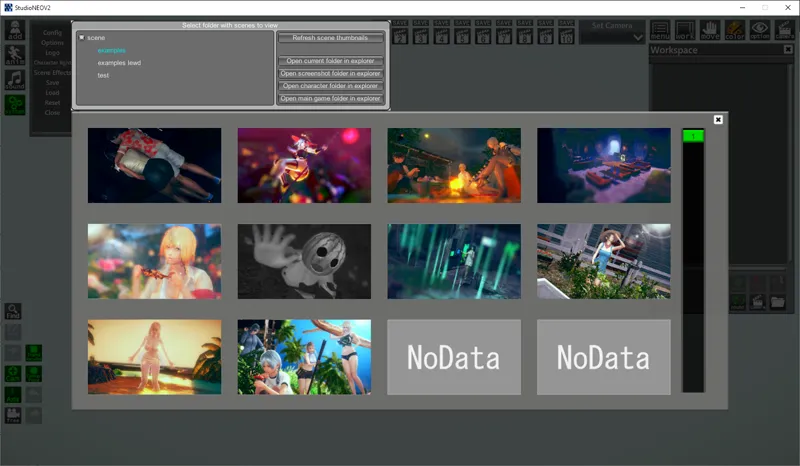
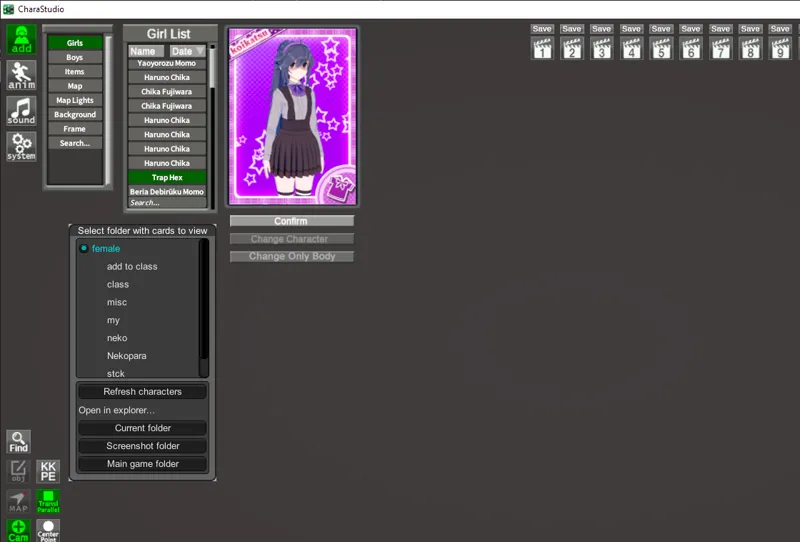
Adds folder support to main game character browsers (only KK), and studio scene and character browsers. You can organize your cards and scenes into folders and use this plugin to browse them.
What's new?
Added support for AI-Shoujo studio
Added studio character folders (Big thanks to @GeBo1 for implementing this feature in #4!)
How to use
Make sure at least BepInEx 5.x is installed and your game is updated.
Download the latest release below.
Extract the plugin into your game directory. The dll file(s) should end up inside the folder BepInEx\plugins.
Start Studio and open the scene load window. You should see a new window next to the standard file list. Click on the folder names in the list to open contents of that folder.
Comments (4)
Nice mod, would be even better with main game character browser support for AI, huehue.
That's something for the future :)
*drool* THANK YOU!!!!!!!!!!!!!!!!!!!!!
"Added studio character folders (Big thanks to @GeBo1 for implementing this feature in #4!)" This is the feature I've been waiting for! Thanks so much to you both.