

0.28.4.5 - Power & Controllers
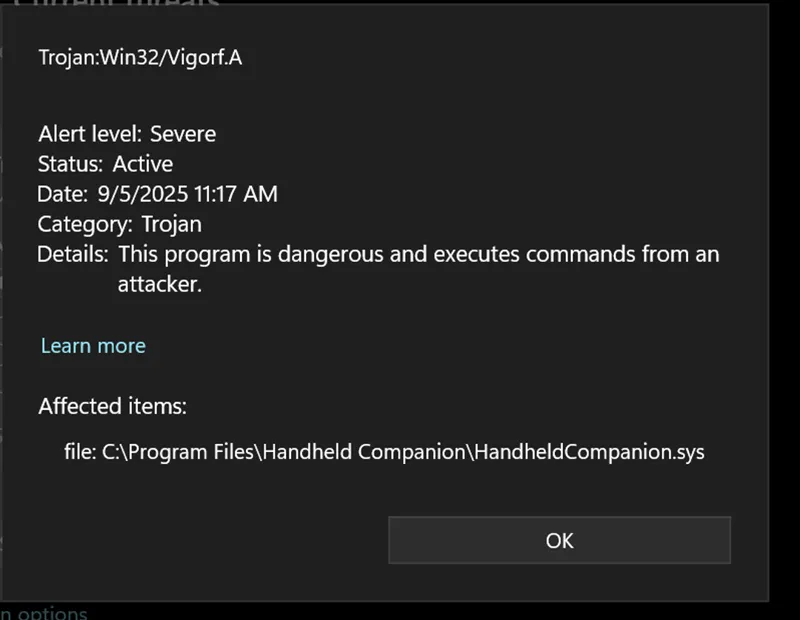
Dear Patreons, I'm glad to report that today marks an end to the WinRing0 saga as version 0.28.4.5 finally replaces the old WinRing0/RyzenAdj power path with PawnIO on AMD-based devices while also tightening TDP handling across all platforms. If you want more background on the WinRing0 story, you can read the previous post. To our numerous external controllers users, we've also unlocked the ability to use and remap all extra buttons (paddles & others) on any SDL-supported controller. Finally, this build also improves UI/OSD, and fixes several regressions around power and inputs.
Highlights
WinRing0/RyzenAdj to PawnIO (AMD power path): All AMD power manipulation (TDP, CPU clock frequency, GPU frequency, Curve Optimizer) has been moved off WinRing0/RyzenAdj and onto PawnIO. This should prevent any future Windows Defender warnings and make the whole stack more robust and cooperative with anti-cheat systems going forward.
Extra buttons on SDL controllers: We’ve updated the SDL controller database and added support for paddles and miscellaneous buttons on any SDL-supported controller. If your pad exposes extra buttons through SDL, HC can now see and bind them.
Hotfixes
0.28.4.3b: Fixed a regression with keyboard based OEM buttons.
0.28.4.4: Fixed support for PawnIO version 2.1.0.0.
0.28.4.5: Fixed simultaneous support for PawnIO versions 2.0.1.0 and 2.1.0.0.
Power & Dependencies
Please let us know if you notice any regressions or improvements on TDP manipulation (all devices) or Curve Optimizer (AMD specific).
PawnIO-based power path
We’ve replaced the RyzenAdj and WinRing0 dependencies with PawnIO for AMD power manipulation, covering:TDP control
CPU clock frequency
GPU frequency
AMD voltage curve (Curve Optimizer)
This is aimed at eliminating WinRing0-related issues and Defender warnings, and giving us a cleaner, more maintainable power path going forward.
TDP handling improvements
Improved overall TDP management so requested values are properly (re)applied instead of occasionally "sticking".
Controllers & Input
Improved SDL controllers support with an updated the gamecontroller database (12/02/2025) and support for paddles and miscellaneous buttons from generic SDL controllers.
Legion Go 2: M1 and Page/Desktop buttons are now properly integrated into the device mapping.
UI/UX & OSD
On-screen display / RTSS: Added an RTSS frame graph to the on-screen display, giving you a clearer view of frame pacing and performance (thanks to @ltchipotle).
Navigation & interaction
You can now use the gamepad left joystick for UI navigation.
Miscellaneous tweaks and improvements to the Layout page for a smoother configuration experience.
Settings & window behavior
New setting: Fullscreen on launch. ALT+ENTER now toggles the main window between windowed and fullscreen states.
New setting: Show splash-screen at startup if you like the visual cue when HC launches.
QuickTools
Added an "Exit HC" button to the QuickTools navigation bar to cleanly close Handheld Companion without having to fight against Windows task-tray icon.
Stability & Fixes
Fixed an issue where Configurable TDP up/down could be set to 0, forcing TDP to an abnormally low value.
Fixed AMD-specific Curve Optimizer availability checks so the feature is only exposed when supported.
Fixed AMD integer scaling registry check/override by matching the currently active GPU while also making the integer scaling dropdown selection more robust.
Fixed an issue preventing some inputs from being captured when the controller polling rate was set to 250 Hz and above.
Fixed Legion Go 2 M1 button behavior, so the button now works as expected.
Fixed a crash when failing to open the ONEXPLAYER serial port.
Fixed a crash on null selectedProfile when navigating to the power profile page.
Library Updates
SDL3
LibreHardwareMonitor
Sentry
Microsoft.Xaml.Behaviors.Wpf
System.Drawing.Common
System.IO.Ports
System.ServiceProcess.ServiceController
System.Text.Json
Special thanks to
@ltchipotle for his support on WinRing0 migration
Comments (3)
Hotfix: 0.28.4.5 brings compatibility with both PawnIO 0.2.0.1 and 0.2.1.0.
Hotfix: 0.28.4.4 fixed support for PawnIO 2.1.0.0.
Hotfix: 0.28.4.3b fixed a regression with keyboard based OEM buttons.