



Merry Christmas and Happy New Year
UPD: The previous fix was not quite enough, so here is a second attempt, preview212. My apologies, please update once more. Thank you!
Merry Christmas and Happy New Year, everyone!
For the past couple of months, we’ve been primarily working on all sorts of fixes, although there were a few new features too. Now, thanks to all your feedback and reports, this new update should be more stable, and hopefully, bring us closer to a public release of 0.3!
Crucial fixes
First of all, the issue with the triple screens configurations is finally fixed, and existing configurations will work as expected with no issues. Some issues with performance have been solved as well, with CSP using a better way to time its computations without wasting any CPU time. Other fixes include a commonly reported problem with malfunctioning CSP bindings, or various issues with recently rewritten car audio, and a lot more.
Assets streaming for tracks
This one is still in early stages, and pretty experimental. The idea is simple: instead of loading the entire track at the start, load the bare minimum and then stream missing geometry from disk, but only when the camera is nearby. Track configs can specify what geometry should be streamed, and while most regular sized tracks wouldn’t really need it, it should allow for larger tracks to load faster, and for modders to add more details. Here is some documentation on how to set it up, as well as its development status.
Automatic gearbox
A good automatic gearbox requires more than just shifting up and down based on some thresholds, and previously there wasn’t really a good way to implement it. But now, with new API available to car physics scripts, it’s doable, and we prepared some examples of how it could be done, for both AMT and proper AT with torque converter and specialized gears. Here are the scripts modders can use, and, if you want to give it an early test while waiting for proper cars to be released, here is a small modification for Alfa Romeo Giulia Quadrifoglio.
Assists editor
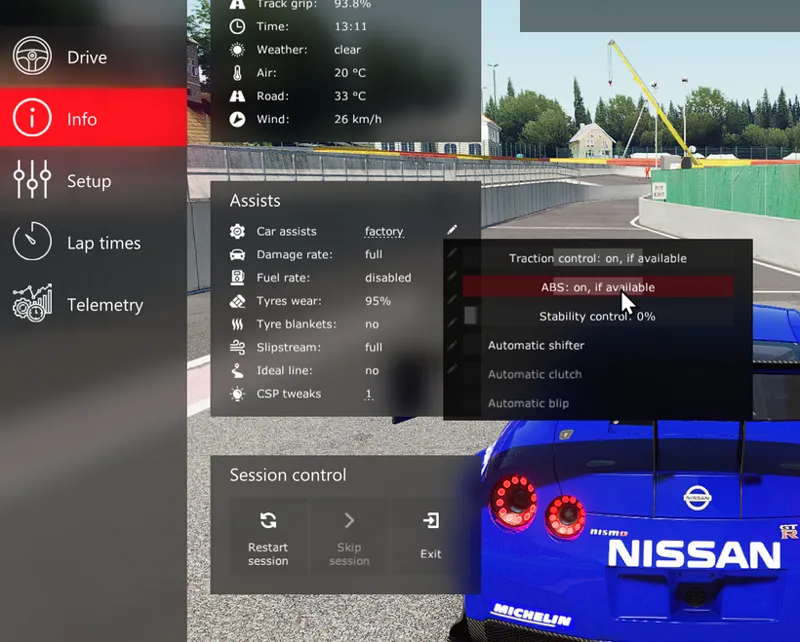
Something we should’ve added years ago, a small extension for both new and old menus allowing to change assists live in single-player races. In near future, there’ll be more assists related to CSP physics too, such as brakes heating or initial tyre wear.
Wind audio
Original audio uses two samples for wind, and sadly one of those samples, the one usually activating during slip-streaming, has some noticeable clipping. Considering that each car comes with its own wind audio (but most of them reuse the same samples), fixing it is a bit tricky, but I believe I found a reasonable solution, replacing that parameter triggering broken sample with a fitting DSP. It’s available in Audio settings as “Alter wind audio”, enabled by default (if you’d want to compare though, please keep in mind that it wouldn’t work in replays, at the moment Assetto Corsa doesn’t store slip-streaming information in replays).
Another addition is wind from other cars, a subtle detail to make the general soundscape more lively. Thanks to zgshnk for the idea and all the help with fine tuning (check out his Patreon too, by the way, there are some interesting things he’s been working on).
Other notable changes
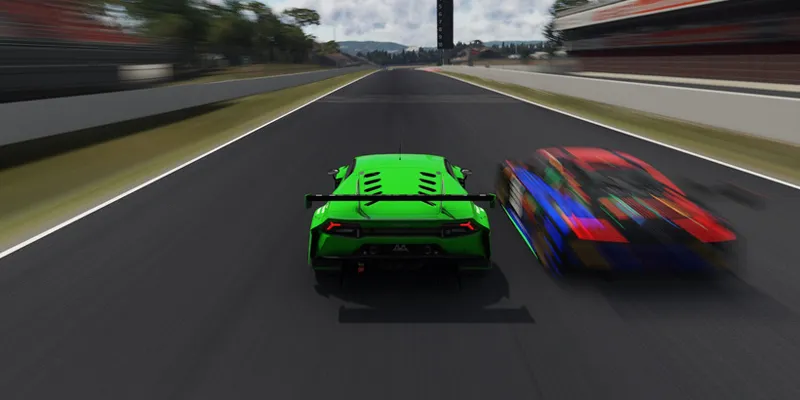
There are a bunch of other additions, such as adaptive V-sync option, fixes for MSAA with LCS, rewritten circular polarizing filter for photo mode, improved smoke and skidmarks (now they can even accurately reflect ABS in action), the ability to use animated GIFs as textures and a lot more. You can find the full list of changes here, and get the new build here.
Thank you so much for all the incredible support over the years. Have the best holidays!
Comments (309)
keep crasing
When I run this csp version in single screen its fine but when I run it on my pimax super vr it crashes?
anche io ho lo stesso problema
after installing 212 F5 and F7 camera are not working anymore
no pp filter app in vr again
Sadly for some reasons I get sound issues with this version :( - Tried changing a few settings but to no avail.
Hello guys! I have a little problem with my dpad on my wheel. The buttons are working in every other game. But in AC i cant use it. A month ago I was able to set the pit strategy during the race with it, but now no matter how I set it in the csp, it doesn't control what it should I've tried all the existing drivers and firmware on the steering wheel, none of them change the situation. What could be the solution to the problem?
For some reason it stopped working again, what can I do? Does everyone have this?
same here, this version does not work anymore it seems like
sorry but download this version is damage help me
Is there any settings I need to adjust for triple monitor to work? Says the update fixed it, but I am still loading on the right screen not center spanning.
Hello everyone, I have some problem, when I go download your content and when I try to race it keeps on telling me CSP installation is damaged (versions mismatch
Please could you help me 🙏
I don't have start lights when race starts is there a quick fix for this?.
d:\dev\csp\csp.cpp (1): [QajLHhx4dhQ] d:\dev\csp\csp.cpp (1): [uO1EYt3xWLg] d:\dev\csp\csp.cpp (1): [3GDULOFYXCE] d:\dev\csp\csp.cpp (1): [RFwV2qmX4HA] d:\dev\csp\csp.cpp (1): [UA34iY/qgUc] d:\dev\csp\csp.cpp (1): [df51Wcxj620] 00007FF931A8618F (ntdll): (filename not available): _chkstk 00007FF931932327 (ntdll): (filename not available): RtlLocateExtendedFeature 00007FF93192A961 (ntdll): (filename not available): RtlRaiseException 00007FF92E2CA80A (kernelbase): (filename not available): RaiseException d:\dev\csp\csp.cpp (1): [epFYZkY1jDs] d:\dev\csp\csp.cpp (1): [5CTYDy0bbc4] d:\dev\csp\csp.cpp (1): [uhvdcHITo0w] d:\dev\csp\csp.cpp (1): [f3HqAolhGWM] d:\dev\csp\csp.cpp (1): [C4LPEfGpExI] d:\dev\csp\csp.cpp (1): [Ga83JiAQdp4] d:\dev\csp\csp.cpp (1): [0eJz65RR+6A] d:\dev\csp\csp.cpp (1): [0kDmnqsHlG0] d:\dev\csp\csp.cpp (1): [zFdnMo2lSAM] AC\acs.cpp (477): wWinMain
I am on the newest pure version and newest CSP preview. In rain my windshield starts fogging and the wipers smear it on the windscreen and I have 0 vision. I can't see anything at all until I turn off rain. How do I fix this? This was not happening on older pure and CSP preview versions.
yuhhh
I Need help with one problem when I go download your content and when I try to race it keeps on telling me CSP installation is damaged (versions mismatch)
Hi, same for me...
I'm just starting to look at updating CSP and am wondering if the file above light-patch-v0.3.0-preview212-full is everything I need. I'm in the process of downloading Pure 3.10. Should I update Pure 3.10 first.
Could you make optimization for linux?
C'est fabuleux ce que tu fais mon gars... C'est encore mieux que Assetto Corsa Evo. Dingue, Dingue, Dingue. Merci ❤️
I really like the name appears on the license plate during the online race. If that can be shown on the replay, it will be super cool.
This is saying its unavailable for me
i've just paid to download the shaders patch and i'm getting a mismatch error , and help please
is lightning not working
Please help me, im getting crashing on csp version higher than 0.1.79
find a fix?
This one isn't working for some reason, not sure if it's on my end but even only running Kunos tracks and cars it says "CSP Mismatch", I'm going to revert to an earlier version to see if I can run it. Thanks for what you do!
tripple screens not working, game only visible on middle and right screen
add up the horizontal resolution in all 3 screens, then input that number into Content Manager's custom resolution in Assetto Corsa settings for Video. It works for me and I have 3 completely different monitors. I had your issue too.
Hi, sorry to bother you, I have a problem, some shadows/reflections are flashing along the camera, I also have a video if you're interested, can you help me please?
my rain is not working i also use pure with this
Because the grass keeps appearing as I drive by, it's really annoying because I can see it loading up near the car, or maybe it's just the green shadow (I'm not really sure what it is). Is there an option to make it load at a greater distance so I don't see it so close? Thanks
is theis x4fab?
Hey man sorry but I subscribed and i dont want to
Fixed please thanks
fps drops
game crash on drift map. sometimes after 1 min sometimes 10 min.
my game keeps crashing
my game kept on crashing. does anyone know how to fix this issue?
my game keeps crashing
Any chance that one day 0.3x will be compatible with Snowymoon mod? Or perhaps provide DLAA natively? For VR users, DLAA (or quality TAA like Ams2) bring Assetto Corsa to another level. I cannot upgrade CSP anymore :/
Andrew what settings did you use for VR?
anyone else have trouble downloading?
yeah the dwrite.dll cant replace the original for me
Anyone knows how to fix the no smoke generation? I enabled it both in csp and assetto cosa settings (maximum) but it is not generated in game
pure wont work this is fustrating i used 7 zip just like in the video script wont start, deleted onedrive and still doesnt work
RAIN NOT WORKING
download sol
anybody know why i dont see the rain at all
install by CM or coppy?
is this the CSP exilitay was talking about?
Hi, Love what you & Peter Boese have done/continue to do with CSP+Pure, you two are real magicians👍 Just a bit of feedback, and it's only my humble opinion ... The FIREWORKS in CSP look AMAZING and so life-like -- probably the most realistic I have ever seen in a videogame. However, could you remove the firework that spins in a circular clockwise motion? Such fireworks do not exist in real life, and the fireworks look so real until those circular ones appear, then it just kills the immersion, for me at least. Or, maybe create a separate script that doesn't include the circular fireworks, that way you can still keep them if you preferred? Thank you
How do i stop my fps dropping to 30?
reload the settings on pure confing. i usually click reset and it goes back to normal.
Hello, I have noticed a problem that appears to have started at 0.3.0-preview 110 and persists through the current version of 0.3.0-preview 212. A number of cars have analog gauge clusters that have gone blank; where the needle remains but the gauge indicators are black. An example is the NSX pack by Some1 at OverTake. All 6 gauges in the cluster disappear when version 0.3.0 is installed https://www.overtake.gg/downloads/honda-nsx.4768/
Same goes for the Japan Dream Pack DLC supras.
Since the 0.3.0 rewrite, DirectX Errors occours on the Loading screen and Error 21009 shows up. FPS drops to 30. Its an Bug with Snowy Moons FXAA/DLAA Mod.
It is not a bug with Snow Moons mod, it is a bug with CSP.
rain stopped working for me, cant get it to work no matter what I do (even a full reinstall).
for people who the game crashes after a few seconds, delete actools content manager map in appdata/local. It now works for me again.
gettin miss match using thois?
i cant see car lights makes my game crash
Integrity Failure: Please report to X4FAB:21002 is on the top of my screen. any ideas?
You are probably using Snowy Moons DLAA / DLSS mod or another mod that needs to hijack the GXGI files. Same issue this side and I have reported it countless times.
Is there a problem with instruments not showing up on cars just so i know what the problem is? Thanks anyone??
I can't see the numbers on my dash board in the first person view. Edit: I just checked on some other cars and so far the dash numbers on the Supra MKIV all versions are the only ones that don't show.
Hello, the pitcrew have no animation when he have the lollipop in up position.
why do multiple cars fully cut throttle input when shifting now... the GT cars and BMW's etc feel like they're single clutch cars now like the aventador SV... It's been like this in the recent versions. Has anyone got any advice?
have you noticed that clutch behavior in general is weird? in my telemetry i keep seeing Auto Clutch: 1.. but i have it off every where i can think of. and some how on manual cars now i can upshift without the clutch... but downshifting needs it or else it damages the transmission and goes into N. i think its this update with the assists menu thats making it odd or overwriting something.
i cant see rain or snow with the mod
was woundering if in your next patch you could add back in the dynamic flags love your lighter stuff but i run nascar mods an head to go back to 1.79 to find the dynamic flags that use to be in the track adjustment of the light patch
hi i have an issue where when using lights path loads of my cars have all their dashboard textures removed including the tachometer and speedo. if i unintasll lights patch the issue goes away so what should i do?
Also have this issue with some mods.
I've noticed that some cars can't leave the pit lane (they drive out and then return – teleported – as if they were stuck). Is anyone else experiencing this problem? I've already checked everything that could be the issue (fuel, tires, damage).
if its a mod and not kunos ... try turning off extended physics if its on. i believe some mods just dont work with it.. but some might still work with it off.
Hey guys I just got AC and now I'm trying to do all of this lol. Do I just download this patch or is there a different download I need first? I know I have to past it into my AC root folder but I'm having trouble with it. Also in my content manager it is telling me I'm in the lite version then asks me for a key to get the full version. Please any help is appreciated!
Did you get anywhere with this? I have a similar problem
my sky is constantly grayish blue
Downloaded the latest however all rain effects are snow, not rain.
Charlie, thank you so much!!! my temperature was set to 0 but as soon as I changed it to 29ish, the rain came. appreciate your help!!
will there be a fix for the tree lights extention that we use for competition drifting, ever since 0.3.0 it can litterally not work in the car and you can look at it free room and work
Just a quick question, is anyone else experiencing missing car textures in the latest CSP updates (since at least around CSP 0.25). I'm trying to use the VRC Ferrari F310B but some front and rear wing textures are missing when in replay mode. I've messed around with some settings to no avail but these textures appear to be there in CSP 0.1.79
Exhaust smoke looked better in preview140 for me, preview212 smoke looks artificial, anyone else felt this way or should I change any settings?
i managed my last year stutter problems changing my whole PC :)
Amazing product, I experienced no issues at all. Insane value btw
What guys u are talking about? everyting works without problem, no stutter or lags. I updated straight from 0.2.4-preview1 and nothing broken at all.
Any solution to the "stutter" in the first few minutes... I'm having a problem with FPS... I lose it quite noticeably. After a while it recovers, but it's always stable.
not a single problem amazing preview idk whats wrong with the other people
Everything after 0.29 is totally unusable this is the first time i experience since 162v crashing out going online servers, graphics totally laggy in vr, and that big message on top screen regarding some x2900 code or whatever,, i
Why don't any of the previews work? Is this a joke? You pay to access this account and get hundreds of files, not a single one of which works. Is this a joke?
yeah, still no patch :(. The worst "preview" ever
I'm having an issue with curved screen correction and Pure (happens with newest versions of everything and is still there if I roll back a version on both). When I freshly load CSP and Pure to my machine and start a new session, everything looks great. But after I configure the curved screen filter, whenever I start a new session I get ugly orb sparks and everything looks kind of flat and less realistic. If I open the Pure Config and restart weather FX, everything looks great again. But the next time I launch a session, it's back to ugly orb sparks and less-realistic visuals. This happens whether I selected the curved screen correction as my scriptable filter from CM or if I select the Pure LUA bridge as my scriptable filter and then enable curved screen connection through Pure PP -> Spice in the in-game menu. If I disable curved the curved screen correction, everything looks good but then I have the warping from my curved screens (which causes motion sickness for me). I've reported it to Peter Boese as well. He seems to think it's note a Pure issue. Please let me know if there are any further details, logs, etc. I can provide.
Here's a (very poor quality) video demonstrating the issue: https://youtu.be/ObuNdDlNNyE
I've been looking into the sound of my previous cars compared to older versions of CSP, and in some cases, the interior audio is also used for F6 cams audio. Going back to CSP 0.2.11 changes this back to the original sound for the F6, is there a setting for CSP 0.3+ to set it back to how it worked before?
is there a way to always use Exterior car sounds in CM? I remember the setting from many many updates ago but can't seem to find it now. Thanks!
I think it's in an app. Probably one of the Audio non-vanilla ones.
Question: where are suddenly the car setups stored? same with ghost cars? (0.3.0-preview212)
The VR is crashing with the last update. If I return back to 2.11 version is working perfectly. Somebody can help me?
Any fix for hot lapping ghost yet? Mine still dont appear no matter what I try.
I’m new to all of this but I can hear the rain and can not see any visual weather effects. Did I do something wrong? I also have Pure installed.
same happened to me i had to replace the dwrite.dll . I installed it using Content Manager by drag dropping the zip and it said it was installed, version number was updated in CM but it seems thats all that was applied. Later after drag-dropping the files including dwrite.dll did all the new stuff show up, rain worked, etc...
still crash (prev too)..... strange today works (fresh install)
Hello, when I install this version and select a car and click join, it says “initializing DirectX…”. After about 5–6 seconds, the loading finishes. Where am I making a mistake, how can I fix it, or is this a general issue? Thank you.
The Rain FX tab does not appear.
I keep getting Version Mismatch!
Fixed this by unzipping file and copying all files directly into the assetto corsa game folder
Also AI wont turn the steering wheel visually in the newest update, it worked fine on preview 140
I some track AI missing their pit spot, here is an example: https://www.youtube.com/watch?v=Ch4Q4vzmV5k It worked fine in 0.2.x versions and has the problem since 0.3.X Anyone knows the solution and if not could you please fix this Ilja?
Make drift comp hard now the start light get stuck at 1, go really slow or dont light at all...
Time zone error. Does anyone have a solution for this?
I can't "Lighting FX" on or off, nor adjust the brightness. Both options are missing. Please fix this ASAP
Hope somebody can help, what's the problem with the right mirror, it appears to have part of the left image that's stationary and part of the right mirror image that you can adjust ? I'm currently running 0.2.12-preview1, this also happens with 0.3.0 -preview 212 full. This only appears to affect some cars not all 🤷♂️.
For anyone getting the data integrity error message at the top of the screen, I think the snowymoon DLAA mod was causing the problem. FPS drops by 50% now with this new CSP version and DLAA or TAA active. Removed all of the DLL files from the root AC directory and now the data integrity error message appears to be gone. Back to regular anti-aliasing methods for now. Will do more testing to make sure.
the cloud pre sets and other additional weather settings arrent working for me
Please help, I installed the latest CSP and Pure, but the sky in the first-person camera in the car is flickering. What should I do?
Question: Bevore the update I had kind of Rain/Spray random. Now its gone. Where can I activate it again?
how do you get that new UI look in the pitlane? asking for a friend!
Hi, lastest update, game systematically crashes with VR (openVR) + openXR runtime no matter what. Impossible to start any race 00007FF8C1FA782A (kernelbase): (filename not available): RaiseException d:\dev\csp\csp.cpp (1): [ZgzJCN1oxEE] d:\dev\csp\csp.cpp (1): [pLpNK9nr9zU] d:\dev\csp\csp.cpp (1): [rnuC3pcfTiE] d:\dev\csp\csp.cpp (1): [t7jDRUrf9ek] d:\dev\csp\csp.cpp (1): [eA+428pJCc4] d:\dev\csp\csp.cpp (1): [/1H+9iibeE4] AC\acs.cpp (477): wWinMain
Hi, i'm having this crash when using my own car : AC\caravatar.cpp (2188): CarAvatar::setVisible AC\mirrortexturerenderer.cpp (115): MirrorTextureRenderer::render d:\dev\csp\csp.cpp (1): [5nUG3CVfmY8] d:\dev\csp\csp.cpp (1): [Ac/y9CCHqaE] d:\dev\csp\csp.cpp (1): [+lZ3D/hDrNM] d:\dev\csp\csp.cpp (1): [YoB19HTnxgk] d:\dev\csp\csp.cpp (1): [HgBpUxS3Nbw] d:\dev\csp\csp.cpp (1): [+wLOG8uZqVA] d:\dev\csp\csp.cpp (1): [f3ugCtu/j1Q] AC\acs.cpp (477): wWinMain what could it mean ? never had it on previous versions...
Where did the "attempt to fix gridslots" setting go? its still required to be disabled for some tracks to make them work, notably 108 gridslots Nords and fenrys 70 gridslots Nords, and it seems to be enabled by default on version 0.3.0 with no way to disable it
Hey! I started to have crashes after the latest update. This is the first CSP update that causes frequent crashes: Error might have something to do with: d:\dev\csp\csp.cpp (1): [se0dtimChz8] d:\dev\csp\csp.cpp (1): [2qcIJ2F0k9Y] d:\dev\csp\csp.cpp (1): [Opd0XPhu+yU] AC\car.cpp (564): Car::step d:\dev\csp\csp.cpp (1): [g0LBPbcaC10] d:\dev\csp\csp.cpp (1): [TZ+mWxujqAo] d:\dev\csp\csp.cpp (1): [1G5aTKZvGL0] d:\dev\csp\csp.cpp (1): [1ZRYRJ66yu0] d:\dev\csp\csp.cpp (1): [T8SS1U7WVug] d:\dev\csp\csp.cpp (1): [GJScO0elOIM] 00007FF85343D24C (msvcp120): (filename not available): std::_Pad::_Release 00007FF815814F7F (msvcr120): (filename not available): beginthreadex 00007FF815815126 (msvcr120): (filename not available): endthreadex 00007FF87DFAE8D7 (kernel32): (filename not available): BaseThreadInitThunk 00007FF87EFEC53C (ntdll): (filename not available): RtlUserThreadStart
is there any way that instead of imagining new game breaking ideas with every release that instead you release a (and i know i sound crazy here) stable version that actually works and don't require scrolling through like 15 sub sections ticking and unticking hundreds of check boxes and sliders just to get shadows or AA or lighting or literally every single thing just to compromise on some aspect to get it visually closer to the just fine right from start default settings AC comes with that actually render the game properly. i get you like coming up with new features but you have ignored the fact that every iteration, the comments are overwhelmingly people asking how to fix their game, yet you just add more and more broken features and remove the ability to shut most of the biggest culprits off. i have spent literal months of my life tweaking your patches settings just to delete and re-install AC over and over. this should not be a puzzle in computer rendering permutations. seriously tell me the last time you had a majority of the comments be positive? its person after person letting you know you broke their game again yet we get no fixes. maybe simplify and remove dependencies instead of adding unnecessary and unsolicited untested features.
After this update, when I play in VR it uses up a lot of CPU and GPU bandwidth. When I benchmark in Content Manager my FPS goes to mid-60s. When I switch take if off fullscreen mode and have it windowed on my monitor, my FPS is 90FPS as expected. For reference I have a Pimax Crystal Light, 5070 ti, and i7 CPU, and 32gb DDR5 Ram.
I can't play with this version; it gives me an error from the start. With version lights-patch-v0.3.0-preview210, I can play without the error.
It's working correctly now. It was the dwrite.dll file that the Content Manager installer wasn't updating automatically. After manually copying it to the Assetto Corsa directory, it works without error.
My game crashes when I autofill a players' @ name in chat with the 'tab' key
my rain effects are gone what do i do?
does anyone have an issue with the ae86 tuned pop ups having an animation issue after updating csp
with update 212 I can’t really use my xbox one controller..... With the old update 140, no problem for my controller..
Ilja, happy new year! I'm installing CM on a Linux Install. Can I have another CM key if that's necessary? If not, how can I grab the old key?
Hey, not sure if it’s after an update or not, but G-Sync has completely stopped working for me. No matter what settings I change or what I do, it just doesn’t work. Other games are fine — this only happens in AC. It used to happen before for no clear reason, but a reboot would fix it. Now reboot doesn’t help at all. Reinstalling the NVIDIA driver doesn’t help either, same with resetting AC settings and the entire CSP config. Update: if I disable the second monitor, it sometimes helps — but not always, and honestly pretty rarely.
I've the same problem, whether selected or not I get screen tear with the new release. I've gone back to 140 and all is good.
hi, ther is still a huge banner on top of my screen to contact x4fab regarding integrity fasilure 21009
I have the same thing, and have contacted Ilja. Waiting for a response.
Might we expect a fix for non-rain tires behaving like plastic tires being overly skidy and car starting to slide when accelerating above around 70-80 km/h when moderate or heave rain is set? We've had rainfx for a while and this is still present and breaks the experience drastically under rain. P.S. Seems like FPS is somewhat gained on this preview, no tests, just observation.
how do you get the neckfx to work?
revenant mode doesnt seem to be working for me in vr. Theres no option to set a record button. When switching to monitor, i was able to set the button, and it works as should. In vr the button does nothing.
Ever since 0.2.7-preview1 any update thereafter seems to delete the roadside edges textures (gravel) from one of my favorite free-roam tracks, 50KM of Lake Louise. They are now invisible and you can see under the road all the time. Any idea how to correct this?
how can i get code
How do I disable the car assists always being "forced on" in the assists editor? They always revert back to forced on no matter what settings i change and even revert when i restart session.
you sure they are not enabled here? https://imgur.com/a/ZmeI5PR
My AC crashed a lot when using this preview version (during the first loading screen), I had to downgrade to the csp0.2.11 and no crash so far. I'm using CM Full Version with Pure
To improve the AI function you simply need to tweak the adjustments the Settings tab for Custom Shaders Patch (CSP). The section AI (New Behavior). I suggest increasing the rubberbanding effect together with your favorite tweaks. The aggression and strength are just the tip of the iceberg. It will change your game. Thank You IIja!
'Track Display Dynamic Texture' crash when i load track day on specific cars
Уфффф сколько тестов)
Says csp version mismatch, doesnt work
To have the rain fx, you must have full paied version of content manager and the paided pure version too. And everything works fine. I should of know that in the first place but for anyone like me, that's what you need to have.
For some reason I'm unable to bind a button for dynamic return, anyone know of a fix or have the same issue?
Update, I didn't think to switch to keyboard & mouse for input method, bound it and then reselected wheel for input and everything's fine now
I had sol and installed pure and my rain aint working? What do I need to do?
same!
How to I enable my competitors skid sounds with replay?
Can anyone confirm the download file is safe, my anti-virus detects it as a Trojan file
Yes, its safe I,ve been downloading, installing and using these light patches for over 5 years; great addition to AC, you can't run it without it.
This error crash randomly while playing... Error might have something to do with: d:\dev\csp\csp.cpp (1): [wB+Kjplr6lE] d:\dev\csp\csp.cpp (1): [5pcCeZ4osB4] AC\replaymanager.cpp (334): ReplayManager::onStepCompleted d:\dev\csp\csp.cpp (1): [A1JQpCgGhyo] AC\physicsavatar.cpp (169): PhysicsAvatar::onPhysicsStepCompleted d:\dev\csp\csp.cpp (1): [Kn4Qh1tngjQ] d:\dev\csp\csp.cpp (1): [0FJPaAk3gJU] 00007FF8E0BAD03C (msvcp120): (filename not available): std::_Pad::_Release 00007FF8E0AA4F6B (msvcr120): (filename not available): beginthreadex 00007FF8E0AA5098 (msvcr120): (filename not available): endthreadex 00007FF96B47E8D7 (kernel32): (filename not available): BaseThreadInitThunk 00007FF96B6EC53C (ntdll): (filename not available): RtlUserThreadStart
same here
Ty! Happy new Year!
my entire game crashes bad after i try to use it. it used to work and is now unusable
Hi, where can I obtain a Content Manager key?
where you download content manager you have have too scroll down and buy the full cm
Issue with GrassFX popin. Previously grass was stable witout popin, now grass is noticably poping in / extra grass growing 😂 somthing like 20 meters before car. (i have tree and track LODs set to max % btw)
I have the same problem.
I downloaded this and my modded maps stopped working all together…
Appreciate the update. I'm still getting a racing line that gets more wet as the rest of the track dries. The racing line ends up absolutely flooded making rain effects unusable
After updating to CSP v2 or later, my Nintendo Pro Controller's rumble feature stopped working. could anyone help me?
I have no idea why it was working before but I fixed this issue by changing game starter setting in CM to Steam.
Replays arent wanting to work at all, and when I try to load one, it just sends me to a normal race. Any thoughts on that issue?
can anyone help me im using the latest version but when it rains its doesnt show on the ground
Any way to get this to support / work with Snowy Moon TAA mod?
did you disable MSAA and TAA ? In CM, go to: Settings/assetto corsa/video "MSAA" & Settings/custom shaders patch/extra fx "Temporal anti-aliasing"
I love having triples again. 3 different sizes, 3 different MHz's. It's better than ever. I did splurge on Black Friday & buy a new gaming monitor for my main. ;-)
i have same problem as before, i cant get working my triples right like in 0.2.11. all of these preview version mix up my triples. i cant get them working with tips included in these comments. unable to use this preview. thinking about canceling membership
Loading screen is still completely blacked out when enabling HDR
Hi , why all dashbord in some cars are grey ? with no text
If you have this problem is due to HDR mode just disable HDR and it will be ok
after updating to this version my load times take up to 2 minutes even for kunos track but previous version still works fine
I love that you keep working on AC, but please give us back the old menus in Content Manager where CSP extensions were in alphabetical order. I don't understand the mess you created with those new categories all mixed up. I can't update to 0.3 as it's unusable now.
Did you restart the Content Manager after applying CSP preview update? After restart they are no more mixed up, rather grouped into groups. Was frustrated at first also, but saw grouping after restart and it makes good sense now.
I can't get the rain effect on AC, how can I solve the problem?
Did you fix it? I have the same problem 😕
OK, I installed csp0.3.0p212 from CM, with the "clean old config 1rst" option. I always did it by copying the files directly from Win, and most of the crash problems with URD cars and, above all, with RSS cars have been solved. Although I still have random crashes in general, and especially with the latest URD cars, it's running "normally". I haven't tried it online yet, but offline it's running decently, or as I think it should.
bro why when i press alt 5 cam mode becomes darker
It breaks the wind oscillation in the latest Pure version.
Update to what i said a few days ago. Had more time to seriously look into it and since going to either preview211 or preview212 im getting timezone errors i never got before on online. Causing me to be kicked from servers I always played on. Back on preview140 and working fine.
Great. Thanks Ilja.
Using Boese's 3.10 build of Pure LCS, this version of CSP causes major stutter, almost akin to lagspikes in online games back in the day. reverted to your previous build and that was fine (no settings changed between that version and this one either btw)
Same for me
How does one enable the new Automatic Gearbox system in the Giulia? Was looking through vehicle settings, and trying binds which change the gearbox type, but to no avail.
Here's how: files you downloaded for ks_alfa_giulia_qv extract and manually drop into car's directory renaming data_automatic_transmission.acd with data.acd, it replaces original file. P N D works instantly entering the AC.
Not sure if this related, but the car sounds during the replay are very different than during the actual gameplay session. When i go back to 1.78 the problem is gone.
Yes ! the last version is perfect, thanks
Hello! With 212, I've enabled the "multiple ghost" option under CSP Settings, but I can't seem to get it working. The Drive menu doesn't seem to look any different, and the in-game menu doesn't have anything about ghosts either. Am I missing something?
Triple Screens do not work still i have tried everything this is ridiculous you just keep taking my dollar at this point i have been just going back to the csp from a year ago and it works flawlessly
which version works for you?
I'm getting screen tear with the new version - I have reverted back to test and all is good with the 140. Not sure why? VSync is on, frames are capped, and I'm running a half-decent setup - 9800x3D, 5080, 32mb ram @6400.
Hi,, just did some tests. No issues at all with RSS and URD here. (296, Vantage EVO and Mercedes EVO tested). BUT the timezone issue came back, but now, not blocking the session but with warnings like: (Timezone "" not found). This error can be seen with the LIME ROCK PARK track from REBOOT team. thanks.
i think lacanyons is hit also
Does anyone experimenting input lag ??? my ffb is skipping the in-car steering rotation is lagging.. ive adress this issue since lights-patch-v0.3.0-preview132 .. ive been rolling back to preview 120 is the most stable one for me. Please help i'm guessing it might be setting issue ??
still the fps consumption with triples is insane.... nothing changed... please fix this... asking this for years
timezone error still happening on the California highway map (mod)
Crash with RSS and URD cars. I've gone back to version 140 and I don't know why these cars aren't loading either, so I went back even to version 0.2.12-p1.
what cars exactly?
RSS and URD incompatibility, game crash
Same problem for me
On the first lap of the race, the tires are very cold. To the point the grip is substantially lessened. The first corner is treated like you’re on ice.
Some incompatibility with RSS and/or URD cars - crashes game - haven’t worked out if it’s a specific car, or field size. Goes away when I go back to 140
Yes same me back to 140 !
3rd try is the charm, works now!
Awesome stuff, thank you! Happy New Years!
This new tire model will take some time getting used to. Online models are going to have a rude awakening.
I can't see any changes to tire model in the changelogs.
timezones still broken
Track name please?
Thanks for the quick fix enjoy the rest of your holidays 🙏
I just installed 212 now my game completely locks up, it was working last night
Maquina! Muchas Gracias!
tout re marche nikel merci beaucoup
212 version works again, including triple screens!! For those that used the "Old Window Creating Logic" in Other/ DXGI settings fix in previous updates, don't forget to disable it now.
First of all, a big thank you for keeping this game still in the top 5! i highly apretiate what you do! but unfortunately i still have 30 fps more in VR with the 2.12. would love to update but frames matters too much in vr
The 212 version works, thank you! I've tested the cars/tracks that had problems with the 211 version, now they work. The new wind effect generated by the rival cars adds a higher level of immersion, I like it. There is a little but immersion-breaker detail: for some reason the crews around the cars (some mods, especially F1) on the starting grid don't despawn before the lights go out and they are present for multiple corners and even a full lap before they finally disappear (if I restart the session after they're all gone, the crew is not there anymore, which is fine; but I can't wait for an entire lap each time to have a clean start). Is this related to the patch in any way? It didn't happen with my previous working version (preview140), the crew despawned before the red lights / race start. Or maybe it's an overall "quality settings" problem? I do keep everything on "ultra", so maybe there are performance issues and some sort of delays at this point...
CSP 0.3.0 Preview 212 fixes the Timezone issues/Crashes so far - fyi
The improvements you've made to the AI is fantastic!
for me new csp version its not good , some pixelated objects and shadows. 0.2.12 it s simply better. im doing something wrong??
It's working great!! Thank you so much for your hard work Ilja!! Happy Holidays!!
Working perfectly now, thanks!
it's ok for me. Happy holidays
Is there an option to ignore the problem and play normally until a fix is released?
Fix on the way guys.
my game keep saying this while trying to load into servers Unfortunately, Assetto Corsa has crashed: Failed to initialize timezone storage: not found in timezone database. can somebody help
Please re-install it. The link has been updated to the new preview212 with a time zone fix.
come on man this is ridiculous. more errors more crashes its just a mess
Please re-install it. The link has been updated to the new preview212 with a time zone fix.
It crashes for me too. I was driving for a while then I went out and added the new RSS mod and now I can't get in. It's not the mod because I tried deleting it and it crashes again.
time zone error
Hi, it's not working for me either.
Still getting the timezone error and not able to play after updating to build 3748. Have to roll back to p140. I've said this before: CSP development needs to focus more on bugfixing, stability, polish, and less on adding new experimental features
ikr, ts keeps freezing up on me with tracks... as soon as I load up into the pits, game WILL NOT load up the weather
Same here, timezone error (211)
Hey, I'm still getting the timezones error
Try using this code on the CSP section of your server: [WEATHER_FX] ; Available since 0.1.79: TIMEZONE_ID = Europe/Paris ; Timezone ID (TZ database name). If set like that, DST would be computed ; automatically based on the current date, but setting offset explicitly ; with “TIMEZONE” might be a better approach.
rolled back to 110 ,211 not working
Not usable, timezone errors... (preview 211) - 1452 Failed to initialize timezone storage: not found in timezone database (at ac_ext_weather_fx__structs.h:81)
same error to me
Amazing! thank you!
Ho installato la nuova CSP 0.3.0.211 ma non mi funziona più niente mi va in crash il gioco
After the update, I have two pixel bars appearing on the monitor and in Quest 3. When I set the Shader Patch to “recommended,” everything is fine. I’ve already tried everything in the settings—both in Assetto Corsa and in the Shader Patch—and nothing helps. There are many possible causes. I’m curious if anyone has had a similar problem.
For those who have a VR issue, the game launches but you can't see anything on your headset. Check that you have selected a PP filter, because since the update, VR doesn't work if you disable PP in Assetto Corsa video settings. I don't know if this is intentional on IIJA's part or a bug? It would be great if IIJA could restore it to how it was before, because it consumes a lot of FPS.
How can I enable rain on my server?
Still the Same issue with the timezone
have you tried deleting the "cache" folder in assetto corsa main folder? Seems to have worked for a few people. Edit : nevermind, just got stuck on the bug myself.
Hello, I have issues with update car previews (all skins are now black) and with no smoke generation while drifting.
Hi IIja , Merry Christmas. I have just test this new version, It's just great, it works perfectly. I have no problems, except when starting it up for the first time, the screen got stuck on “initializing DirectX.” As you said in your message, I just had to disable the NVIDIA overlay, and once I did that, everything worked perfectly. Thank you so much.
Using the patched version, still gives timezone faults on non-Kunos tracks as reported by others. Went to Highlands (Kunos), using latest version of Pure with the Pure shader. Using HDR, if that matters. From some angles, the world goes red and most things disappear; https://www.dropbox.com/scl/fi/v08tify70mrr34xtmonzu/CSP-glitch.png?rlkey=r3hvmpdkjz4821uk0rubm3it4&dl=0
faithful supporter since the beginning, I installed all the versions for my greatest pleasure. But since the transition to version 0.3, it’s been a disaster. Very many bugs on the circuits textures and inside the cars. I am therefore running version 0.2.12, the latest stable for me. There, while trying to install the latest version, I completely crashed the game :-(
Hello. Thank you for your hard work. Since everyone has already mentioned the time zone issue, I'll skip over that. I understand you made the photo app smaller, but that's likely why the tab for accessing the camera's coordinate history won't open. It might be because I'm playing on a Full HD environment, but please fix it regardless.
bonjour a tous le jeux ne demare plus j ai du repasser a la 0.3.0 140
Idem pour moi, je suis en train de tester quelques trucs mais..... pas plus de détails
Ilja, I would like to edit some settings to make the rain easier for me and AI to make races. I would like to set wet tarmac grip to 0.80 of dry, and puddles to 0.70 of dry grip.... is it possible?? if so, what files i should edit?? Thanks in advance,Merry Christmas and Greetings from Brazil!
Same problem here. Works with Kunos Tracks but receiving error message with Mods
Timezone errors on most modded maps like others are reporting here. SRP/No Hesi works though and in VR on my Quest 3 I am seeing significantly better performance compared to 0.2.12 preview 1. Interestingly SRP for No Hesi works just fine but the 415 does not. All of the 2025 F1 Pyyer maps/extensions also do not work. Other than the game refusing to load for the instances mentioned, I have found no other bugs of any kind, only improved performance for the most part. Thanks for all your hard work and happy holidays!
arghhhhh well IT DOES NOT WORK , timezone failure even with the fix.. anyways Merry chrismas :)
i was on preview 110 all seems fine updated to this new preview 211 im getting the timezone issue that is fixed not for me its added the issue rolled back to preview 110 alls working fine hope you had a merry Christmas and a good new year to come x4fab <3
preview 211 i am still receiving "failed to initialize time zone storage" on all modded track maps. It works fine on kunos maps though.
Man, the performance improvement on triples is unbelievable. Im getting easily 20-30 more fps without changing anything. Merry Christmas to you. Keep making AC1 the best sim out there.
preview 211 i am still receiving "failed to initialize time zone storage" on all modded track maps. It works fine on kunos maps though.
Thank You! Quite the improvement! Merry Christmas to you too!
automatic crash to desktop. rolled back to OCT update. Merry Christmas I can wait for the next patch.
Ah man after reading many of these comments I don't think I want to ruin my Xmas on AC so I'll give this a big hard miss. Thanks for trying anyway.
Still not working with 211 build 3748, Ilja. Same timezone error.
Can't even start the game, sorry but not a good "fix" it seems.
crashes dude to files being wrong/missing, reverting to 2.12 preview 1 fixes every issue (timezones are not one of these issues, mainly bc i cant launch correctly in this version lol).
Still having the issue with the timzones on Preview 211, so cannot start CSP.
Hope your holiday is going well. But it seems a lot of people and myself are getting a failed to initialize timezone storage error on preview 211. This does not happen for me when using preview 210 so i recommend rolling back to that for those having trouble till preview 211 is fixed
hmm i tested something on the original game tracks (kudos) is fine on others > mod tracks is crashing timezones
Also, Ilja, please do something about the AI... I ve written about it almost every time.
Thanks Merry Christmas
Time zones!
preview211?
Failed to initializze timezone storage this is new for me anyways
preview211?
Like others, my game still crashes due to time zones
preview211?
my game crash : Got an error: Failed to initializze timezone storage, this update isn't good. sorry
preview211?
When are we gonna fix the camera Jitter from F7???? !!
merci, passez de belles fetes
Hey Ilja! Thanks a lot for the update and all the work 🙏 Just a quick heads-up: since preview 211 I’m getting crashes on session start (“try a different car or track”), while preview 210 works perfectly on my side with the same cars, tracks and settings. I tried resetting CSP and switching cars/tracks but 211 still crashes, so it might be a small regression in this preview. Cheers and happy holidays 🎄
Same here
How do I install this?
Got an error: Failed to initializze timezone storage: not found in timezone database. I downloaded from the "re-download the update" and the one attached to post, both failed
Happy holidays and thank you
grazie mille per il tuo lavoro. Thank you so much for your excellent job! wish you all the best!
Joyeux Noël ! Un grand merci
Merry XMAS Ilja.
Is there suppoesd to be a download link already?
Merry Christmas 🎁 !!🎄
Merry Clitoris everyone!
Thank you, Ilja! Merry Christmas!
Thank you! Happy holidays!
thanks Ilja! Merry Christmas!
Merry Christmas and a happy new year , assetto corsa wouldn't be were it is without your mod
joyeux noel patron !!!!!!!!!
Merry Christmas and a happy new year
Merry Christmas and a happy new year
Merry Christmas and a happy new year. Thanks for making asseto corsa do great.
🔥🔥🔥
Merry Christmas. Please consider adding Quad view foveated rendering for VR. Since single pass sterol is already supported, it shouldn't be too much work hopefully. it makes a huge difference in GPU gains as shown by Iracing. https://developer.nvidia.com/vrworks/graphics/multiview