



Big rewrite
Thank you so much for your patience! After the last update, I finally decided to upgrade my hardware, and after that, I discovered that I can finally do things like recompile the entire project in just a couple of minutes (right now, Custom Shaders Patch is around 500k lines of code, so on my old laptop it was quite an undertaking). Finally, I could rewrite things properly! Unfortunately, however, I kept digging deeper and deeper, so it took quite a bit longer than I anticipated. And even this build is not quite ready: there are definitely some bugs still, and I’m still working on getting things to run smoother and more reliable. However, it seems to run pretty decently in most cases, so please give it a test and let us know what you think!
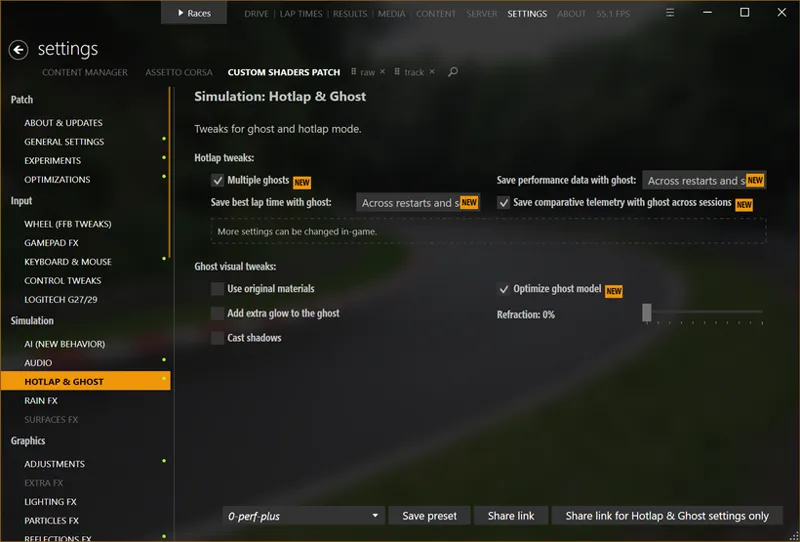
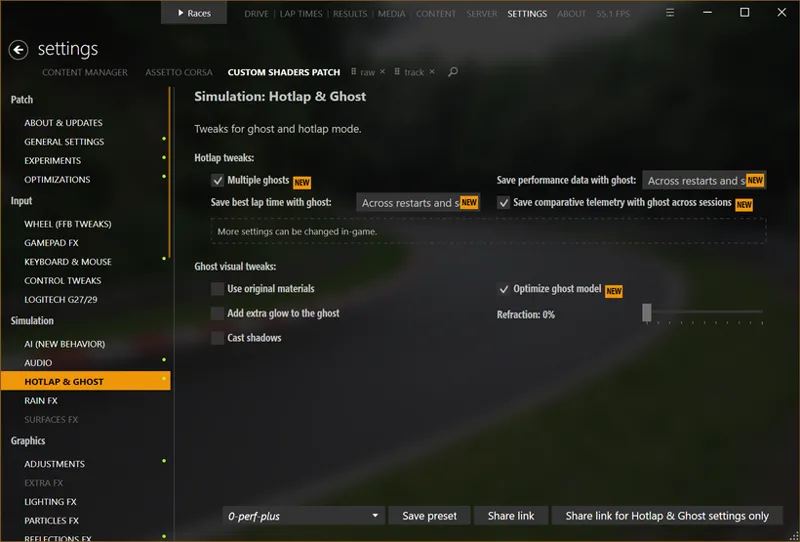
While most of the changes are under the hood, there are still a bunch of new changes I’d like to highlight. One such change is fully rearranged settings. With version bump to 0.3, I thought I can be a bit less strict on keeping things the same, so I took the liberty of moving some things around. Now, all the settings are arranged in groups, so it should be easier to find the thing you’re looking for (also, the new CM update should be able to search in CSP settings as well).
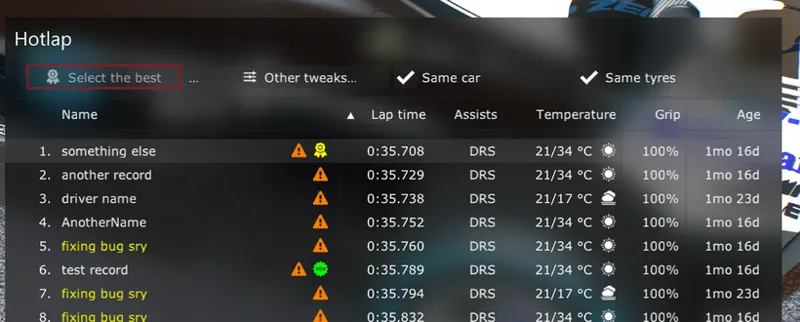
If you often use hotlap, especially with ghost enabled, check out the new “Multiple ghosts” option (it’s enabled by default). With it, you’ll be able to see all the recent and best laps in-game and choose between them, filtering them by tires and car (it allows to load ghosts set in different cars as well). It’ll load performance delta data, lap and sector times and more.
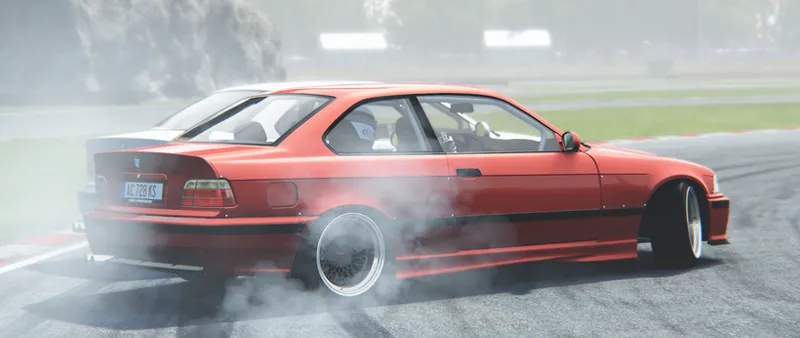
Or, if you ever wanted a ghost, for example, for pair drifting, there is a new feature now too, a new mode called “Revenant” (as in, ghostier ghost). Select it, choose a race, load a race a bind a button: once pressed, it’ll start recording all of your actions and then, when pressed again, it’ll materialize a car recreating it, but unlike an old ghost, it’ll be an actual car, with all the visual effects, collisions and such. It’ll even show up in a replay as a proper car. It actually uses replay data to mirror one car onto another, so make sure to set replay recording duration to something reasonable.
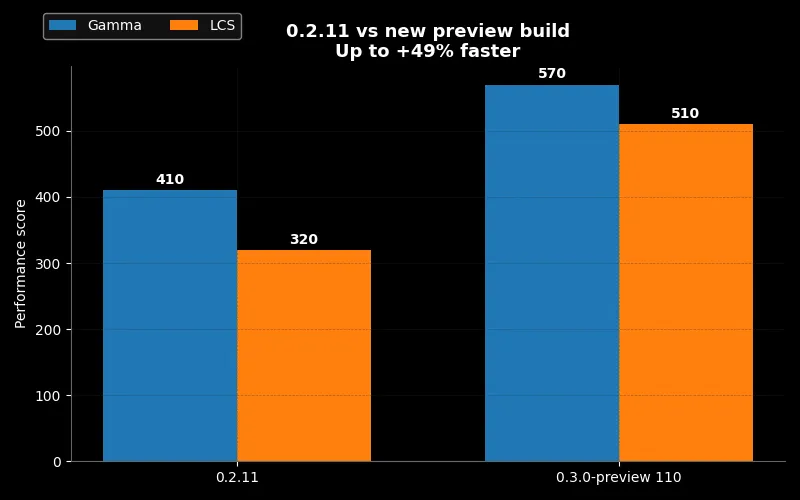
In other notable changes, the new main menu is now active by default, there is a new option for a fancier looking UI, default Weather FX style got a big update for its clouds, exclusive fullscreen have been replaced with a better modern alternative, and VR got a bunch of fixes as well. Here is the full changelog. And, according to both our’s and Peter Boese’s (creator of the wonderful Pure weather system) measurements, it should run noticeably faster, even on Linux.
Please try the new update and let us know what you think! And I’ll work on fixing the remaining issues and getting this thing ready for the public update. Thank you for the incredible support!
Comments (276)
The cooldown lap doesn't work, even though the box for it is checked?
I can’t load in VR with this version. I just crashes as so as it goes into VR. Back on 0.3.11
So, finally we can have a Worldwide Hot Lap table integrated with CM... oh no, it’s just personal laps 😑. Anyway, looking at that Hot Lap UI, can we have integration with the "LapLegends" website? ...Worldwide time challenge 😍...
salut Jai un problème de triple écran quand je veu mettre la dernière version du csp
lights-patch-v0.3.0-preview120-full.zip gives lower frame rates on Steamdeck. At least I have the previous version.
Hi, another question regarding the Brake.mistake implementation. I've seen it's been available in the new APIs, but i wonder how it's used by the game engine. Is it a random fixed value at start, is it called or updated during the game? On my tests i could fix it to 0 second, updating the value on each 10 frames , but i would like to know if it's possible to set it @ 0.1s once ie, and be sure it's not going to be reset to another random value when called by the game.
we need to find a version of CEFsharp that plays nice with Linux im still needing to test news preview on Linux on nohesi and srp servers the 2 problematic ones nohesi is definitively cefsharp related and i think its similar issue for SRP but that end up causing a crc mismatch kick also a custom build of CM for linux maybe the better option as having to symlink loginuser.vdf into prefix is very hacky and isnt the neatest way of doing things it may not even require needing a dedicated client im just not quite sure why cm require the need for loginusers.vdf to be symlinked
Hi Ilja, I do get the an integrity failure - code 21009 - in any car / track combo. - Using version 3650 - Could not drive on servers, game crashed. Threfore I went back to 0.2.12 ...
It would be great to add a hud for the battery. So that we can see in real time how it is being used because not every car has it visible on the display. I mean F1 cars and others that use this system.
If I understand correctly, you have added a table similar to the one on RSR live time. Why don't I see it?
This may be kinda lame but the new game ui I cant change my car color in No-Hesi I had to downgrade to June 11ths patch
Hi Ilja! I'm having trouble getting OBS to recognize ac.exe as a game app for streaming. I solved it by rolling back the CSP version. I noticed a significant performance improvement, but I can't stream.
where is the binding located for the revenant feature? really cant see it anywhere but i am half blind
I downloaded the new patch 0.3.0 and followed the installation procedures correctly, but in CM > settings > custom shaders patch > about & updates I see it at the top of the patch list but it remains (not available to install), I tried many ways but I don't know how to solve it. Help me thanks
Ciao Francesco, la tua installazione è ok. Tutte le versioni "preview" (quelle che scarichi da patreon) vanno installate manualmente e appaiono come non disponibili per l'installazione. Solo le versioni pubbliche vengono listate come installabili direttamente da CM con un click. Quindi non preoccuparti è tutto a posto.
Before this version, in trafic mode, the map selection did only suggest the maps who really have the trafic ability, now all the map show up, is there a way to show just the map with trafic please?
When i just hit race then my map doesnt load properlly.
This latest version doesn’t work at all — the game crashes when I try to start a race. I went back to the old version, and everything works fine.
Two questions: 1. Is the exclusive full screen the one selected in the video menu, or is the new one in the DXGI section? 2. Why do the road stripes flicker or have shiny edges? Why do the grass also have shiny edges, and when you move the steering wheel, those edges move? Is there a way to prevent this from happening? Thank you. I look forward to your response.
FLAMES SCALE_MULT ISSUE
cool update but the flames of my mod is not working :(
hey whem i instald the new version it gave my a griany vieuw and my dachs looks a bit like oil has been spilt on it how do i fix ? thnx
Unfortunately I don't See any other Driver names.
Hello! Latest patch takes away the ability to triple span my screens. I don’t use surround, and manually input settings. Installed previous lights patch, and all is fine again. I just wanted to mention that, in case it hasn’t been said. Thank you!
got the same problem
Working great exept i don't have the starting race red to green dots anymore...really anoying
ye sorry, hotfix coming
minor bug: "Settings > Custom Shaders Patch > UI > General > Hide certain components > Hide ping text in upper right corner" has now inverted behaviour
Hi, with 0.3 the lights flicker every time I move my head in VR, no matter what PP I set.
Thank you for all the hard work!!! Everything works sweet for me except triple screens, the only way I have been able to get it to work is by selecting "Old Window Creating Logic" in Other/ DXGI settings
lol good job only thing missing is back fire/works with sol btw
CLEAR MAGIC!
I‘m pretty sure lighting fx doesn‘t work properly anymore. There was no backfire whatsoever.
Hey Ilja, Thank you again for the incredible mod for Assetto Corsa. I got RTX 5080 /AMD 9800X3D 64 gig ram etc. using VR. I did notice the render app in-game is all over the place. CPU 99% and GPU 98% but checked in Task manager and it showed the "normal" 40-50% as it used to before. actually a little less. Also my beautiful Flames on my drift cars are gone when using 0.3.0. Any tips to get em back? keep up the good work you do for us. Mr. F
Ignore him, I get up to 200% GPU load on my 2080ti and 160+ on my i9990k. Just play and have fun.
Is not work for me
Hi, I was working on my mod and updating the CSP to this version the lights no longer turned on, the brakes no longer had the new CSP shaders. I switched back to the penultimate version where everything works!
Unplayable. Quest 3 with RTX 5090. UI element scaling changed. Frames cut in half. Had to revert to prior version.
Just off ASW or Single Stereo Pass in VR settings.Get crisp picture without upscale.
Hello Ilja, there is something wrong with how 0.3.0 handles the CPU. When you try rain with 24 cars in SPA, the audio is cutting and the performance is horrible. The red bar in the FPS app is getting weird spikes and stuff. Going back to 0.2.12 fixes the issue.
i cant start a race it says waiting for a race to end pls help
Working but some textures missing on some tracks
Pleace check Lazy texture loading and Basic in Chunks Options
hola IIja, definitivamente la v0.3.0 no va bien. a muchas pistas las carga mal. Hay que darle una vuelta. Un saludo amigo
salut pour la plupart des circuit il n'y a plus de textures et les véhicules apparaissent sous la map
Hello, for me the problem is that textures are missing on the circuits.
game crashes when going into setup an try to change brakes or suspension the rest of the setup menu works ok
i have experienced that today as well. just got the new VRC f1 mod and when i go to the breaks the game crashes
After installing CSP 0.3.0., I can drive alone and it works, but the game crashes whenever starting a race against AI. With 0.2.12 it was stable. Looking at errors log, errors.txt says "INIReader: C:\Users\(my username)\Documents/Assetto Corsa/cfg/race.ini > KEY_NOT_FOUND: [CAR_0] DRIVER_NAME". custom_shaders_patch.txt says "34754 38cc 🚀 Compile shader: 4654.60 μs 35025 M 🚧 Generic error"
Well, it did work when racing alone, now game crashes every time even in solo practice. Great. Back to 0.2.12 I guess
For my part, the latest pure v3 works but the lights patch 0.3.0 makes my computer slow down considerably. Resolved by returning to version 0.2.12.
salut , j'ai reussi a faire fonctionner pure 3 avec csp ,0.3.0. il faut supprimer tout ce qui relatif dxgi , reshade.. il faut dans CSP , aller dans la section "other" et puis dans DXGI. decocher HDR support. Hello, I managed to get Pure 3 working with CSP (Custom Shaders Patch), 0.3.0. You have to delete everything related to dxgi, reshade... In CSP, you need to go to the "Other" section and then to DXGI. Uncheck "HDR support". https://acstuff.club/s/f7i9
I've found that shadows and reflections are a little off, compared to the previous version I have a lot of flickering on the car and weird shadow pop-in in places, it's happening on all cars (base and modded) and most (base and modded ) tracks from what I'm seeing.
Same. Or periodic grass/objects flicker on some maps
After installing your CSP patch the exhaust flames disappeared — that’s the issue I noticed, not sure if anyone else has this too
In the old version of CSP everything works, in the new one I don't have textures in the game ????
hi great job for years thx. but for once i have a trouble i was triple screen, and i update for lightpatch 0.3 then , my triple screen became 1 screen , the one on right . and if i tick the full scrreen option , i have the three image on the center screen ... need a hand thx before
Setting "Old window creation logic" in DXGI solved my problem. THX Bruno Pinheiro
hello i want to make a server for me and my friend to play how can i do it i have this version and the server button on to is not working and it says not available in the lite version yet.
Everything fine here, works very good, tested with 2 cars and 2 tracks.
I have strange flickering of the lighting, I had to return to the previous version
Sorry, I had to go back to 0.2.11. Besides the race starting lights not showing, some tracks that worked before the update are simply transparent (except the trees and some parts of the backgrounds). Unless there is an easy fix through the new settings of the 0.3 (which I prefer, it's better organized and some other benefits), I'll wait for another update...
Bugs I’ve noticed: - Track skins no longer work. Areas where the skin textures should appear are now completely black. - Flames no longer show up. - The game won’t launch when the image upscaler is enabled. - Front wheels in custom previews sometimes turn in random direction
- game crashes when trying to change camber values on the Zonda R in pits
Hello, and thank you for your great work. I tried it out and noticed an issue where skid marks don’t appear with some truck mods. It seems that these mods load the skid marks as a separate KN5 file. I don’t have other examples to compare with, so it might be something specific to my setup, but I wanted to report it just in case.
I've lost my triple setup with this update. it shows as triple but only on the center screen
rolled back to 2.12 and all is normal again
No flames 😔
Same here 🥺no other worries otherwise.🙂
Hello everything works fine for me on this version. The only thing that is not working for me are the race start launch lights, switched back to 2.12 preview1 and these are working fine.
bad news furthermore. The fps or whatever happened but the game just run more slower and fps drop significantly when turn :( in the other hand with this new update on lfm servers just vanished my personal skin :(( . whatta shame that for my point of view nothing advanced by new build just old issues remains and alot of new bugs appeared. Realy i never found any of builds so exagerated buggy. :S
The result is completely opposite. The Corsa is such a Corsa.
II updated to 0.3 and now have an issue where tripple screen is not working anymore. Doesnt matter the resolution I set, it always just is fullscreen on the main monitor. any pointers?
It's the same problem for rally circuits.
Hi llja love the new update, the only problem I have is no start lights in race mode, noticed someone else has this problem?
Same here. AC start lights not showing and tracks Flags and start lights not working.
Hi, with this latest version and with reshade enabled, Assetto Corsa runs very jerky, with the previous one no, can you help me thanks.
Hi, in version 2.11 I was able to reduce sound of surfaces in game app by the slider, but with 2.12 and the latest, it continues to make noise and does not respond to the slider. Am I doing something wrong? It does not matter if I enable or disable traction control tab in csp audio manu. Thx
I can not get triple screens to work with this patch. The game opens on my right side screen only. Rolled back to the previous stable version and it works fine
Full of bugs once again...
Another issue is when i take a screenshots the shot being taken removes all color grading and adjustments made to the filter and pure config.
Hello i'm getting a big direct x error when trying to launch into assetto corsa through content manager. I did the basic troubleshooting a fresh install on assetto corsa and command manager and a fresh clean gpu driver install i re downloaded direct x and C++ and i'm still getting the issue. So i rolled back to the pervious CSP patch where the issue is non existent pure 3.0 is working its just lights 3.0 that i'm having a issue with. I figured i would report the problem so it can be looked at. Thank you for your hard work any and all tips for solving the issue are appreciated.
The problem has been resolved thank you to all those who took time to help. Now to redownload all my mods pain... lol
I'm missing the whole track on togue's and highways
Gone back to previous version for now the pure menu's and CMRT hud where huge and not aligning properly.
I had this too and I found a workaround. Check if your UI scale setting is over 100% like mine was. Change your UI scale back to 100% in CSP Settings > UI > General > New UI and it should fit as normal after resetting to default layout in CMRT settings app
I am missing the starting lights in the GUI with latest CSP. Peter Boose suggested this is a bug in CSP. So far, other than that I'm not having any issues in VR, etc. Seems a little performant as well. Keep up the good work!
It may also be that the track itself needs updating to work with CSP 0.3.0, but backward compatibility really should be maintained in CSP given that a lot of us are using mods that will likely never be updated by the authors again.
With version 3.0, my FPS has dropped by 10-20. In RAIN, it's impossible to compete, with much lower FPS, and my CPU usage has shot up to over 110%. Anyone else?
Same, I am on a 5090 and it was almost unplayable. Lagging sound, frame drops galore. I reverted to 0.2.12 preview with Pure 3.0, but even after the downgrade it is not as good as it was before, whether this is pure 3.0 or files left behind from latest CSP 0.3 I have no idea.
I'm finding that I am still getting issues with screenshots taken in HDR are washed or over contrasted, apparent flickering especially when loading initially, and changing ppfilter (or sometimes, simply loading AC) causes the framerate to drop from 60+ to 4-5fps. When it's working, it's working great though. The fix for shadows on driver hands is HUGELY appreciated - a very annoying bug!
To add to this, I have tried using both Pure and the default weather controller. I can reliably 'make' the FPS get stuck at 2-3fps. Starting during the day at 60+fps, change to night, and then when you change back to day again it drops to 2-3fps. Changing PPFilter almost always does this too.
all fine on RTX2080Ti, oculus rift. feels like improvement. cheers! well done!
Same CFG
All works great here RTX3080ti, R9 5900X, 32GB DDR4 - just cant find the start recording bind for the new Revenant mode, does anyone know where to find it?
it's in pits, middle of the screen
Thanks so much for all your time to keep this game at the top. I really do see a difference in VR with this release. The framerate is definitely more stable. It's really nice to finally being able the change the PP filter on the fly. A side effect, I lost the "Overlay leaderboard". It's not linked to VR as it's also not displayed on screen. The option in UI/view is active. When I type F9, I can see the banner a the top of the screen saying which display type is active but the leaderboard is still not visible. Thank you. Stéphane
After updating, on a drying track or in light rain the dry line is getting more wet while the rest of the track dries out entirely. This leaves a very bizarre wet line on the racing line that keeps getting wetter to an unplayable extreme. Even high humidity is enough to get the wet line started
I had this on 0.2p212 also, I can't figure out a cause or any way to change it.
ok. guys where do i find the rain settings. Im taliking about spray and track line drying up
hey so i was trying out this new 3.0 on SRP (shutoko) and the whole map is like floating the trees road exc but car is fine and weather is fine . Its omly for this map that it doesnt work ebery other track it works fine but i just downgraded to 2.12 because thats working a little better for me
Yes, same thing with me, very unfortunate.
New csp is causing a strange bug with Camtool. The camera doesn't move fast enough n falls behind the car loosing it in shot. Switched back n forth twice from 2.12 and the new update to test and it happened both times. Was fine on 2.12preview. Just thought make you aware
umm im having no flames after updating to latest csp and pure ?
Another nice issue as this time i miss the start in an online race as the starting lights was missing and until i realized i messed up my startup protocol :( . I prepare for a lot of bugs here ,which wasnt before. The setup load menu has sometimes not deleting things ,its screwed sometimes ,i note that i use new main menu
Hello, first of all, thank you for the great work you do. I installed the new csp ex the new one as well. In Vr With the same graphic settings that I had with the precedent versions I had an increase in CPU usage from 60 to 99% and the gpu from 60 to 90/95%.
because now implemented to share our resources to the war :S
For some reason, shadows now look like a moving conveyor belt and everything is crazy bright. No idea what's up with it, using Pure but I've reset everything to defaults. AMD card and GPU for what it's worth, but probably rolling back for now.
Hi there is an issue with the reflection , it glows for no reason and flash. its buggy with sun reflections
With new version of CSP the "F9" leaderboard won't appear
Same for me
Even i choosed separate control for cars in extended controls , still messing up control bindings :( ,another issue with new Cota track from pyyer the fenryrs one is showing this error Failed to create texture “Track display dynamic texture”. Creation parameters aren’t valid.
I tried it but the colors just became way too bright with increased contrast and when I reverted back to 0.2.12 preview, the colors normalized.
Same here for me
Bonjour il se trouve ou le mod revenant ? je trouve pas merci
then old windows creating logic , old swap chain , allow exclusive full screen
check in gpu to used to selected monitor
Alright I just figured out on light patch 3.0 issues u guy need go to custom shader patch then go to DXGI option there on side common tweaks
Workls great just cant see my score or change me car colour on no hesi
:) big rewrite. I started and after 20sec i realize that Using VR and my controller cursor is just showing up when i move the cursor , it dissapeared when on menus . The car setup menu car image is still overexposed,Laptimes shows nothing ,honestly this was so crucial usefull every practice race session . Guys we waited half year of patronage to see this fundamental issues after 20sec ??? and the biggest modification underlined here is some unnecesarry ghostcars ? realy ? we are so stupids to say that is normal that again unnecesarry things was implemented before basic issues still there . And dont get me wrong i just started the new release whats comming next after i dig deeper . perhaps other dosens of already working stuffs gets broken . joke
I'm getting an integrity failure error no matter how many times I try. Been running on the previous for months with no issues. Latest Pure 3.0, latest CSP preview.
Seems others using the DLAA mod are getting this, please see https://www.patreon.com/posts/assetto-corsa-v1-106481247 I am not sure it's worth sacrificing DLAA :) Especially not in VR
The improvement in VR performance seems solid. Thanks! I have 2 issues. Start lights not working as another user mentioned. And, not sure if update related, the braking discs glowing through the tires of all cars.
I have the same issue with the starting lights not showing, when starting a race.
Points system on no hesi servers is not working for me everything else works fine
same here
Hello guys :) . I think i found a work around fix at least until Ilja fix this. I tried that little program ResizeRaccon and it's working perfectly! So in-game video settings i have: Fullscreen ON, resolution custom = 5760x1080 and my 144hz... and nothing else selected. Then in ResizeRacoon: in the process you select ACS.EXE and also select auto resize slider, select you preset and save it. Don't touch anything else. For me it works! ;) Hope this helps
If you click “old window creating logic” under dxgi compatibility tweaks, triple screens works fine without resize raccoon
This is awesome! Been wanting to race different ghosts from day 1. Thanks, it works great! Been racing myself all morning.
Hi, did you just install via the link down below and then copied light patch? It then just worked or did you have to enable certain things? I can’t get the ghosts to work (not even from same car)
With csp 0.3 I have some problem with cpu usage so I reverted to 0.2.12prev where on monitor everything is right but when I try to launch the game on vr I've got something like infinite black loading screen and I have to restart my pc as everything seems to be frozen. Same thing happens on 0.2.11 12700KF, 3070ti, 32gb 3600mhz with quest 2
Have the Same Problems, Microlags due to higher CPU Usage. ---- 4060, Ryzen 7 7840hs, 16gb 5700mhz
Hi. CSP 3 installed and crashes DRIVE SINGLE. Just come back into the stable version and waiting for a fix. Thanks for the efforts Ilja
Hi, I just installed the latest version of CSP, but when I go into the options menu, this screen appears, with the various options sorted alphabetically. Why don't the categories appear?
Unfortunately crashing when loading track with dynamic textures. Rolling back to previous CSP solved the problem
What cars do u use? I get it with newer VRC cars but not older ones.
Thx for all the work. Triple screen without surround stopped working on 0.3.0 it initiates game as it was single screeen
look in the comment, there is a option you must checked(DXGI Old Window...). triple Screen with new version without suuround is working
First of all thank you for the amazing job you are doing to boost our common passion for Motorsport/Simracing! I'd like to ask for 3 questions about graphics setting. 1) SSLR quality to Hi-Z is significavely better than ti Simple new? is it worth? 2) while racing with AI on some tracks I suffer an unexpected slow-mo of the games. it is not a topic of FPS drops that are almost 165 that is the limit of my monitor, all the game seems going in slow-mo and then a kind of Fast Forward to recover the lost time)... what can it be due to? 3) are there any suggested / predefined set-ups to tips for the most common hardware configurations (e.g. my stuff RYZEN 7 7800X3D - DDR5 32Gb - RTX 4070 SUPER 12GBsuper). There are so many options and situations that it is hard to understand the consequences of out settings, especially when their stability/reliability is not 100%. if I hope you can suggest me a few tips. thanks
Regarding ghost mode, even with it enabled, I'm unsure as to how to see the results. There doesn't seem to be a menu anywhere in CSP, and neither is there anything in-game (app, menu item, etc.), although it looks from your screenshot like there should be? Furthermore, is it possible to see results from saved .json sessions? I run a local leaderboard on my rig, and I'd love to include the times (if not the ghost, as that data probably doesn't exist).
+1. I can see the ghost feature under CSP settings, it's enabled. Under 'drive': enabled ghost car. Set a lap, exited. Created session again, no ghost visible. Also nothing in the menu's about it as well (in game). Also noticed ilja has a tab called races next to drive (in the picture)... i have never seen that on my CSP, maybe i'm missing something?
Blackout on texture load unfortunately. :) thank you for the updates thus far! 😃
Experienced the same issue with Triple screen mode not working. I notice the the green dot showing enable is on VR mode. I cant get Tripple screen enabled with this version. Reverted to previous version and triple screen working fine.
INTEGRITY FAILURE PLEASE REPORT TO X4FAB 21009
bro thank you for the revenant mode, cant wait till it gets perfected
Idk why but when updating this and pure today, my screen now looks grainy what could this be ?
Yup, I have the same triple screen problems. The interior of the car is also bent outta shape. My FPS has more than doubled. I also love the new UI. The single screen looks good, it's the triples that need some work.
Please can you have a fix for this IIja ?
Hello all. Anyone find out a fix for the triple monitor error ?? I have the same issue... it only shows "everything" in my right monitor !! This is frustrating!!!!.... :(
When I updated to 3.0, I couldn't run triple screens anymore, it just defaulted to my single right monitor. When I switched back to 2.11 everything was fine again and triple screens work.
Does anyone know what new setting is limiting my FPS to 60? I was getting 180 pre patch and I cannot, for the life of me, establish what new setting is throttling
I have the same issue. Quest 3 with RTX 5090.
Seem light patch 3.0 bugged issued with graphic resolution screen keep shutting off screen
The optimisations are amazing in VR, but I've lost the starting lights and I can't do asymmetrical setups (particularly for tyre pressures) because mirroring is automatically on
Hi Ilja, I’m using CSP 0.3.0-preview and noticed that when switching cameras (F1, especially to cockpit view), the engine sound disappears for about 1–2 seconds before coming back. At first, I thought it was caused by Pure 3.0, but I tested again with only CSP enabled and the issue still happens, so it seems to be a CSP related bug. It occurs on multiple cars (like the RSS 1990 and VRC 2025). Maybe something related to how the sound reloads when changing views? Thanks a lot for your amazing work just wanted to let you know about this small issue!
love the ui upgrade plus my fps is way more stable and the game looks better so if u ask me seems good
I had a strange error. With the urd radical cars, I had an error it couldn't find a sound.ini in the data folder. Car had none. I unpacked the data file and then it worked
My start lights have gone, going to need those back please, kind of rely on them!
did this mess with ability to change colors in nohesi?
now im pretty sure it did. after changing to a older build the ability came back
My only issue is that Fonteny textures won't load. Everything else seems good for now
Unfortunately I was not able to get triple monitors to work with this update. I went back to previous version and they worked again. Can't thank you enough for all your work!
weird triples are fine for me.
Hi, Thanks for the work!! On my CSP settings it says not available to install, how do I fix this?
damn that Revenant mode is PERFECT holy shit it's like 2 minutes and you're drifting with yourself instantly. crazy good
Hello, First thanks for your work ! With this version I've got several of the problems already listed on the comments ; graphics bugs, overall graphics / FFB have decreased, lag, crashs, and I CPU warning occupancy. So I'll have to wait a little to enjoy the new vesion ! (intel CPU, Nvidia rtx, windows ; tested with pure 3.0) Have a good day
Cpu utilisation more than doubled going from V0.2.12 to V0.3.0. Same car same track, same AI cars.
installing this the triple monitor no longer works
Tick the Old window creating logic under Other-DXGI
Hi Ilja, Can't find Axis Remap in the Gamepad FX extension anymore. That has allowed me to use the right stick for throttle / break. Is it gone completely, or just somewhere else?
DO NOT TURN ON HDR IN WINDOWS OR HDR SUPPORT IN CM AS THEY ARE BROKEN. TRIGGERS OVEREXPOSURE AND WHITEOUT SCREEN. Please fix 🤙🏻
im having a fully greyed out screen, menu is showing up but something is messing with the game display
Hi Ilja, as usual thanks for your work and for helping keeping AC alive! Two things I wanted to report, which have also been discussed on the VRC discord, first the new main menu is causing crashes when using their Formula Alpha cars. Secondly, and still with their Formula Alpha cars, there is a problem when using the Automatic Clutch option were the throttle is "stuck" i.e. in whatever gear you are the car will apply a bit of throttle even if you're not pushing the pedal.
Thankyou brother! All working fine. I am very happy with the skidmarks occlusion fix! I have been working on some offroad tracks and noticed the reflective dirt tracks csp2.9-2.12. One thing I have breifly noticed with the latest 3.0 update is the puddles seem to be overly animated, but other than that I am so happy to be able to perfect my offroad tracks (which utilise somewhat heavy subdivisions and sculpting on some sections for geometric ruts and details) now that the skidmarks occlusion is fixed!
Are you ever going to update the version of FSR? Or add more upscaling options? I play in VR and it would be amazing if we had more up to date scaling options. Edit: Or at least make it so we could just swap out .dll files. Would be awesome :).
Just use OpenXR runtime for u headset.It have more upscale and render options
AC crashed during launch until I disabled AMD FidelityFX Super Resolution.
Mine was stuck in Direct X initialisation but after disabling FSR it launched in 3 seconds! Thanks for this hint!
Wow i have massive preformance gains in VR. I was able to increase resolution and graphics settings and i still have 20fps more than i did before. The diference is massive thank you.
How do you activate revenant mode? thnks
Practice - hot lap - race - TD - Weekend - Drift - and more modes
Game is really blurry and crashes on NVIDIA hardware if AMD FSR is enabled on loading (it still works when enabling it after loading, but it crashes eventually).
If "Old implementation" option is chosen, AMD FSR function works smoothly on Nvidia GPUs. FYI
Can someone help me with multiple ghosts pls 🙏 ty
is it not possible to deactivate all new features? give us the Info what is new... and when i want this new thing i change the settings? after triple screen Problem i have problem with the track.. Asphalt and Gras. Sky and Buildings are ok
ok track problems comes from texture pack. but is it not possible to keep the old Stand when i u7sed triple screen in old version that i have it without in the new version>?
the GT7 HUD crashes with the new version
I cant load the game with this new version i keep getting this error d:\dev\csp\csp.cpp (1): [00007ffa17ac6b4f] d:\dev\csp\csp.cpp (1): [00007ffa17ac70f1] d:\dev\csp\csp.cpp (1): [00007ffa17ac72ae] d:\dev\csp\csp.cpp (1): [00007ffa1770049f] d:\dev\csp\csp.cpp (1): [00007ffa176ffa25] d:\dev\csp\csp.cpp (1): [00007ffa17784df1] d:\dev\csp\csp.cpp (1): [00007ffa176ff186] AC\game.cpp (23): Game::Game d:\dev\csp\csp.cpp (1): [00007ffa176ede76] AC\acs.cpp (450): wWinMain
I have exactly the same error, nothing works.
anyone has an issue with mods turn blue?
The new main menu crashes the game when trying to access certain pages of the setup screens with the new VRC Formula Alpha 2025. changed back to normal main menu and no problems except for my driving. Absolutely no difference in performance between Gamma and LCS, identical average FPS reported at the ens of the sessions.
Could you describe more deeply how to exactly activate Revenant ghost mode?
just click on Drag Race to see the menu with extra game modes
Loved the update in general, specially the new in game interface, but... Startlights are not working properly. Rain drops apper in my dashboard inside the cockpit. Framerate has droped significantly. I know you~ll fix it, but for now, I will downgrade to 2.1.1. All the best!
CRASH in: OS-Version: 6.2.9200 () 0x100-0x1 d:\dev\csp\csp.cpp (1): [00007ffa42f4e5a2] d:\dev\csp\csp.cpp (1): [00007ffa42f5107a] d:\dev\csp\csp.cpp (1): [00007ffa42f53364] d:\dev\dev_pc_master_race\ksgui\gui.cpp (195): ksgui::GUI::doRender2D d:\dev\csp\csp.cpp (1): [00007ffa42f4a5c1] d:\dev\csp\csp.cpp (1): [00007ffa438cb643] d:\dev\csp\csp.cpp (1): [00007ffa42f4b18e] d:\dev\csp\csp.cpp (1): [00007ffa42e7f0c9] d:\dev\csp\csp.cpp (1): [00007ffa42f0de8d] d:\dev\csp\csp.cpp (1): [00007ffa42f0ed06] d:\dev\csp\csp.cpp (1): [00007ffa42e7ef66] d:\dev\csp\csp.cpp (1): [00007ffa42e7f6b5] d:\dev\csp\csp.cpp (1): [00007ffa42e7fc59] d:\dev\dev_pc_master_race\acs\acs.cpp (477): wWinMain
This update seems to break the start lights. I installed it and got nothing at the start of races, I rolled back to 2.12 and they show up straight away. It also inverts the glance left and right when in chase camera so the glance left, looks right and vice versa.
Killed my performance in VR, straight back to 0.2.12. Probably cpu related as I'm running a 5090
Great new interface, I prefer the new chapters and in-game graphics. I'm on the latest CM/Pure, Nvidia Surround triple-screen on 3x43" 5760x1080, RTX3090Ti, clean and updated PC drivers. Everything works and looks great! The effects (sparks, dust, smoke etc.) are there and looking good. One single detail: I've lost the starting red lights :) , I have to react to the other cars for now. I can't find the relevant setting in CSP. Good update overall!
Triple Screen stopped working. Does anyone have a fix?
The solution for me is to check "Old window creating logic" in "Other: DXGI". FOund that in the thread and it solved it. Hopefully we get a proper fix
crash a tous les lancement . rtx 5080 quest3 csp2.12 ok very well
CRASH in: OS-Version: 6.2.9200 () 0x100-0x1 d:\dev\csp\csp.cpp (1): [00007ffa42f4e5a2] d:\dev\csp\csp.cpp (1): [00007ffa42f5107a] d:\dev\csp\csp.cpp (1): [00007ffa42f53364] d:\dev\dev_pc_master_race\ksgui\gui.cpp (195): ksgui::GUI::doRender2D d:\dev\csp\csp.cpp (1): [00007ffa42f4a5c1] d:\dev\csp\csp.cpp (1): [00007ffa438cb643] d:\dev\csp\csp.cpp (1): [00007ffa42f4b18e] d:\dev\csp\csp.cpp (1): [00007ffa42e7f0c9] d:\dev\csp\csp.cpp (1): [00007ffa42f0de8d] d:\dev\csp\csp.cpp (1): [00007ffa42f0ed06] d:\dev\csp\csp.cpp (1): [00007ffa42e7ef66] d:\dev\csp\csp.cpp (1): [00007ffa42e7f6b5] d:\dev\csp\csp.cpp (1): [00007ffa42e7fc59] d:\dev\dev_pc_master_race\acs\acs.cpp (477): wWinMain
Amazing update thank u
Tried it properly today, it's not good for VR previous version had good performance
I just tried it out in VR with a Beyond 2e. It's a huge improvement locked at 75 Hz and looking very nice
I just loaded up AC for the first time in ages yesterday and was surprised to see there hasn't been an update in so long! And then I get this email today, what a godsend! Can't wait to try it out. Thank you for the continued hard work to make this experience so amazing!
Please Fix the Triple Screen Problem->3 Screens NO Surround/Eyefinity! I cant use the Eyefinity from AMD, i get only trouble with it. i go back to 2.x with no problem with my triple
ok fixed thx for the DXGI info Old Window
Hey same thing for me the backfire flames are invisible when driving, but when I force it in the photo mode it's there not sure whats going on there
Does it make any difference if you turn New/CSP Flames on/off?
What's the best/most useful way to log bug reports?
Im locked on 60fps on triples, anyone else having this issue? Haven't changed anything from previous settings
Yep, same here but on a single monitor. No matter what I change in the configuration I am locked at 60fps
Ждал )
Thanks for the update, but for some reason, I could not* take clear screen shots like before, the screen shots now seem to be blurrier and aliased, using Nvidia RTX 3050. Anyone experience that as well?
confirmed that it is due to the latest CSP, or maybe the new CSP needs new settings to correct this. Rowing back to previous CSP for now. Hope this info helps.
I love the new CSP menu layout in CM. is a lot clearer. I Use Triple screens but no nvidia surround. Until now, with CSP 0.2.12-Preview I used : - fullscreen => off - Custom resolution => 5760 x 1080 x 240Hz - Show on screen => selected "the middle one" now with CSP 0.3, no matter what setting I change, the picture never spans across all screen anymore. Any idea ? Is it thinking it is in full screen no matter what and locks itself to one monitor ? Thanks for the amazing work ;-)
same here
wow it is really amazing and smooth, one thing i noticed is that the starting lights don't appear anymore. i just have to react to the other cars starting, is there a quick fix to that?
Same here. I can't find a relevant setting in the CSP menu. I've verified the file intergrity, no issues there.
in my case after installation 0.3.0 shows on the list but its says Not Available to Install and i cant select it, while older 0.2.12 is working without any problem
are you using the preview version or the non preview version?
The starting lights no longer show to start the race. This was observed in Race Weekend. Reverting back to v0.12 P1, starting lights show up and work as intended.
I have no more exhaust flames. For me is a big part of the game. What can I try to fix? (I need an independent event, not only related to audio backfire, as for antilag or running rich discharge not producing backfire sound.)
Hey strange thing, for me the backfire flames are invisible when driving, but when I force it in the photo mode it's there not sure whats going on there
Man I love your work in improving the quality of life in this game and i love supporting you either :)
Using in VR with Snowy Moon TAA Mod and DLSS getting "report to X4FAB Integrity Error 21009"
Re install mod, csp just rewrite dll of snowy mod
No graphical issues thus far with Pure.
Holy moly this update tripled my FPS and everything is very very pretty! Can't wait for more improvements.
For me, my triple setup didn't work anymore, game starts on a single monitor, and not even on the primary. Does someone have similar issues?
try to uncheck the fullscreen mark
Ahhhh now I have to skip gym and try the new update 😍
Thank You! Liking the revenant feature. Hopefully one day we can save the recording and or add more cars to it. Really liking it!
how do I bind the record button for revenant?
start game, it's at the start.
Thanks for the update, Ilja! On my rig the new patch shows less performance than the previous one. I am locked at 120 fps. I used to get it with under 50% gpu utilization with my video card (5080) running at 2500ish mhz. The card now throttles to 3015-3022 mhz with the same utilization % in order to keep the same fps. No settings changed.
First attempt at loading into silverstone_ks using Pyyers extension and I got a fatal error "Track display dynamic texture" creation parameters aren't valid
same
I'm in VR and gave it a quick go... The SRP map loads on top of the map. I can see the cars driving on my level but can't see the track. It's like down there somewhere on a lower level, if that makes sense. Sorry my English is not good. Happens online and offline? I tried a practice session on Spa and everything is fine?
I have a picture-in-picture setup, but one image is frozen and only displayed in monochrome. Unfortunately, it doesn't work at all.
I just found the problem myself and fixed it. It's working perfectly for me now.
Wait, did I read that right, can change pp filters in VR in game?
Open the Photo Mode app in game and it’s there.
What is the difference between Pimax high and Pimax recommend?
Unfortunately performance in VR is pretty bad
When using Snowymoon's antialiasing filter I get "Integrity failure please report to x4fab: 21009" on the top of the screen. Other than that it works ok with this filter enabled, but only with closed cars (at least this is what I narrowed it down to). When I load any open wheeler (ASR mods, kunos stock ones) I get absolutely terrible framerate. I play in VR using Oculus Rift. Would be great if this got fixed, because I can't play without it :).
The question is, why are you using another Antialiasing solution when... csp alr has one? Is it a VR thing?
I'm sorry to have bad news. I only see 1080p. I've tried several settings, and nothing changes. Good night.
Has the rain bug been fixed?
Triple Screen no longer functions after installation!
My triples are fine. running 7680x1440 as a single screen in Windows with the triples option turned on in CM. Getting a 10fps performancer upgrade on LAC too.
does anyone know how to make the rain work
watch this for rain https://www.youtube.com/watch?v=6t9u4eF4ruU
Awesome, can't wait to try it out
photo mod with triples is cutting photos :( now i understood it is making zoom cuting photos
just found the issue. it is amd fidelity super resolution :( but without it i loose a lot of fps! Ilja can you please fix this issue? cheers!!
i lost my triples, i didnt changed any of the settings, game only showed on one screen but "triple-like" cutted in three
i converted back 0.2.11 preview, everything was fine as usual, strange.
Not ready yet. I've some crash with it. If you want, i can send you my crash-dumps :).
Awesome stuff mate!!!!!!!!
map textures are not loading
TechnoRacerX's textures are black on nords.
Awesome stuff mate, will give this a go today
Broke my game, maps don't load in, cars driving on invisible roads, wtf
Try disabling advanced chunkenization in graphics adjustments, just for a test, would that help?
Are you for real ?! Are you telling us you couldn't buy a new PC untill now with the $50.000 monthly you get from us ?
Tbh I had it for awhile now, but I just couldn’t find time to switch. All the software, all the settings, all the licenses… And ever since I left my country and started traveling, I had to leave my nice PC behind
😍😍😍
looks great so far , thankyou
IVE BEEN WAITING SOOO LONG FOR THE MULTIPLE GHOSTS TYSM!
I am yet to try 1 ghost still. So now it could be me racing me that raced me that once raced me? that is pretty cool
ILY for the "ghost" stuff
Merci et quel travail , terrible 🤩
amazing
🔥