




Further improvements to LCS and SurfacesFX, online replays, radio app and a bunch of fixes
As always, it took a bit longer than I hoped, but it’s not only the fixes, there are some new quality-of-life improvements as well. And, of course, a lot of fixes, since it’s going to be the next public update too.
Linear color space and default WeatherFX style updates
Of course, there were quite a few bugs with linear color space implementation, but now most of them should be fixed: that includes issues with nePBR shaders, lights range, rendering breaking on reloads, heating materials being broken and more. SSLR should also look a bit better with LCS on, although it might need more work still.
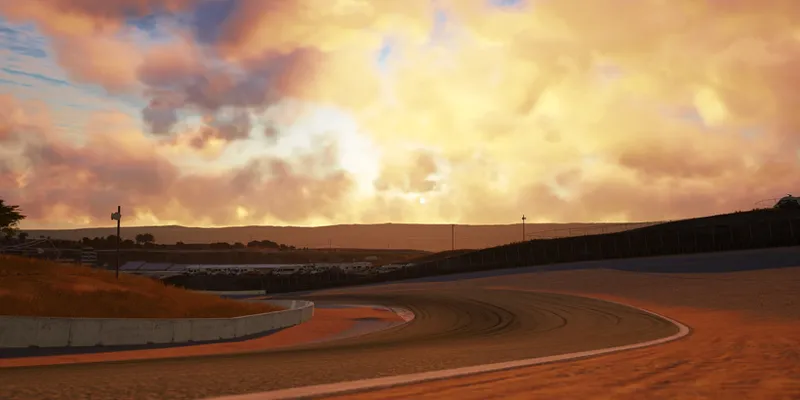
Default WeatherFX style got a few updates and fixes as well. Main change is new cloud layers for clouds up above. Also, there is now a small chance to see a falling star at night. Other than that, fog above (on tracks with tall buildings) and exposure in tunnels should be fixed and working properly now. Oh, and all the extra effects are optional now.
SurfacesFX
Getting closer and closer to a final version, now we’ve added surface type modifiers and rally tyres. A proper rally mode with a functional copilot is coming soon, but for now you can test current progress with these two cars: Toyota Yaris and a rally version of Kunos Celica (updated suspension and tyres). Most tracks should work out of the box, but to be sure simply open “data/surfaces.ini” and add “_EXT_SURFACE_TYPE=GRAVEL” to sections with gravel.
Please note, SurfacesFX is still a subject to change and is not yet available in public build, but it will be soon.
Radio
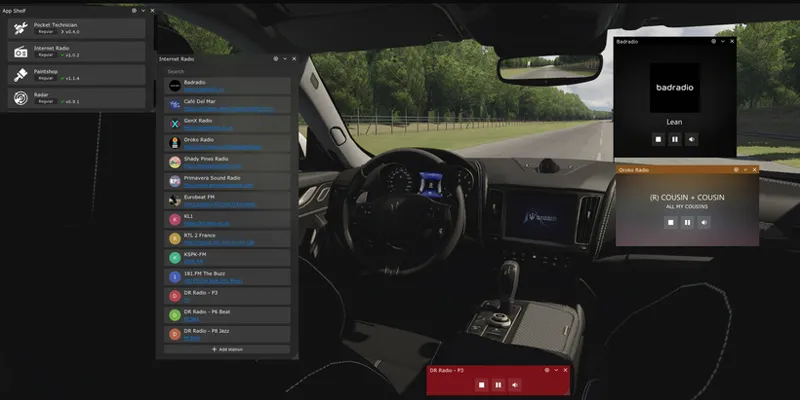
If you ever looked at Assetto Corsa and thought: “That’s cool and all, but why is there no music?,” I have some great news for you. The whole internet radio thing previously only available in Android Auto has been revisited. Instead, now CSP itself keeps track of the list of stations and manages playback, while other scripts can interact with it and control the state. This way, Android Auto app remains functional, but there is also a new Internet Radio app on the App Shelf seamlessly integrating with it, which is a lot more usable if you want to add your own stations or something. Not only that, the updated system uses API provided by radio.co and laut.fm to show some details for the currently playing track. And the list of stations has been updated as well, with dead ones removed and cool stations like badradio added.
Apps switcher
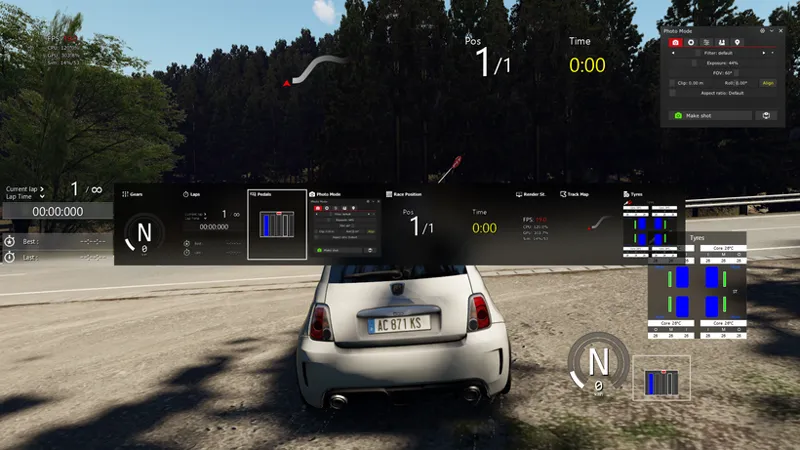
Sometimes even I’m losing open in-game windows, be it outside of view or just hidden in piles of other windows. Well, now it should be easier to find a missing window with the help of the new Ctrl+Tab shortcut, which works very similar to Alt+Tab in Windows (to keep things familiar), but also moves apps in the view (optional and can be disabled in taskbar settings). It might not be a huge change, but I think it might save some time (definitely saved me some time already).
Replays online
There is a new super-experimental option in General/Developer (at the bottom) allowing you to actually use instant replays right in online races (as long as the car has stopped moving). Not going to hide it, it’s a bit broken, some aspects of CSP weren’t designed for both simultaneous replay playback and recording (because, of course, this way AC should both replay things while continuing simulation and recording new stuff), but it seems to be mostly functional.
Rain FX
Turns out, for quite a long time there was this silly bug in rain physics where AI or remote cars driving far away from the main car in places the player hasn’t visited before would create areas without any puddles at all (which would then remain puddleless for the rest of the session). Recently, due to a change in some visual aspects, that zero got replaced with something like “pretty deep puddles”, so in some races you could see your car suddenly lose all grip in some cursed areas. Well, that one should be fixed now, sorry about that mishap. Apart from that, AIs should be wiser when changing tyres and no longer change tyres on the last lap.
Other notable changes
Shadows stabilization actually works now, shadows are a lot less shifty.
New AI Spline Editor app on the App Shelf for tweaking trajectories and sides.
Web Browser should perform better on Windows 11 with HAGS enabled.
New option to disable loading of interior and other redundant samples for remote cars that might help with performance and memory consumption.
WeatherFX got an option allowing conditions outside of their usual range.
Here is the full list of changes. Not a whole lot of new stuff, but now with the public v0.2.3 update and linear color space finished I hope I’ll be able to get back into adding new exciting visual features.
As always, thank you immensely for all the support! Here is a link for a quick update install.
Comments (262)
hi, i’m having trouble downloading this csp when i get it to my content manager it says not available to install
same
how to get traction cuz it dont grip ??
does anyone no why my rain isnt working?? i can hear the sound but cant see the rain
you need to install lights-patch-v0.2.4-preview instead of the default CSP by dragging the file into content manager, and make sure you download SOL properly by dragging files: system, extension, content, apps to assetto corsa root folder with 7zip or winrar
Hey, I have a problem with my rear lights cause they are buggy and the red turns into shattered green sometimes
Hello. I'm new to AC and the "modding" community. I've installed CM Full, CSP Full and SOL (for now). I cannot get the rain to be visible. I can hear it, it has an affect on the tires and the wipers come on, but I cannot see it. I've done what has been suggested online and in forums, with no luck. There is no "dwrite.dll" error from CM. IDK what else to do at this time. Thank you in advance for anyone with suggestions.
Maybe you used Pure before. Desinstall pure I play it with SOL only. Also, config rainfx from de app menu in CM
Hello, I suddenly have no more rain even though I have set everything up like before. Does anyone have an idea?
same problem here
hi! my rain on windscreen look black and not transparent? allready fully reinstalled AC, what it can be? Thx
Hi, I have an issue where I can't get rid of purple light in reflections and general graininess in the graphics when CSP is enabled. It's a bit hard to describe but I've tried disabling various effects but only disabling the entire CSP and latest pure seems to fix. Any ideas?
i cant get the sol planer to work, plz help
I installed this and the rain works perfect in CM but steam wont launch the game anymore after the install I have no idea how to remove the files or how to get my game to launch properly again. any one have any ideas?
Hello love the mod! Anyone know how to get AI car all use wet tyres. Only a few will actually use them
Grag and drop the compressed file into Content Manager, standard procedure.
it says on the csp no available to install
Im searching for the same answer. Read we need the/a paided bete version of csp from llja and maybe just drag those files into the CM..... just anywhere i dunno. And rain FX should then show up on the left column. Oh and we need the preview version of CM. gotta get that rainFX!
Where rainfx
I cant see the rain
Anybody else seeing 'banding' in rain. It appears as diagonal lines slightly darker than the mist coming off the rooster-tails. I believe it is there to represent heavy raindrops but it is distracting and a bit unnatural. You never really see rain drops that way unless they've had a chance to accumulate on a high surface prior to hitting the ground. You'd see this in extremely heavy rain, if the car travels under an over-hanging sign board etc...
hello I need help because I currently took the latest version of Custom Shader Patch and Pure but when I want to put the rain on the Pure Planner, the rain effect doesn't fall there is nothing... please help me
if your rain is not working, you new csp preview version. normal csp doesn't work for rain when using pure
hi guys im new here, i want to ask how to install the rain file on the game and which link should i download?
Hey there, I am unable to get rain to behave properly. I can see the rain, but there are no clouds. If I choose Sol, instead of Pure, I can see the clouds, but not the rain. Please help. I also cannot see CSP Debug in the toolbar anymore. I am currently using CSP 0.2.3.
need to update to preview 2.4
Does anyone know why walk out dont work and how to fix,thanks.
im having an issues with the latest version of csp, on some roads there are details that get completely blurred and faded and also sometimes transparent, i tried to look if anyone had a similar issue so i could fix my problem but i can't find anything about it, any idea on what could be the issue ?
Try changing the mip lod bias, that or the LOD settings
Hi, after updating to the v0.2.x even the newest one the Particles FX is not working. No smoke, flame, etc. I already checked active in CSP ParticlesFX menu but when I open ParticlesFX debug in game, every tab said it has been disabled. ParticleFX only work in v0.1.79.
IF YOU CAN ONLY HEAR RAIN... REINSTALL EVERYTHING. THIS WILL FIX YOUR PROBLEM.
brother, everything what? the entire game? i've reinstalled pure like 3 times :(
where do you get pure
https://www.patreon.com/peterboese/posts
please help
can only hear rain i have the latest version of csp and pure
figured it out, transfer the stuff inside the folder into your assetto corsa game folder
I’ve literally done everything right but still can only hear rain…. I have latest pure and this version of csp…. Still can’t see rain, so frustrating bruv pls help :(
same here!!!!
new update when?
Nobody expects the Spanish Inquisition! :P
Muchas gracias por tu trabajo 🤘😝
Con esta actualización ya sin que funciona el efecto lluvia perfecto otra vez
yes in normal game idem black scream please new youtube thanks
in vr using the pure vr preset on csp 24 preview 1 causes a black screen on desktop
title is still viewable in headset just not on desktop
not work youtube fixes please
Hi Ilja. Would it be possible to put a VR render slider in CM so you could set full resolution in your headset control panel then set the required level in CM. That seems to be the way other games work with better results. Many thanks.
man this would be amazing
Hey, when i know the online replays are still a bit buggy but when i use them they're like sped up and not from the begging of my sessions but from a certain point and when i pause the replay it's still plays but now at normal speed without any sound and then the start point changes. Any fix?
does anybody know why i dont get any visual rain?
no idea. i have the same problem. latest lights patch, latest sol, latest everything, rain fx enabled. anyone?
I manually installed v0.2.4 from the drop down menu in cm/csp/ install from a file... I now see on the left under "Currently Active" Shaders Patch version: 0.2.4-preview1. On the right side under "Available Versions" I see the dot checked next 0.2.4 but it's greyed out and says "Not available to install" I see LCS option under weather fx and the new Surface FX option but the graphics are broken. Obviously it hasn’t been updated correctly. Any clue what I’m doing wrong?
i hear the rain but dont see it. i have full version of CM i have pure have sol but still nothing. this guy never replies, any help?
He never responds... Pure has nothing to do with rain, so your problem comes from a bad CSP installation. If everything is correct everything works and Peter Boese is working every day on a new version of Pure which will be released soon. Il ne répond jamais .... Pure n'a rien à voir avec la pluie, donc ton problème vient d'une mauvaise installation de CSP. Si tout est correct tout fonctionne et Peter Boese travaille chaque jour à une nouvelle version de Pure qui sortira bientôt.
With that release Vertical Synchronization (VSync) stopped working inside CM.
i have downloaded it and can hear the rain but cant see it?
same for me
Just a quick question: is there a way to disable/hide the raindrops (not water spray) from being rendered on the rearview mirrors? https://www.reddit.com/r/assettocorsa/s/bpYxkd4OdP
I think a hotfix for the Exit button bug is long overdue while we wait for some new version. I know that releasing hotfix has not been a thing so far, but things can change, right?
not just thats the fact thats content always wont start the 2rnd time bore me men
i have issues with AC 1.16.4 the game will not start
got something similar where game is always cancel ? for no reason i need to restart pc then it work i close the game i need to restart pc to start the game again ?
i do not have the sol weather planner in my app section in asseto corsa please help the box is ticked in the app section on cm
Hi Ilja, VR [OpenXR OpenComposite] Varjo Aero : 1) Seeing a weird issue in the latest CSPs: the right eye shows pure black while the left eye sees normally lit elements at night and certain angles. Happens on all default settings, mostly on the car bodies. Anyone else experiencing this? I'll grab a video soon. Thats straight on. If head is looking strongly to the left or right the eyes swap. Slightly to the left or slightly to the right is shows fine both eyes. 2) Another issue: badges from rear right eye sees black too.. Like any older cars with chrome badges right eye sees black on certain angles. Many surfaces glitch a little. Both latest patreon and 023. It seems that elements disappear. Badges and steering wheels (!) disappear based on angle. I just disabled every single optimisation - even default ones - issue persists. Thats also straight on. If head is looking strongly to the left or right the eyes swap. Slightly to the left or slightly to the right is shows fine both eyes. All optimisations are off for this run just to triple check. None of the single pass or optimisations resolve this in any combination. All on, all off, sps off opts on, sps off opts off, etc. Thanks!
The "EXIT" button is mostly hidden now when you try to exit. It barely appear on the right of the new pause window
whens the next update would love to get hands on
ive heard rumors that hes working with kunos on ace, so maybe thats where hes been recently
00007FFA81F6B467 (msvcrt): (filename not available): CxxThrowException 00007FFA822D257D (KERNEL32): (filename not available): BaseThreadInitThunk 00007FFA82DCAF28 (ntdll): (filename not available): RtlUserThreadStart 00007FFA81F6B467 (msvcrt): (filename not available): CxxThrowException 00007FFA822D257D (KERNEL32): (filename not available): BaseThreadInitThunk 00007FFA82DCAF28 (ntdll): (filename not available): RtlUserThreadStart
00007FFE2C457B50 (nvwgf2umx): (filename not available): NVAPI_DirectMethods 00007FFE2C60FBD6 (nvwgf2umx): (filename not available): NVAPI_Thunk 00007FFE2C87785F (nvwgf2umx): (filename not available): NVAPI_Thunk 00007FFE2C8777BF (nvwgf2umx): (filename not available): NVAPI_Thunk 00007FFE2C86C18D (nvwgf2umx): (filename not available): NVAPI_Thunk 00007FFE2CCD760A (nvwgf2umx): (filename not available): NVDEV_Thunk 00007FFE2D1EE5FE (nvwgf2umx): (filename not available): SetDependencyInfo 00007FFF050B257D (KERNEL32): (filename not available): BaseThreadInitThunk 00007FFF066CAF28 (ntdll): (filename not available): RtlUserThreadStart
run a steam file integrity check on assetto
ETA for the new updated version??
Everything works fine; just no visual rain anywhere only sounds and visual effects like thunder.
The headlight is turned on as default in replay even when I didn’t turn it on. I have to manually turn it off within the camera app.
soo does it have rain or not
mine too...no rain even on last version, it was fine when I played last time
my rain is missing in weather fx
Hello. Is it possible to make the track wet or do I need to use another mod for that?
When I installed and run this patch, the game will start but I lose wheel control. Very strange. I just end up reverting back to 2.3.11 and all is well.
my game crash, i can play only 2.3.11 with pure and pp filter, i'm disapointed
My rain don’t work
you have a quick link for this patch i cant for the life of me get it to install properly
My problem is as follows: regardless of the version of CSP, whether it's preview or the most recommended, whenever I enable in settings > assetto corsa > video > 'post-processing effects' after starting a race or in the benchmark itself, the screens start flickering black. I've done countless tests, toggling effects on and off, limiting FPS, enabling synchronization, adjusting graphics settings up or down. Basically, if I enable this option, the problem occurs; if I leave it disabled, I have no issues, but I don't get such nice graphics using the filters. If anyone can help me, I'd appreciate it. SETUP RTX 4090 R9 5900X 32GB DDR5 3x OLED LG 55"
TYSMMM
Activating LCS makes rain drops dark and therefore unusable. I keep the option deactivated.
Hi, how to repair "invalid race configuration" error. I can't start anyting with ai
Buggy. Causes lots of stuttering for me on my system. Other patches fine. I have rain in my rear view mirror on clear days. Help?
The top one is as seen in the CM showroom, the bottom one is in-game. Why does it look different? What can I do to make it look the same in-game as in the showroom? https://i.hizliresim.com/i9hi7xo.jpg
Since I updated to CSP-v0.2.4-p1 and Pure 0.271 Highres, the cars and the track look blurry in the outside camera. Is there a solution for this?
my sky is black and it keeps kicking me out of the game
I don't have the rain drops !!!
Moi non plus
Another added bug: In the cockpit view, if I look backwards I see the sky, not backwards (I don't know if I'm explaining correctly). Another thing, I downgraded to the previous version of CSP with rain (v0.2.3-prvw211) and I realize that it is a lower build version than the public one with the same version number 0.2.3. (build.2974 in the full version and build.3044 in the public one) and this generates a problem for me when trying to run with the latest LMH cars from RSS, which I bought yesterday, which require at least b.3044, for example. I didn't know about this until now and I don't know if it was always like this, the full version is an "inferior" version to the public version without rain. I hope you will give us a new version soon or at least some patch or hotfix to fix the many problems of this version. In the time I've been using the full versions of CSP this must be the version with the most bugs.
AC always was like this for looking back from cockpit, not CSP related but you can use the mouse to look back holding right (or left) button
for some reason, i cant see the raindrop, even tho they are enbled
SOMETHING HAPPENS WITH THE RAIN, I HAVE NO RAIN AND IM STILL USING THE LIGHTS PATCH NO PREVIEW BECAUSE THIS VERSION ITS BROKEN FOR ME ): ANY SUGGESTION?
Is there a hotfix for this version of CSP planned soon?
can someone tell me why when i have rain theres no spray from my tires?
Ai not changing to wets when it rains
Any reason why after the update my AC will not allow input from quest 2 controller in the app menus however the CSP Python apps like chat, will work but others like my initial D tach and turbo gauge apps will not respond to input from my controllers UNLESS I view my desktop in oculus VR but once I click back over to the AC window inside my quest most menus like onboard camera become unresponsive to my controllers input
The new pause menu appears to be too narrow, the exit button is mostly hidden.
hi, is rain supported with this version? when i turn rain on i only hear the sounds, i have everything enabled.
same
Hi mate, when is the new CSP coming out? This last one is riddled with issues .... it crashes in game all the time.
different floor in CM.why does the preview have a different floor? i mean not mirror/how fix it?last CM version and CSP patch . https://radikalfoto.host/i/m4FR7
Content Manager showing this version cannot be installed. Also having terrible luck with preview version 0.2.3 where upon loading a race it immediately cancels it when this version is used. I have no issues when I revert to an older non preview version
fixed this myself by tinkering with Content Manager settings
is it just me im having problem with VR... game keeps getting darker everytime i restart.
I have the same issue.
also at content manager when i install light patch 0.2.4 previe1 it says not availiable to install ......why ? preview csp version where installed correctly
i cannot see rain anymore.........i use pure 0.271 and light patch 0.2.4 preview1
On my csp i don't find the option to set the headlight brightnes. I have the last pure version and the lasta preview of shaders patch
i for some reason cant seem to get rain at all? i have all the updates, latest lights patch, sol 2.5, csp 2.3..
i can hear all the rain noises and droplets etc, just nothing shows on screen, even in a kunos car and track? any help pleasse
Thank you! But I have rain in my rear view mirror even on a sunny day. Are you aware of this problem?
Hello. While driving in rain, even if I entered into a completely closed tunnel I still see rain pouring in my rearview mirror. Is there any way to fix it?
not working for me, csp failed
Anyone know how to get walkout camera mode working? I have enabled it within the ini and turned off New Ai Behavior. Still not getting the prompt to exit the car.
WITHOUT YOU AND Boese I WOULD OF DELETED THIS GAME A LONG TIME AGO!!
Just wondering if you'd had the chance to take a look at the drone camera issues? There was some pretty bad shaking when using it a little while ago.
Why was the number of settings under Smart Shadows drastically reduced? Primarily missing Shadow Opacity which helps somewhat combat the flickering in VR
i downloaded this into my content manger but its not showing up. any help?
Hi guys anyone know how to fix Loading shader for csp or something in that matter , loading time takes like 10 minutes now :(
How do I enable or disable LCS? It does not give me any option to do with in WeatherFX
In Weather FX, selectign "Default" is enabling LCS. Selecting something else, like "Pure" is disabling LCS
Hi, the ai is very broken in this game now. Please fix as its not a hot lap simulation
Something goes wrong with the new pause menu in 0.2.4, the Exit button almost at the outside of the ui and it's hard to click
Yes, the same for me,. Can this be looked into please?
where can we find the yaris?
The paragraph that mentions it has a link, patreon is just bad at making inline links obvious. https://files.assettocorsaclub.com/file/acclub-files/6f9089/hdt_wdt_toyota_yaris_wrc_gravel_09.zip
im following the steps in the video but after i download the preview file it doesnt pop up in custom shaders patch under about and updates. any tips?
did you ever figure it out?
I hope somebody can help I'm running CSP 0.2.4-preview 1 when driving in the rain all the forward facing camera views have rain drops on them including the view from the cockpit without the steering wheel but when the steering wheel is there there are no rain drops ? the same is when I'm driving there are no raindrops on the visor. Have I turned something off by mistake, do I need to turn something on ? This problem has been on going for sometime now. Cars with windscreens are fine its just the driver visor that's the problem. Regards Mark
Can you solve the problem? How can you help you?
Failed to allocade GPU memory
new version does not work with f1 FSW mode
Anyone know what the rally track pictured above with the helicopter in view is?
I’ve tried everything and the game looks the same. It’s also missing some presets in the setting. And yes I can see it’s installed.
Thanks for continuing to update CSP, but this update is really buggy. I hope you can fix some of this and give us a new update with fixed things soon. Again, thank you very much for continuing to make CSP for us.
There are some problems with AI splines generated using the traffic tool. They don't work unless "Use safer approach" is enabled, and even then it causes problems where it won't launch sometimes. What's causing this? Will it be fixed soon? It's making it very difficult to develop a map since the AI spline is causing so many problems.
Graphics look like default ac graphics for me, ive tried everything and none of the settings will fix it/change anything. Only happened after installing this update.
Crashes the game back to desktop when you exit a race. Strange.
for some reason the "new menu screen" is bugged out and i cant see the exit game button?
why does the rain not work
rain just stoped working
Exactly the same problem. Tried everything - no result
Question about the radio app: Is there a similar file like the old stations.txt to add station manually?
Lot's of bugs not fixed. Unfortunately. CM not saving changing, thus not applying the changes to the game. Need to do it manually in the .ini files. Applying the LCS in the CM weather tab and launching the game and it's crashing, receiving a message that the shaders are missing. Close CM open and relaunch and it goes. Also related to the LCS selected after the changes in the weather tab doesn't matter if the script model is on default it's necessary to reselect the controller in the race menu, otherwise it will crash too. AI REFUELING TO TOP FUEL INSTANTLY WHEN PITTING, NOT RESPECTING THE CAR PARAMETERS. 4 YEARS I'M POINTING TO THIS. Would really like to see that fixed because it's impossible to do offline races with refueling like this.
Unfortunately it seems that 0.2.xx has broken the onboard camera view and so the cockpit cam is no longer useful. Have to use bonnet or dash cam, so miss out on the neck physics, or ability to move seat up and down. If I roll back to CSP 1.7 the problem goes away, but then the graphics dont work because SOL and Pure etc are all broken, sky goes black..ahh what a nightmare
The exit button is 90% hidden in VR in the new pause menu for me , I can barely see enough of it to click and exit. Shadows look much better in VR with new options selected and turned off
Same for me
Love CSP to death, but the rain is just too slippery to enjoy. Sol had an option to adjust grip in wet conditions easily, is there anything similar for rain in Pure? Or maybe some file I can edit to limit road wetness?
Peter said to lower the humidity in Pure to limit slippage. Peter a dit de diminuer l'humidité dans Pure pour limiter la glisse.
Would anyone know how to assign a button to switch radio stations on the fly ?
Artificial intelligence enters the pits on the last lap and never leaves
u neeed pure
Hey I have tried to get this rain working and it just refues to work, I installed sol and all the settings required and the rain just does not show up.
same bro lol
NeckFX settings looks a lot different, how do you customize the values?
you need to disable "Replace original CSP implementation with a custom script" in Neck FX Vous devez désactiver " Replace original CSP implementation with a custom script" in Neck FX
my VR refresh dropped to 60 FPS. It was 90 FPS. Is there a way to fix this?
With lastest previews the raindrops on windscreen are a solid texture when using LCS- Is this a bug or a settings thing? https://cdn.discordapp.com/attachments/735562303595872337/1242043394859991100/Screenshot_vrc_pt_2024_ferrenzo_csp_heartland_motorsports_park_20-4-124-11-12-6.jpg?ex=664c668d&is=664b150d&hm=8acf2c8701cf93707128538b73c38e87deca13d063b1c7b36343ab33e7617894& https://cdn.discordapp.com/attachments/735562303595872337/1242043394050752674/Screenshot_vrc_erc_1999_fortix_csp_heartland_motorsports_park_20-4-124-11-13-54.jpg?ex=664c668d&is=664b150d&hm=f5f5f48dd5847ab939070abfdbeb3c5fdf6ffb8d4d75d7c5dbc55853b33d72ea& https://cdn.discordapp.com/attachments/735562303595872337/1242043393136398417/Screenshot_vrc_formula_na_2021_road_heartland_motorsports_park_20-4-124-11-6-25.jpg?ex=664c668c&is=664b150c&hm=b22fa64354f9b69dda75e985114eb87501e9385fe14dea86ae6b1843cc3e7fcc&
I'm having an issue where I can't use my mouse to click HUD apps while driving. I've tried messing with all the settings in the "controllers integration" section of "mode tweaks: VR" but noting seems to work
To be specific, left clicking doesn't work. This seems to be a conflict between hand tracking and mouse clicking. I'm on Quest 3. If I turn hand tracking on in the controllers integration section, I can point with my mouse and then pinch my fingers to select UI, but I can't left click. However this is really finnicky and annoying. How do I disable hand tracking and enable left clicking all together?
my sol planner won't work and i can't select "sol2.5" in my controller scripts and when it allows me to it still doesn't work help
Not sure if Sol works with LCS. I think you need to deactivate LCS to use Sol or opt for Pure 0.271 while waiting for the Pure LCS version which should be released soon. Peter is at work! Pas sur que Sol fonctionne avec LCS. Je pense qu'il faut désactiver LCS pour utiliser Sol ou opter pour Pure 0.271 en attendant la version Pure LCS qui devrait voir le jour bientôt. Peter est au boulot !
this update broke my pause menu and i cant go into cockpit view
Reinstall the CSP version properly and reinstall Pure. All Peter's explanations here https://www.youtube.com/watch?v=uXcwlAqhItc Réinstaller la version CSP proprement et réinstaller Pure. Toutes les explications de Peter ici https://www.youtube.com/watch?v=uXcwlAqhItc
There is still a black spot on the sun when the LCS AND TAA are both on.
Since version 2.3-preview 1, some apps have disappeared from the taskbar and do not appear on the dashboard. Is there any way to get these apps back on my Hud?
The sky is black when I use LCS.When I use Pure it says on the csreen that I need CSP 0.2.3p211 or latert.I'm using 0.2.4.Is the a fix for this?
just copy the dwrite.dll from 0.2.4 to your assetto corsa folder. Backup the current first /This fixed my black issue.
I have have a bug that is randomly crashing the pc. I have to manually shut it down and it is only happening with content manager. On the event log of windows there is something about the « ETW USB tracing » It is ,according to google, a problem with the oculus software but since it is only happening with csp and content manager I’m asking for help here.
No one can help ? Please
Hi! Someone knows how to join the Discord? In the $1 tier says that there's one, but when I linked my patreon with discord it only joined me on another server of other patreon suscription that I have :(
https://discord.gg/hyzBfBuW
Love the look of the linear color space, but the sparks produced by my cars are surrounded by black borders whenever I enable it.
disable cast shadows in Particles FX
Nice patch. sadly some light in the distance still pop up
make sure the "Replace original CSP implementation with a custom script" is not active/unchecked... eye had this issue as well
does anyone know why my neck fx does not work and my drivers hands are invisible with the preview? ive tried older versions
you need to disable "Replace original CSP implementation with custom script" in Neck FX. vous devez désactiver "Remplacer l'implémentation originale du CSP par un script personnalisé" dans Neck FX.
hi how can I adjust the opacity of the shadows? the button is no longer there and the shadows are too dark
do i update over exisiting files or clear old updates?? plz help
Hello, I would like to know how I can configure the surf for gravel, I have it like this, but I see that it does not have much effect, [SURFACE_0] KEY=GRAVEL FRICTION=0.90 DAMPING=0 WAV=gravel.wav WAV_PITCH=1.3 FF_EFFECT=0 DIRT_ADDITIVE=0.7 IS_VALID_TRACK=1 BLACK_FLAG_TIME=0 SIN_HEIGHT=0.01 SIN_LENGTH=1 IS_PITLANE=0 VIBRATION_GAIN=0.04 VIBRATION_LENGTH=0.05 _EXT_SURFACE_TYPE=GRAVEL I don't know if I have to select more things in the content manager. Thank you
You setting is fine, you can even use more simple settings [SURFACE_1] KEY=GRAVEL FRICTION=0.93 DAMPING=0 WAV=gravel.wav WAV_PITCH=0 FF_EFFECT=0 DIRT_ADDITIVE=1 IS_VALID_TRACK=1 BLACK_FLAG_TIME=0 SIN_HEIGHT=0.01 SIN_LENGTH=0.01 IS_PITLANE=0 VIBRATION_GAIN=0.02 VIBRATION_LENGTH=0.02 just make sure that you have surfacesFX and extended physics activated
Hello, Is it possible to add an offline mode so that multiple people can play on one computer? For example, you enter several player names, each player takes turns completing, say, 5 laps, and at the end, there's a summary showing who had the best time?
hey Ilja, is there any way to fix that there is no crash audio in replays? Like hitting the wall or other cars makes no sound in replays somehow. Anyone else noticed that yet?
yo i think u might got a bug in this light patch cause the game is crashiing for me to.
The AI auto drive doesn’t work anymore on most tracks. Revert to 23 and it works fine by pressing C.
it's "Ctrl + C" always was , come on, it was a clear bug with AI driver only binded on C key, and now people think it was expected behavior.
great work on the rally tires, will be great when co drivers are added. there is an old co-driver pace notes app, but its not very good.
Is it not? What don't you like?
Noob question. How do you disable LCS for current PP filters to work as expected? Or are there already PP filters available that are LCS compatible?
go to weather effects and select pure weather controller (if you have downloaded pure), then some of those pp filters will work again.
is there a reason its telling me i need an updated csp version when i try to use this???
Awesome update. But i am not able to find out how to use online replay after i set the checkmark in csp general settings. probably me being stupid. anyone knows? edit: ye, me being stupid. it's the normal vanilla "replay" button in escape menu. Never thought about something that simple. mb^^
Hi IIja im new to this but after some mucking around file wise i finally got the rain fx working ..............and its brilliant Thanks for your hard work ...Peace
Not sure if others have mentioned it, but my game crashes if Linear Colour Space is on with helmet turned on, only in the cockpit view (not even the dash view, just the cockpit view). It doesn't crash if LCS is off, or helmet is turned off.
I was just having that same problem, I would've never thought to turn off the helmet
i really like this update, already seeing the linear colour space improvements and the rallying improvements. weather control, dont see a need to use Pure anymore with CSP
Everything works as should I don't have the missing exit button it's normal but I am having issues with my turbo buttons working then not working and I have to manually adjust in pits. Anyone else?
Thanks :)
I still can't use LCs because of the same shader bug as the last version. The only thing it says is "Unfortunately, CSP couldn’t find one of its shaders, so Assetto Corsa has crashed. Most likely, it means that your CSP installation is damaged or not complete."
Install it different way. Manually into folder for example
Awesome!
Hi, I much prefer the newer UI so replace the really boring red one. Now when I go to exit my current session, the Exit button when paused is covered
Same
Hi, i have been having an issue and even with the latest csp i am having to use 2.0 becauase i get an error loading in ai splines and it completely freezes my pc to the point i have to restart it. please can you fix this.
Install track manually
Thanks for all your hard work ❤️
Cómo se instala con CM ? O hay que copiar el contenido dentro de la carpeta raíz ? Es necesario instalar el puré ???
"only if you have a potato PC" ayayayayay :D
Does it work with Pure?
oui, avec Pure 0.271
Hi, Ilja. Great work as always! But 2 issues I found since updating: (1) the Pause Menu "Exit" button is barely visible and (2) when I "Look Behind", I see the track from a very high altitude. Dunno what's causing that.
Disable "draw grooves over track" in track adjustments settings, that fixed the camera issue for me.
I hope the Exit button during in-game will be fixed in next update as it's missing. Thank you for your hardwork.
Oui je confirme plus de bouton quitter
hello. When I activate rain with Sol Planner. I always get green streets. I have to switch it off with csp debug. Is there a solution? thx & Greetings from Zurich
For me LCS only works if I have PP Filters enabled. If not enabled the picture is very dark and unplayable. This is true for both Pure and Default Weather options. On my system this means around 15fps drop with any PPF in, which is unfortunate.
Hi everybody If you want everything to work correctly, you must completely delete the "Extension" folder and the dwrite.dll in your Assetto Corsa root folder. Unzipped the latest Csp version and Copy and Paste manually the new “Extension” file and the new dwrite.dll in your Assetto Corsa root folder. Then in CM - Setting - Custom Shaders Patch, update: Cars configs Cars Texture Cars VAO Tracks config Tracks VAO Backgroud. Close CM Then install PURE 0.271 with install.bat as described by Peter Boese in this link https://www.youtube.com/watch?v=uXcwlAqhItc Do not use CM to install PURE ! After that, everything works perfectly, rain, fog, and no dark sky. Remains the small problems like Exit and the various problems being resolved.
Do not use CM to install CSP? absolutely. Delete the extension folder?I advise against this. You will lose your configurations. I uninstall CSP in CM, close CM, and drag and drop the CSP zip file contents to the AC root folder, overwriting as requested. Never failed me once
thanks for all this work. just wondering when you loaded it up is it meant to say not available to install and in gray under available versions? it says currently active 0.2.4-preview and have all the extra settings so seems to be working fine! Thanks
Yes. To the left of that you'll see "Currently active: ...version: 0.2.4-preview1"
Hi ! I'd like to know if this latest version is compatible with VR? Thanks
Hi, "Exit" command has dissappear when I press ESC in game
at the extrem right of this window you can see a little peace of window : it work if you click on it but it 's hard to see it
Funciona la lluvia?
yes the rain works for me no problem
Odometers are still broken - they always reset to 0 with a new session. Tested with Kunos cars and known working mods
here it works the counter keeps the km after restarting the game to see another person's opinion
Thank you for this update of the excellent work we have the impression of being in a new game the second layer of clouds, it's perfect the radio I didn't know but it's great to roll in music. Congratulations again for this update.
Weird at home, everything works as it should with all my filters
Since the new colour processing method was introduced, all my PP filters look either too dark, too bright, and produce unnatural colouration. Any new PP filter suggestions?
I'll so that. Thanks! I guess we have to wait for PP filters to be created with LCS in mind?
rain its not working for me, any suggestion? ):
You fixed every issue I had with this last one, for some reason I still wasn't getting rain no matter the CSP or settings or anything. Maybe coincidence but I doubt it, it looks incredible thanks fam.
Same issue here with the EXIT button not appearing properly on screen.
The removal of the exit in the new pause screen isn't good. Now instead of just exiting the game I must go back to the pits to exit, kinda cringe
If you see in the menu far right, there is a little piece of the exit button. If you click it, you exit the race. Its working until a proper fix.
Hello, I'm having an issue with the screen saying I need a preview version for Linear Space. I have this version installed and it is still popping up. Any help?
Holy moly, that replay functionality is a *massive* boost for leagues that stream on AC. A few hotkeys to streamline the process would be monumental.
Thats great, but would be amazing if the AI from this game goes 100% full throttle. I tried everything, Rare app... the AI is so dumb.
Keen to get back on this when I return from holidays.. keep up the great work man 😀
Any fix for black sky?
Sounds like a weatherfx bug, select a different controller
i cant find the instant replay thing, is it in content manager or ingame?
ingame
Amazing ! Thank you for your work !
Yes this update makes me chub
Thank you for your work. We appreciated it❤️
Once AGAIN. ODOMETERS DO NOT WORK. FIX YOUR STUFF BRO !
what the fuck dude! you're a subscriber not the boss, chill out
This is true the ESC button shows only part of the menu and the C button doesn't work
4xfab thanks! As feedback, the quit race button for the modern race menu is cut, only a tiny part can be seen. (The camera, continue, replay, quit menu race). It was ok with previous version. I dont know how to send you a print of the issue if it´s needed. (I know a tiny issue but i think may be correct)
me too
graphics are all messed up after installing
as always 4xfab surprising us! thanks for always making content for us!!
Edit: Sorry didn´t see the online install link. (My CM doesn´t like the zip file install at all. Never work. But the online install link works perfectly)
Just when you think CSP can't get any better, more excellent quality of life features arrive!
Amazing work