





[DOWNLOAD] EvoForge is becoming more than just a converter!
Hey everyone!
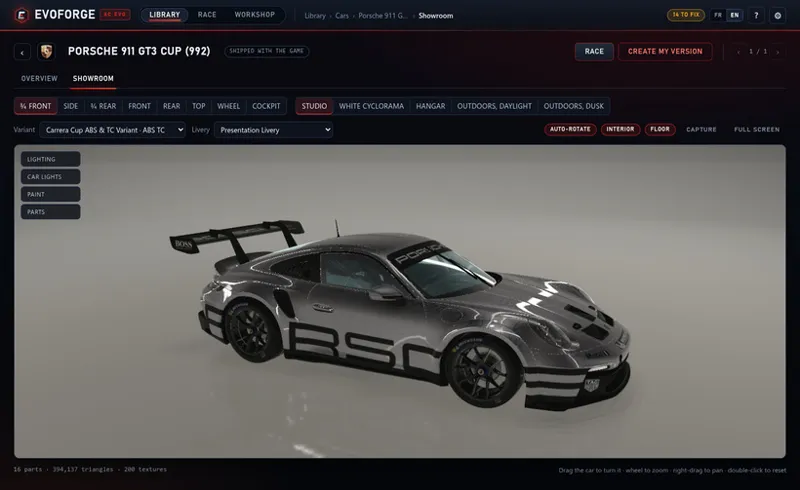
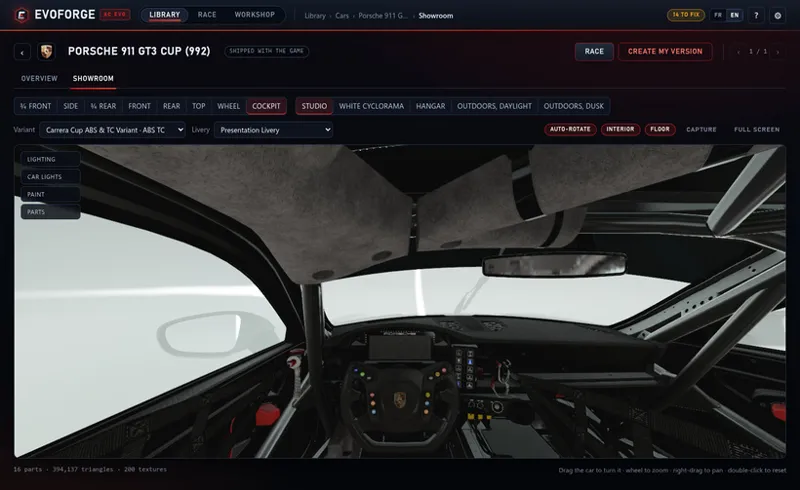
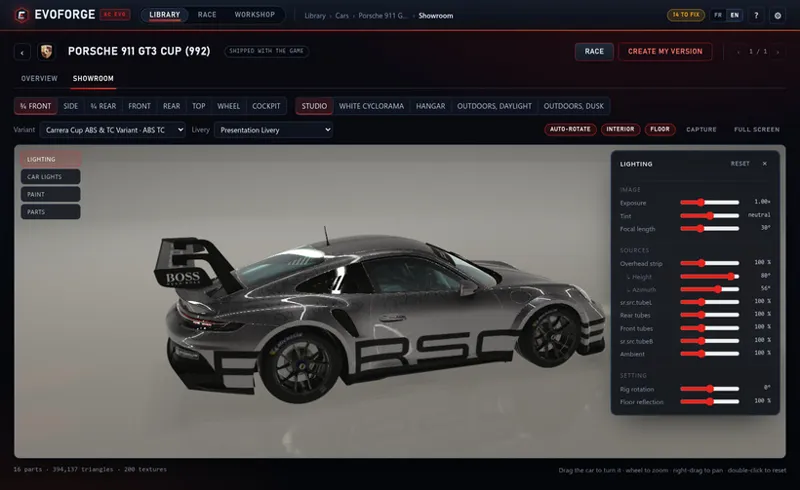
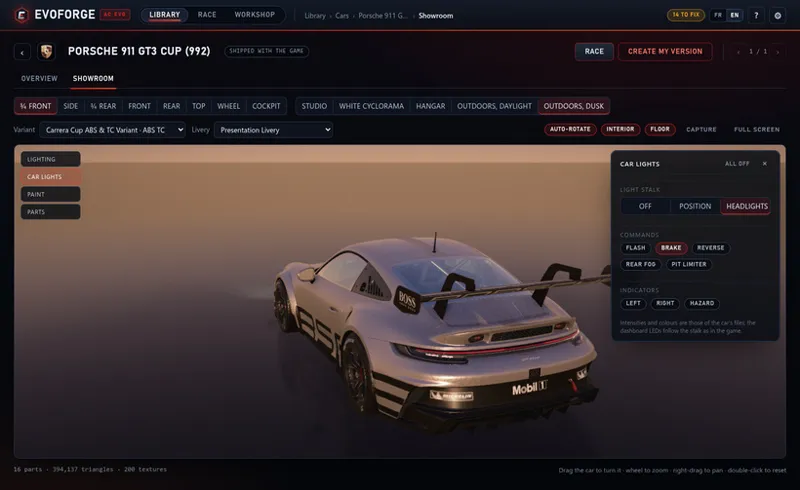
This one is about seeing the car. Every car now has a real 3D showroom — turn it, light it, switch its headlights on, sit in the cockpit — and from that same view you can click a part to know what it is, hide it, cut a panel out, paint a piece, or import a model of your own and place it with a gizmo. It is drawn with the game’s own shading, transcribed from the game’s own compiled shaders, in a studio calibrated against the room the game parks your car in.
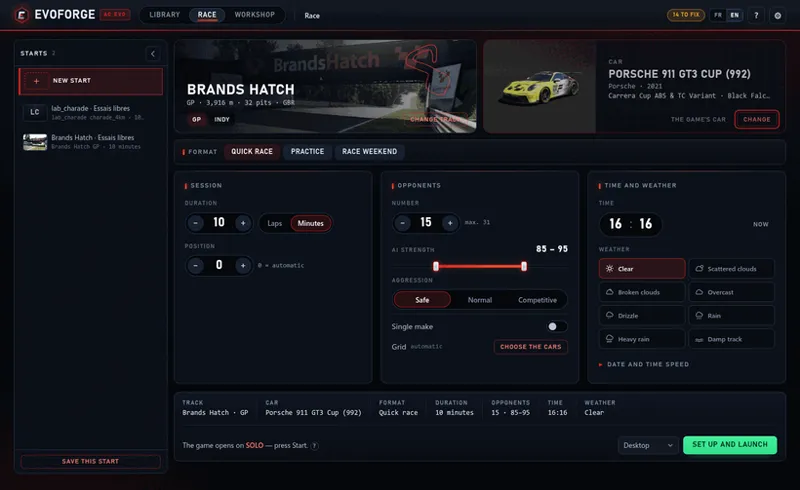
And EvoForge was rebuilt around it. Modding is no longer the centre of the app: there is a Library of everything you own, a Race screen and a Workshop. Installing a mod — dropping a package, a folder or a zip — is something the app does now, which it simply never did. And on Windows the Race screen puts you straight onto the track, in the format you chose — through the game’s own menus, with your driver in the seat.
⚠️ Please read this first
Wheels, tyres, ride height, lights and the driver are written into the car when it is converted. A car you built last week has none of it — re-import the mod. And if you made your own version of the Volkswagen Golf R before this build, rebuild it: the broken file reference is inside the package that is already installed. Converted circuits are luckier — their pictures and timing zones are repaired by undeclaring and declaring them again, with no reconversion.
🚗 A showroom for every car
Eight preset views, a camera you grab, four settings, a mirror floor, a Light panel with one line per real source in the scene, a focal length from 12 to 70°, and a Capture button. It works on every car you already have, factory cars included.
Its own textures, in the game’s own formats. Compressed texture chains are handed to the graphics card as they are, colour space decided by the file’s format rather than by the slot’s name — including the format the game keeps its normal maps in, 856 car textures of the shipped fleet, which is what makes paint look like paint rather than plastic.
The studio is not tuned by eye. The game’s own showroom room was measured band by band instead: its ceiling is black, the light comes from thin tubes, and the six ceiling spots contribute about 0.2 at the roof — in the game’s garage the car is lit by the room, not by the spotlights. Ours matches it, which is why a pearl black stays black and a windscreen stays transparent.
Switch the lights on as in the game: stalk off / sidelights / headlights, flash, brake, reverse, rear fog, pit limiter, indicators. The dashboard LEDs follow, and the headlights project onto the ground through the game’s own cookie.
On Windows it runs on Vulkan. A car’s materials bind up to 19 textures at once and the default graphics mode allows 16, so the window runs on Vulkan and the real limit of your machine becomes the budget: 32 on yours, nothing dropped, confirmed in your own log.
✂️ And working on the car from there
Click a part and the panel tells you what it is — its material, its shader, the textures actually bound to it — with a button to edit that material live in the scene. You can hide a part or a single piece of it, isolate, and on a car of yours, remove it for good on Save. Removal is physical and repeatable: the untouched original stays in the package, so restoring is byte-identical.
Lasso, brush and wand to select triangles, with Alt to remove. Two of your reports went in here: a Depth slider so a selection goes through the thickness (the back face leaves with the surface), and coloured veils composed after tone mapping so they stay readable on white bodywork.
A Look panel to paint a piece or a whole material: ten looks, a free colour, gloss, metal and clear coat, plus real carbon, brushed aluminium and leather generated as tileable textures and written properly on Save. An eyedropper copies the look of another piece; Same material grabs all four wheels at once.
Editing a material a livery covers has never been visible in game — older than it looks, and it explains results in the Materials tab that never made sense. A livery lists slots, and the game replaces the material of those sections with the livery’s own when the car loads. The app says so now, and there is an Atelier livery: a livery with no artwork, built the way the game builds its own, that shows the car exactly as you painted it.
Import OBJ and FBX — read by a reader written for this, no dependency — place it with a gizmo or by typing its dimensions, export a piece as an OBJ in the car’s own frame, or replace a part with an import in one write. Ctrl+Z covers the lot, 60 steps.
🗂️ A new EvoForge: Library, Race, Workshop
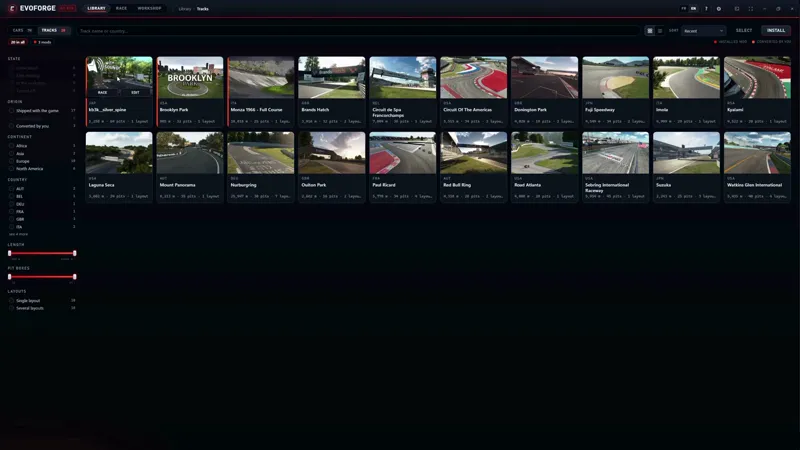
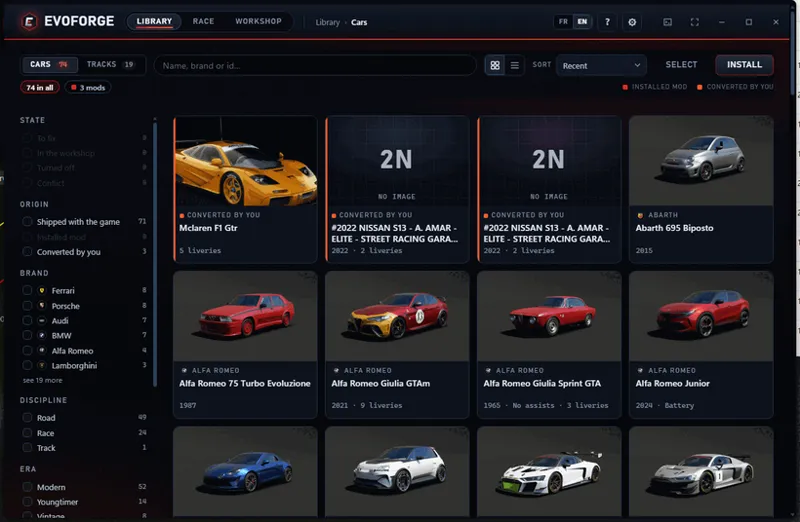
One library for the game’s cars and tracks, the mods you installed and what you converted — tiles or rows, real manufacturer badges, facets with live counts, and a selection mode. It is the first entry in the menu and the screen the app opens on.
One page per car and per track: a common shell with a single bar of actions and ‹ n / total › arrows through the list you came from. Anything you convert, install, rename or delete appears in the library at once, in every window you have open.
Installing a mod, which did not exist before: drop a package, a folder or a zip. What it is is decided by the files inside, never by folder names — Content Manager distributes AC1 tracks in exactly the layout EVO uses, so path-based guessing would have installed an AC1 track into your game. You get the manifest before anything is written, named ways out of an id conflict, and a full rollback if it fails.
Shelving: put a car or a track aside instead of deleting it, and bring it back with one click.
Faster: the game’s package tables went from 1 117 ms to 14 ms, the parts catalogue left the startup path (2.3 s of 3.6), acting on twenty items went from 4 687 ms to 234 ms. A conversion keeps running while you move around the app.
🏁 Straight onto the track
The first attempt set a developer switch inside the running game, and it did open on the circuit — by skipping the car screen, which is the only place the game ever resolves who is driving. So you arrived with an empty seat. EvoForge now drives the game’s own menu instead: it leaves an order beside the game, and the menu carries it out in the order a player would — select the car, go to Solo, pick the mode, press Start. Driven on 9 September: straight into the race, with the driver in the car.
This needs two of the game’s interface pages to call two files of ours, so those two pages are edited inside the package: one line added, nothing replaced, the original kept byte for byte and restorable from Settings at any time. Worth knowing: “Verify integrity” in Steam would download that file again — already true for any circuit you installed.
Desktop, or VR. The game has exactly two Steam launch options — read out of Steam’s own app data: the executable on its own, and the same one with -vr, declared as OpenXR. The Race screen now has that list beside the green button, and remembers your choice.
The format you choose is the format you get. The first version always started a practice session; the game turns out to ship a template per mode and write its sessions from it. Verified in the game’s own logs: a quick race creates the race with 36 grid positions.
Opponents, with the cars you pick if you want to pick them — the list cycles, so five opponents over three cars gives 1, 2, 3, 1, 2. Strength, aggression and one-make follow the game’s own values, and the weather block it calibrated is copied as it is.
One rule of the format worth knowing: a car’s state carries the identity the game gives that car. Copy a state to place an opponent and the game is handed two cars with one identity, which it refuses outright — so that field is stripped from every car put on the grid.
It reads back what it wrote before launching — format, sessions, circuit, layout, containers, duration, starting position, time of day, car, opponents, grid — and refuses to start if one of the points that would change what you drive disagrees.
🏎️ And the Race screen was rebuilt around it
A panel of saved starts down the left: a list with a thumbnail of the circuit, rename, duplicate, delete in two steps, and a New start entry so you never feel you are editing somebody else’s race. Load one, change something, and it says modified and tells you what — “duration 10 minutes → 20 minutes” — with Update, Save as a copy or Discard.
One sheet in three cards — session, opponents, time and weather — with no dead controls: at zero opponents, strength, aggression and the grid are not greyed out, they are “alone on track”, and they come back with the first opponent.
Three formats, because the game opens three. The screen offered eleven; the game’s solo screen knows quick race, practice and race weekend, and the other eight could only end in a session it would not open. Date and time now start from your machine’s clock.
A receipt in the footer — circuit, car, format, duration, opponents, time, weather — writing only what this format actually writes. And the app is full width now.
🛞 Wheels, tyres, ride height — from your McLaren reports
Right on one side, wrong on the other. A tyre in EVO is one mesh used at all four corners with no mirroring — measured across the whole factory roster — so our tyre carried the mod’s inner sidewall on the outside of the right-hand wheels. The mesh is cut at the wheel plane and mirrored now, and so is the baked texture.
MICHELIN stretched across the rear tyre: one texture family was baked on the front (69 mm of sidewall) and reused on the rear (112). The two axles now live in two bands of the same map, at unchanged resolution: rear 23–57 mm against AC1’s 24–57.
The rubber was charcoal and the lettering pure white. The game’s own forty tyre families sit at 55 out of 255, and write their white markings around 155–170.
The tyre wider than its rim: the wheel was being judged by its full width, centre lock nut included, and squeezed by 7 %. Width comes from the flanges now — AC1 to the millimetre.
The car too low at the nose. We took the tyre’s physical radius from the drawn mesh; Assetto Corsa does the opposite, and its own engine proves it — it measures the graphic radius, logs it, and never scales anything. Result: AC1’s ground clearance to the millimetre. On mods whose tyres are drawn oversized, typically drift cars, the tyre now sinks slightly into the road — it does that in AC1 too.
Rear tyres you could never tune separately — two compounds differing only by their curve came out as one. A rear tyre file is always written now.
The game crashed on a car cloned from the Golf R: Kunos store one of its lighting files in the GTI’s folder, so re-identifying the clone renamed the file but not the folder it lived in. Checked across all 71 cars of the package — the Golf R is the only one.
🧍 The driver comes with the car
Worth knowing, because it is a property of the game’s session files: a session does not refer to a driver, it carries his appearance inlined — the actual mesh paths of his suit, gloves and helmet. Left alone, that field survives from one session to the next and can end up naming a package you deleted, which shows as a car with nobody in it. So EvoForge writes it deliberately: the car’s own driver when it ships one — every conversion does — otherwise the game’s own default for that kind of car, and a generic driver you customised is kept, because that one is yours.
🛑 Brakes: heat that was never written
The whole thermal chain — how a disc heats, spreads that heat and cools down — sat behind a switch that nothing in the app ever turned on. So no converted car has ever had brake fade, and none of them could have glowing discs: the game wires a glow mask into the emissive slot of the disc material and modulates it on temperature, and with no temperatures there is nothing to modulate. It is written by default now, whenever the mod provides the data — 65 of the 386 cars in the reference set do.
Kunos copy two disc profiles, not one — road and race, and the race rear is not the race front. What changes is wear: a road disc consumes itself about seventeen times faster, while the eleven fields of pure heat are identical. And the brake bias adjustment step separates them — race at 0.2 % or finer, road at 0.5 — on 19 factory cars out of 19. That step is a field your mod writes itself, so the profile is read rather than guessed.
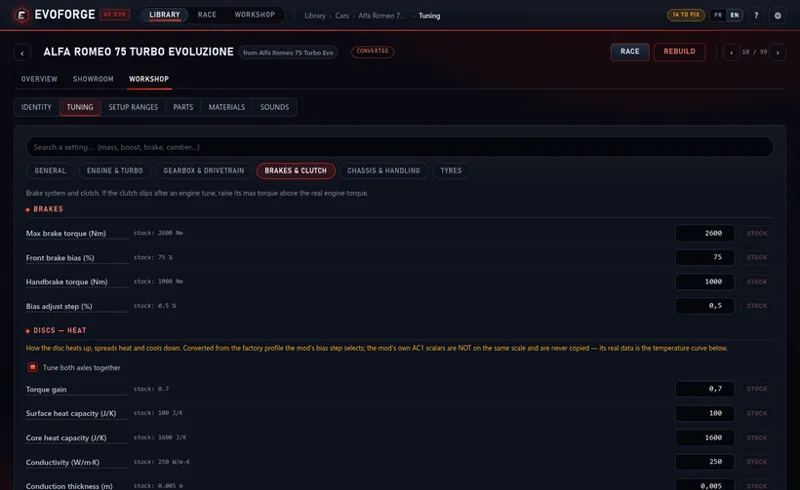
The Brakes tab went from four fields to about fifty: the discs (heat and wear, front and rear, with a “tune both axles together” box), the ABS with one block per setting the car offers, the electronic brake distribution with one block per stage and its curve, and the two temperature curves. Measured on the shipped fleet: 59 of 68 cars expose their ABS, 17 an EBB, 19 a disc compound.
And what is not carried: the two “max glow” figures AC1 mods write have no equivalent in this game, so they are reported and left alone. A mod’s own bias step now reaches the in-game slider, which it never did.
The Brakes tab of a converted Alfa 75: the four old fields, then the disc heat block the conversion now writes.
🔦 Exterior lights, read out of the game’s shaders
Brightness is a catalogue, not a calculation. A sidelight and a brake light use the same texels at the same mask value; the factor of ten lives in the intensity alone. And the intensity is never proportional to what the mod declares — AC1 writes 1 000 on a Supra’s lamps and 60 on a quattro’s, and the game gives both the same headlight. Our old rule scaled one from the other. It is gone.
Lit patches with everything switched off: the factory skeleton a converted car is built on carries emissive textures of its own on some sections, and the mod’s meshes were sampling them at random. Any section a mod takes over keeps none of them now.
One sheet for the lights, a cell per declared lamp, so two meshes reading the same texels stop receiving the union of their functions — that was the brake light coming on with the headlights. Related: a mesh takes the family of its function, not of its position.
Only what the mod declares gets built: no invented plate light, front fog, amber or white at the back. The slightly blue tint of an M4’s headlights, on the other hand, is faithful — Kunos wrote that colour themselves.
🛣️ Tracks: white grass, and grass that vanished
White grass. The game’s own tufts are pure white and take their colour from an aerial photograph of the circuit — sixteen of its eighteen tracks ship one. We had copied a scene from one of the two that instead declare a flat grey tile. A converted circuit now gets that photograph synthesised from its own meshes, in the olive the game’s circuits actually carry: measured at 79, 83, 56 under the grass of five different tracks.
You said the grass appeared too late; it was disappearing too early. Against a factory circuit we drew 46 % of the tufts at the trackside, 12 % at 50 m and nothing at 150 m. Three causes: the distant grass asset was skipped over its name (15.7 % of all factory grass), the election rewarded the asset that fades fastest, and whole lawns were never seeded — 66 hectares out of 94 on Brands Hatch.
Calibrated against what the game actually loads, which is not what you would count: Brands declares two identical sets of grass containers and its scene attaches only one — 585 000 tufts run there, not 1.17 million. A converted Brands comes out at 417 000 and a converted Brooklyn Park at 240 000, deliberately below the circuit they are measured against.
Several trees in one AC1 texture are detected and given a species each — one atlas on Brands holds 18. Every row of the conversion sheet also has a 3D button that shows the mod’s actual geometry with its texture.
The lap was timed in the wrong place. Since the end of July the finish line was being written into the field the game reads as a sector split — proven on a factory circuit’s own zones, and confirmed by the game announcing a split at our line and “unexpected on split” at the real one, 450 m further on. The HUD map is drawn from the racing line with the game’s own framing now, so the car runs on the trace instead of beside it.
A converted circuit has its picture and its map in the menus: the game looks for three files, named from the circuit’s displayed name rather than its folder id — read in its own interface code. All three are written now, at the sizes the factory circuits use, and circuits you converted earlier get theirs by undeclaring and declaring them again.
Converting a circuit is three screens instead of one page of 2 475 pixels, with the grass selection finally shown and editable, and “suggested” kept distinct from “chosen”.
Surfaces: the AC1 look, at AC1 resolution. A converted track surface is now built the way the game builds its own: the mod's diffuse stays untouched as the base, and the AC1 detail — the tarmac grain, the gravel, the soil of the hillsides — becomes a tiled layer of the game's terrain shader, weighted by the mod's own blend mask or by the alpha that dosed it in AC1. The formula was read in the game's pixel shader, and it is the one the factory circuits use on more than four hundred materials. Before this, the detail was baked into one texture, which capped it at 3 cm per texel on the track and 60 cm on the terrain; the shader now tiles it at the mod's native 1 mm on the asphalt and 1.6 cm on the hills. Brightness follows AC1's own lighting equation, referenced to each circuit, so a road that was dark in AC1 stays dark and a bright gravel trap stays bright. Two bugs went with it: a shared road texture composed with the pit lane's settings, which made the main track 40 % too dark with a stretched grain, and a normal map applied once across 270 m of track instead of every 1.3 m, which was the streaking. Tall billboard "grass" that AC1 uses as decorative brush is no longer planted as tufts.
🪟 One window, and it is EvoForge’s
EvoForge opened two windows: a black console, and the app inside what was visibly somebody else’s frame. The console was not a bug to hide — the executable was built as a console program, which is two bytes in its header. It is a graphical program now, with its own icon, and the ninety-odd external tools it calls no longer each pop a console of their own. The window has no system frame: console, full screen, minimise, maximise and close live at the end of the app’s own top bar, which is also what you drag it by. Closing it stops the server behind it.
One bug on the way worth telling: on Windows the window came up white while the page inside it was perfect — every stylesheet loaded, a screenshot through the debugger showing the whole app. It just never painted. Hiding the consoles of external tools was being applied to the window’s own process, so the window was born hidden — and a browser view that starts hidden never paints again, not even once it is on screen and in front.
A console when you want one: Settings → External tools → Open the console gives you a real terminal following the live log. That is what makes a report from your machine actionable.
The library’s bar hid under the app’s bar — your report. Three faults stacked: it stuck to the top of the page while the app’s bar was already there and above it (57 of its 83 pixels went behind), the filter column hung from a hard-coded distance that matched nothing, and its stickiness did not work at all. Fixed against the bar’s real height.
A factory car’s showroom no longer offers to edit it: no Look panel, no triangle selection, no removal, no import on a car the game ships. The camera, a trial coat of paint, the lights, capture and OBJ export stay — and in their place, Create my version, which makes the copy and reopens the showroom on it.
🖥️ The rest
Variants and liveries told apart: mechanical configurations and visual ones are not the same thing, and calling them one hid half of what you own — 56 of the 82 shipped cars have more than one variant, the record is 21. Your own version can be made from a single configuration, carrying that one alone.
Animations declared by AC1 or by a CSP configuration are carried over — pedals, handbrake, wings, adjustable aero, DRS. Proven in game on a modded E92. But a part that spins continuously — a fan, a turbine — cannot be made to: every animation the game ships is 22 keys at 30 fps, the only looping slot in the fleet is the windscreen wiper, and four ways of forcing it were tested in game and stayed still. Those parts stay motionless rather than being faked.
A car opens by itself when you land on its page — it is stored packed, and the workshop tabs now appear only once it is genuinely loaded, so nothing you click leads to a tab that is not ready.
The interface follows written rules now: solid red means danger only (a selection is no longer red), one primary button per screen, nothing readable under 12 px, monospace for data and never for prose — and no raw data on screen: a car is “Ferrari F138” with its id in second place, and a value that is unknown hides its line instead of printing a dash.
Undeclaring a track used to write into the game’s content package without keeping a restorable backup — an irreversible operation on the game’s own archive. It keeps one now.
🚧 What is proven, and what is not
Proven in game: the direct start onto the track through the game’s own menus, with the driver in the car (9 September), the composed session format, and the animation chain that drives a moving part; the showroom and the new window run on your own Windows machine. Proven on measurements and benches, not yet driven: everything else — tyre and rim geometry, the ride height law, the driver, the opponent grid, the exterior lights, the brakes, the grass, the track pictures. Where a fault was reported in game the fault is certainly real; the fix has usually not been seen in game yet.
Two limits worth stating rather than hiding. The rubber black of Assetto Corsa 1 cannot be reproduced — the two games light it differently, so compare a converted tyre against a factory car in the same showroom, not against a screenshot of AC1. And a grid of opponents you chose by hand applies to the direct start, not to the game’s own solo screen, which builds its grid itself.
If something looks wrong, a screenshot plus the car or track name is what makes these fixes possible. Nearly every item above started as one of yours: the white grass, the tyre that was right on one side and wrong on the other, the car sitting too low, the lap timed in the wrong place, the crash when selecting a car made from the Golf R.
Thank you all for the reports, the screenshots and the patience. And as always: please respect the work of the original mod creators — convert what is yours, or what you have permission to use.
Comments (11)
bonjour a chaque fois que j'essaye de télécharger une voiture ca me mets : échec de création set its patch first , comment y remedier ? merci .
Hi Jesus, I did my 1st car conversion from AC (Lotus Exige 240S) and it looks pretty good. Unfortunately the driver hands are not aligned with the wheel... any suggestions to fix that? Thanks.
Hi! Unfortunately, it really depends on the quality of the mod for AC1. You need to check whether the hands are properly aligned in AC1 as well.
I like this ac to evo mod converter. Working fairly good. I am getting a lot of sound converting issues. One is some sounds do this Coast thing, then it has this god awful sound all the time. its playing a "on accel" or "off accel" . Other car sounds convert fine.
Hello,does anyone know how to have the default ACE driver in converted cars instead of this broken like octopus with no hands :P ?
Is it possible to duplicate already converted cars to make new variants or just new versions without needing to import again? I also get a bit lost with the sound side of the app if thats possible to overhaul in the future. I'm also unsure if its possible to increase downforce on a car in general with it being clear how much you are adding downforce wise. I am also unable to save paint options via "look" it just goes straight back after saving. I've also found that with f1 cars straight from ac that it doesn't import the actual ers deployment options. Otherwise really really really incredible stuff this is such an amazing tool! The first time I've ever actually bought something like this and its worth every penny!
Thank you so much — that means a lot, genuinely. Let me go through your points one by one, honestly: Duplicating an already-converted car — not yet, and you're right that it's missing. Today the one-click "My version" button only appears on the game's factory cars. A converted car can only be re-imported, which is silly because the car is just a folder at that point. Inside a car you can already create configurations (mechs) and liveries, but a true "duplicate this converted car as a new car" button isn't exposed. It's on the list — the machinery already exists server-side, it mostly needs the button and a clean rename/new-ID step. The sound side — fair, it's the densest part of the app. Short version of the intended path: open the car → Sounds tab → Sound Studio card → pick a source (an AC1 mod folder / another car's bank / "master the current sound") → the role pills (engine, limiter, gearbox, backfire…) fill in automatically → Apply. Everything below that (per-sample listening, mixer, DSP, RPM bench) is optional expert territory you can ignore. Note that applying requires FMOD Studio installed — without it the button stays disabled. That said, "I get lost" is exactly the feedback I need: if you can tell me where you got stuck (choosing the source? the role mapping? knowing what "Apply" actually changes?), I'll rework that screen — a guided, plain-language path is planned. Downforce — partially. What the converter does today is a 1:1 port of the AC1 aero (wing positions, CL/CD curves, gains) — it's a format conversion, not an approximation, so the car keeps its original aero balance. What you can change right now is in the Ranges tab, aero section: the front/rear wing angle range, i.e. how much wing you're allowed to dial in from the game's setup screen. Widen it and you can add real downforce in-game. What doesn't exist yet is a straight "add X% downforce, here's the number" control with a readout — and I agree that's what's actually wanted. Noted as a feature. Paint saved from "Look" reverting — this one I know exactly, and it's not (only) a save bug. At load, the game replaces the material of body sections that are livery "slots" (EXT_SKIN and friends) with the material of the currently selected livery. So your paint is saved, but the livery is painted straight over it — which looks exactly like "it went back". That's why there's now a scope selector on those sections: "Atelier livery" (the default — a livery with no artwork, which shows the car exactly as you painted it) or "This livery" (applies to the currently selected livery only). After saving, make sure the Atelier livery is the one selected in the livery picker, both in the showroom and in-game. If you're on an older build, update first. If it still reverts with Atelier selected, tell me which car and I'll dig in — that would be a real bug. ERS on F1 cars — the hybrid system is converted (battery capacity, MGU-K/H power and coast curves, and the ctrl_ers deployment profiles with their original names, derived from the car's ers.ini). EVO's ERS is a direct descendant of AC1's, so the profiles map across almost verbatim. But it's had very little real-world in-game validation, and "the deployment options don't come across" is precisely the kind of gap I can't see from here. Could you tell me which car (and ideally send the conversion report/log for it)? There's an "AC1 ERS" line in there that tells me straight away whether the profiles were read and written, or skipped. Thanks again — feedback like this is worth more than you think. The duplicate button, a clearer downforce control, and a friendlier sound flow are all going on the list.
Bravo et merci pour le taf réalisé !
Merci pour tout le boulot accompli !Continue d'avoir cette passion , on te supporte!
Awesome work man, all we need is the sound mods to work completely now, i keep getting fmodstudiocl Exited 1 when trying to apply LS3 sounds waves from a car i extracted them from on AC1
Well, now I really can't wait for my laptop to come back from the service center.