

ETS2 - Showcasing the Elite DashCam Reshade (Update v1.4.1)
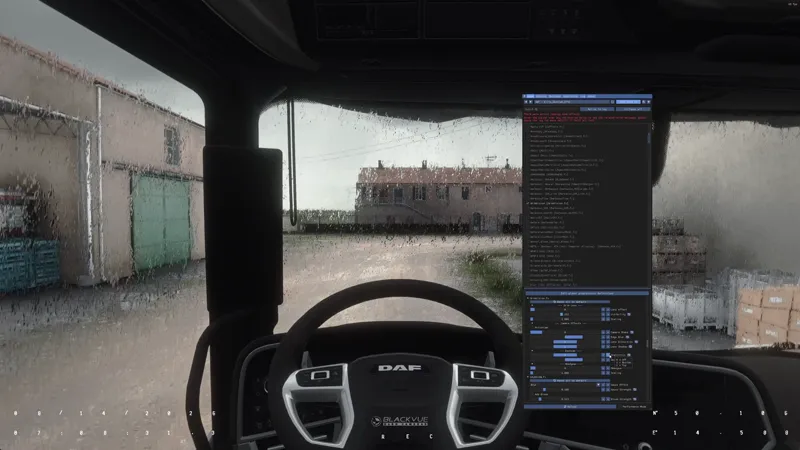
Elite DashCam ReShade is designed to recreate the distinctive look and feel of high-end dashcam footage with a cinematic touch.
The preset features pronounced bloom, slightly exaggerated highlights and shadows, subtly enhanced colors, and a fine layer of color noise to give the image more depth, texture, and character without pushing it too far.
To further improve immersion, Elite DashCam also includes a custom camera shake effect and subtle edge blur, helping the footage feel more dynamic, physical, and authentic.
A fully integrated dashcam overlay adds the finishing touch, displaying the current date, time, geolocation coordinates, a recording indicator, and a manufacturer-style logo directly on screen.
Perfect for driving games, realistic gameplay showcases, cinematic road footage, and immersive first-person driving videos.
How to use Dashcam statistics/camera shake?
It's pretty simple. Just open the GrimVisionFX shader menu and enable the effects you like. You can customize the geolocation coordinates, camera shake levels, and all the other immersive effects.
What's new in v1.4.1?
Minor fixes for GrimVisionFX Shader
Improved ReShade Presets for ETS2 & ATS
Updated Snowymoon config files for ETS2 & ATS
Updated Manual
Download
Please download the latest files and replace the old ones.
You'll find the updated files in the following posts, depending on your access type:
Full Access (monthly): https://www.patreon.com/GrimVisionFX/posts/grimvisionfx-162912160
Lifetime Access: https://www.patreon.com/GrimVisionFX/posts/grimvisionfx-165558895
Thank you for your support! Your feedback is always appreciated!
- Grim Worlds
ETS2 on RTX 5090 - Ultimate POV & Dashcam Realism | Romania 1:1 | 8K (YouTube)
Comments (6)
A friend huffplays told me about you and I payed for the reshade etc my god it does not disappoint! Amazing work
Hey, thank you so much! And your friend too! 🙌❤️😊 I'm always happy to hear that people enjoy my work!
Hi, I managed to apply the ReShade presets in ETS 2... but the GrimVisionFX menu didn't show up for me.
Send you a DM 👍
wie geht das mit der camera in reshade einstellen
Hey, you mean the positioning in the truck?