



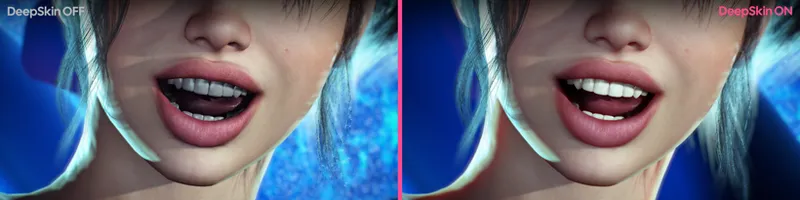

DeepSkin V3
NEW: Teeth & Mouth Overhaul
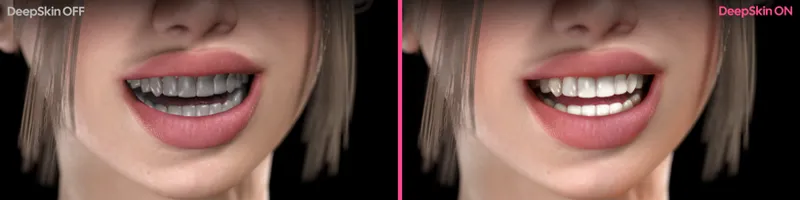
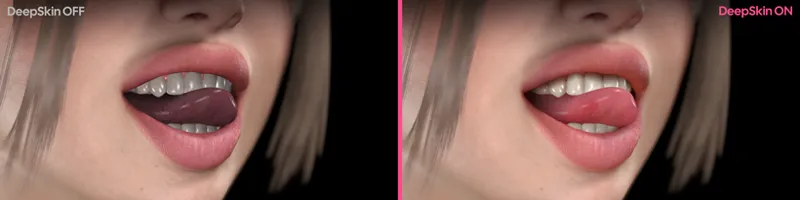
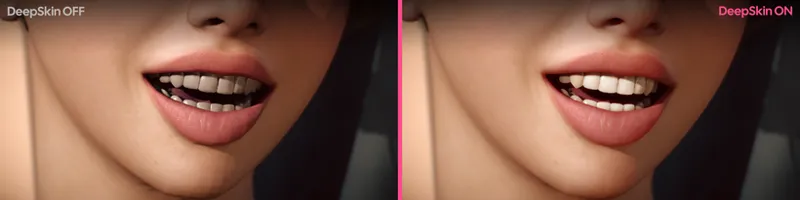
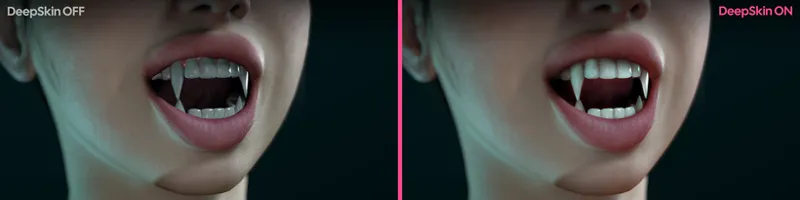
Teeth, gums and tongue are now included in the SSS and get a complete overhaul.
Mouth SSS: teeth, gums and tongue now have SSS.
Mouth Interior Shadow: The the mouth now darkens with depth past the lips towards the back of the mouth (adjustable).
Lip Shadow: This darkens the mouth right behind the lips and fades out as they part. It is driven by the lip opening, measured from the character's own lip vertices every frame, so the lip shadows follow the lips actual position during smiles or talking. Top / Bottom Lip Shadow Offset let you calibrate where each line sits on your character.
Mouth tessellation: the mouth gets its own density multiplier, so the low-poly stock teeth can be smooth without relying on the body-wide tessellation. Mouth Tess Depth Falloff drops the density with depth behind the lips, so the areas you barely see don't get tessellated. Auto Reduce Mouth Tessellation decreases tessellation further while the lips are sealed.
Mouth Replacement Textures (on by default): a bundled higher-quality teeth and gum set provided to me by BooMoon.
Auto Remove Teeth Clothing (on by default): automatically removes mouth/teeth/gums clothing items from the model so you don't need to manually remove them to see DeepSkin's teeth. Turning this off or disabling/removing the plugin will restore them.
Other Fixes & Improvements
Embody Compatibility: When activating Embody, DeepSkin automatically releases it's shader from the head so Embody can hide it as normal, and takes it back when possession ends.
Fixed an issue where the decal on clothing items didn't fade with the 'Fade Shadows' option.
Fixed an issue where tessellation wouldn't get reverted to the state it had before adding DeepSkin, meaning re-adding could cause tessellation to multiply it each cycle.
Fixed an issue where you needed to restart VaM when trying to load a different version of DeepSkin.
Download the update from the original plugin's page
Comments (1)
wow!