


Black Box - Crash Analyzer v2.1 [BeamNG Drive]
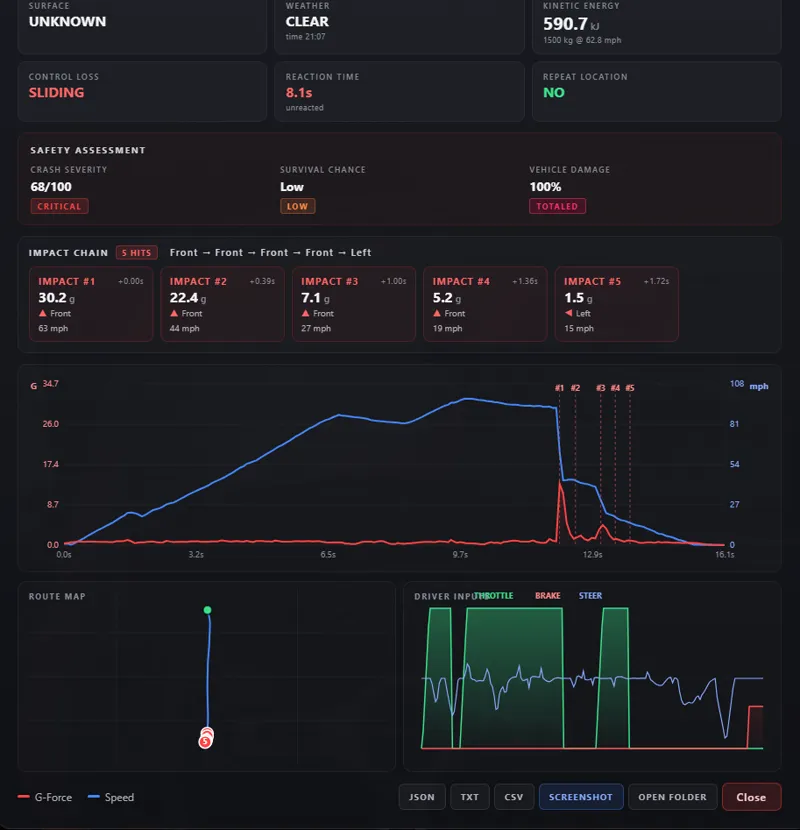
Ever crashed so hard you wished you could rewind and see exactly what happened? That's what Black Box does. It quietly records every drive in the background - your speed, G-forces, steering, throttle, brakes, the whole thing - and the moment you wreck, it hands you a full breakdown once the car comes to rest.
You get an impact report with the stuff that actually matters: how fast you hit, how many times you bounced, which corner took the blow, whether the engine survived, how badly the car is mangled, and a severity score so you can settle the "that was a big one" argument with real numbers. There's a route map showing where it went wrong, a timeline you can scrub through frame by frame, a G-G diagram for the driving nerds, and a damage map that lights up wherever you got hit.
Every crash gets saved to history, so you can compare wrecks side by side, chase your own records (hardest hit, longest jump, biggest pile-up), and export the raw data to CSV or JSON if you want to dig deeper. Fancy showing off? One button turns any crash into a clean report card you can drop straight into Discord or a video.
Tune it to taste in the settings - crash sensitivity, sound alerts, whether reports pop up on their own or wait for you to open them. Works in singleplayer, ignores traffic, and stays out of your way until you need it.
Add the "Black Box" app to your UI and start driving. It'll be watching.
Changelog v2.1.0
- Reworked crash severity scoring to use sustained (smoothed) G instead of the raw single-tick spike, which previously inflated the score on light contacts
- Reworked survival-chance estimate to be based on delta-V (real-world injury predictor) instead of peak G, so ratings are realistic
- Added Settings tab: detection sensitivity (Low/Normal/High), stop delay before report (0.5/1.0/2.0s), near-miss logging toggle, auto-open toggle, crash sound toggle; all saved locally and applied live
- Added Damage Map: top-down car diagram with front/rear/left/right/roof zones lit by impact directions, plus per-zone intensity bars
- Added auto-open toggle so reports only pop up on demand when disabled, with a "N NEW" badge on the widget for pending reports
- Reports now open only after the vehicle has come to a complete stop for at least one second
- Added G-G diagram (longitudinal vs lateral acceleration scatter)
- Added timeline scrub slider with live speed/G/throttle/brake/RPM readout
- Added crash comparison: pin two crashes in history to see a side-by-side metric diff
- Added crash heatmap: previous crash sites of the current map shown on the route map
- Added Records tab tracking personal bests (hardest hit, biggest crash, fastest impact, longest jump, most impacts, highest delta-V, survived)
- Added Export All button to save the full crash history as one JSON file
- Added crash sound alert on impact (toggleable)
- Added surface type, weather and time-of-day to reports
- Added repeat-location detection (flags crashes within 20m of a previous one)
- Added kinetic-energy readout, control-loss classification (oversteer/understeer/aquaplaning/etc.), precise impact angle, reaction-time and driver-input telemetry
- Added post-crash state (engine alive, flat tires), tire-slip and brake-start-speed readouts
- Added airtime tracker, near-miss logging and standalone rollover detection
- Added g_long and g_lat columns to CSV export
- Fixed traffic and AI vehicles being logged; only the player's active vehicle is tracked now
- Fixed reports triggering while on foot / walking mode
- Fixed vehicle name in history showing the player car for traffic crashes
- Fixed damage percentage always reading near 100%; damage tiers recalibrated to BeamNG's real scale
- Fixed large exports and reports failing to save by sending them in chunks
- Fixed detection settings resetting when switching vehicles
- Fixed private/internal fields leaking into exported JSON
- Fixed a fatal Lua load error caused by exceeding the LuaJIT upvalue limit
- Fixed the crash report card layout and cramped/overlapping data
- Fixed UI app preview not appearing in the Apps list