




SimSweep 4.1.6 (Important Update)
First, the important one: SimSweep was hiding its own updates from you
If your SimSweep still says 4.0.16 it's not because you skipped updates. The old update system basically never showed you one. It would silently download the whole new version in the background and only show the Update button after the download finished. Close the app before that invisible download was done and it threw it all away and started over next time. Every single time. So most of you never saw an update button at all. A bunch of the crashes and freezes people keep reporting are things I already fixed in versions your app never told you existed.
That's fixed now. The Update button shows up the second there's a new version and you get a real progress bar when you click it. But your current version can't fix itself so you gotta do this one by hand. Go to simsweep.com and install the newest version right over the top. Takes a minute. Your scans and settings and protected files all stay exactly where they are.
The freeze is officially (basically sort of) dead
If SimSweep ever locked up on you after a scan or the 50/50 tool just sat there frozen, that was my number one most hunted bug and it took a few releases to catch cause it only hit some machines. I ended up building SimSweep the ability to report its own freezes back to me and within a day the reports pointed at the exact spot, the app was shoving a mountain of scan data at the display all at once. That one is fixed at the source in 4.1.5.
Real numbers from testing: 50/50 went from 82 seconds per 1,000 files to under 1 second. The after-scan freeze went from up to a minute on some machines to nothing.
Hence the basically sort of. I'm still seeing a few hangs in the reports that have a different cause and I'm hunting those now, so if one hits you it reports itself back to me automatically and every single one gets looked at.
Pick how deep you want to scan
There's a new scan depth picker next to the Scan button. Quick, Standard or Deep. Quick lists your files fast and keeps everything from your last full scan. Deep always digs through your saves and tray. If scans have been heavy on your machine, Quick is your new best friend.
4.1.0 stuff you probably never saw
4.1.0 was the biggest release SimSweep has ever had and thanks to the update thing above most of you never got it. So here's what it brought:
Scans got way more accurate
CC details work again on modern CC. Category, color, style, age and gender badges had quietly stopped showing on newer files because the game changed its formats. All back now.
Way fewer false alarms. Healthy files were getting counted as damaged. One real library had 1,437 broken results and every single one was wrong. Tray households, lots, files with a bad preview image, all read correctly now.
Files marked Broken actually tell you why now. Click one and it names the exact check that flagged it.
Big libraries scan on about 28 percent less memory and giant saves don't get skipped anymore.
A damaged file no longer ruins everything after it. SimSweep reads past the bad part and keeps what's good.
Recently Added remembers when it first saw a file so rescanning doesn't make your whole library look new.
Online-only OneDrive files get a guided download step instead of silently failing.
Your files got a safety net
If a cleanup or quarantine gets interrupted mid-move SimSweep picks it back up or rolls it back. No more half-sorted Mods folder.
Cleanup won't act on an outdated picture of your library anymore. It wants a fresh scan and double checks every file right before touching it.
Permanent deletion got a big red warning and bulk quarantine actions show live progress instead of looking frozen.
50/50 only keeps the culprits you actually accept.
Access stuff
Patreon having a bad day doesn't lock you out of your perks anymore. You get a grace window of a little over a month.
Decrypt key problems explain themselves in plain words now and there's a Re-activate on this device button so you never retype a key.
If your access lapses your Decrypt theme gets remembered and comes back when you do.
Mac builds are properly signed and notarized. No more scary warnings on install.
New privacy switch in Settings if you want to turn off the daily heartbeat report.
And if your screen ever goes blank
If Windows kills SimSweep's display the app now reloads it, falls back to Safe Mode if it has to, and walks you through recovery if even that fails. Before this it was just a dead white window.
Little things that add up
If SimSweep ever fails to start, the error window can send me a report with one click. No more copying text into Discord (unless you wanna say hi).
Protecting a file removes it from Conflicts and Duplicates instantly instead of after your next scan.
Notices at the bottom of the window update on their own now instead of waiting for a restart.
What I'm cooking right now
The Sims page. SimSweep is learning who your sims actually are. A new page that shows every sim in your saves with their real in-game face and exactly which CC they wear outfit by outfit. You can protect everything a sim wears in one click and see who loses what before you delete anything and click any item to jump straight to it in your library.
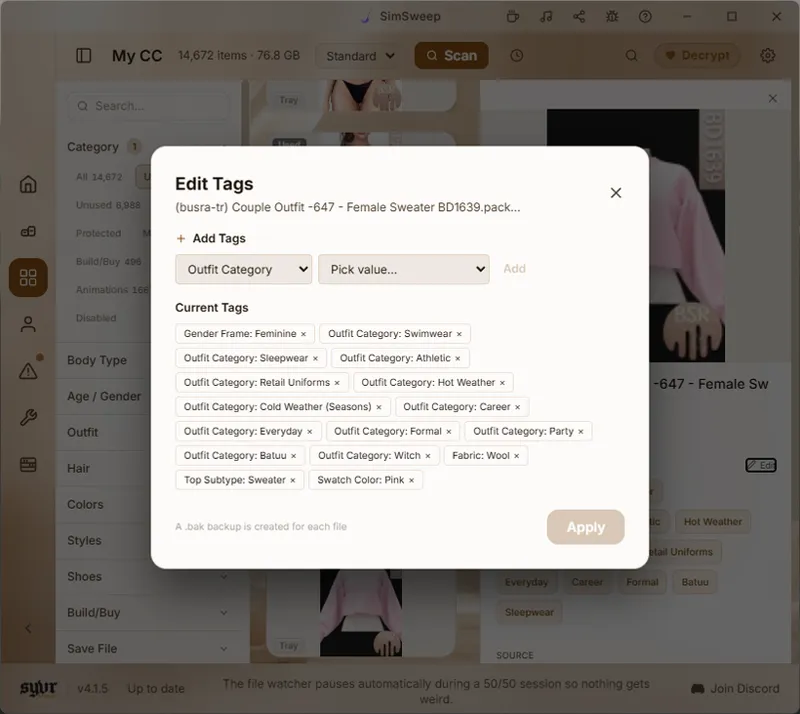
Editing CC, not just organizing it. Clothing gets an Edit button right in the item details so you can see every tag on a piece with real names, even the newest ones, and remove or add tags without opening another tool. That swimsuit that keeps showing up in formal wear? Fix it yourself in two clicks.
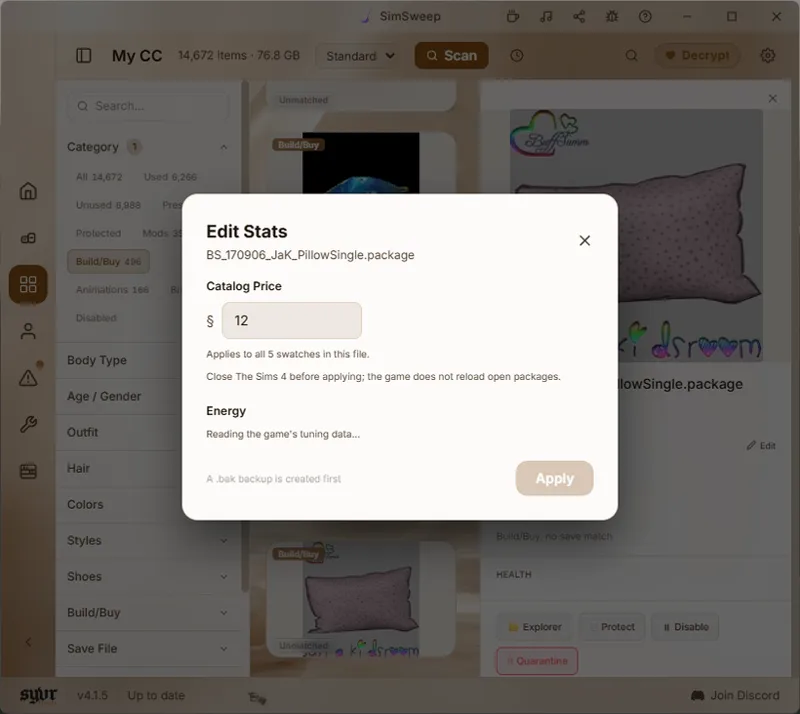
Build/Buy items too. You can change the catalog price of any Build/Buy CC and the first quality stat is already built, bed Energy. You know that gorgeous CC bed that sleeps like a park bench? Soon you can crank it up yourself and the change only touches that one item and nothing else in your game.
And before anyone panics about their precious CC, every edit backs up the original file first automatically so if you change your mind you get back exactly what the creator made.
All of this is in early access for Decrypt members while I finish building it and it goes free for everyone once it's done.
That's the catch-up. If you hit anything weird the bug icon at the top of SimSweep goes right to me. Thanks for sticking around.
https:simsweep.com <---- Download here
Comments (3)
can you help me figure out who to ask about results? missing framework is confusing and vague. theres a lot lol and maybe theyve been misplaced through the many updates of mods/game. i have no idea...
Since the update I'm just getting a white window that's not responding. I've tried uninstalling and reinstalling but it made no difference.
Windows or Mac?