



GCODE ⏐ PART 09 ⏐ Rhino and Grasshopper
PRINT SETTINGS
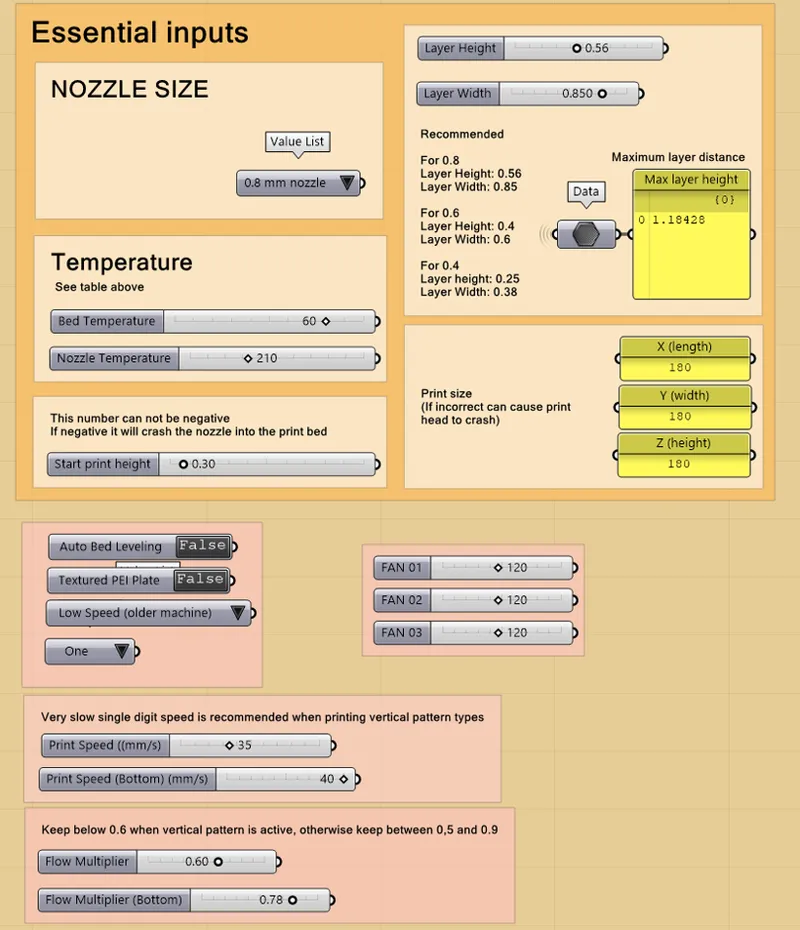
Below you'll find my print settings for most of my prints. You will want to change this in these cases:
(5) Vertical pattern, the Print Speed should be lowered from 35 mm/s to 6 mm/s and all fans maxed to 255.
(7) PETG, TPU or other material that requires different speeds and temperatures.
If you use a nozzle that's not 0.8 mm you will have to change the layer height and layer width. You can use the recommended values.
As a quick tip, if you ever feel like the print quality could be improved, you can safely drop your layer height down to 0.5 millimeters (using a 0.8 mm nozzle). Another thing to watch when printing non-planar is your maximum layer distance. A really high value here usually just means a multiplier is active from your vertical or blob patterns. But, if that high number is actually coming from a large non-planar deviation, dropping your layer height a bit more will compensate for it.
Also, you can find the grasshopper surface generator featured in the video very soon, in the resources collection as well as in side the Series 01 collection.