
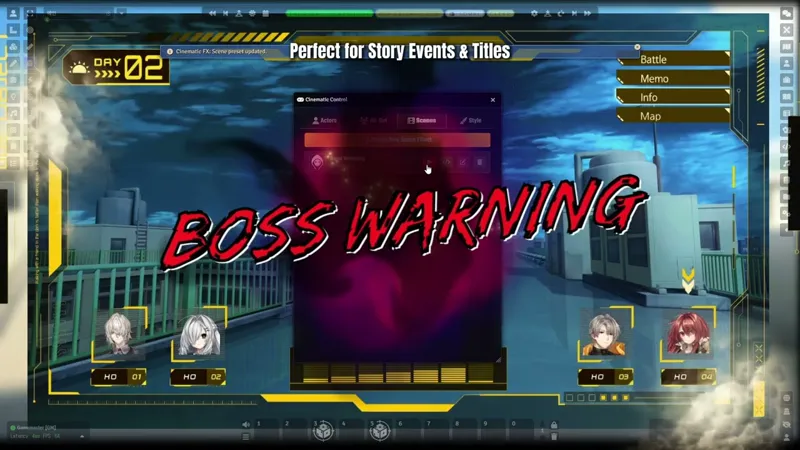
🎬 [Early Access] Cinematic Cut-ins v1.3 Update: Layer Compositing, Scene Director, and New Themes!
Happy New Year! 🎆
I hope you all had a wonderful holiday season. To kick off the new year with a bang, I’ve been working on a massive update that transforms this module from a simple effect player into a full-fledged directing tool.
Today, I am proud to introduce Cinematic Cut-ins v1.3!
This update focuses on "Compositing" and "Atmosphere." You are no longer just playing animations; you can now build complex visual scenes with layers and control exactly when they happen during combat.
🚀 New Features
🎨 The Revolution: Dynamic Layer System
The old "Background/Foreground" system is gone. It has been replaced by a powerful Layer Manager.
Multi-Layer Editing: You can now stack multiple images or videos and control their Z-index order freely.
Blend Modes: Apply professional blending effects like Screen, Multiply, Overlay, and Add to your assets directly within Foundry VTT.
Transform Controls: Added options to Mirror (Flip) and Rotate (Angle) your character or assets.
Note: Existing themes have been updated to seamlessly support these new layering capabilities.
🎥 Cinematic Scene Director
Cut-ins are no longer just for Actors!
Scene Tab: A new "Scenes" tab has been added to the control panel. You can now create standalone visual effects (like "Chapter 1 Start" or "Sudden Event") without needing a dummy actor.
Combat Automation: You can now link these Scene Presets to global combat events.
Battle Start / Battle End (Victory)
Round Start (e.g., Show a "Round 2" banner automatically)
⏱️ Precision Triggering
Round-Specific Logic: In Actor Triggers, "Turn Start/End" can now be set to fire only on specific rounds (e.g., "Trigger only on Round 2 and 5").
Text Visibility: Added an option to completely hide the Main Text or Sub Text for a purely visual experience.
Editor Pause: Added a Pause Button in the configuration preview window, making it much easier to adjust assets at a specific frame.
✨ New Themes
New Personal Themes:
Glitch: A chaotic, digital noise effect perfect for cyberpunk or horror settings.
Dash: A high-speed theme where the character traverses the screen from left to right.
Runes: A heavy, ancient stone tablet style with magical glowing runes.
New All-Out Attack Theme:
Legion: A Sci-Fi/Tactical HUD theme where characters are "scanned" into existence. Perfect for organized squads or mecha pilots.
🐛 Bug Fixes & Polish
Visual Sync: Fixed a bug in Cinema/Focus mode where the black letterbox bars would linger for 0.2 seconds after the theme animation ended.
CSS Optimization: Refined the CSS of various themes to ensure smoother animations when using the new Layer System.
Thank you so much for your continued support! I can't wait to see the incredible scenes you'll create this year.
Download the update now and start directing!
Layer Compositing, Scene Director | Cinematic Cut-ins v1.3 Update (YouTube)
Comments (13)
Hi!!! ^^ I want to upgrade my Foundry for my next campaign and this module will help me a lot :D But.... I have a question about Cinematic Cut-ins and Stylish Action HUD: we are playing on Daggerheart system, so would it be possible to configure this both modules to work with this system?
Hello. Will there be any grimdark themes? I’d like to use this for Drakkenheim, but the style currently offered is clearly very different. Unless I can achieve something suitable using the presets and the built-in editor. Btw, this is great work ! Keep up !
Hello! Thank you so much for your kind words! You're right that the current default themes might not fully capture that grimdark vibe just yet. I definitely plan to expand the library with more diverse styles in future updates. That said, you don't have to wait! You can use the Layer Manager feature to build your own custom themes right now. It allows you to stack unlimited images or videos, apply blend modes, and fully customize the look. This should help you create the perfect atmosphere for your Drakkenheim campaign. Thanks again for the support!
Hello, is there a Discord server or something similar? I have just started and would like to know where I can ask specific questions or give suggestions. For example, one suggestion would be to allow users to change the pictures in combo attacks. My group uses tokens from the same source, but not for the avatar. So they don't quite match. It's nothing major, but being able to change them would help. Also i found this link under one of your youtube videos: https://www.notion.so/2c8a9504d08780c8a694dcf0ffc791f2?v=2caa9504d08780e68ceb000c2bc39636 Maybe add that somewhere on Patreon for easy access.
Hello! Yes, there is a Discord server. Since you are a subscriber, you should have been invited automatically. Please check if your Discord account is properly linked in your Patreon settings. If it is already linked but you haven't been invited, please try unlinking and then relinking it to refresh the connection. If that still doesn't work, you can use this link: https://discord.gg/EzxH4YFP However, I don't usually recommend using the manual link because Patreon handles automatic invites and role assignment best. That is a great suggestion regarding the combo attack pictures. Once you join the server, please leave it in the 'suggestions' channel. Thank you for your support!
Where can I get the effects?
Hello! Since I'm not sure exactly which effects you are referring to, I'll cover both possibilities: 1. Built-in Theme Effects: The standard visual effects and animations for each theme are included in this module. They are automatically applied when you select a theme. 2. Additional Assets (Layer Manager): If you are asking about the specific video assets I added using the Layer Manager in the showcase video, those are from JB2A. You can check out the free version of their module here: https://foundryvtt.com/packages/JB2A_DnD5e Hope this helps!
Hi I love the modules look and plan to support in the future for a Cyberpunk RED campaign, Question is this modules what allows for the excellent scene creation you have in the video? Specifically the turn indicator, icons and visual novel esc look? If not would you mind sharing what modules/what you do to achieve this! Love the work I am seeing :)
Hi! Thanks for checking out the project! To give you the full picture: 1. Cinematic Cut-ins (This Module): Handles all the character cut-ins and automated Turn/Round indicators. It comes with built-in animations & themes, so you can create cool cut-scenes right away without needing any extra assets! 2. Visual Effects (VFX): Some particle effects seen in the video utilize JB2A assets (not included). I added them using the module's Layer Manager, which lets you layer external assets on top of the default themes. 3. Scene Backgrounds & UI: The static Visual Novel style background images are external assets from BOOTH (not included). You can make great cut-ins with just this module alone, but the specific background art and JB2A effects from the video are separate. Hope this helps!
Should this require the Early Access membership? Because I don't see the Cinematic Cut-in module with the Member level when I look at https://foundryvtt.com/me/subscriptions and it shows as "Not owned" in my Foundry Setup and Add-in manager.
Hello Christoffer, Yes, that is correct. As mentioned in the subscription benefits, the 'Cinematic Cut-in' module is currently in the Early Access phase. Since it is a new release, it will be unlocked for all supporter tiers on January 13th (one month after launch). You can find more details regarding this in our Update Policy. Thank you for your support!
Before I support and buy this patreon and module, we play using Draw Steel which is a 2d10 system that has tiered results. Would it be possible, per se, on a Tier 3 result (16 or higher on 2d10) to play one of those Cinematic cut-ins?
Hello! Thank you for your interest. Yes, absolutely! The module is designed to be system-agnostic, so it works with Draw Steel as well. You can achieve this using the 'Dice Check' or 'Advanced Formula' triggers included in the module. Dice Check: You can simply set a condition to trigger when the Total >= 16. Advanced Formula: You can write logic like t >= 16 (where 't' is the total) for more precise control. Keyword: If the chat card explicitly displays text like 'Tier 3', you can also use a simple Keyword trigger to detect that phrase. It handles the 2d10 tiered results seamlessly. I hope this helps!