


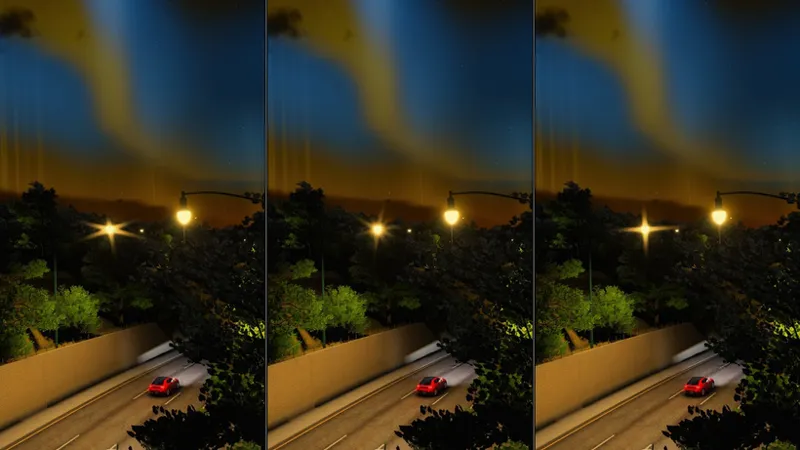


Ocular 2.0 PP-Filter | Full Access Release
Ocular 2.0 is out for ALL MEMBERSHIPS!
And Ocular Pro 2.0 comes with it!
Full Access members, this one’s for you. Ocular 2.0 is the biggest update the filter has ever had, and it ships with a fully rebuilt Ocular Pro app. Both are attached to this post.
Quick List:
One filter for both Pure and Pure LCS
8 tonemap modes, all balanced so the sky and sunlit roads don’t clip
8 glare shapes with separate day and night settings
5 colour looks, 6 grading LUTs and the Ocular tone curve
Screen-space ambient occlusion, aerial perspective and stars in the daytime sky
Ocular Pro rebuilt as a library/hub: every tool gets its own window
Unlocks with your Ocular Pro key, nothing new to enter
One Filter, Both Engines
No more picking between “Ocular” and “Ocular LCS”. It’s just Ocular 2.0. Select it as your PP filter and it loads the build tuned for whichever Pure you’re running.
Tonemapping:
8 modes: Ocular Fine-Tuned, Realism (ACES), Ocular (Old), Sensitometric, Unreal, Juicy, AgX and Uchimura. Every one is balanced so the sky and sunlit roads don’t clip.
Glare & Streaks:
A brand new glare system with eight shapes: Ocular, Anamorphic, Starburst, Prism, Nova, Camera, Cross and Mist. Day and night get their own settings, and on top of that you get:
Godrays
Sun disc ring
Interior rays
Moon rays
Colour:
Colour Looks: Ocular, Kodak, Neutral, Warm and Cool
Grading LUTs: six to pick from
Ocular Tone Curve: full control over the curve
Halation, split-toning and neon separation
Depth & Atmosphere:
Screen-Space Ambient Occlusion: contact shadows wherever surfaces meet
Aerial Perspective: distance haze that follows the sun
Manual fog, cloud and sky gradient controls
Daytime Stars: stars you can see in the daytime sky
Nights & Lights:
Sun blinding
Light trails
Speed lens
Polariser filter
Emissive Light controls: no more orange glow flooding the cabin in daylight. (Ocular LCS)
Everything sits on ten pages in Pure’s own app, from Exposure and Grading to Lens, Depth, Atmosphere and World.
Ocular Pro 2.0: The App, Rebuilt
Ocular Pro is a library now. Open it and every tool sits on its own tile. Click a tile and the tool opens in its own window. Click the Ocular logo in any tool to jump back to the library, or close every open tool at once from there.
Driver Animations:
Your driver sips from a double cup, smokes a cigarette, a Backwood or a Swisher, or hits a vape, with smoke, ember glow and per-driver fitting. The lean is FREE for everyone.
Filter:
Tune Ocular 2.0 live from inside the car, every page and every slider.
Looks: Ocular, Dreamy, Realistic and Freezing, each tuned separately for Pure and Pure LCS
One click hands everything back to the filter
Track Lights:
Recolour every lamp on the track by group: street lights, tunnels, signs and buildings. Force them on in daylight, or Alt-click a lamp in the world to jump straight to it.
Car Studio:
Paint & Finishes: Alt-click any part of your car to repaint it or give it a carbon, alcantara, chrome or piano black finish
Windows by Position: windshield, front and rear side windows, quarter glass, rear window and glass roof. Take any of them out with a click on the car drawing. Lamps and mirrors are never touched.
Window Tint: goes on the windows ONLY, smoked or any colour, window by window
Underglow: pulses, cycles or moves with your music
Your car’s look is saved into its skin.
Wet Roads:
Wet roads on any track, from damp to soaked, plus flooding. It only changes what you see, so it works online too.
Flames & Pops:
Pops and bangs come first:
Styles: crackle map and anti-lag
Triggers: lift-off, upshifts and the limiter
Sound Sets: Neutral, Gunshot, AK-47, Bangs, Crackles, Backfire and Street
Ocular’s own exhaust flames
Second page: burning tyres and a nitrous purge on a key.
Vault Drivers:
Exclusive driver models for Vault Access members, applied with one click.
Make It Yours:
The Style page has six themes (Midnight, Graphite, Slate, OLED, Ocean, Plum), eight accent colours plus a colour of your own, window opacity, corner roundness, shadows, background glow, animation speed and brighter text for bright tracks.
Runs on your Ocular Pro key
Ocular 2.0 needs Ocular Pro running with a working key. Without one, the filter stays locked. Each key works on ONE PC. If you change PC, open a ticket in the Discord.
Requirements:
CSP 0.3.0-preview634 or newer
Pure or Pure LCS (3.50+)
Ocular Pro with an active key
Black or washed-out picture? Check your CSP version first.
Access:
Ocular 2.0 and Ocular Pro 2.0 are out now for Filter Access members or higher.
📥 Download: ATTACHED TO THIS POST!!!!!!!!!!!!!!!!!
Get your key at https://guaponso.com/profile (paid memberships only)
Put your key in the Installer.
Click Install on Ocular 2.0 & Ocular Pro
Every Full Access membership goes straight into new tools, new looks and new drivers. Questions, bugs or screenshots of what you make: the Discord, discord.gg/guaponso.
Make sure to link your patreon to your discord to get support.
— Guaponso / Guap
Comments (10)
What is minimum pc spec for these
nothing is changing in the content manager when i play or launch it
it doesnt show up in filters when i download content
Use our installer!
I need to request a ticket for the code—how do I go about that?
https://guaponso.com/profile
yo i put the key in the ocular and i cant used like its says where thit you find the ocular
Make sure you're putting the key in the Ocular Pro app.
waarom kan ik het bestand niet downloaden ?
Make sure to press the three dots when hovering over the warned download, press "Keep", when opening the application, click "More info" & Press "Run Anyway"