





[Free] Fibo 2 Edit
YouTube: https://youtu.be/vn0EnhevQDk
Hey everyone!
Bria just dropped Fibo 2, and right now it's ranked the #1 open-weights image editing model on Artificial Analysis. Even better, it runs completely locally on as little as 8GB of VRAM!
Fibo 2 comes in two versions:
Fibo 2 Dev: text-to-image and image editing. Bigger and slower (30-50 steps).
Fibo 2 Edit Turbo: editing only, and the one we're using in this workflow. It only needs 4 steps, so it's really fast. On my 3060 Ti (8GB VRAM), I'm getting edits in under 30 seconds.
A couple notes before you jump in:
Edit Turbo handles plain-English edits (outfits, poses, props, lighting, backgrounds and simple text), up to 4 reference images (call them <image_1>, <image_2>, etc. in your prompt), and masked edits.
Settings are 4 steps, CFG 1, euler / simple. Negative prompts don't do anything on the Turbo model. Of course, feel free to experiment!
Leaving width/height at 0 outputs around 1 megapixel, so your images will come out smaller than your input. Set the size yourself or run an upscaler after (the paid version includes ours!). Or, play with the resolution yourself!
Prompt tip: tell it what to change, then list everything it should keep. Something like "Keep her face, pose, background and lighting exactly the same" goes a long way.
Getting Started
Fibo 2 is native in ComfyUI as of Oct 21, so there are no custom nodes to install, but you do need an up-to-date ComfyUI:
1.) Click the "Manager" button in the top right of your ComfyUI interface and update ComfyUI. (On the portable version, you can also run update\update_comfyui.bat.)
2.) Once the update has completed, restart ComfyUI and refresh your page.
3.) Download the workflow JSON from the bottom of this post and drag and drop it into ComfyUI.
4.) Download the models from the resources section below and place them in the listed folders. Good news: if you've run FLUX.2 / Klein before, you likely already have the VAE, and maybe the text encoder too, so you may only need the Edit Turbo model!
Tests
I think it's always important to put each model against a benchmark, and usually that is by comparing it against the communities favorite/best model. As of now, for local image editing, that would have to be Qwen 2.1. Here's a test comparing Qwen 2.1 and Fibo in creating carousel posts by changing the pose from a single reference image. Column 1 is the base reference image provided to the model, the top row is Qwen, the bottom row is Fibo.
Both produced pretty solid, convincing results all around, however I think Fibo 2 has a bit of a red tint to it, kind of like we saw with Flux Klein. However, our Patreon members get access to our Silent Snow custom nodes which includes an imperfection effects node to help you color balance outputs automatically! You can find that below if you're interested.
I think Qwen also just leans closer to that influencer, handheld, candid selfie style than Fibo does, but the speed of Fibo is pretty unmatched, especially at only 4 steps. Both of these models were run at their recommended settings, so we're getting a true apples to apples comparison here.
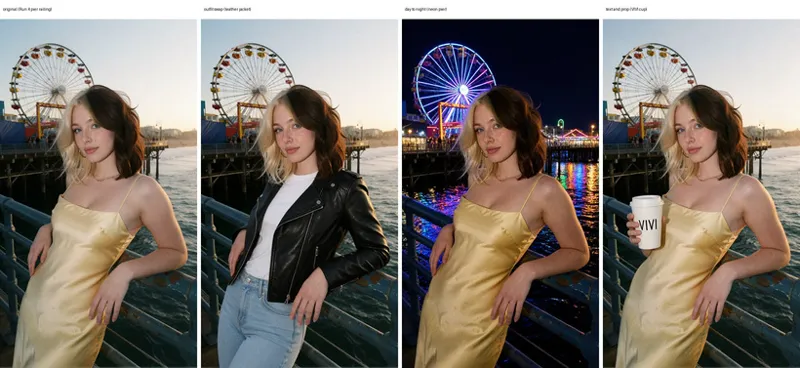
Looking at Fibo's capabilities directly, I tested a few different edits across the same image:
Overall, I would say that the results are pretty solid, especially for how quickly it generates! One problem that I noticed in the generation is that the model tends to produce a bit of a grainy effect over the image despite keeping everything (for the most part) untouched. This is partly due to the generation being a lower resolution than the input image, however even when I tested at higher resolutions, that grain remained, and overall image quality declined.
License (Please Read!)
Fibo 2's weights are licensed CC BY-NC 4.0, non-commercial only. You can't sell what you make with it unless you get a separate license from Bria or use their paid API. And before you switch back to Qwen: Qwen Image 2.1 moved to a research-only license too. So both of the best open-source editors right now are free to play with, but pay to sell. I'm not a lawyer, so definitely check the license for your own use case!
Resources
Fibo 2 Edit Turbo (diffusion_models): https://huggingface.co/Comfy-Org/Fibo-2.0/blob/main/diffusion_models/fibo2_edit_turbo_int8_convrot.safetensors
Qwen 3 VL 4B (/text_encoders): https://huggingface.co/Comfy-Org/Fibo-2.0/blob/main/text_encoders/qwen3vl_4b_int8_convrot.safetensors
Flux 2 VAE (/vae): https://huggingface.co/Comfy-Org/Fibo-2.0/blob/main/vae/flux2-vae.safetensors