



5 Tips for Creating Custom ComfyUI Workflows
The results are in! The most requested topic from our poll was "The Basics (ComfyUI, building workflows, overall tips)". So without further
The results are in! The most requested topic from our poll was "The Basics (ComfyUI, building workflows, overall tips)". So without further ado, here they are!
Tip 1: Start from the bottom up, not the top down.
The biggest mistake I made when starting off in ComfyUI is starting with the biggest workflows first. What I mean by that is, originally coming from AUTO1111, I wanted to find big workflows that could automate the things I was doing in AUTO1111 with simple clicks. Like Reactor, Hires upscaling, etc.
Unfortunately, it's not a 1:1 translation (even image generation fundamentally works differently between ComfyUI and AUTO1111). That being said, the best way forward in ComfyUI is to understand not how individual nodes work, but more importantly how they work together in groups to create certain outputs. For example, to upscale you need at least an upscale model node and an upscale image node. To "finish" a workflow, you'll always want a "Preview Image" or "Save Image" node. There's no button.
Start from the bottom up. Learn the small stuff first and how simple processes work together in groups, then string them together for new, more complicated results. Which leads us to the next tip:
Tip 2: Leverage Templates
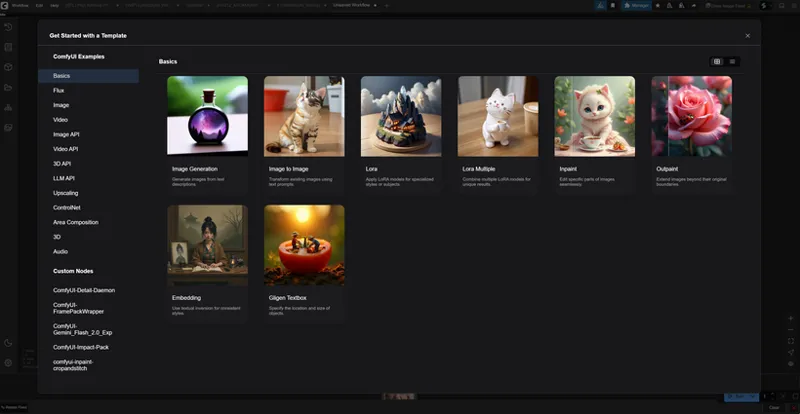
Some of you may not know (I certainly didn't) that ComfyUI has a templates section in the manager. If you click "Workflow" at the top left then "Browse Templates". You'll find tons of different simple workflows to help you start generating with models like Flux Dev & Schnell, Kontext, SDXL, and more.
You can then add masking, upscaling, or addons (Reactor, ACE++, Controlnet, etc.) to these templates to build new, more sophisticated workflows built for a specific purpose.
Tip 3: Big Workflows
Big workflows are much less complicated then they may seem at first glance. It's important to understand that big workflows are nothing more than stringing together different groups of nodes. Take the skin refiner workflow we've been talking about for example. It has dozens of nodes, but can be thought of much more broadly into simple groups - masking the skin, fixing it, and adding it back.
When we look at big workflows, try to break them down by groups of nodes rather than looking at individual nodes and their utility. Groups of nodes work together to produce an output, there is no one-node, do-all solution. Stringing together these groups is what allows us to build "mega" workflows that solve complex issues all in one step.
Tip 4: Watch everyone, all the time
The world has never seen an industry or technology this intense and fast paced. Likewise, the world has just now been able to connect globally at an unprecedented scale, meaning anyone can say anything whenever they want, at the click of a button.
Because of that, it's never been easier to learn from others, experts or novices. There are gems in the videos with 1k views, and sometimes garbage and nonsense in videos with 100k views. Find the patterns between workflows and videos, use what you need, and ignore the rest.
There are a lot of "parrots" out there as we like to call them - creators that aren't really providing substance, just reiterating what is known in a unique way. Pay attention to what these creators are actually saying and how they say it.
Tip 5: Just do it
Arguably the most important tip is to ensure that you aren't stuck in an "isolation tank of fear". It's hard working in an industry that changes daily, if not hourly at times, but you can't be paralyzed by those changes.
The best AI creators and developers are the ones that pivot, adapt, and are malleable along with the industry. They understand the core concepts of how different AI models and systems work, allowing them to change with the times quicker than experts in specific AI areas (like N8N workflows for example).
Patreon Exclusive Tip:
A lot of this is perception in my opinion. AI is some pretty insane "magical" technology, but it's also a tool like Blender, After Effects, Davinci, and the likes. What you've learned still applies here. Concepts like green screening, masking, depth masks, recoloring, geometry nodes, etc. are all skills that translate into ComfyUI. Don't abandon what you've learned and treat AI as an independent "beast" so to speak. If you come from the tech/media/VFX industry, everything you've learned can help you in ComfyUI.
Any specific questions or topics you want us to look into deeper? Let us know!