
How To Add Multiple Elevators to your Builds
If you need additional elevators for one of my existing builds:
Find the initial room with the elevator inside
Look for where the initial elevator is. On the floor above, there will be a 2x2 space for additional elevators on above floors.
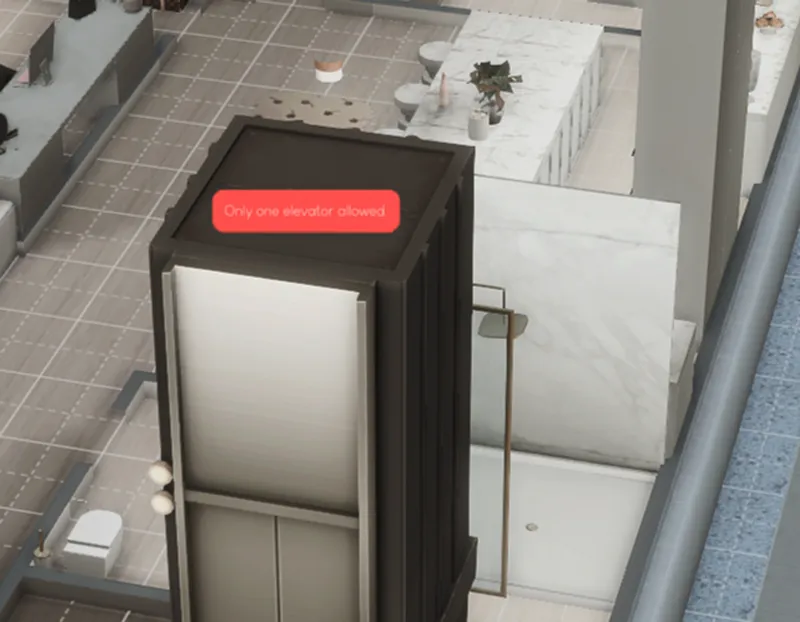
If you try to just copy the elevator itself, you will get an error message for "Only one elevator allowed"
Copy the Room
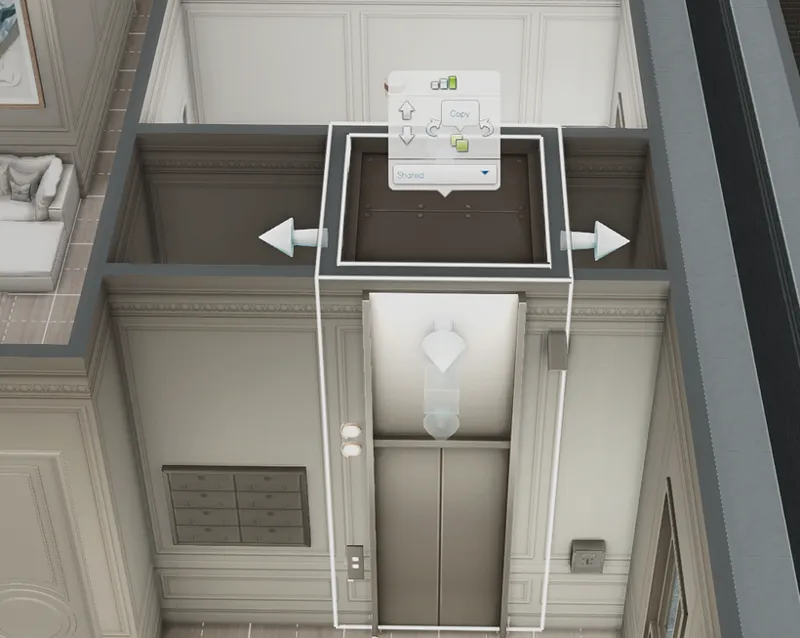
Click the entire 2x2 surrounding walls/room with the elevator inside of it
Select Copy.
Paste it in the same position on each additional floor where the elevator should continue.
If you are starting a fresh build:
Create a 2x2 Room
Build a 2x2 room where you want your first elevator.
Place the elevator inside that room.
If you try placing a second elevator normally, you’ll get the “Only one elevator allowed” error (see screenshot above).
Copy the Room
Click on the entire room (not just the elevator).
Select Copy Room (see additional screenshot above)
Paste the copied room wherever you need additional elevators.
Because you’re duplicating the full room instead of placing a new elevator object, the game allows it.
⚠️ Important
This workaround only works before a household is placed on the lot.
If you enter Build Mode from Live Mode after moving Sims in, the game will detect multiple elevators and require you to remove them before saving changes to your build.
So always complete elevator placement first.
This is perfect for apartment complexes, rental properties, hotels, or any multi-storey build where one elevator just isn’t realistic.
Let me know if anything’s unclear, happy to help.
Bee 🤍
Comments (4)
I hope both sides of your pillow are cold tonight. 🩵 thank you so much
Haha you’re so welcome ☺️🫶🏻
Do you know that your heaven sent?😭 this is gonna make my builds so much better
Hahaha omg no worries! I knew I’d read about it somewhere. Hopefully it works for you! 🤞🤍