
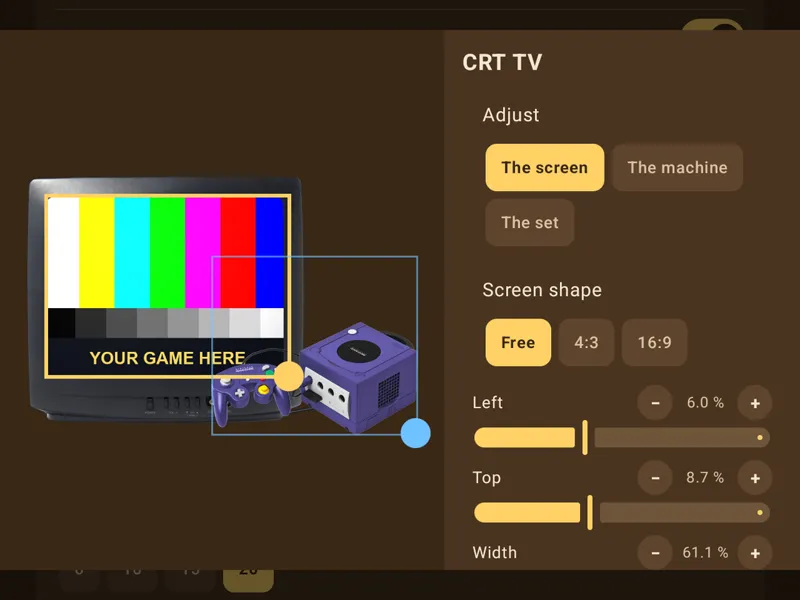
Game Switcher customization
I think I forgot to show this in my 1.3 update video but all the frames for the game switcher are totally customizable. You can add your own images, resize the screen, add a cable between the console + tv, move and resize and place things in front of or behind each other etc.
Go to Settings -> Game Switcher -> Frames and there you can see all the built-in frames, choose a different one from the drop-down lists (custom picture at the bottom) and tap on the image of the frame on the left to customize it!
I spent days refining this. I can't believe I forgot to show it!
Comments (4)
I had the same problem with jump launching games in the background on my Odin 2. The solution was that jump had wrongly identified it as a dual screen device. Turning dual screen off in the settings solved it.
Really nice frontend! The scraping tool is awesome. I'd like to suggest a new feature: the ability to create custom tabs for different consoles. For example, I prefer to separate my Android apps from Android games and emulators. It would also be great if I could create a custom tab specifically for Flash games and assign it to an Android Flash emulator app. If this feature is already implemented, I probably just missed it!
On the retroid pocket classic I cannot find the option to allow the game switcher to operate when a game is open.
Love the frontend, but I do have a problem on my Ayn Odin Mini: I set all the emulators I have on the device, they work, Jump sees them, all good. But when I want to start any game (no matter the system) through Jump, it opens the emulator in the background. So I always have to switch apps from Jump to the now running emulator. Games work, Emus work, it's just that Jump seems to always stay on top, no matter what