

Translator++
One day, I encountered a good doujin game at certain site. It has an exceptionally good user review, beautiful artwork along with captivating game play… on top of that, this game is distributed for free. But, too bad … this game is in Japanese, while I … just like the rest of 7 billion earth population … don’t speak Japanese.
So, after spending hours of agonizing research on aggregate tool, automatic translation tool etc… I came up with two conclusion. First, machine translations are suck when used as-is! Especially on handling inconsistent languages like Japanese. Sometimes with my limited knowledge of Japanese, the untranslated text are more understandable than the one translated using machine. Second, creating manual translations are painfully vexing without appropriate tools…. And unfortunately there are no such tool.
And finally I decided to create my own tool. A tool to combine the handiness of machine translation while accommodating manual translation.

Here is the result of what Translator++ can do in about 3 minutes of work :
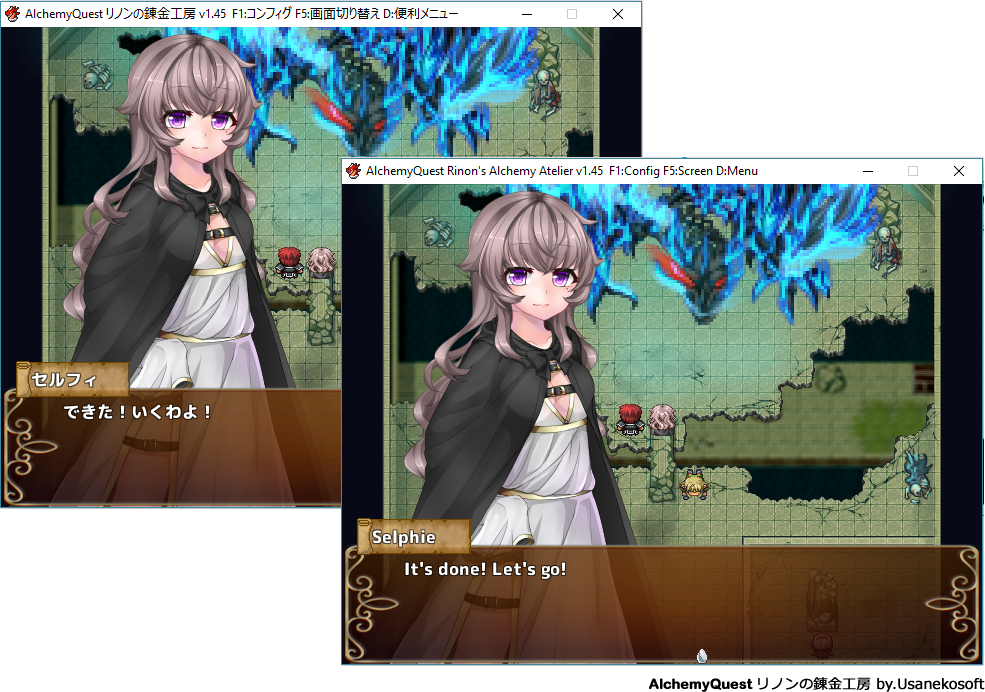
Not much? Well, the entire opening sequence of this game is translated, along with some manual translation.
Features:
GUI Editor

Translator++ is pretty much Inspired by Atlas translation tool. By using grid view, we can have several translation and reference for one context. The best translation (the rightmost filled column for each row) will be used by the engine when deploying translation, while the older version of translation still retained.
Here is some feature from Translator++ :
Find and replace makes everything easier.

Your translation progress are visually tracked :

Automatic translation in the box

Automation
Who doesn’t like automation? If possible, we like to have the entire translation process done automatically…. by single click. Unfortunately, that’s hardly unrealistic for producing a quality translation … at least for now.
But we are trying our best to help you out from manual labor.
Automatic translation
Translator++ equipped with tool to translate all in-game text using some of the most famous translation tool available.
This feature is mainly served as a reference to produce better manual translation. But yes, if you don’t care about translation quality … you have an option to translate everything using online or offline translation services just by a couple of click. -_^
Post-translation automation
You can trim your translation result to fit the game message box maximum length.
And … much more...
Translator++ is currently can handle RPG Maker XP, VX, VX Ace, MV and Wolf RPG Editor engine.
Also, I’m planning to work on some major visual novel engine (i/e Renpy) compatibility in the near future. Also, by the time I write this article... Translator++ is currently only support Japanese to English translation. More language support will be added soon.
I just started this project last month. Translator++ is currently in early development stage. It is pretty much unfinished. So, expect some bug here and there… But feel free to contact me if you find any.
Benefit for Patrons
Thank you for supporting my works.
Patrons will always have access to the latest version of Translator++.
Download
If you are a patron, use this link instead.
Comments (10)
I tried this on several games, but it doesnt work..
i have this problem Warning: Unknown: failed to open stream: No such file or directory in Unknown on line 0 Fatal error: Unknown: Failed opening required 'autoInit.php' (include_path='.;./php/includes') in Unknown on line 0
Me too. I tried installing every Microsoft Visual C++ and still no success.
I decrypted the game file but the program can not load, freeze at 0%
For some reason the program dont save your progress even if you save it
Does the program also translate into "rpg 2000" based games?
I wanted to ask you how to switch languages to automatically translate input and output channels PS: I wanted to apologize for broken English, because I do not understand it and used machine translation
I come using the wolf and mv but I would like to translate the games of xp and vx, maybe I'm clumsy but I do not know how to do it since I do it like with wolf or mv and it does not work or it does not work out ... you could help me ? you do not have a tutorial or so? thanks :3
Sorry for bothering me, i am a vietnamese and i am a student Ask if this software has a 32 bit version? I apologize if there are incorrect entries because I'm not good at english and I'm using google translate
Hello Nga Thanh. Thank you for your comment. Unfortunately all released version of Translator++ are built for Windows 64 bit... at least for now. But, the good news is, Translator++ is using NWJS. So It should be easy to migrate to windows 32 bit. You can just download Windows 32 bit version of NWJS (<a href="https://nwjs.io/)," rel="nofollow noopener" target="_blank">https://nwjs.io/),</a> then copy www, 3rdParty, data, php, ruby, node_modules folder along with package.json & package-lock.json to the 32 bit verion of NWJS. I think it will be OK. Or you can wait a bit, because I have a plan to release the 32 bit version in the near future. ;)