
Arcadia Action Camera — Forza Horizon 6 [PC]
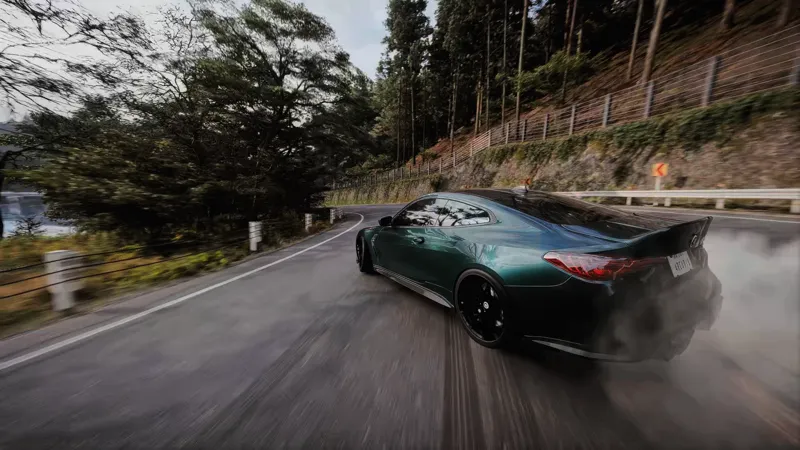
Introducing Arcadia Action Camera, my custom camera setup designed to bring a much more dynamic and cinematic feeling to driving.
Inspired by games like Need for Speed and Driveclub, Action Camera completely changes the way the car feels in motion.
Both Chaser Mode and Driver Mode are now more responsive, mobile and intentionally shaky, creating a stronger sensation of speed and making acceleration, braking, cornering and road movement feel much more physical.
What changes?
🏎️ More Dynamic Chaser Camera
More movement and responsiveness around the car for a stronger sense of speed.
👤 Enhanced Driver Camera
Additional movement and shake make the cockpit view feel more physical and immersive.
💨 Dynamic Drift Behavior
During drifts, the camera movement becomes noticeably more pronounced, reacting to the rotation and movement of the car for a much more dramatic effect.
🎬 Cinematic Driving Experience
The goal isn't absolute realism, but a more energetic and expressive interpretation of the driving experience.
I've been using this camera together with Arcadia TrueLight, and the combination brings the game significantly closer to the cinematic racing aesthetic I've been looking for.
Installation
Xbox (Microsoft Store / Xbox App)
Download and extract the archive.
Open the extracted archive and locate the mediapc folder.
Navigate to your Forza Horizon 6 installation directory, for example: D:\XboxGames\Forza Horizon 6\Content
Copy the mediapc folder into the Content folder.
Allow Windows to merge folders and replace files if prompted.
Steam
Download and extract the archive.
Open the extracted archive and locate the mediapc folder.
Drag and drop the mediapc folder into your Forza Horizon 6 installation directory where forzahorizon6.exe is located
Note: There is no need to overwrite nor change anything, the game will load them automatically.
Compatibility
✔ Tested in Chase Cam and Driver Cam
✔ Compatible with ReShade
✔ No known conflicts with visual enhancement mods
✔ No known conflicts with radio or audio mods
✘ Won't work with any other camera mod
Recommended Settings
For the best experience, enable the following in-game settings:
Camera FOV
Options → Video → Cams FOV
Chase Cam FOV: 80
Driver Cam FOV: 71
Drift Camera
Options → HUD & Gameplay → Drift Camera
Drift Camera: On
Sensitivity: 50
Speed: 50
Range: 60