
JayESims x Jaye Hinson Present: Jaye Cash V2 — Custom Amount ADD ON Update Dropping Tonight @7:30 PM CST
Hey Mod Haus Family 💚
First, thank y’all so much for the wild feedback on the launch of Jaye Cash. JayESims x Jaye Hinson Present: Jaye Cash — The Money Mobile App | JayESims on Patreon I really mean that. Y’all showing love, testing, asking for more features, and pushing me to go harder is exactly why I keep going!
THIS is officially our biggest JayESims mod ever. Out of every trait, career, social pack, CC, or gameplay system we have made, Jaye Cash is the biggest one we’ve built so far.
The main thing y’all asked for was the ability to type in your own amount instead of only using preset money options. I was already working on that but spent some extra time after the release to have this ready!
Your Sims can now send and request custom typed amounts through Jaye Cash.
What’s New In V2
Jaye Cash now includes:
Changelog
Jaye Cash V2 Changelog
Added custom typed send amount
Added custom typed request amount
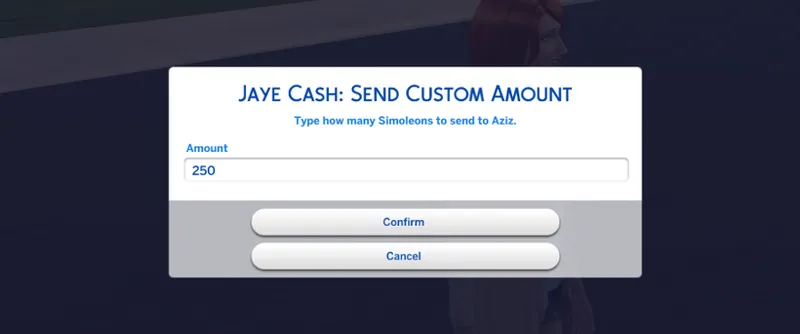
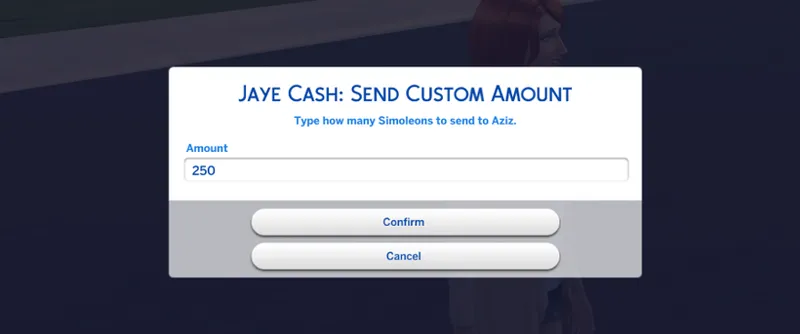
Added typed amount pop-up box
Added household-to-household custom money transfer
Added phone support for custom amount options
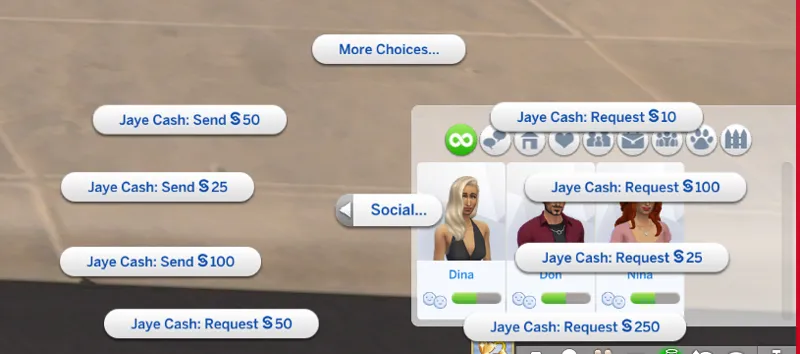
Added relationship panel support for custom amount options
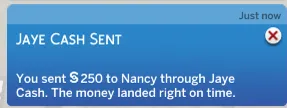
Added accurate custom amount notifications
Added custom amount request paid/ignored outcomes
Added not enough funds checks
Added request cooldown support for custom requests
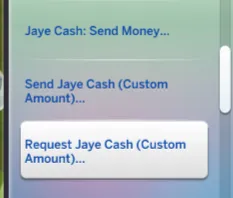
Added Request §250 to the relationship panel
Custom Typed Amounts
Your Sims can now type the exact amount they want to send or request.
So instead of only choosing preset options, you can now send things like:
§25
§250
§1,000
§10,000
The typed amount box opens in game, you enter the amount, and the app handles the transfer.
Send Jaye Cash Custom Amount
Your Sim can send a custom amount to another Sim.
How it works:
Your Sim chooses Send Jaye Cash Custom Amount
You type the amount
Your Sim’s household loses that money
The other Sim’s household receives that money
A buff is added
A notification appears with the exact amount
Request Jaye Cash Custom Amount
Your Sim can request a custom amount from another Sim.
How it works:
Your Sim chooses Request Jaye Cash Custom Amount
You type the amount
The other Sim can either pay it or ignore it
If they pay, their household loses the money and your Sim’s household receives it
If they ignore it, no money moves
Buffs and notifications will still apply
Larger requests are harder to get paid, so asking for a little money is easier than asking somebody for a huge amount.
Where The Options Show
The custom amount options now show in:
Phone
Relationship Panel
So you can use Jaye Cash through the phone like a real money app, or directly from the relationship panel.
Important Gameplay Notes
Custom amount transfers are for Sims in different households.
If two Sims live in the same household, they already share the same household funds, so the custom transfer will not work between them because there is nothing separate to move.
The mod also checks if the sending Sim actually has enough money. If they do not, the transfer will not go through.
Requirements
For Jaye Cash interactions to show, make sure:
Your Sim has met the target Sim
Their friendship is 50% or higher
The Sims are Teen or older
The target is not a child, toddler, infant, pet, or horse
Script Mods are enabled for the custom amount feature
XML Injector is installed
Files To Install
Please delete the old Jaye Cash files first.
Install these files:
JayESimsXJayeHinson_JayeCash_V2.package
JayeCashCustomAmountV2 folder
The script folder must stay like this:
Mods/JayeCashCustomAmountV2/Scripts/jayecash_custom_amount.py
Do not rename the script file.
After installing, delete:
localthumbcache.package
Delete Old Files First
This update took a lot, but I’m so proud of where this mod is going. Thank y’all for supporting, testing, and helping me keep leveling up.
CONNECT WITH JAYESIMS X Jaye Hinson
Stay connected outside Patreon.
Baby Lab Name Generator - JayESims Baby Name Lab | Baby Name Generator, Birth Certificates & Sims Storytelling Tool
https://discord.gg/NVXhzzXhaK Discord
Blog For Tips, CC Finds And How-To JayESims Mod Hub
CurseForge - JayESims's Profile - Member List - CurseForge
Tumblr - @jayexsims on Tumblr
Jaye Hinson Instagram - : https://www.instagram.com/jayehinson
TikTok: @Jay4Sims
FaceBook Mod Haus Group: Click Here
Pinterest: SimsJaye
Twitter/X: Click Here
YouTube: Click Here
JAYESIMS Instagram: Click Here
Twitch: Click Here
Spotify - Click here for MOD HAUS SPOTIFY PLAYLIST
SUPPORT ME.
make TikToks. debunk the rumors. troubleshoot and help those who have trouble. buy commissions. even pay for one month then cancel. it all helps. every single bit of support tells me it’s worth it to keep going.
🧩 If the XML Injector is not installed, certain interactions, buffs, and trait features will not appear or work as intended.
📥 You can download the XML Injector here (by Scumbumbo/Triplis):
https://scumbumbomods.com/xml-injector
Place it directly in your Mods folder (no more than one subfolder deep).
⚠️ Important Installation Rule
Each mod comes in two versions:
User‑Directed Version
Autonomous Version
You must choose ONE version only.
Do NOT place both versions in your Mods folder at the same time.
Having both installed will cause conflicts, missing interactions, or unexpected behavior.
AUTO Version
“Auto” means the actions happen autonomously (without you controlling it).
Just like how Sims have a mind of their own.
So yes, you will usually NOT see pie menus for mods/files that you downloaded that say AUTO. That’s normal.
User Directed Version
“User Directed” means the actions are in your control.
Mods/files that say User Directed should show pie menus because you’re the one choosing the interactions.
Comments (7)
Hello, I loveeee your mods. I subscribed to the donut plus membership, but I do not see the download for this mod.
You aren’t on the right page. Please make sure you are the right page love🩷
i might be missing it but wheres the download link?\
You are missing it. It's for early access for select tier members ( you are not on that tier) and this is not the post also. :) PopTart tier and up currently.
Amazing! Speechless!
I can't wait for you guys to get your hands on it!!
We are equally excited!