


CombatFlite: Solving the "Activation Error"
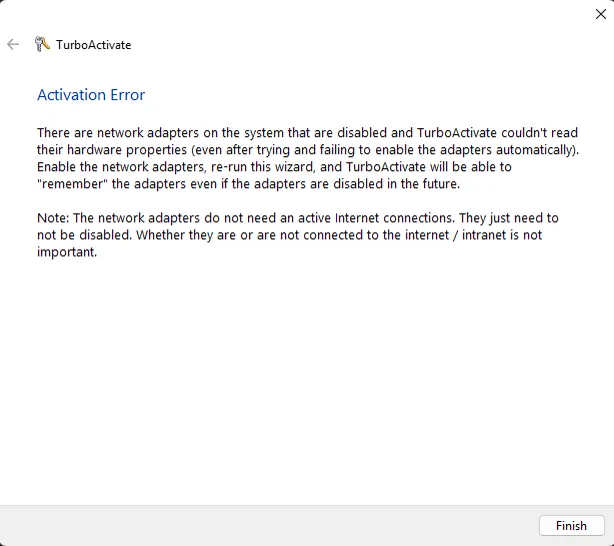
Several people occasionally complained that they encountered an “Activation Error” when attempting to activate CombatFlite on a new or freshly rebuilt system. The error typically states that TurboActivate cannot read the hardware properties of one or more network adapters, even when adapters are present and functioning.
In practice, this issue is not related to your network configuration, but to a TurboActivate DLL mismatch introduced in certain Windows environments.
Issue Description
CombatFlite relis on a software called "TurboActivate" to manage licenses and ensure that you are allowed to use the product key that you entered at activation. This software relies on a Windows library (.dll) to gather hardware identification data used for licensing. Many people repot that they encountered an error which causes TurboActivate to fail with the message:
However, this message is misleading: the root problem is the TurboActivate .dll itself, not your network cards.
Solution: Replace the TurboActivate DLL
The fix is simple and has been confirmed to work on Windows 10 and Windows 11 installations.
Step 1: download the correct .dll
Option 1: go on TurboActivate editor at https://wyday.com, create a free acoount, then download the latest version of TurboActivate for Windows;
Option 2: download the attached Turboactivate v5.0.0 file.
Step 2: overwrite the existing .dll in CombatFlite. It's by default located in your C:\Program Files\CombatFlite\bin folder
Step 3: launch CombatFlite and activate!
Very Important !
Deactivate your old installation beforegiving away your old PC: CombatFlite’s license allows activation on one machine at a time.
Before activating on a new PC, you must deactivate your license on the old installation:
Help → Deactivate
Failing to do this will result in an activation limit error, even if the DLL issue is fixed...
Note: CombatFlite website has been renewed in August 2025, for one year. It means that we will probably be able to download the installation package on the official website until there. Just in case, you will also find the full installation package attached below. If you want to reinstall CombatFlite later, it might be helpful...
PS: What's Next After CombatFlite ???
If you’ve read this far, you deserve a small teaser.
Behind the scenes, I’ve begun collaborating with a friend of mine who has the capabilities, and the willingness, to build the next-generation mission-planning tool we’ve always wanted. Think of something at least on par with CombatFlite, but fully tailored to our operational workflow, our DCS needs, and all the modern features we can imagine...
It’s early to say more, but if everything goes well, 2026 might bring some exciting news for all serious virtual aviators :)
Comments (4)
hey, i dont change my pc but the key still say "already used" whats wrong and how to fix that?
I'm not sure, did you install it on another computer in the past?
Also make sure to deactivate it before making major hardware changes to your PC. I found out the hard way that can mess things up too. Thankfully the guy from CF was still replying to emails at the time and was able to manually reset things on his end, but I've heard he's much less responsive now.
Can't wait for CombatFlite Reloaded! Hopefully there will be an option to match the in-game headings! 😄