




Guide for the Body Part Reviewer
(Compatible with version 1.1 of BDM released on August 15th.)
It can look a bit challenging but it's more intuitive than it seems. Just remember that if you do something wrong, you can always edit the body parts of the sims that have the wrong ones and come back to the reviewer to edit the config.
BDM is highly customizable because it simply would not work otherwise. The body parts available are simply too diverse to create an automatic map for all of them. And a sim's body parts can impact WW gameplay, and since every person plays the game differently, it's best to allow you to have full control.
There is no "right way" to config the mod. You make it the way you want. I'm using my own style and tastes for this tutorial, so you don't have to follow every step exactly.
Don't feel like settings things up? Check out these premade settings.
Step 1 - Load the Parts
This scans all body parts recognized by WickedWhims. You should only do this after loading a save with all the parts you plan to use installed at least once.
The file you're looking for is called cas_parts_keeper_data.ww, located at Documents\Electronic Arts\The Sims 4\saves\WickedWhimsMod.
If after loading you see parts you no longer have or don't see parts you do, I recommend deleting the cas_parts_keeper_data.ww and loading a save again.
Step 2 - Clean up
From this step on, I recommend having the game open on the side so you can check parts visually.
Removing broken or textureless parts
Creators often make versions that have no texture so you can use a different overlay on top of it. That happens often with breasts. It's great for adding custom nipples, but I think you're here because you don't want to have to add things manually to sims. So we skip any part that says "textureless" or "without texture" or any other name in that ballpark.
Many meshes don't mention that they are textureless, so you'll need to go in game, get a sim naked, and equip the parts to check if they are working properly.
You can also take the opportunity to check for broken meshes, like parts that glitch or render as normal clothes instead of the real part.
You should also keep an eye on parts marked as native. They are the parts from the original AE mesh, so they will make your sims look like Barbie dolls. It's OK to keep them for feet and male chests, but everything else should be removed.
You can always unskip parts if you make mistakes.
Removing occult specific parts
You'll notice that some parts have a small tag next to their name showing an occult type. This tag determines which randomization pool that part belongs to. Skipping a part with an occult tag removes it from that occult's pool.
For example: say you have Noir's Pornstar Cock and Aliens From Outer Sex, and you want human Sims to use only the first and aliens to use only the second. Here's how:
Type "aliens from outer sex" in the search bar, open the occult dropdown, select Human / Unrestricted, select all, and click Skip Selected.
Then type "pornstar cock" in the search bar, select Alien from the occult dropdown, select all, and click Skip Selected.
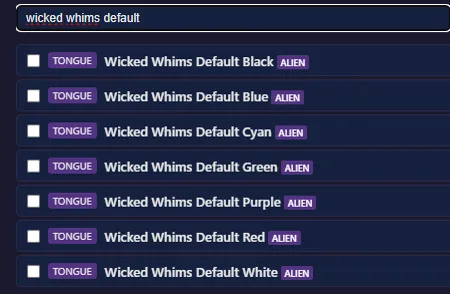
You should also remove the colorful tongues. Find them by typing "wicked whims default" into the search bar. I personally like to keep them for alien sims.
How does the occult part application work?
Each part in the config has a tag specifying which occult it belongs to. When the mod randomizes a Sim, it checks the pool for that Sim's occult type. It applies the occult-tagged part first, then selects a matching part for the human transformation. If a part with the same name exists in the human pool, that part is applied. If not, the mod picks a random human part, and for penises specifically, it tries to match the size of the occult-form part.
Going back to the example: you removed the Pornstar parts tagged for aliens and the Aliens From Outer Sex parts tagged for humans. Human Sims will never get the alien parts. Alien Sims will get alien-tagged parts in their alien form, and a size-matched human part in their human form. This matters because Khlas size traits are applied based on the occult-form part, so if the alien form has the Big Cock trait, the Sim gets those buffs regardless of what form they are in.
Step 3 - Futa Rules
If you don't want NPC sims to have a chance of being futas, just uncheck the "Allow futa parts" box and move to the next step.
Once you check the box to allow futas, there isn't a lot of config you need to do. All female penises are assigned automatically and all male bottoms are assigned as vaginas.
When a sim is turned into a futa, they will receive the gender options traits that match their body parts:
Sims getting a vagina can't pee standing and can become pregnant.
Sims getting a penis can pee standing and impregnate others.
Sims with both parts pee standing and are able to both impregnate and become pregnant.
The Occurrence chance is what the name says: the likelihood of a sim turning into a futa. Set any of the values to 0 if you don't want a specific type of futa.
Wicked Whims has default male vaginas and female penises, so you don't need to have specific parts installed to get those features. But you do need specific parts to have both parts. A sim with a penis and a vagina isn't made by applying both meshes — it's a penis mesh that has a vagina instead of testicles. The only creator I've seen making that is Noir.
What about the "Both Parts"?
Again, you'll need specific meshes that say they include a penis and a vagina. If you have the Noir ones, they will probably already be auto selected.
Sorry for being repetitive about this, I just want to avoid confusion.
Step 4 - Matching Soft to Hard
The Reviewer can match soft and hard penises automatically for most packs. It compares names and part types to find matches. For example, "Noir Pornstar Cock Hard Extra Big Cut" gets matched to "Noir Pornstar Cock Soft Extra Big Cut".
If a creator made more size options for the hard versions than soft versions, the part that doesn't have a direct soft version will get one of a similar size. For example, Real Gen penis by Simdulgence has a hard XX Large but no soft XX Large, so the reviewer assigns the X Large version. It's OK for a soft penis to be used for several hard penises.
The Reviewer can make mistakes, so I recommend giving the auto matching a look over before moving on.
You can drag the corner to resize the lists. Parts in the bottom list don't need to be confirmed again.
There's no part with a matching name
Some creators use non-standard names for soft versions. Berni, for example, sometimes uses the word "sheath" for soft variants in their furry packs. For any part the Reviewer couldn't auto-match, you'll need to scroll through the soft penis list and find the right one manually.
Pick the closest one you can find. You may notice parts named "Khlas Roland Edit for Males" or "Khlas Jordan Edit Malik Penis" — these are edits of Simdulgence's parts. To match them, download the original Simdulgence Exclusive Designs parts and assign "Simdulgence Simple Penis Roland" and "Simdulgence Simple Penis Jordan" as their soft versions.
Step 5 - Picking Sizes
For this step I recommend having the game open with a male Sim, getting him naked, then typing the command "ww.get_hard 10" in the cheat console and keeping the game paused so you can inspect each part.
The Reviewer auto-assigns sizes for parts that state their size explicitly in the name. For example, the Pornstar Cock pack gets assigned like this:
Noir Pornstar Cock Hard Micro → Tiny
Noir Pornstar Cock Hard Small → Small
Noir Pornstar Cock Hard Average → Average
Noir Pornstar Cock Hard Big → Big
Noir Pornstar Cock Hard Extra Big → Huge
Noir Pornstar Cock Hard Huge → Huge
Some parts (like Simdulgence's Exclusive Designs) are pre-assigned based on my personal judgment. You can compare the sizes in game to decide what size each penis should be.
Why size matters
What a bold statement.
There are five size categories: tiny, small, average, big, and huge. Assigning a size also sets the part's rarity automatically:
Average and Small → Common
Big → Uncommon
Tiny and Huge → Rare
This is not a permanent tie — you can still customize rarity after customizing sizes. Want huge dicks to be the norm? Set their rarity to common!
Sizes also determine which Khlas traits get applied:
Small and Tiny → Small Cock
Average → no trait
Big and Huge → Big Cock
These traits give several gameplay effects. If you don't like them, you can set all penises to Average.
Step 6 - Choosing Rarity
This is where you assign rarities to parts. Usually breasts, vaginas, chests, tongues, and feet, since those couldn't have their rarity set automatically like the penises. What you assign here is entirely personal preference.
The process is straightforward: use the search bar and the type/occult filters to find the parts you want, select them using the top checkbox, then click the rarity you want to assign. Switch the rarity filter from "Any rarity" to "Unset" to show only parts that haven't been assigned yet.
Keep your eyes peeled for pierced tongues and digitigrade feet!
Step 7 - Other Settings
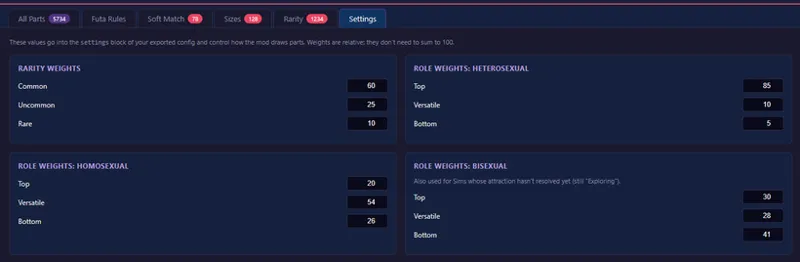
Now you set the weights that control how likely parts and Khlas traits are to be applied during randomization.
Rarity Weights
These control how likely parts of each rarity tier are to be selected. A higher number means that rarity will come up more often. The numbers can go from 0 to 100, and they don't need to add up to 100.
Rarity Weights
These control how likely parts of each rarity tier are to be selected. A higher number means that rarity will come up more often. The numbers can go from 0 to 100, and they don't need to add up to 100.
Role Weights
These control the distribution of Khlas sex role traits (Top, Bottom, Versatile) among male Sims. How you distribute them should reflect your playstyle.
Like rarity weights, the numbers go from 0 to 100 and don't need to add up to 100.
When setting the default weight distribution for homosexual and bisexual sims, I based myself on real-world likelihoods (different studies done in different places might have different outcomes, so I just picked one that seemed to have the most data). The heterosexual settings were a bit less scientific, I just put in values that make playing as a heterosexual or bisexual woman who has many different partners (which is how I usually play) more convenient.
After that, we're done! Export the config and place the downloaded json file in your BDM folder!
Setting up a BDM file is not a linear process. I often forget to change something, so I need to go back to a previous step to edit it. I guess it helps that many tabs edit different aspects of the same parts, that way you're always going over your progress.
Where do I find compatible parts?
Creator's Patreon pages.
You won't find any on CurseForge. They have a strict no NSFW policy. And remember: Body presets are not mody meshes!
Comments (1)
Where can I find this html file? I did "Open the game and load any save", but I can't find "[SpcyYogrt]BDMPartReviewer.html" anywhere. Any tips?