
Moderate with confidence and build your team
Have you seen this situation happen?
You share a new post and the conversation gets going. Someone disagrees with your take, which is fair game. Then another comment crosses the line from disagreeing with you to insulting you personally. Suddenly, the conversation needs your attention.
Moments like this can happen when you bring people together online, and knowing how you want to respond makes them much easier to navigate.
That's where community moderation is essential.
Community moderation helps you uphold what's permitted in your space and step in when a conversation crosses the boundaries you've set. Disagreement can still be productive, and members don't always need to agree with you or each other. Your community expectations help make the line clear between a lively conversation and behavior like name-calling, harassment, spam, or other activity that takes away from the community you're building.
Sometimes moderation is as simple as deleting a singular comment, such as an accidental duplicate post. Other times, it means reminding someone about a community expectation or rule, responding calmly to a tense conversation to de-escalate, or using moderation tools such as delete, mute, or block when a situation calls for it. Each response gives you another opportunity to reinforce your community expectations and help keep the space safe and welcoming for everyone.
An empathetic response goes a long way
When difficult situations pop up, community expectations give you something concrete to point back to. The way you do that can help keep a tense moment from taking over the conversation, and stay thoughtful and empathetic to everyone involved.
People rarely do their best thinking when they're frustrated, embarrassed, or feeling called out in front of others. A calm, empathetic response creates enough space for the conversation to move forward.
Start with what you can observe, then connect it back to the expectation you’ve already set for your community, and be clear about what you’d like to see instead.
For example:
"Our community expectations ask everyone to keep disagreements respectful. You're welcome to disagree with one another, but name-calling crosses that line and isn't permitted here. Please keep the conversation focused on the topic and be respectful to everyone. If it continues, further moderation action may be taken."
This keeps the response focused on the behavior and the shared expectations for the space, and outlines what could happen next if the warning isn't heeded. You don't need to guess at someone's intentions or explain why you made the call. You're simply reinforcing a boundary everyone has been asked to follow.
And remember, you're rarely speaking to just one person. Other members can see how you respond, too. A clear, consistent reminder shows everyone where the boundaries are and that the same expectations apply across the community.
Sometimes that reminder is enough to get the conversation back on track. When the behavior continues or calls for a stronger response, Patreon's moderation tools give you additional ways to step in.
Your moderation toolbox
The tools available depend on where the conversation is happening. Posts and Quips, Community Chats, and Lives each work a little differently.
Match your response to what's happening. A one-off comment might only need deleting; repeated behavior may call for a warning or a bigger step. Blocking has the biggest consequences, so it's worth knowing exactly what it does before you need it.
Lighter-touch options
Delete a comment or message: remove a single comment or chat message without acting against someone's whole membership.
Adjust comment permissions: set who can comment on a post or Quip, or across your whole Patreon: anyone with a Patreon account, all members, paid members only, or off entirely.
When someone needs to step back
Mute (Community Chats and Lives): puts someone in read-only mode for up to 24 hours. They can still see the conversation, just not add to it.
Kick from a Live: removes someone from that broadcast only. They keep their membership and can join future Lives.
When someone needs to leave your community
**Block:** ends someone's membership immediately, paid or free, and keeps them from rejoining. You can also remove their past comments and messages. Since it ends a membership, save it for repeated or serious behavior rather than a first response.
Let Patreon help too
Auto-moderation for posts and Quips: filters likely spam or harmful comments automatically. Review anything caught by mistake and restore it if needed.
Auto-moderation for Lives: a similar setting you can turn on before or during a broadcast.
When something gets reported
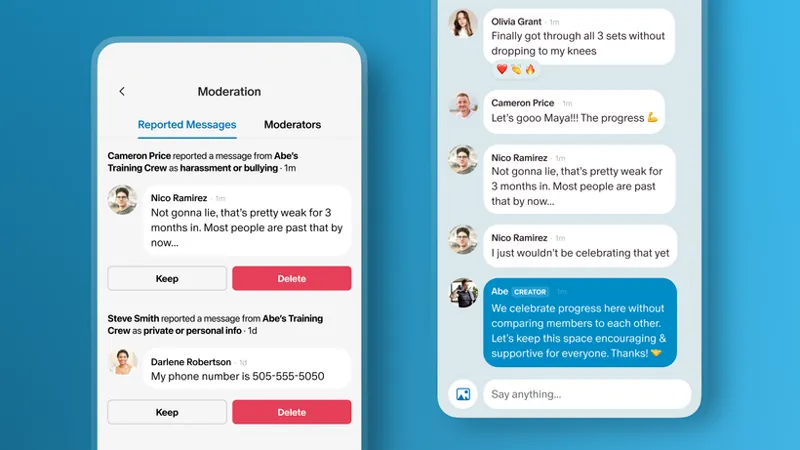
Reports to you: members can report Chat and Live messages straight to your Moderation Hub, where you or a trusted moderator decide whether to keep or remove them. Reported post and Quip comments don't appear in the Hub, but reporting still lets you hide them from your page.
Reports to Patreon: anyone can report a comment, message, or user to Trust & Safety if it may violate Patreon's Community Guidelines. Reporting a post or Quip comment also gives you the option to hide it from your page.
⚡ Pro Tip: Different community spaces have different moderation tools. Posts and Quips have comment controls, while tools like muting and kicking are specific to chats and Lives. Knowing what's available in the spaces you use most can make moderation decisions much easier in the moment.
Community in practice: Abs with Abe
Abe notices one member repeatedly leaving discouraging comments under other members' workout updates.
The first time, Abe replies directly with a reminder about the community expectation to celebrate progress without comparison, and lets the member know disrespectful comments may be removed if it continues.
A few days later, another discouraging comment appears, so Abe deletes it. When it happens again, he removes the comment and gives a final warning: continued behavior may lead to losing access to the community.
The pattern continues, so Abe blocks the member. Blocking immediately ends their membership, including a paid membership, and prevents them from rejoining. It's a serious step, but by this point Abe has clearly communicated the expectation, given the member chances to adjust, and seen the behavior continue despite ample warning.
Some situations need your judgment
Some moderation decisions are straightforward. Spam, repeated self-promotion, or solicitations that distract from your community are usually easy calls.
Others require more judgment.
In the age of social media and fandoms, it's common for members to feel a strong connection to creators they admire, and most of the time that's a good thing. Occasionally that connection turns into expectations you can't realistically meet, like immediate replies, emotional support, or more one-on-one access than you're able to give.
If you notice that happening, weekly discussion threads, office hours, or recurring Q&As can give that energy somewhere to go: a reliable place for members to connect with you that doesn't depend on constant one-on-one attention.
You may also come across behavior that doesn't clearly break a written expectation but still changes how your community feels. Maybe one member regularly dismisses other people's ideas, or always has to have the last word, and you notice newer members go quiet once that person joins the conversation.
When you notice a pattern like that, address it where it's happening. Reply with a clear reminder about the kind of conversation you want to encourage and what needs to change. If it continues, let the member know future comments may be removed or other moderation action may follow. That gives them a chance to adjust while making the expectation clear to everyone else in the conversation.
Community in practice: Abs with Abe
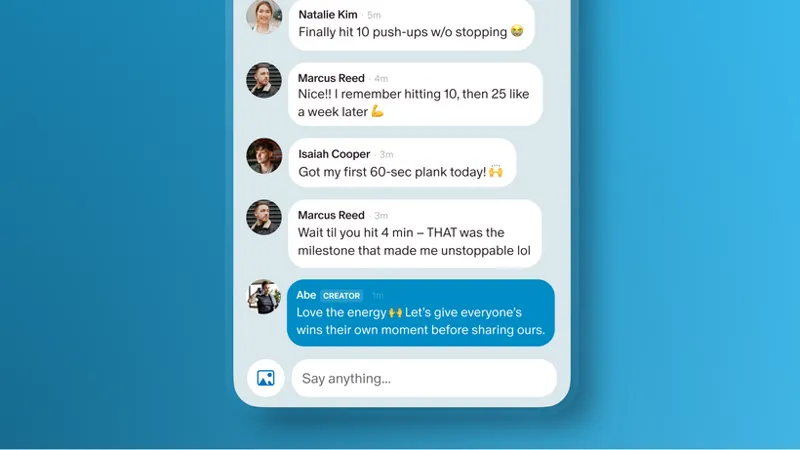
One of Abe's longtime members means well, but constantly one-ups other people's progress in the chat. Nobody's mentioned it, but Abe's noticed newer members have gotten quieter.
Because Abe knows this member well and trusts their intentions, he checks in privately: he loves how invested they are, and asks if they'd be open to leaving a little more room for others to share their wins first.
With someone he doesn't know as well, Abe might handle the same behavior directly in the public conversation with a friendly reminder to make room for everyone.
No community expectation was broken, and Abe doesn't need to write a new one. The member just needed a personal nudge and a little redirection.
You don't have to do this alone
As your community grows, it can help to bring someone else in to moderate.
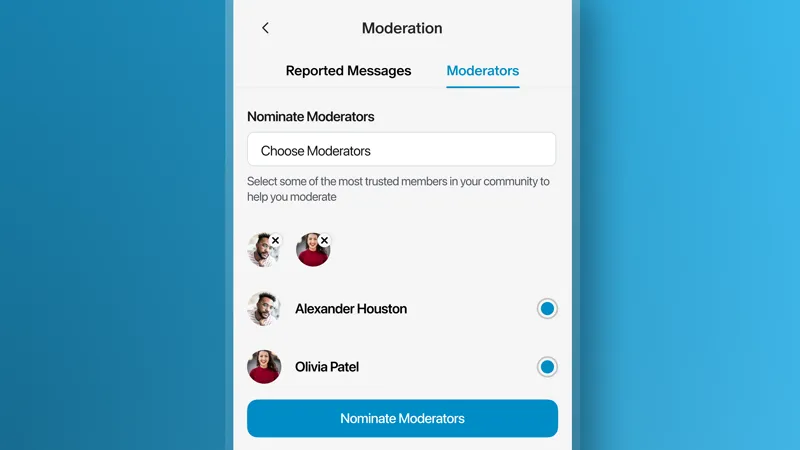
Ask a trusted member: someone already active in your community understands its culture, and members may recognize them. Give them Trusted Moderator access to review reported Chat and Live messages in your Moderation Hub.
Hire for it: depending on your community's size and activity, you might bring someone on specifically for moderation support.
Loop in your team: if someone already helps run your Patreon (a co-host, editor, teammate), add them as a teammate for broader page access, then separately grant trusted moderator access if you want them handling reports too.
Before you ask someone, find out what experience they're bringing. Have they moderated before? Are they comfortable with the tools? Then talk through expectations together: which situations they can handle on their own, when to come to you, and how you'd like them to approach moderation.
Support them too. Some creators offer a complimentary membership, others pay, and many rely on regular check-ins and recognition.
Community in practice: Abs with Abe
As Abs with Abe gets busier, Abe notices he's spending more time on moderation and less time in the conversations he loves being part of.
He asks one of his longest-standing members to become a trusted moderator and help keep an eye on the members-only chat, offering a complimentary gifted membership and a public shoutout for taking on the role.
They talk through expectations ahead of time, check in regularly, and work together to keep the chat welcoming and on track.
🧭 Your next steps
Community expectations help people understand the experience you're creating. Moderation helps enforce it.
Most moderation happens in small moments, and over time, those moments are what make your community feel safe and worth being part of.
Explore Patreon's moderation tools so you know when each one is most helpful.
Think through one response you could use the next time a conversation starts to become tense.
If your community is growing, consider whether it's time to invite someone you trust to help moderate your space.
📌 How helpful was this material? Click to let us know: 👍 | 👎
Comments (2)
Is anyone else having issues with going live on Patreon ??
Hey there, if you're still having issues going Live on Patreon, please reach out to our Support team here: https://support.patreon.com/hc/en-us/requests/new