
Turn first-time visitors into members
🧭 This post is part of our Growing your Patreon collection. If you haven't taken the Growth Pathfinder quiz yet, consider starting with How should you grow? to discover your best growth opportunities and build a personalized path through this collection.
A new visitor lands on your Patreon already curious about your work. They might've found you through Patreon's home feed, through a similar creator, or because you linked your Patreon on another platform.
However they got here, now it's your time to shine.
In just a few moments on your Patreon page, that visitor is deciding whether this feels exciting, confusing, welcoming, worth exploring, or... easy to leave. (Nooooo! 🙀)
Your quest is to create an environment where curious visitors become engaged members. This is your membership quest.
Help fans find their footing fast
The tricky part is that you've probably spent months (or years!) building your Patreon.
You know where everything is. You know which posts matter most. You know what all your memberships mean. You know exactly where you'd click.
A first-time visitor doesn't. They're trying to get their bearings.
What does this creator make?
What's happening here?
Why do people join?
Why do people stick around?
And perhaps most importantly: What should I do next?
If those answers are easy to find, curiosity can turn into comfort. And comfort can turn into confidence.
If those answers are difficult to find... well, curiosity can quietly turn into confusion. And confusion can turn into a swift exit.
Help fans feel at home
Think about the last time you visited a website, community, or online space for the very first time. The best experiences usually have something to casually guide you along.
"Welcome! Here's where to start."
Patreon pages can do the same thing.
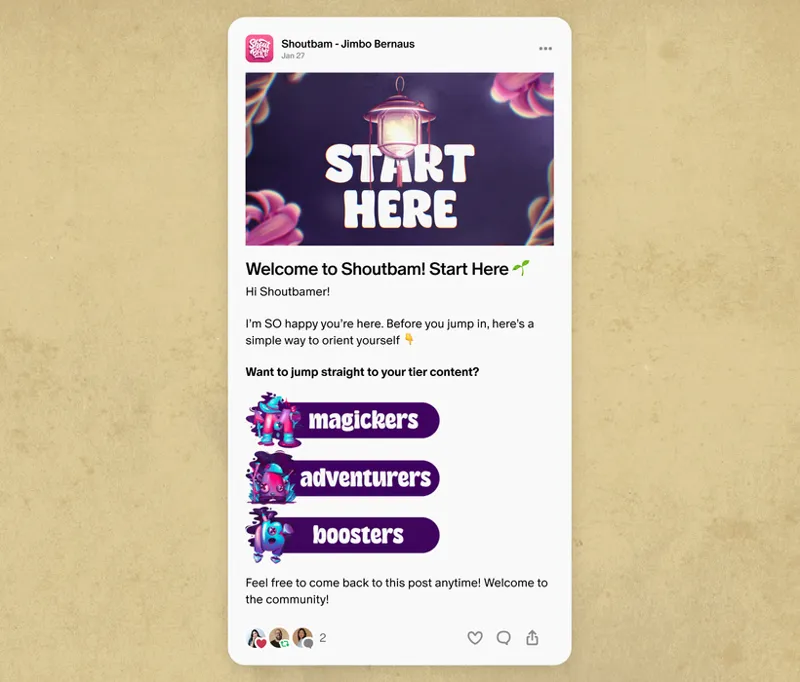
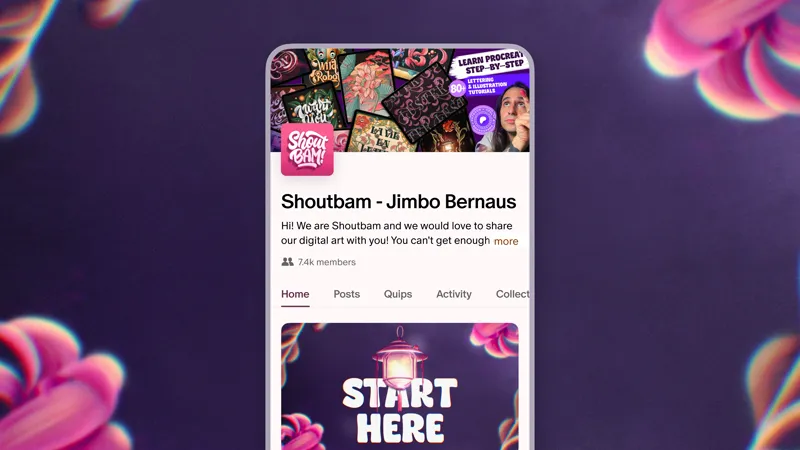
Visual artist Shoutbam does this beautifully. When you land on his Patreon, it feels like someone has already thought about the questions a new visitor might have. The work is organized, the page is easy to explore, and there are clear places to begin.
A clear About section helps visitors understand who you are. Custom navigation tabs, featured work, and organized collections* that group similar work together guide them toward the things you most want them to see. Public posts give them a taste of your work, while straightforward tier descriptions help them understand what's waiting for them as a member.
*Some features mentioned are available on Patreon’s updated creator page. Learn more about it in Patreon’s help center article.
Fans won't have to work hard to understand what's happening. Which is great, because you want your visitors spending their energy getting excited about your work rather than trying to figure out where to click.
Want to see how Shoutbam does it? Make your Patreon easier for fans to explore (and easier to stick with) has the full story.
Let curiosity turn into comfort
Once someone understands your Patreon page, give them a way to imagine themselves being part of it.
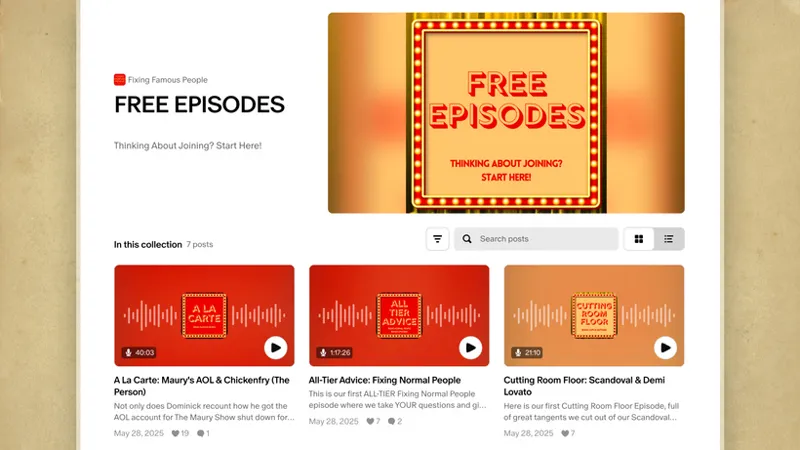
Podcast creators Fixing Famous People use a public collection to give new visitors a sample of their media. They get a sense of the humor, the format, the personalities, and the experience.
Better yet, they make it incredibly easy to find. The collection is clearly labeled and featured prominently on their page, so curious visitors don't have to go hunting for it.
It's a bit like those little food court samples. You're just strolling through the mall minding your own business and suddenly someone hands you a tiny piece of teriyaki chicken. Next thing you know, you're standing in line ordering lunch.
Giving visitors a taste of your work works the same way.
No need to start from scratch. Look through your existing work and ask yourself: "If someone knew nothing about me, which 3-5 pieces would help them understand what makes this Patreon special?"
Those pieces can become your own version of a "start here" experience.
Curiosity becomes comfort. Comfort becomes confidence. And confidence makes it much easier for someone to decide they want more.
Make the next step obvious
So now your curious visitor can easily navigate your page and they've explored a sample of your work.
What's next?
Yes, there's a button to click and browse your tiers. But what helps someone decide joining is actually for them?
Whether it’s in a tier description, public post, or call to action, try shifting the focus from what you offer to what they gain.
For example:
Join us for Friday's livestream.
Follow this project from beginning to end.
Come behind the scenes while we build this together.
Be part of the conversation.
These invitations help people picture themselves participating. And once someone can picture themselves there, they already feel like they belong.
You can also create opportunities that feel timely or exclusive. A little FOMO, if you will.
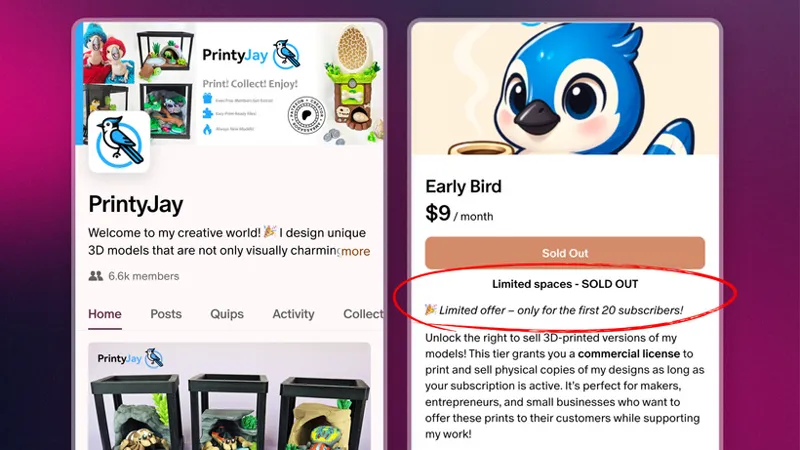
3D printing creator PrintyJay offers a limited membership tier with a set number of spots available. The limited availability makes joining feel special and encourages people to jump in before the spots fill up, while helping ensure the creator can sustainably deliver the benefits they've promised.
Limited spots aren't the only way to create urgency, either. Limited-time offers, discounts, and special events can all give people a reason to take the next step sooner rather than later.
People act when two things click at once: they know what they're joining and they know why now is the time.
Fresh eyes make all the difference
Have you heard the expression "You can't see the forest for the trees"? Sometimes you're so close to the details, you forget to look up and take in the whole picture.
That can happen with your Patreon page too. Which is a good problem to have! It means you've put time and care into building it.
But it also means you've likely stopped noticing some of the places where first-time visitors might hesitate.
That's why a fresh set of eyes can be incredibly valuable.
Ask a friend to explore your Patreon. Ask a community member. Ask someone who's never used Patreon before.
Watch where they click. Notice what confuses them. Pay attention to the questions they ask.
Often, just one or two intentional changes can make a huge difference.
A clearer collection.
A stronger call to action.
A better explanation.
A more obvious place to start.
Those small shifts add up.
Try making one or two changes, then give yourself time to see how they perform. Are people spending more time exploring? Are more visitors becoming members? Are the same questions showing up less often?
You don't need to redesign your entire Patreon overnight. Growth usually comes from a series of small improvements that make the experience a little clearer, a little friendlier, and a little easier to navigate.
Try things. Learn what works and what doesn’t. Then keep building based on what you learn.
⚡ Pro Tip: Follow the steps in The public view of your Patreon Help Center article to see your page from the perspective of fans and members.
Your Patreon grows with your community
Your Patreon page and community are alive, which means they will continue to grow and evolve alongside you.
Just like the work you create, you can iterate and improve it over time.
As your work evolves, your audience evolves too. New projects appear. New members arrive. New opportunities emerge. And the experience you want people to have may change right alongside them.
That's part of the fun of having a Patreon community.
You get to create a space where curiosity can turn into comfort, comfort can turn into confidence, and confidence can turn into action.
And then continue improving that experience as your community grows.
🧭 Your next steps
Review your Patreon through the eyes of someone brand new.
Identify one or two places where the experience feels unclear or overwhelming.
Refine one call to action to focus more clearly on what members gain.
Make 1–2 page improvements based on where visitors may be dropping off.
Revisit your page regularly as new visitors continue arriving.
Check your page views and conversion patterns in Insights to see what changes are helping.
📌 How helpful was this material? Click to let us know: 👍 | 👎
Comments (3)
Good advice...but once again geared toward podcasts and graphic/physical artists, so not terrifically helpful for other types of art. How do authors take advantage of this advice, especially those of us whose time is already desperately short to begin with?
This definitely gave me some ideas.
Very informative 👏