
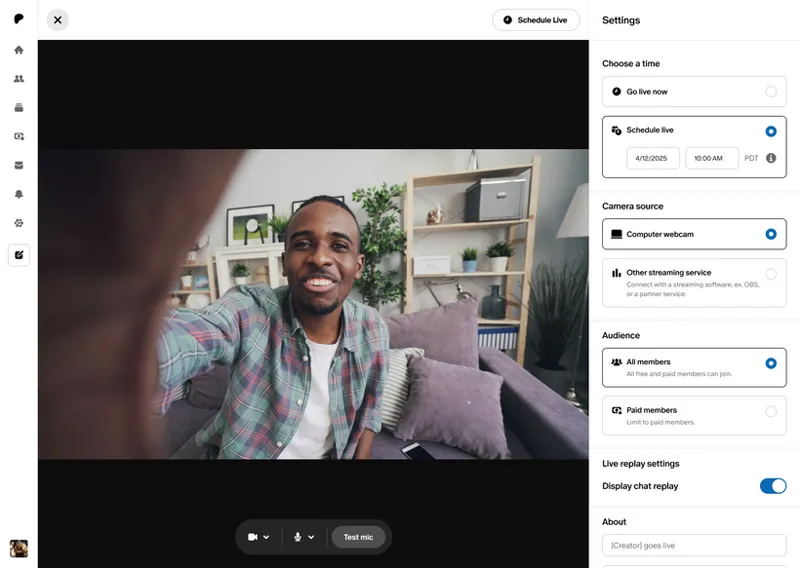
Go Live, right on Patreon
Livestreaming on Patreon is here! Whether you're testing new concepts with trusted members or opening your creative process to potential new ones, Live helps transform casual viewers into members who are deeply invested in you and your work.
A new way to connect with your community
Start a Live the same way you create a post. Head to the Create button and select Live. Go live instantly or schedule ahead to build anticipation, with notifications to let your fans know.
Use Live to add new benefits to your memberships. Host Lives for all members to bring new fans to your Patreon, or offer exclusive behind-the-scenes access and premium content to your paid tiers. Who you go Live to is up to you.
Keep everyone engaged with interactive tools. Use chats, emoji reactions, and pinned comments to spark conversations. There's even a pop-out chat to help keep you keep track of messages while you're live.
Enjoy the Live beyond the moment. Recordings are automatically saved to your drafts, so you can share with members later. You can even get detailed insights on each Live to understand what resonates most with your community.
Do it all in a safe space. Enable auto-moderation and assign up to 10 trusted moderators to keep conversations respectful. You can also mute, report, and delete messages or control chat access to maintain the environment you want.
Ideas for getting started
Creators are already gathering and growing their communities through Live every day. Chats & Reacts jumped on Live to react to Taylor Swift's new album and engagement news, while podcasters Reddit on Wiki offer bonus monthly Lives for certain paid tiers. And our team went live recently here on Patreon for Creators to highlight ways podcasters can use Patreon to grow their communities.
Whether it’s to host a Q&A, react to breaking news, tease upcoming work, or just surprise their communities, here's how creators are using Live:
Test and refine ideas in real time. Get instant feedback from your most engaged members before investing time in full production. Share rough sketches, bounce concepts around, or walk through your creative process as members watch and contribute.
Build anticipation for bigger projects. Schedule Lives to announce new work or share progress updates. The closeness of live interaction makes every announcement feel personal.
Gather your community from across platforms. Fans need to become members to participate, creating a natural funnel to grow your community on Patreon.
Create premium experiences that drive upgrades. Host exclusive AMAs for paying members, offer personalized advice sessions, or give behind-the-scenes tours of your workspace. Free members who want to join the Live will need to upgrade to participate.
Make it a regular touchpoint. Whether it's weekly office hours, monthly Q&As, or surprise check-ins, consistent Lives give your most dedicated fans something to look forward to.
Ready to connect directly with your community? Get started by setting up a Live on Patreon. To see who's eligible for Live, visit our Help Center.

Comments (16)
Question: Can we have overlays and alerts to use for OBS? I want to livestream on Patreon, but also multistream, and I'd like to have overlays and alerts to help lure people from other platforms to my Patreon. Is that something you guys would be willing to do?
Hi DanDann, glad to hear you're excited to include Patreon Live in your streaming strategy, and we appreciate your feedback. While customizations like overlays and alerts for OBS are not supported on Live natively right now, you may be able to achieve your desired goal, or something similar, by incorporating Streamlabs into your multistreaming process. We recently launched an integration with Streamlabs and will be sharing more information in an upcoming post on Patreon for Creators. In the meantime, you can learn more about the Streamlabs integration and how to set it up here: https://support.patreon.com/hc/en-us/articles/35597591801997-Going-Live-on-Patreon-through-OBS
Why I don't have the option to go LIVE?
Hi Laetitia. You can learn more about eligibility for Live here in Patreon's Help Center: https://support.patreon.com/hc/en-us/articles/29638941178893-Live-Set-Up-and-Overview If you have have any additional questions specific to your account, we recommend selecting the "submit a request" button at the top of the page to reach out to our support team, who can help you directly.
Pleeeeease make it so that comments in the live become comments on the draft/final post. Also, does the live link redirect to the post link once the draft has been posted?
I originally built my success as an indie troubadour thanks to livestreaming. Seeing this on Patreon brings me so much joy! Thank you 🙏
Lives directly on Patreon have been so powerful for nurturing my community. Interestingly, I recently did a member poll and the *replays* of my weekly Lives came in at the number two spot of most used features of my Patreon community. The live while actually live was more like in the number 7 spot. So, don’t underestimate the power of the replay capacity! It is valuable!
great reflection, thank you
I LOVE THIS
Just wondering if the video in drafts after the live recording can be dowloaded to edit and add media to whatever topic comes up, since it’s live. Anyone know the answer? Thank you!
Yes, you can download the live recording. Though I record locally in Ecamm Live so that I have the best quality file to work with 😊
Love this !!!
Thanks for rolling this out widely at last - still have to try it out, but I'm sure I won't be disappointed.
is it possible for a 18+ photographer? for example: editing while being livestreaming? thanks
I think I saw that this isn't for 18+ creators yet...though I may have misread that
This is big! Thank you for the update!