
Introducing your new creator page
A new home for your creative world
Today we rolled out a redesigned creator page that brings everything you offer into one place, making it easier for fans to explore, engage, and connect with your creative world. Whether you’re a podcaster, video creator, or artist, this new design gives your fans a stronger first impression with a page built for discovery and engagement. Set it up anytime to spotlight your best work, showcase your brand, and guide fans toward what matters most.
What’s new
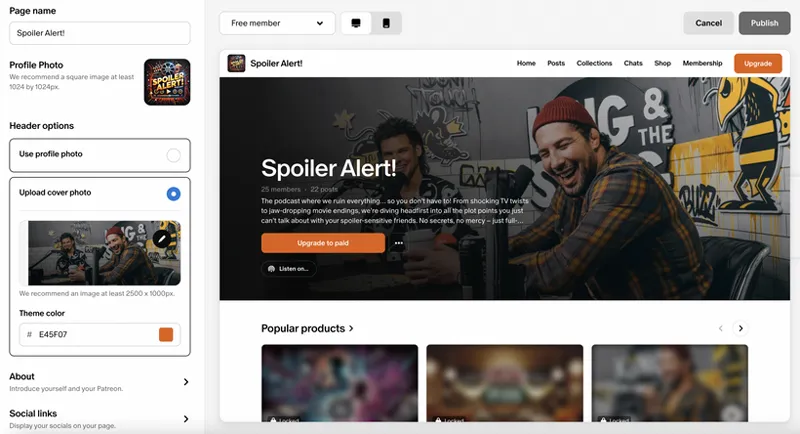
A more visual, customizable page: Your new creator page starts with a new design. Choose from two new header image options, enjoy a refreshed look & feel, and feature the work you care most about.
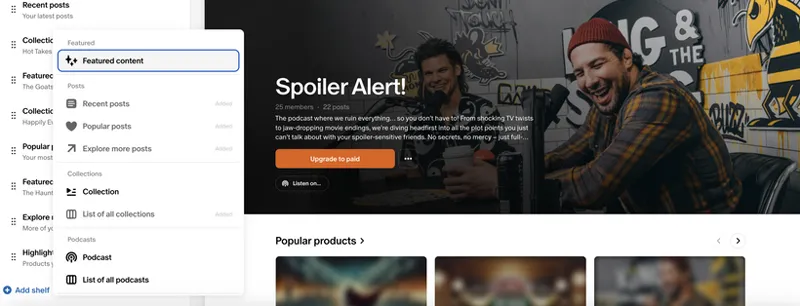
Shelves for curation and discovery: The new creator page is made up of customizable "shelves". Think of them like modules you can use to:
Highlight your latest or most popular posts
Organize collections by theme, series, or project
Feature upcoming drops or livestreams
Surface top-performing products from your shop
Curate seasonal content (holidays, launches, campaigns)
Pin important announcements or updates
One page for all fans: The new Home tab is what everyone will see first: non-members, free members, and paying members. That means it’s your most important opportunity to tell your story and guide fans toward membership.
And don’t worry, the chronological post feed isn’t going anywhere. It now lives in its own Posts tab, right next to the new Home tab, so fans who want to scroll your latest updates can still do so easily.
How to share your new page
When you’re ready, let your community know you’ve upgraded your space. Here are a few ways to spread the word:
Post about it: Let your community know that the design has changed, but their benefits, access, and membership tiers remain exactly the same, like creators Chris Sherland or Austin B Media did. Here’s a sample caption you can customize:
My new creator page is live! I’ve rolled out a brand new design, and I’ve set up my new page to help you find everything more easily. Same membership, same access, just a better experience. Come take a look!
Share on social: Your new curated shelves are a great chance to spotlight your work to new fans. Post your Patreon link on socials and highlight what you’ve set up so fans (and potential new members) can easily explore what you’re most excited to share.
Getting started
The new creator page is now available as an option to all creators. You’re in control of when you make the switch. Just click “Get Started” on your creator dashboard to explore, customize and publish whenever you’re ready. Fans will still get the same membership and access, now with a more bespoke experience.
Want to see what it looks like in action? Check out Patreon for Creators’ front page, and head to our Help Center Guide for step-by-step support.
Comments (42)
I have heard that Patreon is very useful and good at what it does. I just haven't actually seen that yet. I may, out of curiosity, go see how Ko-Fi operates ... I am still committed to making Patreon work for my project
as a new comer to Patreon and having worked in software quality and usability ... Patreon can use some serious work on it' on it's onboarding for new users. I have spent some serious time on understanding the editting process for your starter page ... and there doesn't appear anyway of saving what you have done without publishing it. Note: one of the menus in the editor is in Chinese ... not a language that I have learned to read yet.
Hey there, welcome to Patreon. You're right that page edits can't be saved without publishing. Page settings don't auto-save, so Publish in the top-right is what saves your changes. If your page is already live, fans keep seeing the previous layout until you publish, and the live preview on the right lets you check your work first. Posts work differently: if you exit the post editor, it's saved as a draft automatically. For the menu showing up in Chinese, you can reach out to our Support team here: https://support.patreon.com/hc/en-us/requests/new If you'd like to suggest a save button for the page editor, you can submit a feature request here: https://support.patreon.com/hc/en-us/articles/4413425955213-Submit-a-feature-request-or-feedback
I much prefer the old layout. I can't find my way between my creator page and my member pages at all. It's so frustrating.
I feel you!!!
Be careful if you post images that are outside of the 1500 x 900 container this new format uses. Now those images are smashed down with grey letter box borders on each side. Images inside posts never behaved this way in the past and now with this change, it is markedly worse and I have fans asking questions/complaining about it. If you click the preview image inside the post, it does pop out the proper size, but aside from adding another click (which everyone knows is death for retention), it makes everything look janky. My guess is Patreon wants art uploaded to fit their 1500 x 900 format but that does not work for comic pages in this new Patreon layout. I regret ever migrating to the new layout. Other creators with the old layout are not having this issue at all. If I could roll it back, I would immediately.
The new banner doesn't look any better. There definitely should be an option to choose between the old banner layout and the new one, so content creators could choose the banner layout that they like the most. Making that would add more customization options.
Will we be able to @ people on here anytime soon? Or see messages from our subscribers? I don’t get any notifications when people comment
The algorithm is choosing posts of mine with 2 likes and 0 comments as "Popular Posts." It looks like my work gets no engagement. This has got to be hurting me more than it's helping.
Congratulations!!! Such design updates are much welcome to keep up the UX pared with platforms such as Skool
Wow
I prefer the old layout or at least give us more options for headers and all
I am new here
I cannot access to my page as a Creator! Only as a member, and I cannot post neither edit anything.
I like this but my listeners HATE the new feed design.
i just got the new creator page , and its looks so much cool . love it
Learning quickly as I go through choosing free memberships to figure out who I might support with a paid membership. Make posts for free members, not just paying ones! I am showing ssmples, and telling why I do my work. Also: Making sure that when audios, videos and images, etc are sold in the shop, that you don't only add them at the top of the piece you publish - if you're selling items, attach the item file at the bottom.
Made the switch and the way the "About" text appears influenced a decision to re-organize it so what appears "above the fold" seems more deliberate. Here's a case where knowing where that cuts off would be helpful. Am I missing it or are our recommended creators no longer appearing?
I'm puzzled about this too. We used to be able to switch to a non-creator view of our page.
Wow, I love this new creator page ! It makes the user experience much smoother and more enjoyable!
I have switched. The lack of control on how the text appears is a fundamental flaw. Had to reset my image in procreate to accommodate the text.
I like it already. Very well step-by-step.
Made the change. It’s a no brainer for me. Beautiful upgrade, thank you
I am new and just starting to do some writing. I do not understand how to make my page stand out, or to make it look modern. To me the directions and navigation to start on Patreon is all over the place and there isn't any specific direction. I am not an expert at setting up web sites, so this is basically getting on my nerves, as all I want to do is write and then get it out to the public to get members. How do I modernize my page?
Will you add in the future a way to show the tiers again? I think showing tiers is really important (I -accidentally- switched to the new one and I'm regretting it because of this)
I made the switch and the new layout looks better than the old one, but I have some suggestions: 1) Make an option to not blur the banner. 2) Let us choose what part of About to show in the banner. Now it looks a bit clunky. 3) Let us customize the title of the shelves. I think it would be specially useful for the Featured shelves. 4) Allow to select more than one post in a Featured shelf. If the layout is a concern here, maybe create a "Customized" shelf type, where we can select specific posts. 5) Make a shelf type similar to "Most recent post" but we can select a specific type of post. For example, feature the most recent poll. This case would be very beneficial for creators that make regular polls.
I have made the switch, but agree with other posters that the banner sucks. Having a grey out area and no way to change the color of the title does not work for me.
I made the switch and I am regretting it. The harsh blurring on the left side of the banner image and the About copy covering a large portion of the banner does not look great.
Yeah, I made a point to check all of the options before I posted here. I am using the photo option only because the blurred banner does not work. And listen, I am not here to disrespect anyones work but based on the majority of the comments here and elsewhere, the blurred banner is not going over well. It's a new thing. It happens. There are tweaks and feedback from your users. I just hope that Patreon is listening and make plans to offer a different option soon.
I'm a little hesitant to make the switch at the moment, particularly because of the giant blur on the left side of the banner on wider windows. Consider allowing us to remove the blur or customise the blur's colour. Afford us more customisation options, such as separating the opening summary on the banner from the bio (About) to allow us to summarise our bio, or at least choose where to cut off our bio for the banner. Thanks for keeping the Posts feed at least.
I just updated my banner but the page looks TERRIBLE on a ultra wide! I really think an update is needed. It looks so lopsided with a gigantic blurred header on half the monitor on one side and a nice graphic on the other. Other than that it looks good.
The new look is great, but is there any plan to included pinned posts in the layout options?
Featured post should show the pinned post?
Brilliant! BRAVA et BRAVO! Go raibh míle maith agat. Agus arís. Now.... If only I had more Years, Days, Hours, fingers, toes.... lolornot If YOU are a Squirrel-like Creator ~ i.e., of sites, etc., and can do for me everything I've 'hearted' below: Please reach out. I'd make like @KiaCreates and make Patreon my only place(s). [Please note, I've three Patreons, so far! ;)]
Oops! Yes, I'd love if we could double-return without having to, well.... ;) And yes, I'm looking to build a 'long-term relationship' lolonly ~ i.e., creating on Patreon with products, podcast(s), and programs launching asap.... To ALL comprising Team Patreon: Thank YOU for sharing your extraordinary Gifts for GOOD! To ALL Creators: BRAVA et BRAVO plus BRAVE! Blessings in ALL your endeavours! Máirín
I like the new look! My only quirk would be: not a fan of the way it currently handles the About blurb at the top (I'm using my logo as a header and not a complete header picture, if that impacts the shape of things.) It cuts it down to a smaller blurb, but I have no control over how it gets cut. I tried to make it appear as a 'complete' paragraph by adding two blank lines, but it still showed it regardless. I wish the options hidden under the three dots (About, Gift Membership, Share) were either displayed as smaller buttons below Join For Free and Membership Options, or at least About could be shown. And that's just from dealing with folks that don't automatically "see" things like three dots, hamburger menus, or even the smaller arrows for shifting through more than three Patreon membership options, since folks used to miss that aspect as well. I'll also add a +1 to the above creator requesting the ability to link out to other things. (Possibly a spot that could also hold that About page, etc.)
Wonderfull !
Yay! it looks cool, thaks for the update! thet visual its better now, and i can check how it looks like for all kind of members i have. Im only waiting when you have time to add the Shop tab on my Patreon 🙏💜
Do you not have a shop tab?
Definitely a fan of this new page! I could see this 'Patreon for Creators' Patreon using it and was hoping we'd get the chance to use it too. It's well thought out and looks current, modern. I'll start using it today and explore its abilities.
This looks great!
Love this! Honestly if you could add a bit to this where we can have links out to other things at the bottom or side, I could do away with my bio site/link tree and just have my Patreon landing page as my main link in bio! That would be amazing!